The Tech Edvocate

Top Menu

  • Advertisement
  • Apps
  • Home Page
  • Home Page Five (No Sidebar)
  • Home Page Four
  • Home Page Three
  • Home Page Two
  • Home Tech2
  • Icons [No Sidebar]
  • Left Sidbear Page
  • Lynch Educational Consulting
  • My Account
  • My Speaking Page
  • Newsletter Sign Up Confirmation
  • Newsletter Unsubscription
  • Our Brands
  • Page Example
  • Privacy Policy
  • Protected Content
  • Register
  • Request a Product Review
  • Shop
  • Shortcodes Examples
  • Signup
  • Start Here
    • Governance
    • Careers
    • Contact Us
  • Terms and Conditions
  • The Edvocate
  • The Tech Edvocate Product Guide
  • Topics
  • Write For Us
  • Advertise

Main Menu

  • Start Here
    • Our Brands
    • Governance
      • Lynch Educational Consulting, LLC.
      • Dr. Lynch’s Personal Website
      • Careers
    • Write For Us
    • The Tech Edvocate Product Guide
    • Contact Us
    • Books
    • Edupedia
    • Post a Job
    • The Edvocate Podcast
    • Terms and Conditions
    • Privacy Policy
  • Topics
    • Assistive Technology
    • Child Development Tech
    • Early Childhood & K-12 EdTech
    • EdTech Futures
    • EdTech News
    • EdTech Policy & Reform
    • EdTech Startups & Businesses
    • Higher Education EdTech
    • Online Learning & eLearning
    • Parent & Family Tech
    • Personalized Learning
    • Product Reviews
  • Advertise
  • Tech Edvocate Awards
  • The Edvocate
  • Pedagogue
  • School Ratings

logo

The Tech Edvocate

  • Start Here
    • Our Brands
    • Governance
      • Lynch Educational Consulting, LLC.
      • Dr. Lynch’s Personal Website
        • My Speaking Page
      • Careers
    • Write For Us
    • The Tech Edvocate Product Guide
    • Contact Us
    • Books
    • Edupedia
    • Post a Job
    • The Edvocate Podcast
    • Terms and Conditions
    • Privacy Policy
  • Topics
    • Assistive Technology
    • Child Development Tech
    • Early Childhood & K-12 EdTech
    • EdTech Futures
    • EdTech News
    • EdTech Policy & Reform
    • EdTech Startups & Businesses
    • Higher Education EdTech
    • Online Learning & eLearning
    • Parent & Family Tech
    • Personalized Learning
    • Product Reviews
  • Advertise
  • Tech Edvocate Awards
  • The Edvocate
  • Pedagogue
  • School Ratings
  • A Visitor’s Guide to Fresno (CA), United States

  • A Visitors Guide to New Orleans (LA), United States

  • A Visitors Guide to Sacramento (CA), United States

  • A Visitors Guide to Lyon, France

  • JisuLife Ultra2 Portable Fan: A Powerful Multi-Function Cooling Solution

  • A Visitors Guide to Viña del Mar, Chile

  • A Visitors Guide to Århus, Denmark

  • A Visitors Guide to Bakersfield (CA), United States

  • A Visitors Guide to Aurora (CO), United States

  • A Visitor’s Guide to Toledo (OH), United States

Digital & Mobile Technology
Home›Digital & Mobile Technology›Useful Tools to Stress Test Your CPU

Useful Tools to Stress Test Your CPU
By Matthew Lynch
April 10, 2023
0
Spread the love

As technology evolves, the need for high-performance components becomes apparent. One critical part of any computer is its Central Processing Unit (CPU). A CPU is responsible for executing all instructions and calculations on a computer. However, to ensure that a CPU can perform its duties without any issues, it’s essential to test it regularly. By performing a stress test, you can determine whether your CPU is working correctly and identify any potential issues. In this article, we’ll discuss some of the most useful tools to stress test your CPU.

1. Prime95 – This is a popular CPU stress testing tool that has been around for many years. It’s an excellent choice for overclockers who want to push their system to the limit. Prime95 uses the Fast Fourier Transform (FFT) to stress test the CPU, and it’s compatible with both Windows and Linux.

2. AIDA64 – This stress testing tool includes a wide range of benchmark tests that can put your CPU through its paces. It’s particularly useful for testing overclocked systems, and it can measure cache and memory performance as well. The tool is compatible with both Windows and Linux.

3. HeavyLoad – This stress testing tool is simple to use and ideal for novice users. It allows you to stress test your CPU, GPU, and hard disk simultaneously. This tool is also compatible with both Windows and Linux.

4. OCCT – This stress testing tool is feature-rich and can stress test CPUs, GPUs, and PSU (Power Supply Unit). It’s straightforward to use, and it has an intuitive interface. OCCT can also monitor voltage, temperature, and fan speed. This tool is compatible with Windows only.

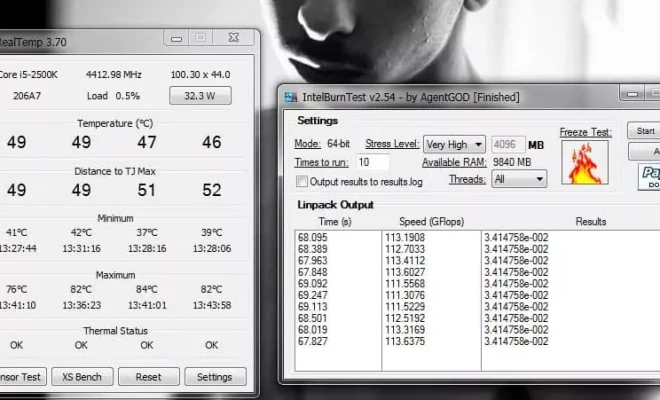
5. Intel Burn Test – This stress testing tool is perfect for stress testing Intel-based systems. It’s designed to push systems to their limits and can detect system instability quickly. Intel Burn Test uses a lot of power, so it’s essential to have adequate cooling. This tool is compatible with Windows only.

6. Furmark – Although primarily a GPU stress testing tool, Furmark also stresses the CPU. It’s one of the most demanding benchmarks available and can test your system’s stability at maximum load. Furmark is compatible with Windows only.

Conclusion

By testing your CPU regularly, you can ensure that your system is working optimally. The tools listed above are some of the most useful for stress testing your CPU. Each tool has its capabilities and features, so choose the one that fits your needs. Keep in mind that during any stress test, it’s essential to monitor the CPU temperature and voltage to avoid damage. Happy testing!


Previous Article

Things to Do If Windows 11 Widgets ...

Next Article

Ways to Fix Apple Watch Face Keeps ...

Matthew Lynch

Related articles More from author

  • Digital & Mobile Technology

    How to Update Mozilla Firefox on Mobile and Desktop

    May 30, 2023
    By Matthew Lynch
  • Digital & Mobile Technology

    How to Sync iPhone Over Wi-Fi

    June 9, 2023
    By Matthew Lynch
  • Digital & Mobile Technology

    Ways to Fix the “Compressed (Zipped) Folder Is Invalid” Error on Windows

    September 8, 2023
    By Matthew Lynch
  • Digital & Mobile Technology

    Best Free PDF Editors (March 2023)

    May 30, 2023
    By Matthew Lynch
  • Digital & Mobile Technology

    The Best Download-Free Spelling and Grammar Checkers

    June 12, 2023
    By Matthew Lynch
  • Digital & Mobile Technology

    How to Use Goal Seek in Microsoft Excel for What-If Scenarios

    August 3, 2023
    By Matthew Lynch

Search

Login & Registration

  • Register
  • Log in
  • Entries feed
  • Comments feed
  • WordPress.org

Newsletter

Signup for The Tech Edvocate Newsletter and have the latest in EdTech news and opinion delivered to your email address!

About Us

Since technology is not going anywhere and does more good than harm, adapting is the best course of action. That is where The Tech Edvocate comes in. We plan to cover the PreK-12 and Higher Education EdTech sectors and provide our readers with the latest news and opinion on the subject. From time to time, I will invite other voices to weigh in on important issues in EdTech. We hope to provide a well-rounded, multi-faceted look at the past, present, the future of EdTech in the US and internationally.

We started this journey back in June 2016, and we plan to continue it for many more years to come. I hope that you will join us in this discussion of the past, present and future of EdTech and lend your own insight to the issues that are discussed.

Newsletter

Signup for The Tech Edvocate Newsletter and have the latest in EdTech news and opinion delivered to your email address!

Contact Us

The Tech Edvocate
910 Goddin Street
Richmond, VA 23231
(601) 630-5238
[email protected]

Copyright © 2025 Matthew Lynch. All rights reserved.