The Tech Edvocate

Top Menu

  • Advertisement
  • Apps
  • Home Page
  • Home Page Five (No Sidebar)
  • Home Page Four
  • Home Page Three
  • Home Page Two
  • Home Tech2
  • Icons [No Sidebar]
  • Left Sidbear Page
  • Lynch Educational Consulting
  • My Account
  • My Speaking Page
  • Newsletter Sign Up Confirmation
  • Newsletter Unsubscription
  • Our Brands
  • Page Example
  • Privacy Policy
  • Protected Content
  • Register
  • Request a Product Review
  • Shop
  • Shortcodes Examples
  • Signup
  • Start Here
    • Governance
    • Careers
    • Contact Us
  • Terms and Conditions
  • The Edvocate
  • The Tech Edvocate Product Guide
  • Topics
  • Write For Us
  • Advertise

Main Menu

  • Start Here
    • Our Brands
    • Governance
      • Lynch Educational Consulting, LLC.
      • Dr. Lynch’s Personal Website
      • Careers
    • Write For Us
    • The Tech Edvocate Product Guide
    • Contact Us
    • Books
    • Edupedia
    • Post a Job
    • The Edvocate Podcast
    • Terms and Conditions
    • Privacy Policy
  • Topics
    • Assistive Technology
    • Child Development Tech
    • Early Childhood & K-12 EdTech
    • EdTech Futures
    • EdTech News
    • EdTech Policy & Reform
    • EdTech Startups & Businesses
    • Higher Education EdTech
    • Online Learning & eLearning
    • Parent & Family Tech
    • Personalized Learning
    • Product Reviews
  • Advertise
  • Tech Edvocate Awards
  • The Edvocate
  • Pedagogue
  • School Ratings

logo

The Tech Edvocate

  • Start Here
    • Our Brands
    • Governance
      • Lynch Educational Consulting, LLC.
      • Dr. Lynch’s Personal Website
        • My Speaking Page
      • Careers
    • Write For Us
    • The Tech Edvocate Product Guide
    • Contact Us
    • Books
    • Edupedia
    • Post a Job
    • The Edvocate Podcast
    • Terms and Conditions
    • Privacy Policy
  • Topics
    • Assistive Technology
    • Child Development Tech
    • Early Childhood & K-12 EdTech
    • EdTech Futures
    • EdTech News
    • EdTech Policy & Reform
    • EdTech Startups & Businesses
    • Higher Education EdTech
    • Online Learning & eLearning
    • Parent & Family Tech
    • Personalized Learning
    • Product Reviews
  • Advertise
  • Tech Edvocate Awards
  • The Edvocate
  • Pedagogue
  • School Ratings
  • A Visitors Guide to Long Beach (CA), United States

  • A Visitor’s Guide to Fresno (CA), United States

  • A Visitors Guide to New Orleans (LA), United States

  • A Visitors Guide to Sacramento (CA), United States

  • A Visitors Guide to Lyon, France

  • JisuLife Ultra2 Portable Fan: A Powerful Multi-Function Cooling Solution

  • A Visitors Guide to Viña del Mar, Chile

  • A Visitors Guide to Århus, Denmark

  • A Visitors Guide to Bakersfield (CA), United States

  • A Visitors Guide to Aurora (CO), United States

Tech Advice
Home›Tech Advice›Unlock the secret FM tuner in your Android phone

Unlock the secret FM tuner in your Android phone
By Matthew Lynch
July 15, 2023
0
Spread the love

Have you ever wondered if there is a hidden FM tuner in your Android phone, just waiting to be unleashed? You’re not alone. Many Android phones come with a built-in FM tuner that’s disabled by default. With the help of this guide, you’ll learn how to unlock the secret FM tuner in your Android phone and enjoy free, over-the-air radio stations.

Step 1: Check if Your Phone Has an FM Chip

The first thing you need to do is check whether your Android phone has an FM chip built in. To do this, consult the manufacturer’s website or other online sources related to your phone model. Keep in mind that not all smartphones have an FM chip.

Step 2: Download an FM Radio App

To access the FM tuner in your smartphone, you’ll need an app that enables such functionality. There are plenty of apps available on the Google Play Store for this purpose. Some of these apps include NextRadio, Radio.com, and TuneIn Radio.

Step 3: Grant Permissions

Once you’ve downloaded and installed an FM radio app, you may be prompted to grant various permissions required for the app to work properly. Be sure to allow access permissions like location services and audio recording so the app can find local stations and utilize your phone’s built-in microphone for optimal performance.

Step 4: Connect Your Wired Earphones or Headset

Most phones with a built-in FM tuner require a wired earphone or headset to function as an antenna. Therefore, you’ll need to plug in one before attempting to access radio stations through your chosen app.

Step 5: Scan for Local Stations

Now is the time to start discovering local radio stations! Open the FM radio app of your choice and begin scanning for available stations. The process may vary slightly depending on which app you use, but most apps will have a ‘Scan’ or ‘Tune’ button that helps you find stations in your area.

Step 6: Customize and Save Your Favorite Stations

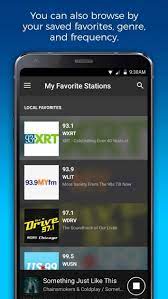
Once you’ve found stations you enjoy, most FM radio apps will allow you to save them as favorites. This makes it easier to access them in the future without needing to scan again.

Step 7: Enjoy Your Unlocked FM Tuner

Congratulations! You’ve now successfully unlocked the secret FM tuner in your Android phone, opening up a world of free radio entertainment.

Conclusion

Unlocking the secret FM tuner in your Android phone can not only provide you with free entertainment but can also prove useful during emergencies or when you have no access to an internet connection. Whether it’s listening to music, news, or talk shows, having access to over-the-air FM radio stations is a fantastic feature worth exploring. So go ahead, tune in and enjoy the world of radio on your Android smartphone!


Previous Article

Unlocked phones vs. locked ones: Everything you ...

Next Article

Unlock this hidden iPhone feature to quickly ...

Matthew Lynch

Related articles More from author

  • Tech Advice

    Investing in Exxon Stock: A Comprehensive Guide

    September 5, 2023
    By Matthew Lynch
  • Tech Advice

    Sonos ZonePlayer S5 review: Sonos ZonePlayer S5

    July 14, 2023
    By Matthew Lynch
  • Tech Advice

    How to Prevent Users From Running Certain Programs on Windows 11

    February 20, 2024
    By Matthew Lynch
  • Tech Advice

    The 2024 Ford Mustang GT Is The Fast, Agile V8 Coupe You’ve Always Wanted – The Autopian

    August 11, 2023
    By Matthew Lynch
  • Tech Advice

    2024 Volvo XC90 B6 Ultimate Bright Theme 4dr All-Wheel Drive Sport Utility SUV: Trim Details, Reviews, Prices, Specs, and ...

    August 21, 2023
    By Matthew Lynch
  • Tech Advice

    The Obesity Paradox: How Fat Can Be Good for You

    July 6, 2023
    By Matthew Lynch

Search

Login & Registration

  • Register
  • Log in
  • Entries feed
  • Comments feed
  • WordPress.org

Newsletter

Signup for The Tech Edvocate Newsletter and have the latest in EdTech news and opinion delivered to your email address!

About Us

Since technology is not going anywhere and does more good than harm, adapting is the best course of action. That is where The Tech Edvocate comes in. We plan to cover the PreK-12 and Higher Education EdTech sectors and provide our readers with the latest news and opinion on the subject. From time to time, I will invite other voices to weigh in on important issues in EdTech. We hope to provide a well-rounded, multi-faceted look at the past, present, the future of EdTech in the US and internationally.

We started this journey back in June 2016, and we plan to continue it for many more years to come. I hope that you will join us in this discussion of the past, present and future of EdTech and lend your own insight to the issues that are discussed.

Newsletter

Signup for The Tech Edvocate Newsletter and have the latest in EdTech news and opinion delivered to your email address!

Contact Us

The Tech Edvocate
910 Goddin Street
Richmond, VA 23231
(601) 630-5238
[email protected]

Copyright © 2025 Matthew Lynch. All rights reserved.