The Tech Edvocate

Top Menu

  • Advertisement
  • Apps
  • Home Page
  • Home Page Five (No Sidebar)
  • Home Page Four
  • Home Page Three
  • Home Page Two
  • Home Tech2
  • Icons [No Sidebar]
  • Left Sidbear Page
  • Lynch Educational Consulting
  • My Account
  • My Speaking Page
  • Newsletter Sign Up Confirmation
  • Newsletter Unsubscription
  • Our Brands
  • Page Example
  • Privacy Policy
  • Protected Content
  • Register
  • Request a Product Review
  • Shop
  • Shortcodes Examples
  • Signup
  • Start Here
    • Governance
    • Careers
    • Contact Us
  • Terms and Conditions
  • The Edvocate
  • The Tech Edvocate Product Guide
  • Topics
  • Write For Us
  • Advertise

Main Menu

  • Start Here
    • Our Brands
    • Governance
      • Lynch Educational Consulting, LLC.
      • Dr. Lynch’s Personal Website
      • Careers
    • Write For Us
    • The Tech Edvocate Product Guide
    • Contact Us
    • Books
    • Edupedia
    • Post a Job
    • The Edvocate Podcast
    • Terms and Conditions
    • Privacy Policy
  • Topics
    • Assistive Technology
    • Child Development Tech
    • Early Childhood & K-12 EdTech
    • EdTech Futures
    • EdTech News
    • EdTech Policy & Reform
    • EdTech Startups & Businesses
    • Higher Education EdTech
    • Online Learning & eLearning
    • Parent & Family Tech
    • Personalized Learning
    • Product Reviews
  • Advertise
  • Tech Edvocate Awards
  • The Edvocate
  • Pedagogue
  • School Ratings

logo

The Tech Edvocate

  • Start Here
    • Our Brands
    • Governance
      • Lynch Educational Consulting, LLC.
      • Dr. Lynch’s Personal Website
        • My Speaking Page
      • Careers
    • Write For Us
    • The Tech Edvocate Product Guide
    • Contact Us
    • Books
    • Edupedia
    • Post a Job
    • The Edvocate Podcast
    • Terms and Conditions
    • Privacy Policy
  • Topics
    • Assistive Technology
    • Child Development Tech
    • Early Childhood & K-12 EdTech
    • EdTech Futures
    • EdTech News
    • EdTech Policy & Reform
    • EdTech Startups & Businesses
    • Higher Education EdTech
    • Online Learning & eLearning
    • Parent & Family Tech
    • Personalized Learning
    • Product Reviews
  • Advertise
  • Tech Edvocate Awards
  • The Edvocate
  • Pedagogue
  • School Ratings
  • A Visitors Guide to Long Beach (CA), United States

  • A Visitor’s Guide to Fresno (CA), United States

  • A Visitors Guide to New Orleans (LA), United States

  • A Visitors Guide to Sacramento (CA), United States

  • A Visitors Guide to Lyon, France

  • JisuLife Ultra2 Portable Fan: A Powerful Multi-Function Cooling Solution

  • A Visitors Guide to Viña del Mar, Chile

  • A Visitors Guide to Århus, Denmark

  • A Visitors Guide to Bakersfield (CA), United States

  • A Visitors Guide to Aurora (CO), United States

Digital & Mobile Technology
Home›Digital & Mobile Technology›Top 7 Free Windows RSS Feed Readers/News Aggregators

Top 7 Free Windows RSS Feed Readers/News Aggregators
By Matthew Lynch
June 11, 2023
0
Spread the love

Staying informed and up-to-date on the latest news and information can be a challenging task, especially with the vast amount of content available online. RSS feed readers and news aggregators help to simplify this process by bringing together content from various sources into one convenient location. Here are the top seven free Windows RSS feed readers and news aggregators.

1. Feedly

Feedly is a robust and user-friendly feed reader that allows users to easily organize and read content from multiple sources. The application has a simple and intuitive interface, making it easy to navigate and customize. With Feedly, users can create custom collections based on topics, browse popular feeds, and save articles for later reading.

2. Inoreader

Inoreader is a powerful RSS feed reader that offers advanced features for power users. It has a clean and modern interface, with a comprehensive search function that allows users to find specific content quickly. Inoreader also allows users to create custom rules to filter specific content and stay informed on relevant topics.

3. QuiteRSS

QuiteRSS is a lightweight and open-source RSS feed reader that offers a simple and minimal interface. The application is easy to use and allows users to manage multiple feeds and organize content into categories. QuiteRSS also supports offline reading and can automatically detect and download podcasts.

4. NewsBlur

NewsBlur is a news aggregator that combines traditional RSS feed reading with social features. The application allows users to follow specific topics and share articles with other users. NewsBlur also offers a powerful search function, allowing users to find specific content easily.

5. RSS Owl

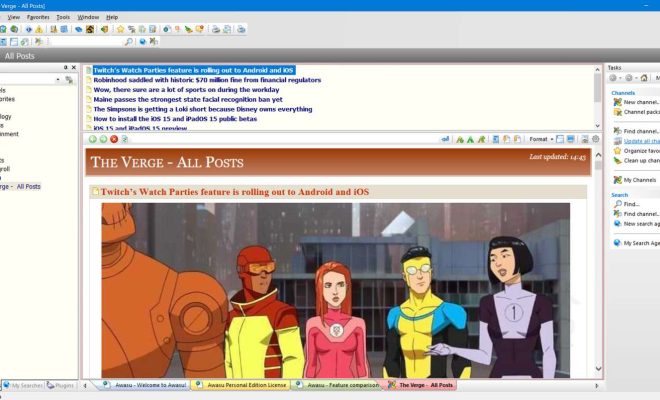
RSS Owl is a feature-rich RSS feed reader that comes with advanced features such as filtering, searching, and notifications. The application also offers an integrated browser, allowing users to browse and read articles without leaving the application. RSS Owl supports multiple platforms, including Windows, Mac, and Linux.

6. RSS Reader for Windows 10

RSS Reader for Windows 10 is a native Windows 10 application that provides a clean and modern interface for RSS feed reading. It supports multiple feed formats and allows users to customize the layout, fonts, and colors. With RSS Reader for Windows 10, users can also receive live tile notifications for new articles.

7. Nextgen Reader

Nextgen Reader is a powerful and modern RSS feed reader that offers a mobile-inspired interface. The application supports multiple sources, including Feedly, Feedbin, and NewsBlur. Nextgen Reader also offers offline reading and can sync content across multiple devices using OneDrive.

In conclusion, these free Windows RSS feed readers and news aggregators offer a range of features to help users stay informed and up-to-date on the latest news and information. Whether you’re a casual user or a power user, there is a feed reader on this list for everyone. 

Previous Article

Ways to Fix the Bluetooth “Setup Incomplete ...

Next Article

Importance of physical fitness and ways to ...

Matthew Lynch

Related articles More from author

  • Digital & Mobile Technology

    How to Find Your House on Google Street View

    June 2, 2023
    By Matthew Lynch
  • Digital & Mobile Technology

    Steps to Successful Hard Drive Maintenance

    April 10, 2023
    By Matthew Lynch
  • Digital & Mobile Technology

    The 9 Best LGBT Podcasts of 2023

    July 5, 2023
    By Matthew Lynch
  • Digital & Mobile Technology

    How to Enable Bluetooth on a Google Stadia Controller

    June 6, 2023
    By Matthew Lynch
  • Digital & Mobile Technology

    The 15 Best Minecraft Mods

    June 12, 2023
    By Matthew Lynch
  • Digital & Mobile Technology

    Is FaceApp Safe to Use? Here’s What You Need to Know

    June 5, 2023
    By Matthew Lynch

Search

Login & Registration

  • Register
  • Log in
  • Entries feed
  • Comments feed
  • WordPress.org

Newsletter

Signup for The Tech Edvocate Newsletter and have the latest in EdTech news and opinion delivered to your email address!

About Us

Since technology is not going anywhere and does more good than harm, adapting is the best course of action. That is where The Tech Edvocate comes in. We plan to cover the PreK-12 and Higher Education EdTech sectors and provide our readers with the latest news and opinion on the subject. From time to time, I will invite other voices to weigh in on important issues in EdTech. We hope to provide a well-rounded, multi-faceted look at the past, present, the future of EdTech in the US and internationally.

We started this journey back in June 2016, and we plan to continue it for many more years to come. I hope that you will join us in this discussion of the past, present and future of EdTech and lend your own insight to the issues that are discussed.

Newsletter

Signup for The Tech Edvocate Newsletter and have the latest in EdTech news and opinion delivered to your email address!

Contact Us

The Tech Edvocate
910 Goddin Street
Richmond, VA 23231
(601) 630-5238
[email protected]

Copyright © 2025 Matthew Lynch. All rights reserved.