The Tech Edvocate

Top Menu

  • Advertisement
  • Apps
  • Home Page
  • Home Page Five (No Sidebar)
  • Home Page Four
  • Home Page Three
  • Home Page Two
  • Home Tech2
  • Icons [No Sidebar]
  • Left Sidbear Page
  • Lynch Educational Consulting
  • My Account
  • My Speaking Page
  • Newsletter Sign Up Confirmation
  • Newsletter Unsubscription
  • Our Brands
  • Page Example
  • Privacy Policy
  • Protected Content
  • Register
  • Request a Product Review
  • Shop
  • Shortcodes Examples
  • Signup
  • Start Here
    • Governance
    • Careers
    • Contact Us
  • Terms and Conditions
  • The Edvocate
  • The Tech Edvocate Product Guide
  • Topics
  • Write For Us
  • Advertise

Main Menu

  • Start Here
    • Our Brands
    • Governance
      • Lynch Educational Consulting, LLC.
      • Dr. Lynch’s Personal Website
      • Careers
    • Write For Us
    • The Tech Edvocate Product Guide
    • Contact Us
    • Books
    • Edupedia
    • Post a Job
    • The Edvocate Podcast
    • Terms and Conditions
    • Privacy Policy
  • Topics
    • Assistive Technology
    • Child Development Tech
    • Early Childhood & K-12 EdTech
    • EdTech Futures
    • EdTech News
    • EdTech Policy & Reform
    • EdTech Startups & Businesses
    • Higher Education EdTech
    • Online Learning & eLearning
    • Parent & Family Tech
    • Personalized Learning
    • Product Reviews
  • Advertise
  • Tech Edvocate Awards
  • The Edvocate
  • Pedagogue
  • School Ratings

logo

The Tech Edvocate

  • Start Here
    • Our Brands
    • Governance
      • Lynch Educational Consulting, LLC.
      • Dr. Lynch’s Personal Website
        • My Speaking Page
      • Careers
    • Write For Us
    • The Tech Edvocate Product Guide
    • Contact Us
    • Books
    • Edupedia
    • Post a Job
    • The Edvocate Podcast
    • Terms and Conditions
    • Privacy Policy
  • Topics
    • Assistive Technology
    • Child Development Tech
    • Early Childhood & K-12 EdTech
    • EdTech Futures
    • EdTech News
    • EdTech Policy & Reform
    • EdTech Startups & Businesses
    • Higher Education EdTech
    • Online Learning & eLearning
    • Parent & Family Tech
    • Personalized Learning
    • Product Reviews
  • Advertise
  • Tech Edvocate Awards
  • The Edvocate
  • Pedagogue
  • School Ratings
  • Your Home Insurance Bill Just Exploded: 5 Reasons Why — And What Comes Next

  • Your Home Insurance Premiums Are Skyrocketing: Is Your State On This List?

  • The Brutal Truth: Why 30-Year vs. 15-Year Fixed Mortgage Rates in 2026 Could CRUSH Your Homeownership Dreams

  • 7 Things First-Time Homebuyers MUST Know About the New 6.89% Mortgage Rates

  • Your Dream Home Just Got Pricier: Why Mortgage Rates 2026 Are Soaring Toward 7%

  • Unbelievable: The True Cost of CRISPR Anti-Aging Will Absolutely Shock You

  • Your Genes Hold The Key: How CRISPR Could Restore Youthful Function

  • The Mind-Blowing Way CRISPR Could End Aging As We Know It

  • Why Millions Are Rushing to Install Home Battery Storage Now

  • Google’s €13 Billion Bet: The Unseen Renewable Energy Funds Quietly Reshaping Your Portfolio

Tech Advice
Home›Tech Advice›Things You Didn’t Realize Apple’s Notes App Could Do

Things You Didn’t Realize Apple’s Notes App Could Do
By Matthew Lynch
July 23, 2023
0
Spread the love

The Notes app, a staple in Apple’s software suite, is often dismissed as overly simple. However, this unassuming note-taking platform is known to surprise people with its hidden features. With constant updates, the Notes app now offers more than just a space for your shopping lists and jotting down thoughts.

In this article, we will explore some of the lesser-known features of Apple’s Notes app that you may not have realized were at your fingertips.

1. Organize Your Notes with Folders

If you have an extensive collection of notes, keeping them organized in folders can be helpful. To create a new folder on your iOS device or Mac, tap or click the “New Folder” button and give it a name. You can then drag and drop your notes into their respective folders for easy organization.

2. Pin Important Notes

You may find yourself frequently referring to specific notes within the app. Pinning important notes to the top makes them accessible on both iOS and macOS devices. Swipe right on an important note (iOS) or right-click and select “Pin Note” (macOS) to secure it at the top of your list.

3. Collapsible Headings

For those versed in coding techniques like HTML or Markdown, Apple also allows collapsible headings to declutter lengthy lists and condense lengthy sections. Add collapsible headings by tapping the “Aa” icon in iOS or Format > Font > Style > Heading on macOS.

4. Password-Protect Sensitive Notes

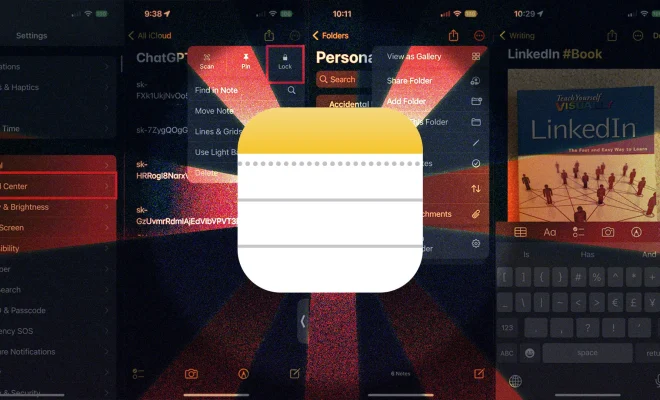
Keep sensitive information safe by password-protecting individual notes. On iOS, select the share icon within a note followed by “Lock Note,” while on macOS go to File > Lock Note. Create a password to restrict access, and feel secure knowing your information is safe.

5.Subscribe to Shared Notes

Work collaboratively using the Notes app by subscribing to shared notes. Subscribers receive real-time updates when changes are made, making it perfect for project management. To share a note, click the “Share” icon on iOS or macOS and choose your preferred method for sending the link.

6. Add Sketches and Drawings

When words don’t suffice, express yourself with drawings and sketches. On iOS devices, tap the “+” icon followed by the “Add Sketch” button to start creating a masterpiece. Although drawing capabilities aren’t yet available on macOS, new artwork added to notes will sync across devices.

7. Scan Documents

Replace your bulky scanner with Apple’s Notes app. Tap the “+” icon on iOS and select “Scan Documents” to start scanning receipts, forms, or any important documents. Scans are then stored within your notes and can be shared or printed like any other document.

8.Utilize Apple Pencil Support

Elevate your note-taking even further if you own an iPad and Apple Pencil. Handwrite notes directly within the app using the pencil tool, and convert your handwriting to typed text—ideal for jotting down notes during a meeting or brainstorming ideas.

Conclusion:

Apple’s Notes app may appear simple at first glance, but its hidden features unlock a world of increasing productivity and versatility. With advancing technology behind it, this unassuming note-taker has evolved into a robust tool capable of meeting various personal and professional needs. Put your Notes app to work by exploring these lesser-known features today.


Previous Article

Testing Auto HDR in Windows 11: A ...

Next Article

Top Zoom Tips for Better Video Calls

Matthew Lynch

Related articles More from author

  • Tech Advice

    The Best Laptops to Buy in 2021

    October 19, 2023
    By Matthew Lynch
  • Tech Advice

    Best VPN Service 2023: VPNs Tested by Our Experts

    July 16, 2023
    By Matthew Lynch
  • Tech Advice

    8 Easy Ways to Take Screenshots in Windows 10 and 11

    October 19, 2023
    By Matthew Lynch
  • Tech Advice

    Apple Updates Maps, Wallet Ahead of the Paris Olympics

    May 26, 2024
    By Matthew Lynch
  • Tech Advice

    2024 Ford Expedition SUV: Latest Prices, Reviews, Specs, and Incentives

    August 19, 2023
    By Matthew Lynch
  • Tech Advice

    How Long Can Unpaid Student Loans Haunt You?

    September 7, 2023
    By Matthew Lynch

Search

Login & Registration

  • Log in
  • Entries feed
  • Comments feed
  • WordPress.org

Newsletter

Signup for The Tech Edvocate Newsletter and have the latest in EdTech news and opinion delivered to your email address!

About Us

Since technology is not going anywhere and does more good than harm, adapting is the best course of action. That is where The Tech Edvocate comes in. We plan to cover the PreK-12 and Higher Education EdTech sectors and provide our readers with the latest news and opinion on the subject. From time to time, I will invite other voices to weigh in on important issues in EdTech. We hope to provide a well-rounded, multi-faceted look at the past, present, the future of EdTech in the US and internationally.

We started this journey back in June 2016, and we plan to continue it for many more years to come. I hope that you will join us in this discussion of the past, present and future of EdTech and lend your own insight to the issues that are discussed.

Newsletter

Signup for The Tech Edvocate Newsletter and have the latest in EdTech news and opinion delivered to your email address!

Contact Us

The Tech Edvocate
910 Goddin Street
Richmond, VA 23231
(601) 630-5238
[email protected]

Copyright © 2026 Matthew Lynch. All rights reserved.