The Tech Edvocate

Top Menu

  • Advertisement
  • Apps
  • Home Page
  • Home Page Five (No Sidebar)
  • Home Page Four
  • Home Page Three
  • Home Page Two
  • Home Tech2
  • Icons [No Sidebar]
  • Left Sidbear Page
  • Lynch Educational Consulting
  • My Account
  • My Speaking Page
  • Newsletter Sign Up Confirmation
  • Newsletter Unsubscription
  • Our Brands
  • Page Example
  • Privacy Policy
  • Protected Content
  • Register
  • Request a Product Review
  • Shop
  • Shortcodes Examples
  • Signup
  • Start Here
    • Governance
    • Careers
    • Contact Us
  • Terms and Conditions
  • The Edvocate
  • The Tech Edvocate Product Guide
  • Topics
  • Write For Us
  • Advertise

Main Menu

  • Start Here
    • Our Brands
    • Governance
      • Lynch Educational Consulting, LLC.
      • Dr. Lynch’s Personal Website
      • Careers
    • Write For Us
    • The Tech Edvocate Product Guide
    • Contact Us
    • Books
    • Edupedia
    • Post a Job
    • The Edvocate Podcast
    • Terms and Conditions
    • Privacy Policy
  • Topics
    • Assistive Technology
    • Child Development Tech
    • Early Childhood & K-12 EdTech
    • EdTech Futures
    • EdTech News
    • EdTech Policy & Reform
    • EdTech Startups & Businesses
    • Higher Education EdTech
    • Online Learning & eLearning
    • Parent & Family Tech
    • Personalized Learning
    • Product Reviews
  • Advertise
  • Tech Edvocate Awards
  • The Edvocate
  • Pedagogue
  • School Ratings

logo

The Tech Edvocate

  • Start Here
    • Our Brands
    • Governance
      • Lynch Educational Consulting, LLC.
      • Dr. Lynch’s Personal Website
        • My Speaking Page
      • Careers
    • Write For Us
    • The Tech Edvocate Product Guide
    • Contact Us
    • Books
    • Edupedia
    • Post a Job
    • The Edvocate Podcast
    • Terms and Conditions
    • Privacy Policy
  • Topics
    • Assistive Technology
    • Child Development Tech
    • Early Childhood & K-12 EdTech
    • EdTech Futures
    • EdTech News
    • EdTech Policy & Reform
    • EdTech Startups & Businesses
    • Higher Education EdTech
    • Online Learning & eLearning
    • Parent & Family Tech
    • Personalized Learning
    • Product Reviews
  • Advertise
  • Tech Edvocate Awards
  • The Edvocate
  • Pedagogue
  • School Ratings
  • A Visitors Guide to Colorado Springs (CO), United States

  • 5 Pairs of Shoes That Will Instantly Step Your Shoe Game Up

  • Radiant Youthful Skin is the Perfect Christmas Gift

  • Give Your Loved One the Gift of Youthful, Radiant Skin this Christmas

  • Give Your Loved One the Gift of a Restful Night Sleep this Christmas

  • Nex Playground’s Holiday Sales Bring Active Play Indoors This Seaso

  • A Visitors Guide to Louisville (KY), United States

  • A Visitor’s Guide to Nashville-Davidson (TN), United States

  • A Visitors Guide to Portland (OR), United States

  • 7 Men’s Bruno Marc Shoes That Are the Perfect Christmas Gift

Digital & Mobile Technology
Home›Digital & Mobile Technology›The Wii U GamePad: a Portable Game System?

The Wii U GamePad: a Portable Game System?
By Matthew Lynch
June 4, 2023
0
Spread the love

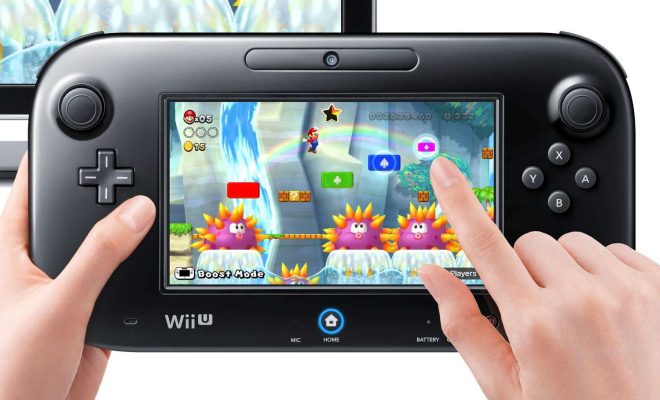
The Wii U GamePad was first unveiled in 2012 as part of Nintendo’s Wii U console. The GamePad was a radical departure from the standard video game controller, featuring a touch screen display and motion controls. It had the ability to stream games from the Wii U console to the GamePad, allowing players to continue playing even if they couldn’t sit in front of the TV.

But is the Wii U GamePad a portable game system? Technically, yes. It’s lightweight and can be used wirelessly within a certain range of the Wii U console. However, it’s not as portable as other dedicated handheld gaming devices like the Nintendo 3DS or the Sony PlayStation Vita. The GamePad requires a power source to function, so it can’t be taken on the go without an external battery pack.

Despite its lack of true portability, the GamePad still offers a unique gaming experience. The touch screen display adds a new layer of interactivity to games, allowing players to use their fingers to manipulate in-game objects or navigate menus. The motion controls are also a lot of fun, giving players the ability to perform actions like tilting the controller to steer in racing games or swinging it to hit a ball in sports games.

One of the biggest advantages of the GamePad is its ability to stream games from the Wii U console. This means that if someone else wants to watch TV, you can continue playing your game on the GamePad without interruption. This is especially useful for households with multiple people and only one TV.

Another great feature of the GamePad is its integration with Miiverse. Miiverse is a social network for gamers where they can share their thoughts on games and connect with other players. The GamePad’s touch screen display makes it easy to access and interact with Miiverse, adding to the social aspect of gaming.

In conclusion, while the Wii U GamePad may not be as portable as other handheld gaming devices, it still offers a unique gaming experience. Its touch screen display, motion controls, and ability to stream games from the Wii U console make it a versatile and fun controller to use. Whether you prefer to play on the TV or on the GamePad, the Wii U provides gamers with an immersive and engaging experience.

Previous Article

How to Connect Your Android Phone With ...

Next Article

How to Turn On a Microsoft Surface ...

Matthew Lynch

Related articles More from author

  • Digital & Mobile Technology

    How to Change Brightness on Windows 10 Computers

    June 4, 2023
    By Matthew Lynch
  • Digital & Mobile Technology

    What is the Web?

    May 13, 2023
    By Matthew Lynch
  • Digital & Mobile Technology

    Is FaceTime Not Working? Potential Fixes to Try

    August 5, 2023
    By Matthew Lynch
  • Digital & Mobile Technology

    What is a Terminal Emulator?

    April 24, 2023
    By Matthew Lynch
  • Digital & Mobile Technology

    How to Repair a Corrupted Windows 10 Installation

    June 6, 2023
    By Matthew Lynch
  • Digital & Mobile Technology

    How to Delete Temporary Files on Windows 11

    May 28, 2023
    By Matthew Lynch

Search

Login & Registration

  • Register
  • Log in
  • Entries feed
  • Comments feed
  • WordPress.org

Newsletter

Signup for The Tech Edvocate Newsletter and have the latest in EdTech news and opinion delivered to your email address!

About Us

Since technology is not going anywhere and does more good than harm, adapting is the best course of action. That is where The Tech Edvocate comes in. We plan to cover the PreK-12 and Higher Education EdTech sectors and provide our readers with the latest news and opinion on the subject. From time to time, I will invite other voices to weigh in on important issues in EdTech. We hope to provide a well-rounded, multi-faceted look at the past, present, the future of EdTech in the US and internationally.

We started this journey back in June 2016, and we plan to continue it for many more years to come. I hope that you will join us in this discussion of the past, present and future of EdTech and lend your own insight to the issues that are discussed.

Newsletter

Signup for The Tech Edvocate Newsletter and have the latest in EdTech news and opinion delivered to your email address!

Contact Us

The Tech Edvocate
910 Goddin Street
Richmond, VA 23231
(601) 630-5238
[email protected]

Copyright © 2025 Matthew Lynch. All rights reserved.