The Tech Edvocate

Top Menu

  • Advertisement
  • Apps
  • Home Page
  • Home Page Five (No Sidebar)
  • Home Page Four
  • Home Page Three
  • Home Page Two
  • Home Tech2
  • Icons [No Sidebar]
  • Left Sidbear Page
  • Lynch Educational Consulting
  • My Account
  • My Speaking Page
  • Newsletter Sign Up Confirmation
  • Newsletter Unsubscription
  • Our Brands
  • Page Example
  • Privacy Policy
  • Protected Content
  • Register
  • Request a Product Review
  • Shop
  • Shortcodes Examples
  • Signup
  • Start Here
    • Governance
    • Careers
    • Contact Us
  • Terms and Conditions
  • The Edvocate
  • The Tech Edvocate Product Guide
  • Topics
  • Write For Us
  • Advertise

Main Menu

  • Start Here
    • Our Brands
    • Governance
      • Lynch Educational Consulting, LLC.
      • Dr. Lynch’s Personal Website
      • Careers
    • Write For Us
    • The Tech Edvocate Product Guide
    • Contact Us
    • Books
    • Edupedia
    • Post a Job
    • The Edvocate Podcast
    • Terms and Conditions
    • Privacy Policy
  • Topics
    • Assistive Technology
    • Child Development Tech
    • Early Childhood & K-12 EdTech
    • EdTech Futures
    • EdTech News
    • EdTech Policy & Reform
    • EdTech Startups & Businesses
    • Higher Education EdTech
    • Online Learning & eLearning
    • Parent & Family Tech
    • Personalized Learning
    • Product Reviews
  • Advertise
  • Tech Edvocate Awards
  • The Edvocate
  • Pedagogue
  • School Ratings

logo

The Tech Edvocate

  • Start Here
    • Our Brands
    • Governance
      • Lynch Educational Consulting, LLC.
      • Dr. Lynch’s Personal Website
        • My Speaking Page
      • Careers
    • Write For Us
    • The Tech Edvocate Product Guide
    • Contact Us
    • Books
    • Edupedia
    • Post a Job
    • The Edvocate Podcast
    • Terms and Conditions
    • Privacy Policy
  • Topics
    • Assistive Technology
    • Child Development Tech
    • Early Childhood & K-12 EdTech
    • EdTech Futures
    • EdTech News
    • EdTech Policy & Reform
    • EdTech Startups & Businesses
    • Higher Education EdTech
    • Online Learning & eLearning
    • Parent & Family Tech
    • Personalized Learning
    • Product Reviews
  • Advertise
  • Tech Edvocate Awards
  • The Edvocate
  • Pedagogue
  • School Ratings
  • Kopu formāts un tradicionālās izmaksu līnijas slotos

  • Komiksová estetika mení tón prezentácie automatových hier

  • Tipogrāfija kā tematisko spēļu automātu vizuālās identitātes daļa

  • Bonusa kārtu attīstība mūsdienu spēļu automātu stāstījumā

  • Kā turpinājumi saglabā spēles identitāti, mainot tās mehāniku

  • Kā tiešsaistes kazino piedāvā pazīstamas spēles līdzās jaunākajiem izlaidumiem

  • Kā mobilo ekrānu portreta izkārtojums mainīja spēļu automātu kompozīciju

  • Kazino spēļu vadības elementu un informācijas izkārtojuma pielāgošana dažādiem ekrāniem

  • Kā māksla un mehānika veido spēļu automātu portfeļa atšķirības

  • How Sequel Slots Retain Familiar Features While Updating Play

Digital & Mobile Technology
Home›Digital & Mobile Technology›The Ultimate Raspberry Pi Commands Cheat Sheet

The Ultimate Raspberry Pi Commands Cheat Sheet
By Matthew Lynch
June 14, 2023
0
Spread the love

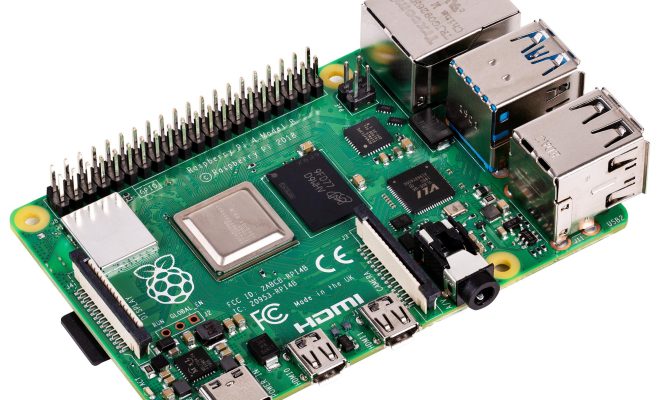
The Raspberry Pi is a versatile and powerful single-board computer that has exploded in popularity over the years. It allows users to create anything from simple home automation systems to complex robotics projects. However, to unleash the full potential of the Raspberry Pi, you must be familiar with the different commands that control its functionality.

In this article, we will introduce you to the ultimate Raspberry Pi commands cheat sheet that contains the most important and commonly used commands for operating the Raspberry Pi.

1. The reboot command

The reboot command performs a system reboot of the Raspberry Pi. It is used when you want to restart the system to apply changes or to refresh the system. To execute this command, you need to type “sudo reboot” in the terminal. The “sudo” command is necessary to gain administrative privileges and perform this operation.

2. The shutdown command

The shutdown command is used to shut down the Raspberry Pi properly. It is essential to shut down the system correctly to avoid data loss and hardware damage. To execute this command, type “sudo shutdown -h now” in the terminal. The “-h now” command will initiate an immediate shutdown of the Raspberry Pi.

3. The apt-get command

The apt-get command is a core utility used to manage software packages on the Raspberry Pi. It is used to search, install, and remove applications from the system. To install a package, type “sudo apt-get install [package_name]”. To remove a package, type “sudo apt-get remove [package_name]”.

4. The update command

The update command is used to update the Raspberry Pi software and packages to the latest versions. Keeping your system up to date ensures efficient performance and optimal functionality. To execute this command, type “sudo apt-get update && sudo apt-get upgrade” in the terminal.

5. The sudo command

The sudo command is one of the most important commands in the Raspberry Pi terminal. It is used to perform administrative tasks and gain elevated privileges. To execute this command, type “sudo [command]” in the terminal.

6. The ping command

The ping command is used to test the connectivity between the Raspberry Pi and a specific location on the internet. It is helpful in diagnosing network issues and identifying the cause of connection problems. To execute this command, type “ping [website_address]”.

7. The nano command

The nano command is a text editor used to create and edit files and scripts on the Raspberry Pi. It is simple and easy to use, making it an essential utility for coding and scripting. To execute this command, type “nano [file_name]”.

8. The ls command

The ls command is used to list the files and directories in the current working directory. It is helpful in navigating and searching for files on the Raspberry Pi. To execute this command, type “ls”.

9. The cd command

The cd command is used to change the working directory on the Raspberry Pi. It is helpful in navigating and accessing different directories and folders. To execute this command, type “cd [directory_path]”.

10. The ifconfig command

The ifconfig command is used to view the network configuration of the Raspberry Pi. It provides information about the network interfaces and their status. To execute this command, type “ifconfig”.

In conclusion, with the ultimate Raspberry Pi commands cheat sheet, you have the power to operate and control your Raspberry Pi efficiently. These essential commands will help you manage software packages, perform administrative tasks, edit files and scripts, diagnose network issues, and navigate the system’s different directories and folders. Make sure to bookmark this cheat sheet for your next Raspberry Pi project. Happy coding!


Previous Article

How to Use QR Codes in Video ...

Next Article

How to Shut Down a Raspberry Pi ...

Matthew Lynch

Related articles More from author

  • Digital & Mobile Technology

    What Word Processing Program Comes With Apple Computers?

    May 15, 2023
    By Matthew Lynch
  • Digital & Mobile Technology

    What is a Cloud App?

    April 16, 2023
    By Matthew Lynch
  • Digital & Mobile Technology

    How to Update Your Logitech Unifying Receiver

    June 3, 2023
    By Matthew Lynch
  • Digital & Mobile Technology

    Reasons Why Your Next iPad Should Be Cellular

    August 5, 2023
    By Matthew Lynch
  • Digital & Mobile Technology

    What is Virtual Storage (VS)?

    May 14, 2023
    By Matthew Lynch
  • Digital & Mobile Technology

    What Is a USB Port?

    May 30, 2023
    By Matthew Lynch

Search

Login & Registration

  • Log in
  • Entries feed
  • Comments feed
  • WordPress.org

Newsletter

Signup for The Tech Edvocate Newsletter and have the latest in EdTech news and opinion delivered to your email address!

About Us

Since technology is not going anywhere and does more good than harm, adapting is the best course of action. That is where The Tech Edvocate comes in. We plan to cover the PreK-12 and Higher Education EdTech sectors and provide our readers with the latest news and opinion on the subject. From time to time, I will invite other voices to weigh in on important issues in EdTech. We hope to provide a well-rounded, multi-faceted look at the past, present, the future of EdTech in the US and internationally.

We started this journey back in June 2016, and we plan to continue it for many more years to come. I hope that you will join us in this discussion of the past, present and future of EdTech and lend your own insight to the issues that are discussed.

Newsletter

Signup for The Tech Edvocate Newsletter and have the latest in EdTech news and opinion delivered to your email address!

Contact Us

The Tech Edvocate
910 Goddin Street
Richmond, VA 23231
(601) 630-5238
[email protected]

Copyright © 2026 Matthew Lynch. All rights reserved.