The Tech Edvocate

Top Menu

  • Advertisement
  • Apps
  • Home Page
  • Home Page Five (No Sidebar)
  • Home Page Four
  • Home Page Three
  • Home Page Two
  • Home Tech2
  • Icons [No Sidebar]
  • Left Sidbear Page
  • Lynch Educational Consulting
  • My Account
  • My Speaking Page
  • Newsletter Sign Up Confirmation
  • Newsletter Unsubscription
  • Our Brands
  • Page Example
  • Privacy Policy
  • Protected Content
  • Register
  • Request a Product Review
  • Shop
  • Shortcodes Examples
  • Signup
  • Start Here
    • Governance
    • Careers
    • Contact Us
  • Terms and Conditions
  • The Edvocate
  • The Tech Edvocate Product Guide
  • Topics
  • Write For Us
  • Advertise

Main Menu

  • Start Here
    • Our Brands
    • Governance
      • Lynch Educational Consulting, LLC.
      • Dr. Lynch’s Personal Website
      • Careers
    • Write For Us
    • The Tech Edvocate Product Guide
    • Contact Us
    • Books
    • Edupedia
    • Post a Job
    • The Edvocate Podcast
    • Terms and Conditions
    • Privacy Policy
  • Topics
    • Assistive Technology
    • Child Development Tech
    • Early Childhood & K-12 EdTech
    • EdTech Futures
    • EdTech News
    • EdTech Policy & Reform
    • EdTech Startups & Businesses
    • Higher Education EdTech
    • Online Learning & eLearning
    • Parent & Family Tech
    • Personalized Learning
    • Product Reviews
  • Advertise
  • Tech Edvocate Awards
  • The Edvocate
  • Pedagogue
  • School Ratings

logo

The Tech Edvocate

  • Start Here
    • Our Brands
    • Governance
      • Lynch Educational Consulting, LLC.
      • Dr. Lynch’s Personal Website
        • My Speaking Page
      • Careers
    • Write For Us
    • The Tech Edvocate Product Guide
    • Contact Us
    • Books
    • Edupedia
    • Post a Job
    • The Edvocate Podcast
    • Terms and Conditions
    • Privacy Policy
  • Topics
    • Assistive Technology
    • Child Development Tech
    • Early Childhood & K-12 EdTech
    • EdTech Futures
    • EdTech News
    • EdTech Policy & Reform
    • EdTech Startups & Businesses
    • Higher Education EdTech
    • Online Learning & eLearning
    • Parent & Family Tech
    • Personalized Learning
    • Product Reviews
  • Advertise
  • Tech Edvocate Awards
  • The Edvocate
  • Pedagogue
  • School Ratings
  • A Visitors Guide to Long Beach (CA), United States

  • A Visitor’s Guide to Fresno (CA), United States

  • A Visitors Guide to New Orleans (LA), United States

  • A Visitors Guide to Sacramento (CA), United States

  • A Visitors Guide to Lyon, France

  • JisuLife Ultra2 Portable Fan: A Powerful Multi-Function Cooling Solution

  • A Visitors Guide to Viña del Mar, Chile

  • A Visitors Guide to Århus, Denmark

  • A Visitors Guide to Bakersfield (CA), United States

  • A Visitors Guide to Aurora (CO), United States

Digital & Mobile Technology
Home›Digital & Mobile Technology›The Most Energy-Efficient Way to Set Your Thermostat

The Most Energy-Efficient Way to Set Your Thermostat
By Matthew Lynch
June 15, 2023
0
Spread the love

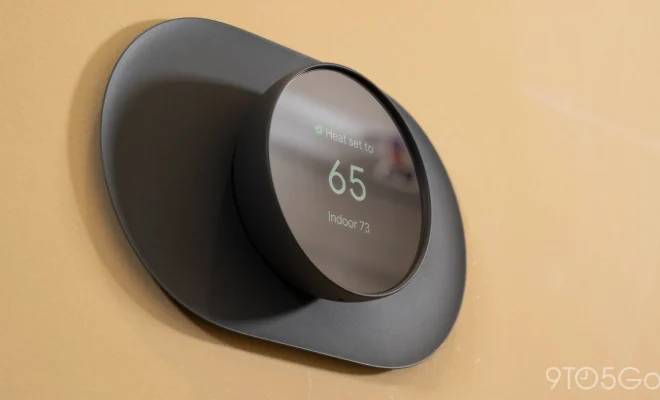
As climate change becomes an increasingly pressing issue, more and more people are looking for ways to be more energy-efficient in their day-to-day lives. One of the simplest ways to reduce your energy consumption and lower your carbon footprint is by setting your thermostat in an energy-efficient way.

First of all, it’s important to understand that the ideal temperature for your home will vary depending on your personal preferences, as well as factors like the season and the time of day. However, there are some general guidelines that can help you find the most energy-efficient temperature to set your thermostat to.

During the winter months, it’s recommended that you set your thermostat to 68 degrees Fahrenheit when you’re at home and awake, and lower it by 10-15 degrees when you’re away from home or asleep. This will help you save energy and reduce your heating bills without sacrificing your comfort. During the summer months, you’ll want to raise your thermostat to 78 degrees when you’re at home and awake, and use fans to help circulate cool air throughout your home. When you’re away from home or sleeping, you can turn your thermostat up by a few degrees to save even more energy.

There are also a few other easy tricks you can use to make your thermostat more energy-efficient. For example, you can install a programmable thermostat to automate temperature changes based on your daily routine. This can help you save energy and money without having to manually adjust your thermostat all the time. You can also use a smart thermostat that learns your preferences and adjusts your temperature settings accordingly. This can help you save even more energy by automatically optimizing your heating and cooling based on your habits and seasonal changes.

In addition to setting your thermostat to an energy-efficient temperature, you can also take other steps to reduce your energy consumption and lower your carbon footprint. For example, you can make sure your home is properly insulated and sealed to prevent air leaks and drafts. You can use energy-efficient light bulbs, appliances, and electronics, and make sure to turn them off when you’re not using them. You can also consider using renewable energy sources like solar panels or wind turbines to power your home.

Previous Article

How to Change a Username and Other ...

Next Article

How to Get Rid of the Illustrations ...

Matthew Lynch

Related articles More from author

  • Digital & Mobile Technology

    Can You Turn off Read Receipts on Instagram? Not Exactly

    June 2, 2023
    By Matthew Lynch
  • Digital & Mobile Technology

    Should You Buy a Blu-ray Player?

    June 12, 2023
    By Matthew Lynch
  • Digital & Mobile Technology

    How to Change Language on HBO Max

    July 14, 2023
    By Matthew Lynch
  • Digital & Mobile Technology

    How to Fix the Epic Games Launcher Not Opening in Windows 11 or 10

    August 5, 2023
    By Matthew Lynch
  • Digital & Mobile Technology

    How to Fix Your Scanner When It’s Not Working on Windows 11

    June 14, 2023
    By Matthew Lynch
  • Digital & Mobile Technology

    How to Adjust Chromecast Resolution

    July 24, 2023
    By Matthew Lynch

Search

Login & Registration

  • Register
  • Log in
  • Entries feed
  • Comments feed
  • WordPress.org

Newsletter

Signup for The Tech Edvocate Newsletter and have the latest in EdTech news and opinion delivered to your email address!

About Us

Since technology is not going anywhere and does more good than harm, adapting is the best course of action. That is where The Tech Edvocate comes in. We plan to cover the PreK-12 and Higher Education EdTech sectors and provide our readers with the latest news and opinion on the subject. From time to time, I will invite other voices to weigh in on important issues in EdTech. We hope to provide a well-rounded, multi-faceted look at the past, present, the future of EdTech in the US and internationally.

We started this journey back in June 2016, and we plan to continue it for many more years to come. I hope that you will join us in this discussion of the past, present and future of EdTech and lend your own insight to the issues that are discussed.

Newsletter

Signup for The Tech Edvocate Newsletter and have the latest in EdTech news and opinion delivered to your email address!

Contact Us

The Tech Edvocate
910 Goddin Street
Richmond, VA 23231
(601) 630-5238
[email protected]

Copyright © 2025 Matthew Lynch. All rights reserved.