The Tech Edvocate

Top Menu

  • Advertisement
  • Apps
  • Home Page
  • Home Page Five (No Sidebar)
  • Home Page Four
  • Home Page Three
  • Home Page Two
  • Home Tech2
  • Icons [No Sidebar]
  • Left Sidbear Page
  • Lynch Educational Consulting
  • My Account
  • My Speaking Page
  • Newsletter Sign Up Confirmation
  • Newsletter Unsubscription
  • Our Brands
  • Page Example
  • Privacy Policy
  • Protected Content
  • Register
  • Request a Product Review
  • Shop
  • Shortcodes Examples
  • Signup
  • Start Here
    • Governance
    • Careers
    • Contact Us
  • Terms and Conditions
  • The Edvocate
  • The Tech Edvocate Product Guide
  • Topics
  • Write For Us
  • Advertise

Main Menu

  • Start Here
    • Our Brands
    • Governance
      • Lynch Educational Consulting, LLC.
      • Dr. Lynch’s Personal Website
      • Careers
    • Write For Us
    • The Tech Edvocate Product Guide
    • Contact Us
    • Books
    • Edupedia
    • Post a Job
    • The Edvocate Podcast
    • Terms and Conditions
    • Privacy Policy
  • Topics
    • Assistive Technology
    • Child Development Tech
    • Early Childhood & K-12 EdTech
    • EdTech Futures
    • EdTech News
    • EdTech Policy & Reform
    • EdTech Startups & Businesses
    • Higher Education EdTech
    • Online Learning & eLearning
    • Parent & Family Tech
    • Personalized Learning
    • Product Reviews
  • Advertise
  • Tech Edvocate Awards
  • The Edvocate
  • Pedagogue
  • School Ratings

logo

The Tech Edvocate

  • Start Here
    • Our Brands
    • Governance
      • Lynch Educational Consulting, LLC.
      • Dr. Lynch’s Personal Website
        • My Speaking Page
      • Careers
    • Write For Us
    • The Tech Edvocate Product Guide
    • Contact Us
    • Books
    • Edupedia
    • Post a Job
    • The Edvocate Podcast
    • Terms and Conditions
    • Privacy Policy
  • Topics
    • Assistive Technology
    • Child Development Tech
    • Early Childhood & K-12 EdTech
    • EdTech Futures
    • EdTech News
    • EdTech Policy & Reform
    • EdTech Startups & Businesses
    • Higher Education EdTech
    • Online Learning & eLearning
    • Parent & Family Tech
    • Personalized Learning
    • Product Reviews
  • Advertise
  • Tech Edvocate Awards
  • The Edvocate
  • Pedagogue
  • School Ratings
  • The Hidden Cost of EVs: Why Your Battery Could Cost More Than Your Car in 2026

  • Jensen Huang’s Shock Exit: This Unbelievable Scandal Just Rocked Nvidia and the AI World

  • Big Walk developer House House Confirms ‘Sparing’ Use of Gen AI – Press Start

  • Baffling: How a Cyber Breach at South Korea’s Top Security Watchdog Exposed Millions

  • Wenn Ordnung den Bildschirm beruhigt: Warum klare Abläufe Casino-Unterhaltung einladender machen

  • Reddit AI Reviews: The Quiet Reshaping of Online Opinion

  • The Chilling Truth: Iran Cyberattacks Europe’s Food and Blood Supplies

  • Anthropic’s $3.4 Billion Bet on Gas: The Unseen Cost of AI’s Future

  • Tribit FlyBuds C3 Earbuds: Premium Features at a Budget-Friendly Price

  • Is AuraCam Pro’s Emotional AI a Privacy Nightmare or Security Breakthrough?

Digital & Mobile Technology
Home›Digital & Mobile Technology›The Minimum Requirements for Running macOS Sierra

The Minimum Requirements for Running macOS Sierra
By Matthew Lynch
June 9, 2023
0
Spread the love

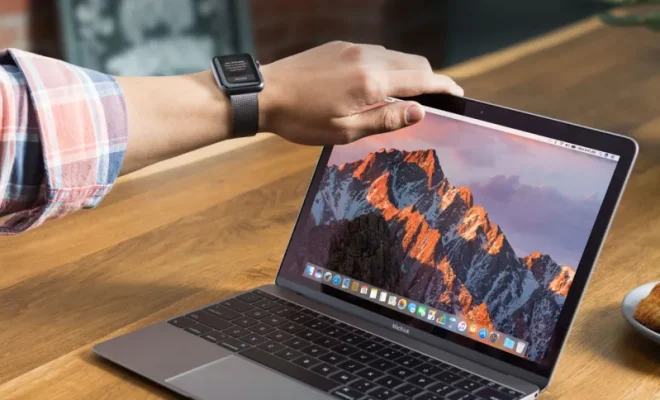
If you are thinking about upgrading your Mac to macOS Sierra, it is important to know the minimum requirements before you do so. Apple recommends that you have a Mac that is no older than 2010, which means that the computer has to be able to support 64-bit architecture. In addition, you will also need to have at least 2GB of RAM and 8.8GB of available storage.

Processor

To run macOS Sierra on your Mac, you will need a processor that is capable of supporting 64-bit architecture. Apple states that the following processors are compatible:

– iMac (Mid-2010 or newer)
– MacBook (Late 2009 or newer)
– MacBook Pro (Mid-2010 or newer)
– MacBook Air (Late 2010 or newer)
– Mac Mini (Mid-2010 or newer)
– Mac Pro (Mid-2010 or newer)

RAM

You will need to have at least 2GB of RAM to run macOS Sierra. However, if you plan on using applications that require more memory, such as editing software or games, it is recommended that you have more than 2GB of RAM.

Storage

To install macOS Sierra on your Mac, you need to have at least 8.8GB of available storage. However, it is worth noting that this is just the minimum amount of storage required to install the operating system. If you plan on using your Mac for a wide range of applications and storing large files, it is recommended that you have more available storage.

Graphics

MacOS Sierra requires a graphics processor that supports Metal, which is Apple’s low-level graphics API. This means that you need to have a graphics processor that is capable of supporting the Metal graphics framework. The following graphics processors are compatible:

– iMac (Late 2009 or newer)
– MacBook (Late 2009 or newer)
– MacBook Pro (Mid-2010 or newer)
– MacBook Air (Late 2010 or newer)
– Mac Mini (Mid-2010 or newer)
– Mac Pro (Mid-2010 or newer)

If you are thinking about upgrading to macOS Sierra, it is essential to ensure that your Mac meets the minimum requirements. To run macOS Sierra, you need a Mac with a processor that supports 64-bit architecture, at least 2GB of RAM, and 8.8GB of available storage. Additionally, your Mac must have a graphics processor that supports Metal. If your Mac meets these requirements, you can download and install macOS Sierra from the Mac App Store.

Previous Article

How to Skip Songs on AirPods

Next Article

How to Watch the Roku Channel Without ...

Matthew Lynch

Related articles More from author

  • Digital & Mobile Technology

    How to Set a Custom Gamerpic for Your Xbox Profile

    June 22, 2023
    By Matthew Lynch
  • Digital & Mobile Technology

    Cross-Platform Mobile Multiplayer Games to Play With Friends

    June 8, 2023
    By Matthew Lynch
  • Digital & Mobile Technology

    Is Your Snipping Tool Not Working? Here’s How to Fix It

    June 22, 2023
    By Matthew Lynch
  • Digital & Mobile Technology

    What Is a PAGES File?

    June 23, 2023
    By Matthew Lynch
  • Digital & Mobile Technology

    International Wi-Fi Internet Service Providers

    June 10, 2023
    By Matthew Lynch
  • Digital & Mobile Technology

    The 7 Best Photo Scanners for Backing Up Old Photos

    August 3, 2023
    By Matthew Lynch

Search

Login & Registration

  • Log in
  • Entries feed
  • Comments feed
  • WordPress.org

Newsletter

Signup for The Tech Edvocate Newsletter and have the latest in EdTech news and opinion delivered to your email address!

About Us

Since technology is not going anywhere and does more good than harm, adapting is the best course of action. That is where The Tech Edvocate comes in. We plan to cover the PreK-12 and Higher Education EdTech sectors and provide our readers with the latest news and opinion on the subject. From time to time, I will invite other voices to weigh in on important issues in EdTech. We hope to provide a well-rounded, multi-faceted look at the past, present, the future of EdTech in the US and internationally.

We started this journey back in June 2016, and we plan to continue it for many more years to come. I hope that you will join us in this discussion of the past, present and future of EdTech and lend your own insight to the issues that are discussed.

Newsletter

Signup for The Tech Edvocate Newsletter and have the latest in EdTech news and opinion delivered to your email address!

Contact Us

The Tech Edvocate
910 Goddin Street
Richmond, VA 23231
(601) 630-5238
[email protected]

Copyright © 2026 Matthew Lynch. All rights reserved.