The Tech Edvocate

Top Menu

  • Advertisement
  • Apps
  • Home Page
  • Home Page Five (No Sidebar)
  • Home Page Four
  • Home Page Three
  • Home Page Two
  • Home Tech2
  • Icons [No Sidebar]
  • Left Sidbear Page
  • Lynch Educational Consulting
  • My Account
  • My Speaking Page
  • Newsletter Sign Up Confirmation
  • Newsletter Unsubscription
  • Our Brands
  • Page Example
  • Privacy Policy
  • Protected Content
  • Register
  • Request a Product Review
  • Shop
  • Shortcodes Examples
  • Signup
  • Start Here
    • Governance
    • Careers
    • Contact Us
  • Terms and Conditions
  • The Edvocate
  • The Tech Edvocate Product Guide
  • Topics
  • Write For Us
  • Advertise

Main Menu

  • Start Here
    • Our Brands
    • Governance
      • Lynch Educational Consulting, LLC.
      • Dr. Lynch’s Personal Website
      • Careers
    • Write For Us
    • The Tech Edvocate Product Guide
    • Contact Us
    • Books
    • Edupedia
    • Post a Job
    • The Edvocate Podcast
    • Terms and Conditions
    • Privacy Policy
  • Topics
    • Assistive Technology
    • Child Development Tech
    • Early Childhood & K-12 EdTech
    • EdTech Futures
    • EdTech News
    • EdTech Policy & Reform
    • EdTech Startups & Businesses
    • Higher Education EdTech
    • Online Learning & eLearning
    • Parent & Family Tech
    • Personalized Learning
    • Product Reviews
  • Advertise
  • Tech Edvocate Awards
  • The Edvocate
  • Pedagogue
  • School Ratings

logo

The Tech Edvocate

  • Start Here
    • Our Brands
    • Governance
      • Lynch Educational Consulting, LLC.
      • Dr. Lynch’s Personal Website
        • My Speaking Page
      • Careers
    • Write For Us
    • The Tech Edvocate Product Guide
    • Contact Us
    • Books
    • Edupedia
    • Post a Job
    • The Edvocate Podcast
    • Terms and Conditions
    • Privacy Policy
  • Topics
    • Assistive Technology
    • Child Development Tech
    • Early Childhood & K-12 EdTech
    • EdTech Futures
    • EdTech News
    • EdTech Policy & Reform
    • EdTech Startups & Businesses
    • Higher Education EdTech
    • Online Learning & eLearning
    • Parent & Family Tech
    • Personalized Learning
    • Product Reviews
  • Advertise
  • Tech Edvocate Awards
  • The Edvocate
  • Pedagogue
  • School Ratings
  • 100 Best Apps for Data Backup

  • 100 Best Apps for Data Migration

  • 100 Best Apps for Data Transformation

  • 100 Best Apps for Data Cleaning

  • 100 Best Apps for Data Entry

  • 100 Best Apps for Business Process Automation

  • 100 Best Apps for Operational Efficiency

  • 100 Best Apps for Improving Processes

  • 100 Best Apps for Scaling Operations

  • 100 Best Apps for Community-Led Growth

Digital & Mobile Technology
Home›Digital & Mobile Technology›The Many Uses of the iPhone Home Button

The Many Uses of the iPhone Home Button
By Matthew Lynch
June 13, 2023
0
Spread the love

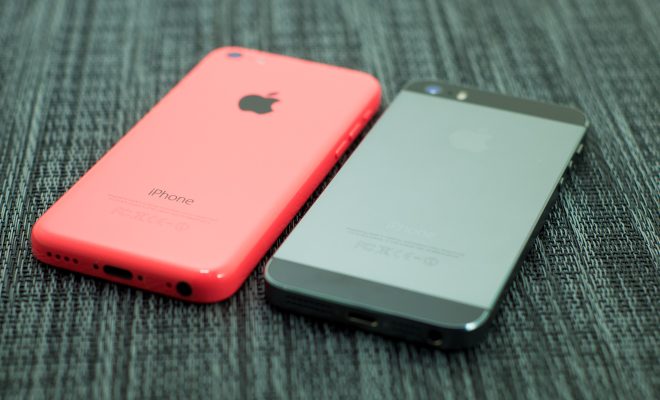
The iPhone Home Button has gone through a lot of changes throughout the years, but it remains as one of the most vital parts of the device. From its early days as a physical button to its current form as a haptic feedback feature, the Home Button has evolved with each new iPhone model. It’s not just a simple key to unlock your phone or get back to the home screen – it offers a diverse range of features and uses that make it an essential component of the iPhone. Here are just a few of the many ways you can take advantage of the iPhone Home Button.

1. Unlocking your device

As mentioned before, the primary function of the Home Button is to unlock your iPhone. A simple press of the button gives you access to your device, and if you have enabled Touch ID or Face ID, you can quickly unlock your phone without even having to press it.

2. Accessing Siri

The Home Button is also your gateway to Siri, Apple’s digital assistant. By pressing and holding down the Home Button, you can activate Siri and ask her to perform various tasks, such as setting a reminder, sending a message, and even playing music. She’s a handy virtual assistant that can help you with anything you need, and all it takes is a single press of a button.

3. Multitasking

With the introduction of iOS 9, Apple introduced a new multitasking feature that allows you to switch between apps easily. Simply double-tap the Home Button, and a list of your most recently opened apps will appear at the bottom of your screen. From there, you can swipe left or right to switch between apps quickly.

4. Apple Pay

The Home Button is also an important part of Apple Pay, a mobile payment system that allows users to pay with their iPhone at participating retailers. To use Apple Pay, simply tap the Home Button while holding your iPhone near the payment terminal. The Home Button will use Touch ID to verify your identity and complete the transaction securely.

5. Accessibility features

The iPhone is known for its accessibility features, and the Home Button plays a vital role in this regard. For example, you can use the Home Button to activate VoiceOver, a feature that reads the contents of your screen out loud, making it easier for visually impaired users to navigate their device. Other accessibility features include AssistiveTouch, which creates a virtual Home Button that can be customized to perform various actions.

In conclusion, the iPhone Home Button is more than just a key to unlock your phone. It’s a multifunctional tool that offers a variety of features and can be customized to suit your needs. By taking advantage of the many uses of the Home Button, you can unlock the full potential of your iPhone and make your user experience even better.


Previous Article

How to Save Contact Information From an ...

Next Article

How to Delete Your App Download History ...

Matthew Lynch

Related articles More from author

  • Digital & Mobile Technology

    Why Your Car Can Zap You and What to Do About It

    June 11, 2023
    By Matthew Lynch
  • Digital & Mobile Technology

    Nothing Chats Aims to Bring iMessage to Android, but It Sounds Messy

    February 1, 2024
    By Matthew Lynch
  • Digital & Mobile Technology

    Digital Video 101: Understanding How Digital Video Works

    March 20, 2023
    By Matthew Lynch
  • Digital & Mobile Technology

    Why Apple’s Pay Later Feature Could Be Bad News for Affirm and Klarna

    June 21, 2023
    By Matthew Lynch
  • Digital & Mobile Technology

    Can’t Download Apps From the Mac App Store?

    June 23, 2023
    By Matthew Lynch
  • Digital & Mobile Technology

    How to Combine Two Columns in Excel

    June 1, 2023
    By Matthew Lynch

Search

Login & Registration

  • Log in
  • Entries feed
  • Comments feed
  • WordPress.org

Newsletter

Signup for The Tech Edvocate Newsletter and have the latest in EdTech news and opinion delivered to your email address!

About Us

Since technology is not going anywhere and does more good than harm, adapting is the best course of action. That is where The Tech Edvocate comes in. We plan to cover the PreK-12 and Higher Education EdTech sectors and provide our readers with the latest news and opinion on the subject. From time to time, I will invite other voices to weigh in on important issues in EdTech. We hope to provide a well-rounded, multi-faceted look at the past, present, the future of EdTech in the US and internationally.

We started this journey back in June 2016, and we plan to continue it for many more years to come. I hope that you will join us in this discussion of the past, present and future of EdTech and lend your own insight to the issues that are discussed.

Newsletter

Signup for The Tech Edvocate Newsletter and have the latest in EdTech news and opinion delivered to your email address!

Contact Us

The Tech Edvocate
910 Goddin Street
Richmond, VA 23231
(601) 630-5238
[email protected]

Copyright © 2026 Matthew Lynch. All rights reserved.