The Tech Edvocate

Top Menu

  • Advertisement
  • Apps
  • Home Page
  • Home Page Five (No Sidebar)
  • Home Page Four
  • Home Page Three
  • Home Page Two
  • Home Tech2
  • Icons [No Sidebar]
  • Left Sidbear Page
  • Lynch Educational Consulting
  • My Account
  • My Speaking Page
  • Newsletter Sign Up Confirmation
  • Newsletter Unsubscription
  • Our Brands
  • Page Example
  • Privacy Policy
  • Protected Content
  • Register
  • Request a Product Review
  • Shop
  • Shortcodes Examples
  • Signup
  • Start Here
    • Governance
    • Careers
    • Contact Us
  • Terms and Conditions
  • The Edvocate
  • The Tech Edvocate Product Guide
  • Topics
  • Write For Us
  • Advertise

Main Menu

  • Start Here
    • Our Brands
    • Governance
      • Lynch Educational Consulting, LLC.
      • Dr. Lynch’s Personal Website
      • Careers
    • Write For Us
    • The Tech Edvocate Product Guide
    • Contact Us
    • Books
    • Edupedia
    • Post a Job
    • The Edvocate Podcast
    • Terms and Conditions
    • Privacy Policy
  • Topics
    • Assistive Technology
    • Child Development Tech
    • Early Childhood & K-12 EdTech
    • EdTech Futures
    • EdTech News
    • EdTech Policy & Reform
    • EdTech Startups & Businesses
    • Higher Education EdTech
    • Online Learning & eLearning
    • Parent & Family Tech
    • Personalized Learning
    • Product Reviews
  • Advertise
  • Tech Edvocate Awards
  • The Edvocate
  • Pedagogue
  • School Ratings

logo

The Tech Edvocate

  • Start Here
    • Our Brands
    • Governance
      • Lynch Educational Consulting, LLC.
      • Dr. Lynch’s Personal Website
        • My Speaking Page
      • Careers
    • Write For Us
    • The Tech Edvocate Product Guide
    • Contact Us
    • Books
    • Edupedia
    • Post a Job
    • The Edvocate Podcast
    • Terms and Conditions
    • Privacy Policy
  • Topics
    • Assistive Technology
    • Child Development Tech
    • Early Childhood & K-12 EdTech
    • EdTech Futures
    • EdTech News
    • EdTech Policy & Reform
    • EdTech Startups & Businesses
    • Higher Education EdTech
    • Online Learning & eLearning
    • Parent & Family Tech
    • Personalized Learning
    • Product Reviews
  • Advertise
  • Tech Edvocate Awards
  • The Edvocate
  • Pedagogue
  • School Ratings
  • A Visitor’s Guide to Fresno (CA), United States

  • A Visitors Guide to New Orleans (LA), United States

  • A Visitors Guide to Sacramento (CA), United States

  • A Visitors Guide to Lyon, France

  • JisuLife Ultra2 Portable Fan: A Powerful Multi-Function Cooling Solution

  • A Visitors Guide to Viña del Mar, Chile

  • A Visitors Guide to Århus, Denmark

  • A Visitors Guide to Bakersfield (CA), United States

  • A Visitors Guide to Aurora (CO), United States

  • A Visitor’s Guide to Toledo (OH), United States

Digital & Mobile Technology
Home›Digital & Mobile Technology›The Best Raspberry Pi Simulators for Testing Your Projects

The Best Raspberry Pi Simulators for Testing Your Projects
By Matthew Lynch
June 13, 2023
0
Spread the love

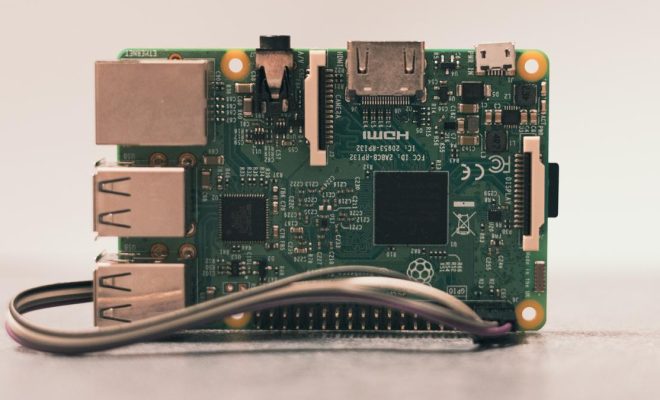
The Raspberry Pi is a versatile and affordable single-board computer that has become a popular choice for DIY enthusiasts, makers, and educators. But before you jump into building your next Raspberry Pi project, it’s a good idea to test it out virtually using a simulator. A simulator allows you to test your project without having to connect a physical Raspberry Pi, which can save you time and money. In this article, we’ll take a look at some of the best Raspberry Pi simulators available today.

1. QEMU

QEMU is a free and open-source CPU emulator that can emulate a variety of architectures, including the Raspberry Pi. It can be used to run an operating system inside a virtual machine and has been used to simulate various Raspberry Pi models for testing purposes.

Some of the downsides of QEMU include that it can be complex to set up and use, and it may not always provide the same level of accuracy as a physical Raspberry Pi. But overall, QEMU is an excellent tool for simulating Raspberry Pi projects.

2. Simulink

Simulink is a simulation and modeling tool that is widely used in the engineering industry. It has a specific Raspberry Pi package that allows you to simulate your Raspberry Pi project in a graphical environment. Simulink provides a range of simulation tools and models that allow you to create and test a wide variety of Raspberry Pi projects.

The only downside of Simulink is that it’s a proprietary tool and requires a paid license to use.

3. VirtualBox

VirtualBox is another popular virtual machine software that supports emulation of the Raspberry Pi. VirtualBox can be used to test and run Raspberry Pi projects on different operating systems, including Windows, Linux, and macOS.

While it may not be as lightweight as some other simulators on this list, VirtualBox has the advantage of being a widely used tool with a lot of documentation and support available.

4. Raspberry Pi Emulators

There are also several Raspberry Pi emulators available for use, including Raspberry Pi emulation for Windows, Raspbian X86, and PiMyLifeUp. These emulators allow you to run Raspberry Pi projects on your desktop or laptop computer without the need for a physical Raspberry Pi.

Some of the downsides of these emulators include that they may not provide the same level of accuracy or performance as a physical Raspberry Pi, and may not support all features of the Raspberry Pi hardware.

5. PiBakery

PiBakery is a software tool that allows you to create custom Raspberry Pi images and configurations. It includes a simulator that lets you test out your custom images without the need for a physical Raspberry Pi.

PiBakery is an excellent option if you want to test out a custom Raspberry Pi image or configuration, but may not provide the same level of accuracy as a physical Raspberry Pi for hardware-related projects.

In conclusion, there are various Raspberry Pi simulators available, each with their own strengths and weaknesses. Depending on your project’s requirements, you can choose the simulator that works best for you. Using a simulator can save you time and money, and help you catch potential errors or issues before deploying your project on physical hardware.

Previous Article

How to Use Driver Verifier to Fix ...

Next Article

Can you suggest alternatives to info@mydomain for ...

Matthew Lynch

Related articles More from author

  • Digital & Mobile Technology

    Verizon abandons contracts: Everything you need to know (FAQ)

    April 14, 2023
    By Matthew Lynch
  • Digital & Mobile Technology

    How to Enable Flash Player in Google Chrome

    May 28, 2023
    By Matthew Lynch
  • Digital & Mobile Technology

    Cluttered iPhone Notes? Get Yours in Order With This Powerful Trick

    February 1, 2024
    By Matthew Lynch
  • Digital & Mobile Technology

    5GE vs. LTE: What’s the Difference?

    June 10, 2023
    By Matthew Lynch
  • Digital & Mobile Technology

    How to Delete Facebook Posts in Bulk

    June 1, 2023
    By Matthew Lynch
  • Digital & Mobile Technology

    What Does a Red “X” Sign on Your Windows Folders Mean?

    June 13, 2023
    By Matthew Lynch

Search

Login & Registration

  • Register
  • Log in
  • Entries feed
  • Comments feed
  • WordPress.org

Newsletter

Signup for The Tech Edvocate Newsletter and have the latest in EdTech news and opinion delivered to your email address!

About Us

Since technology is not going anywhere and does more good than harm, adapting is the best course of action. That is where The Tech Edvocate comes in. We plan to cover the PreK-12 and Higher Education EdTech sectors and provide our readers with the latest news and opinion on the subject. From time to time, I will invite other voices to weigh in on important issues in EdTech. We hope to provide a well-rounded, multi-faceted look at the past, present, the future of EdTech in the US and internationally.

We started this journey back in June 2016, and we plan to continue it for many more years to come. I hope that you will join us in this discussion of the past, present and future of EdTech and lend your own insight to the issues that are discussed.

Newsletter

Signup for The Tech Edvocate Newsletter and have the latest in EdTech news and opinion delivered to your email address!

Contact Us

The Tech Edvocate
910 Goddin Street
Richmond, VA 23231
(601) 630-5238
[email protected]

Copyright © 2025 Matthew Lynch. All rights reserved.