The Tech Edvocate

Top Menu

  • Advertisement
  • Apps
  • Home Page
  • Home Page Five (No Sidebar)
  • Home Page Four
  • Home Page Three
  • Home Page Two
  • Home Tech2
  • Icons [No Sidebar]
  • Left Sidbear Page
  • Lynch Educational Consulting
  • My Account
  • My Speaking Page
  • Newsletter Sign Up Confirmation
  • Newsletter Unsubscription
  • Our Brands
  • Page Example
  • Privacy Policy
  • Protected Content
  • Register
  • Request a Product Review
  • Shop
  • Shortcodes Examples
  • Signup
  • Start Here
    • Governance
    • Careers
    • Contact Us
  • Terms and Conditions
  • The Edvocate
  • The Tech Edvocate Product Guide
  • Topics
  • Write For Us
  • Advertise

Main Menu

  • Start Here
    • Our Brands
    • Governance
      • Lynch Educational Consulting, LLC.
      • Dr. Lynch’s Personal Website
      • Careers
    • Write For Us
    • The Tech Edvocate Product Guide
    • Contact Us
    • Books
    • Edupedia
    • Post a Job
    • The Edvocate Podcast
    • Terms and Conditions
    • Privacy Policy
  • Topics
    • Assistive Technology
    • Child Development Tech
    • Early Childhood & K-12 EdTech
    • EdTech Futures
    • EdTech News
    • EdTech Policy & Reform
    • EdTech Startups & Businesses
    • Higher Education EdTech
    • Online Learning & eLearning
    • Parent & Family Tech
    • Personalized Learning
    • Product Reviews
  • Advertise
  • Tech Edvocate Awards
  • The Edvocate
  • Pedagogue
  • School Ratings

logo

The Tech Edvocate

  • Start Here
    • Our Brands
    • Governance
      • Lynch Educational Consulting, LLC.
      • Dr. Lynch’s Personal Website
        • My Speaking Page
      • Careers
    • Write For Us
    • The Tech Edvocate Product Guide
    • Contact Us
    • Books
    • Edupedia
    • Post a Job
    • The Edvocate Podcast
    • Terms and Conditions
    • Privacy Policy
  • Topics
    • Assistive Technology
    • Child Development Tech
    • Early Childhood & K-12 EdTech
    • EdTech Futures
    • EdTech News
    • EdTech Policy & Reform
    • EdTech Startups & Businesses
    • Higher Education EdTech
    • Online Learning & eLearning
    • Parent & Family Tech
    • Personalized Learning
    • Product Reviews
  • Advertise
  • Tech Edvocate Awards
  • The Edvocate
  • Pedagogue
  • School Ratings
  • Dramatic: AI Surveillance Giant Cuts Hundreds of Jobs Amid Privacy Backlash

  • Dramatic: Anthropic Claude AI Just Banned ‘Cruel’ Behavior — Here’s Why It Matters

  • This One Shift in Gaming VC Could Reshape the Entire Industry

  • The AI Doctor Is Coming: Is It a Miracle or a Menace?

  • Unmasking the AI Deepfake Threat: Why Corporate America’s Billions Are at Risk

  • Shocking: China’s AI Programmers Collapse — A Disturbing Glimpse Into Our Future?

  • Dramatic Spike: College Costs Projected to Soar 7.5% — Are You Ready?

  • 20 Million Records Exposed: The Reckless Truth Behind the Oracle Health Data Breach

  • The AI Cybersecurity Threat: A Dangerous New Frontier

  • Unbelievable: [Automaker Name]’s Self-Driving Cars Under Fire After Fatal Crash — Here’s What We Know

Digital & Mobile Technology
Home›Digital & Mobile Technology›The Best File Download Managers for Windows

The Best File Download Managers for Windows
By Matthew Lynch
June 9, 2023
0
Spread the love

In today’s fast-paced digital world, file downloads have become an integral part of our daily routine. However, downloading files can sometimes be frustrating, especially when files are large or internet connections are slow. Thankfully, file download managers can help make the process easier and quicker. Download managers are programs designed to accelerate, manage and streamline the file download process. In this article, we will discuss some of the best file download managers for Windows.

1. Ninja Download Manager

Ninja Download Manager is a free download manager that works with all Windows versions and can help you integrate download processes from different browsers. The software has a user-friendly interface and allows you to pause, resume or restart downloads if you accidentally close the program, or if your internet connection drops. It can also help you speed up your download process and organize your downloads using its sorting and categorization features.

2. JDownloader

JDownloader is another free and open-source download manager that supports Windows, Linux, and Mac. It’s an all-in-one download tool that can help you download files from different hosting services, including premium ones such as Rapidshare, Mega, etc. It provides an accelerated download process, supports parallel downloads and segmented downloading to help speed up the process. JDownloader is well-known for its automation capabilities, such as automatically solving captcha codes, which helps to speed up the download process.

3. Internet Download Manager

Internet Download Manager is a popular download manager for Windows that is known for its speed and advanced features. It supports various file types and can help to accelerate downloads to five times the normal speed. The software can integrate with different browsers, and can also help you schedule downloads, sort them into categories, and add dynamic downloads.

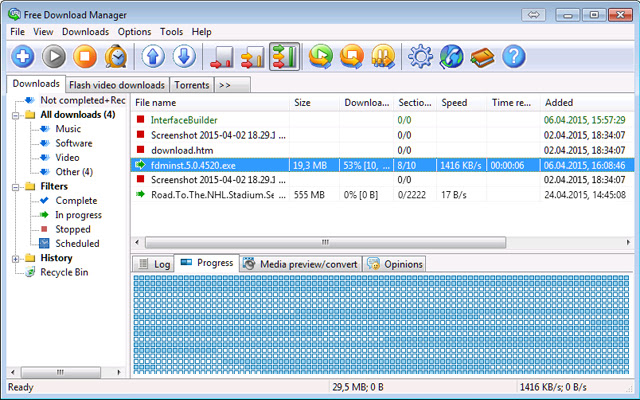
4. Free Download Manager

Free Download Manager (FDM) is an open-source download manager that can help you manage all your downloads with ease. It supports HTTP, HTTPS, FTP, and torrent downloads and can also help you speed up downloads by up to 10 times. FDM can automatically detect the file on the clipboard and you can choose the ones you want to download. The program can also help you organize downloads into various categories, schedule downloads, and manage passwords for specific websites.

5. EagleGet

EagleGet is another free download manager that can help you organize and accelerate your downloads. It’s easy to use and can support HTTP, HTTPS, FTP, and Magnet URLs. In addition, it can also help you pause, resume or restart downloads and support multi-threaded downloads as well. The program can also help you integrate with different browsers, categorize files, and provide a malware checker that scans downloaded files for any security breach.

In conclusion, downloading files can be a tedious, time-consuming task without the proper tools. Download managers are essential for managing and accelerating downloads, and they come in different designs and functionalities. The above-listed managers provide some of the best support for Windows, offering features that can help speed up downloads, schedule download, categorize files and provide a malware check. By using any of these tools, you can easily manage and speed up all your downloads.


Previous Article

How to Change the IP Address on ...

Next Article

Cellphones vs. Smartphones

Matthew Lynch

Related articles More from author

  • Digital & Mobile Technology

    How to Make a Torn Paper Edge in Photoshop

    June 12, 2023
    By Matthew Lynch
  • Digital & Mobile Technology

    How to Take a Break From Being Facebook Friends With Someone

    August 5, 2023
    By Matthew Lynch
  • Digital & Mobile Technology

    How to Use Google Messages for Web

    June 6, 2023
    By Matthew Lynch
  • Digital & Mobile Technology

    How to Make Notepad++ Compare Two Files With a Plugin

    August 5, 2023
    By Matthew Lynch
  • Digital & Mobile Technology

    You Need to Stop Mounting Your TV Over the Fireplace

    May 29, 2023
    By Matthew Lynch
  • Digital & Mobile Technology

    Will Apple Bring Back the 12-Inch MacBook in 2023?

    June 7, 2023
    By Matthew Lynch

Search

Login & Registration

  • Log in
  • Entries feed
  • Comments feed
  • WordPress.org

Newsletter

Signup for The Tech Edvocate Newsletter and have the latest in EdTech news and opinion delivered to your email address!

About Us

Since technology is not going anywhere and does more good than harm, adapting is the best course of action. That is where The Tech Edvocate comes in. We plan to cover the PreK-12 and Higher Education EdTech sectors and provide our readers with the latest news and opinion on the subject. From time to time, I will invite other voices to weigh in on important issues in EdTech. We hope to provide a well-rounded, multi-faceted look at the past, present, the future of EdTech in the US and internationally.

We started this journey back in June 2016, and we plan to continue it for many more years to come. I hope that you will join us in this discussion of the past, present and future of EdTech and lend your own insight to the issues that are discussed.

Newsletter

Signup for The Tech Edvocate Newsletter and have the latest in EdTech news and opinion delivered to your email address!

Contact Us

The Tech Edvocate
910 Goddin Street
Richmond, VA 23231
(601) 630-5238
[email protected]

Copyright © 2026 Matthew Lynch. All rights reserved.