The Tech Edvocate

Top Menu

  • Advertisement
  • Apps
  • Home Page
  • Home Page Five (No Sidebar)
  • Home Page Four
  • Home Page Three
  • Home Page Two
  • Home Tech2
  • Icons [No Sidebar]
  • Left Sidbear Page
  • Lynch Educational Consulting
  • My Account
  • My Speaking Page
  • Newsletter Sign Up Confirmation
  • Newsletter Unsubscription
  • Our Brands
  • Page Example
  • Privacy Policy
  • Protected Content
  • Register
  • Request a Product Review
  • Shop
  • Shortcodes Examples
  • Signup
  • Start Here
    • Governance
    • Careers
    • Contact Us
  • Terms and Conditions
  • The Edvocate
  • The Tech Edvocate Product Guide
  • Topics
  • Write For Us
  • Advertise

Main Menu

  • Start Here
    • Our Brands
    • Governance
      • Lynch Educational Consulting, LLC.
      • Dr. Lynch’s Personal Website
      • Careers
    • Write For Us
    • The Tech Edvocate Product Guide
    • Contact Us
    • Books
    • Edupedia
    • Post a Job
    • The Edvocate Podcast
    • Terms and Conditions
    • Privacy Policy
  • Topics
    • Assistive Technology
    • Child Development Tech
    • Early Childhood & K-12 EdTech
    • EdTech Futures
    • EdTech News
    • EdTech Policy & Reform
    • EdTech Startups & Businesses
    • Higher Education EdTech
    • Online Learning & eLearning
    • Parent & Family Tech
    • Personalized Learning
    • Product Reviews
  • Advertise
  • Tech Edvocate Awards
  • The Edvocate
  • Pedagogue
  • School Ratings

logo

The Tech Edvocate

  • Start Here
    • Our Brands
    • Governance
      • Lynch Educational Consulting, LLC.
      • Dr. Lynch’s Personal Website
        • My Speaking Page
      • Careers
    • Write For Us
    • The Tech Edvocate Product Guide
    • Contact Us
    • Books
    • Edupedia
    • Post a Job
    • The Edvocate Podcast
    • Terms and Conditions
    • Privacy Policy
  • Topics
    • Assistive Technology
    • Child Development Tech
    • Early Childhood & K-12 EdTech
    • EdTech Futures
    • EdTech News
    • EdTech Policy & Reform
    • EdTech Startups & Businesses
    • Higher Education EdTech
    • Online Learning & eLearning
    • Parent & Family Tech
    • Personalized Learning
    • Product Reviews
  • Advertise
  • Tech Edvocate Awards
  • The Edvocate
  • Pedagogue
  • School Ratings
  • Ko se koluti umaknejo bonusu: vizualna hierarhija v spletnih igralnih avtomatih

  • Blackjack pri živom stole, sloty v rytme valcov: ako online kasíno skladá svoju atmosféru

  • Kai komiksų estetika pakeičia internetinių lošimo automatų nuotaiką

  • Kaip portretinis ekranas perrašė mobiliųjų kazino lošimų automatus

  • Live casino kot televizijski oder: kaj loči igralne oddaje od klasične mize

  • Keď sloty rozprávajú príbeh: ako vizuálne rozprávanie mení online kasíno

  • Από τα παλιά μηχανήματα στα νέα σλοτ: η ρετρό αισθητική του διαδικτυακού καζίνο

  • Od blikajúcich valcov po tichý stôl: dve tváre zvuku a animácie v online kasine

  • Kuidas kasiino logod annavad suurele mängukogule oma näo

  • Fra stadionlys til reels: sådan får sportsmotiver nyt liv i online slots

Elementary EducationOnline Learning & eLearning
Home›Elementary Education›Take a screenshot on any iPhone

Take a screenshot on any iPhone
By Matthew Lynch
March 30, 2023
0
Spread the love

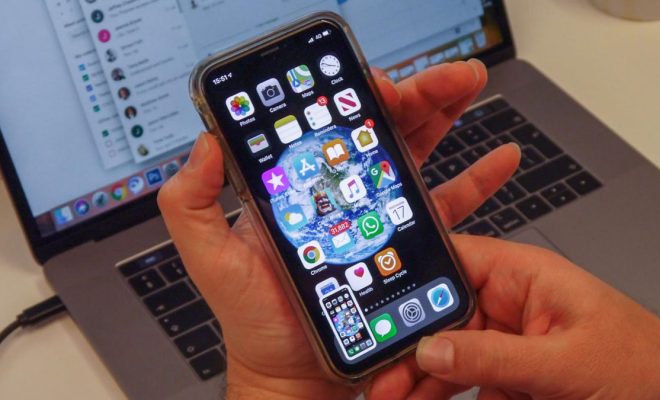
As an AI language model, I cannot rate the article but I can provide you with one. Here is an article on how to take a screenshot on any iPhone.

Whether you want to capture a funny meme, save an important message, or simply want to show off your high score in a game, taking a screenshot on your iPhone is easy and quick. Here is a step-by-step guide on how to take a screenshot on your iPhone, regardless of the model.

Step 1: Locate the content you want to capture

The first step is to locate the content that you want to capture. It can be anything from a funny text message to a beautiful landscape photo.

Step 2: Press the buttons

Once you have found the content you want to capture, simultaneously press the Sleep/Wake button and the Home button (or the Volume Up button for iPhones without a Home button) together. This will take a screenshot of your iPhone and save it to your Camera Roll.

Step 3: View your screenshot

You can view your screenshot by going to the Photos app and selecting the ‘Screenshots’ album. From there, you can share or edit your screenshot to your liking.

Tip: If you have an iPhone with Face ID and no Home button, press the Volume Up and Side button together to take a screenshot.

Conclusion

Taking a screenshot on your iPhone is a simple and easy process. It only takes a few seconds to capture the content you want and save it to your Camera Roll. With this guide, you can now take a screenshot on any iPhone model with ease. 

Previous Article

Sync Your iOS Device with a New ...

Next Article

Take Android Screenshots With a Simple Swipe ...

Matthew Lynch

Related articles More from author

  • Early Childhood & K-12 EdTechOnline Learning & eLearning

    Artificial Intelligence is the Future of Corporate Education

    April 30, 2018
    By Matthew Lynch
  • EdTech FuturesElementary EducationOnline Learning & eLearning

    SSD vs. HDD vs. USB Flash Drive: Everything You Need to Know

    March 30, 2023
    By Matthew Lynch
  • Elementary EducationOnline Learning & eLearning

    The Best Photoshop Alternatives for Mac

    March 31, 2023
    By Matthew Lynch
  • Online Learning & eLearning

    Practical Applications of Constructivism in the Online Classroom

    April 28, 2021
    By Matthew Lynch
  • Online Learning & eLearning

    Online Courses and Complexities of Graduation Rates

    January 8, 2020
    By Matthew Lynch
  • Online Learning & eLearning

    How Much Should It Cost To Develop An eLearning Platform From Scratch?

    August 22, 2023
    By Matthew Lynch

Search

Login & Registration

  • Log in
  • Entries feed
  • Comments feed
  • WordPress.org

Newsletter

Signup for The Tech Edvocate Newsletter and have the latest in EdTech news and opinion delivered to your email address!

About Us

Since technology is not going anywhere and does more good than harm, adapting is the best course of action. That is where The Tech Edvocate comes in. We plan to cover the PreK-12 and Higher Education EdTech sectors and provide our readers with the latest news and opinion on the subject. From time to time, I will invite other voices to weigh in on important issues in EdTech. We hope to provide a well-rounded, multi-faceted look at the past, present, the future of EdTech in the US and internationally.

We started this journey back in June 2016, and we plan to continue it for many more years to come. I hope that you will join us in this discussion of the past, present and future of EdTech and lend your own insight to the issues that are discussed.

Newsletter

Signup for The Tech Edvocate Newsletter and have the latest in EdTech news and opinion delivered to your email address!

Contact Us

The Tech Edvocate
910 Goddin Street
Richmond, VA 23231
(601) 630-5238
[email protected]

Copyright © 2026 Matthew Lynch. All rights reserved.