The Tech Edvocate

Top Menu

  • Advertisement
  • Apps
  • Home Page
  • Home Page Five (No Sidebar)
  • Home Page Four
  • Home Page Three
  • Home Page Two
  • Home Tech2
  • Icons [No Sidebar]
  • Left Sidbear Page
  • Lynch Educational Consulting
  • My Account
  • My Speaking Page
  • Newsletter Sign Up Confirmation
  • Newsletter Unsubscription
  • Our Brands
  • Page Example
  • Privacy Policy
  • Protected Content
  • Register
  • Request a Product Review
  • Shop
  • Shortcodes Examples
  • Signup
  • Start Here
    • Governance
    • Careers
    • Contact Us
  • Terms and Conditions
  • The Edvocate
  • The Tech Edvocate Product Guide
  • Topics
  • Write For Us
  • Advertise

Main Menu

  • Start Here
    • Our Brands
    • Governance
      • Lynch Educational Consulting, LLC.
      • Dr. Lynch’s Personal Website
      • Careers
    • Write For Us
    • The Tech Edvocate Product Guide
    • Contact Us
    • Books
    • Edupedia
    • Post a Job
    • The Edvocate Podcast
    • Terms and Conditions
    • Privacy Policy
  • Topics
    • Assistive Technology
    • Child Development Tech
    • Early Childhood & K-12 EdTech
    • EdTech Futures
    • EdTech News
    • EdTech Policy & Reform
    • EdTech Startups & Businesses
    • Higher Education EdTech
    • Online Learning & eLearning
    • Parent & Family Tech
    • Personalized Learning
    • Product Reviews
  • Advertise
  • Tech Edvocate Awards
  • The Edvocate
  • Pedagogue
  • School Ratings

logo

The Tech Edvocate

  • Start Here
    • Our Brands
    • Governance
      • Lynch Educational Consulting, LLC.
      • Dr. Lynch’s Personal Website
        • My Speaking Page
      • Careers
    • Write For Us
    • The Tech Edvocate Product Guide
    • Contact Us
    • Books
    • Edupedia
    • Post a Job
    • The Edvocate Podcast
    • Terms and Conditions
    • Privacy Policy
  • Topics
    • Assistive Technology
    • Child Development Tech
    • Early Childhood & K-12 EdTech
    • EdTech Futures
    • EdTech News
    • EdTech Policy & Reform
    • EdTech Startups & Businesses
    • Higher Education EdTech
    • Online Learning & eLearning
    • Parent & Family Tech
    • Personalized Learning
    • Product Reviews
  • Advertise
  • Tech Edvocate Awards
  • The Edvocate
  • Pedagogue
  • School Ratings
  • The Reckless Ben Controversy: An Outrageous Fight for Justice

  • Outrageous: The Sydney Sweeney Ad Controversy You Didn’t See Coming — And Why It’s Working

  • The AI CRM War: Why Salesforce Just Made a $2 Billion Bid for a Startup

  • OpenAI’s Navier-Stokes ‘Solution’ Ignites Firestorm: Did They Steal It?

  • Blizzard’s Boldest Bet: Why a StarCraft Shooter in 2030 Could Redefine Gaming

  • Volatile: Why Top AI Bosses Just Triggered a Massive AI Stocks Decline

  • ‘Godfather of AI’ backs Anthropic chief’s call to slow down development

  • Why Millions Are Flocking to Trade Schools as AI Reshapes the Job Market

  • Unmasking the Bizarre ‘Cat in the Hat’ Trend: Why Schools Are Sounding the Alarm

  • Florida DMV Hacked: 200,000 Driver Records Exposed in Stunning Breach

Digital & Mobile Technology
Home›Digital & Mobile Technology›T Smart Defrag 8: The Ultimate Tool for Hard Drive Optimization

T Smart Defrag 8: The Ultimate Tool for Hard Drive Optimization
By Matthew Lynch
June 12, 2023
0
Spread the love

T Smart Defrag 8 is the latest version of the popular disk defragmentation tool from TweakBit. It is designed to optimize your hard drive and improve your computer’s performance by defragmenting your files and folders. With its advanced features and user-friendly interface, Smart Defrag 8 is the ultimate tool for hard drive optimization.

Features

Smart Defrag 8 offers a wide range of features that make it stand out from other disk defragmentation tools. Here are some of its most notable features:


Super-Fast Defragmentation:

Smart Defrag 8 uses advanced defragmentation algorithms that can defragment your hard drive up to five times faster than other defragmentation tools.


Intelligent Defragmentation:

Smart Defrag 8 can automatically defragment your hard drive in the background, without interrupting your work. It can also prioritize frequently used files and folders for faster access.


Boot Time Defragmentation:

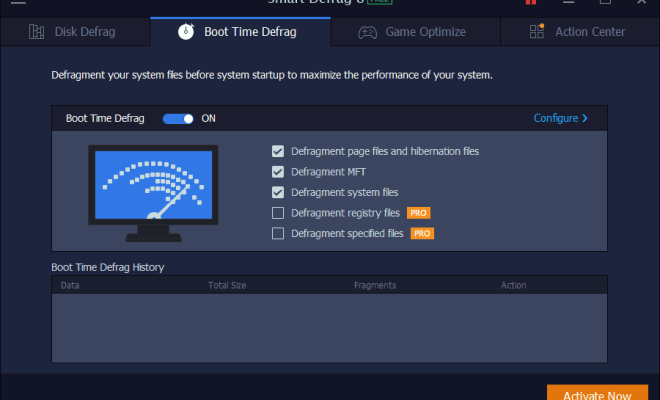
Smart Defrag 8 can defragment your hard drive during the boot process, which can significantly improve your computer’s startup time.

Game Optimize:

Smart Defrag 8 includes a Game Optimize feature that can boost your gaming performance by optimizing your system settings and processes.


Disk Health Monitor:

Smart Defrag 8 can monitor the health of your hard drive and alert you if it detects any issues.


User Interface

Smart Defrag 8 has a user-friendly interface that makes it easy to use for both novice and advanced users. The main screen displays all the essential information, such as the disk status, disk temperature, and the last defragmentation date. Users can also access all the advanced features from the main screen, making it easy to customize the defragmentation process.

Pricing

Smart Defrag 8 is available as a free trial version that allows users to defragment up to 200MB of data. The full version of Smart Defrag 8 is priced at $29.95 per year, which includes unlimited defragmentation, priority support, and a 60-day money-back guarantee.

Conclusion

Overall, Smart Defrag 8 is an excellent tool for optimizing your hard drive and improving your computer’s performance. With its advanced features, fast defragmentation, and user-friendly interface, it is the ultimate tool for hard drive optimization. Whether you are a casual user or an advanced user, Smart Defrag 8 is a must-have tool for maintaining your computer’s performance.


Previous Article

Tony Hawk’s Project 8 Soundtrack List

Next Article

Tony Hawk’s Project 8 Soundtrack List

Matthew Lynch

Related articles More from author

  • Digital & Mobile Technology

    What Is a Modem in Computer Networking?

    June 10, 2023
    By Matthew Lynch
  • Digital & Mobile Technology

    How to Update Nvidia Graphics Card Drivers on Windows

    August 1, 2023
    By Matthew Lynch
  • Digital & Mobile Technology

    The Quick Guide to Creating Symbolic Links (Symlinks) in Windows 10

    September 7, 2023
    By Matthew Lynch
  • Digital & Mobile Technology

    How to Test a Power Supply Unit (PSU) With a Multimeter

    August 5, 2023
    By Matthew Lynch
  • Digital & Mobile Technology

    4 Reasons You Should Sell Dogecoin and Why You Might Keep it

    July 31, 2023
    By Matthew Lynch
  • Digital & Mobile Technology

    Completely Water-Resistant Fitness Trackers Safe for Swimming

    June 23, 2023
    By Matthew Lynch

Search

Login & Registration

  • Log in
  • Entries feed
  • Comments feed
  • WordPress.org

Newsletter

Signup for The Tech Edvocate Newsletter and have the latest in EdTech news and opinion delivered to your email address!

About Us

Since technology is not going anywhere and does more good than harm, adapting is the best course of action. That is where The Tech Edvocate comes in. We plan to cover the PreK-12 and Higher Education EdTech sectors and provide our readers with the latest news and opinion on the subject. From time to time, I will invite other voices to weigh in on important issues in EdTech. We hope to provide a well-rounded, multi-faceted look at the past, present, the future of EdTech in the US and internationally.

We started this journey back in June 2016, and we plan to continue it for many more years to come. I hope that you will join us in this discussion of the past, present and future of EdTech and lend your own insight to the issues that are discussed.

Newsletter

Signup for The Tech Edvocate Newsletter and have the latest in EdTech news and opinion delivered to your email address!

Contact Us

The Tech Edvocate
910 Goddin Street
Richmond, VA 23231
(601) 630-5238
[email protected]

Copyright © 2026 Matthew Lynch. All rights reserved.