
The Tech Edvocate

Top Menu

  • Advertisement
  • Apps
  • Home Page
  • Home Page Five (No Sidebar)
  • Home Page Four
  • Home Page Three
  • Home Page Two
  • Home Tech2
  • Icons [No Sidebar]
  • Left Sidbear Page
  • Lynch Educational Consulting
  • My Account
  • My Speaking Page
  • Newsletter Sign Up Confirmation
  • Newsletter Unsubscription
  • Our Brands
  • Page Example
  • Privacy Policy
  • Protected Content
  • Register
  • Request a Product Review
  • Shop
  • Shortcodes Examples
  • Signup
  • Start Here
    • Governance
    • Careers
    • Contact Us
  • Terms and Conditions
  • The Edvocate
  • The Tech Edvocate Product Guide
  • Topics
  • Write For Us
  • Advertise

Main Menu

  • Start Here
    • Our Brands
    • Governance
      • Lynch Educational Consulting, LLC.
      • Dr. Lynch’s Personal Website
      • Careers
    • Write For Us
    • The Tech Edvocate Product Guide
    • Contact Us
    • Books
    • Edupedia
    • Post a Job
    • The Edvocate Podcast
    • Terms and Conditions
    • Privacy Policy
  • Topics
    • Assistive Technology
    • Child Development Tech
    • Early Childhood & K-12 EdTech
    • EdTech Futures
    • EdTech News
    • EdTech Policy & Reform
    • EdTech Startups & Businesses
    • Higher Education EdTech
    • Online Learning & eLearning
    • Parent & Family Tech
    • Personalized Learning
    • Product Reviews
  • Advertise
  • Tech Edvocate Awards
  • The Edvocate
  • Pedagogue
  • School Ratings

logo

The Tech Edvocate

  • Start Here
    • Our Brands
    • Governance
      • Lynch Educational Consulting, LLC.
      • Dr. Lynch’s Personal Website
        • My Speaking Page
      • Careers
    • Write For Us
    • The Tech Edvocate Product Guide
    • Contact Us
    • Books
    • Edupedia
    • Post a Job
    • The Edvocate Podcast
    • Terms and Conditions
    • Privacy Policy
  • Topics
    • Assistive Technology
    • Child Development Tech
    • Early Childhood & K-12 EdTech
    • EdTech Futures
    • EdTech News
    • EdTech Policy & Reform
    • EdTech Startups & Businesses
    • Higher Education EdTech
    • Online Learning & eLearning
    • Parent & Family Tech
    • Personalized Learning
    • Product Reviews
  • Advertise
  • Tech Edvocate Awards
  • The Edvocate
  • Pedagogue
  • School Ratings
  • Miro vs Conceptboard for project management

  • How to use Teamwork for resource management

  • How much does Procore cost per month

  • How to organize Microsoft Planner buckets

  • Is Teamwork good for billable hours

  • Procore vs Buildertrend which is better

  • Airtable project management templates

  • Can Miro track project progress

  • How to use Basecamp for client work

  • Can Lucidchart create swimlane diagrams

Tech Advice
Home›Tech Advice›Switch from Android to iPhone 12: This is the best way to transfer your data

Switch from Android to iPhone 12: This is the best way to transfer your data
By Matthew Lynch
July 15, 2023
0
Spread the love

Are you considering making the switch from your trusty Android device to the latest iPhone 12? Many people feel overwhelmed about transferring all of their valuable data safely and efficiently. Fear not, for this article will guide you on the best way to transfer your data seamlessly from your Android phone to your new iPhone 12.

1. Prepare both devices

Before beginning the transfer process, ensure that both your Android and iPhone devices are connected to Wi-Fi and have a sufficient charge. Update your Android device with the latest software, and set up your new iPhone 12 until you reach the “Apps & Data” screen.

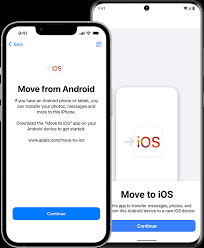
2. Download the Move to iOS App

On your Android device, visit the Google Play Store and download the Move to iOS app. Developed by Apple, this app simplifies the data migration process by securely transferring all of your important files from Android to iPhone.

3. Start the transfer process

On your iPhone 12’s “Apps & Data” screen, select “Move Data from Android.” This will provide a unique code that you’ll need to enter into the Move to iOS app on your Android device. Once entered, both phones will establish a wireless connection.

4. Choose content for transfer

The Move to iOS app will present you with options on what content you’d like to transfer over. You can select things such as contacts, message history, photos, bookmarks, calendars, and more. Select everything that you’d like moved over and tap “Next.”

5. Wait for data transfer completion

The data migration process can take some time depending on the amount of content being transferred and your Wi-Fi speed. Keep both devices connected during this time. Once completed, tap “Done” on your Android phone.

6. Finalize setup on iPhone 12

Your transferred content should now be available on your new iPhone 12. Continue the iPhone setup process, including signing in or creating an Apple ID, setting up Face ID, and configuring your preferred settings.

7. Install apps

Unfortunately, the Move to iOS app will not transfer over your Android apps. To regain access to them, visit the App Store on your iPhone and manually download the iOS versions.

Now your data is successfully transferred from your Android device to your new iPhone 12! Enjoy exploring all of the fantastic features and capabilities that your upgraded device has to offer.


Previous Article

The best ways to sell or trade ...

Next Article

The Best Racing Games and the Wheels ...

Matthew Lynch

Related articles More from author

  • Tech Advice

    The 10 Best Coding Bootcamps for Women

    August 11, 2023
    By Matthew Lynch
  • Tech Advice

    How and Why (or Not) to Brine a Turkey

    July 10, 2023
    By Matthew Lynch
  • Tech Advice

    Dealer Options: Everything You Need to Know

    August 19, 2023
    By Matthew Lynch
  • Tech Advice

    2024 Ford Ranger XLT 4×4 SuperCrew 5 ft. box 128 in. WB Pricing and Options

    August 21, 2023
    By Matthew Lynch
  • Tech Advice

    2024 Skoda Octavia Spied Inside and Out, Compact Model Shows New Infotainment System

    September 4, 2023
    By Matthew Lynch
  • Tech Advice

    COVID-19 Vaccine Booster Side Effects: What You Need to Know

    July 6, 2023
    By Matthew Lynch

Search

Login & Registration

  • Log in
  • Entries feed
  • Comments feed
  • WordPress.org

Newsletter

Signup for The Tech Edvocate Newsletter and have the latest in EdTech news and opinion delivered to your email address!

About Us

Since technology is not going anywhere and does more good than harm, adapting is the best course of action. That is where The Tech Edvocate comes in. We plan to cover the PreK-12 and Higher Education EdTech sectors and provide our readers with the latest news and opinion on the subject. From time to time, I will invite other voices to weigh in on important issues in EdTech. We hope to provide a well-rounded, multi-faceted look at the past, present, the future of EdTech in the US and internationally.

We started this journey back in June 2016, and we plan to continue it for many more years to come. I hope that you will join us in this discussion of the past, present and future of EdTech and lend your own insight to the issues that are discussed.

Newsletter

Signup for The Tech Edvocate Newsletter and have the latest in EdTech news and opinion delivered to your email address!

Contact Us

The Tech Edvocate
910 Goddin Street
Richmond, VA 23231
(601) 630-5238
[email protected]

Copyright © 2026 Matthew Lynch. All rights reserved.