The Tech Edvocate

Top Menu

  • Advertisement
  • Apps
  • Home Page
  • Home Page Five (No Sidebar)
  • Home Page Four
  • Home Page Three
  • Home Page Two
  • Home Tech2
  • Icons [No Sidebar]
  • Left Sidbear Page
  • Lynch Educational Consulting
  • My Account
  • My Speaking Page
  • Newsletter Sign Up Confirmation
  • Newsletter Unsubscription
  • Our Brands
  • Page Example
  • Privacy Policy
  • Protected Content
  • Register
  • Request a Product Review
  • Shop
  • Shortcodes Examples
  • Signup
  • Start Here
    • Governance
    • Careers
    • Contact Us
  • Terms and Conditions
  • The Edvocate
  • The Tech Edvocate Product Guide
  • Topics
  • Write For Us
  • Advertise

Main Menu

  • Start Here
    • Our Brands
    • Governance
      • Lynch Educational Consulting, LLC.
      • Dr. Lynch’s Personal Website
      • Careers
    • Write For Us
    • The Tech Edvocate Product Guide
    • Contact Us
    • Books
    • Edupedia
    • Post a Job
    • The Edvocate Podcast
    • Terms and Conditions
    • Privacy Policy
  • Topics
    • Assistive Technology
    • Child Development Tech
    • Early Childhood & K-12 EdTech
    • EdTech Futures
    • EdTech News
    • EdTech Policy & Reform
    • EdTech Startups & Businesses
    • Higher Education EdTech
    • Online Learning & eLearning
    • Parent & Family Tech
    • Personalized Learning
    • Product Reviews
  • Advertise
  • Tech Edvocate Awards
  • The Edvocate
  • Pedagogue
  • School Ratings

logo

The Tech Edvocate

  • Start Here
    • Our Brands
    • Governance
      • Lynch Educational Consulting, LLC.
      • Dr. Lynch’s Personal Website
        • My Speaking Page
      • Careers
    • Write For Us
    • The Tech Edvocate Product Guide
    • Contact Us
    • Books
    • Edupedia
    • Post a Job
    • The Edvocate Podcast
    • Terms and Conditions
    • Privacy Policy
  • Topics
    • Assistive Technology
    • Child Development Tech
    • Early Childhood & K-12 EdTech
    • EdTech Futures
    • EdTech News
    • EdTech Policy & Reform
    • EdTech Startups & Businesses
    • Higher Education EdTech
    • Online Learning & eLearning
    • Parent & Family Tech
    • Personalized Learning
    • Product Reviews
  • Advertise
  • Tech Edvocate Awards
  • The Edvocate
  • Pedagogue
  • School Ratings
  • A Visitor’s Guide to Fresno (CA), United States

  • A Visitors Guide to New Orleans (LA), United States

  • A Visitors Guide to Sacramento (CA), United States

  • A Visitors Guide to Lyon, France

  • JisuLife Ultra2 Portable Fan: A Powerful Multi-Function Cooling Solution

  • A Visitors Guide to Viña del Mar, Chile

  • A Visitors Guide to Århus, Denmark

  • A Visitors Guide to Bakersfield (CA), United States

  • A Visitors Guide to Aurora (CO), United States

  • A Visitor’s Guide to Toledo (OH), United States

Tech Advice
Home›Tech Advice›Stop incoming iPhone calls from ringing all your other Apple devices

Stop incoming iPhone calls from ringing all your other Apple devices
By Matthew Lynch
July 15, 2023
0
Spread the love

We love our interconnected Apple devices, but sometimes, too much of a good thing can be annoying. One common complaint is that incoming iPhone calls end up ringing on all your Apple devices like iPads and Macs. While this feature can be useful when sharing devices across different family members, it can get intrusive when you are in a quiet environment or during an important meeting. Fear not! In this article, we will walk you through the steps to stop incoming iPhone calls from ringing on all your other Apple devices.

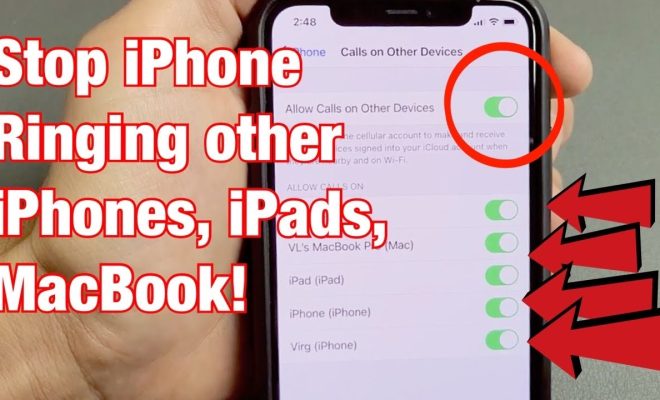
Step 1: Disable Calls on Other Devices

1. On your iPhone, open the “Settings” app.

2. Scroll down and tap on “Phone.”

3. Tap on “Calls on Other Devices.”

4. Toggle off the “Allow Calls on Other Devices” switch.

That’s it! Now your iPhone calls won’t ring on any other Apple device.

If you want to disable this feature for specific devices only, follow these additional steps:

Step 2: Specify Devices

1. In the “Calls on Other Devices” setting menu, you will see a list of connected devices where calls are allowed.

2. Toggle off individual switches for devices where you don’t want to receive calls.

Bonus Tip: Manage FaceTime Call Settings

Stopping incoming iPhone calls from ringing on your other devices may not completely eliminate the problem if FaceTime is activated as well. Here’s how you can control FaceTime calls:

1. On your iPhone, open the “Settings” app.

2. Scroll down and tap on “FaceTime.”

3. Tap on “Calls from iPhone.”

4. Toggle off the “Upgrade Wi-Fi Calls to FaceTime audio” switch.

Conclusion

In today’s interconnected world, we often have multiple devices surrounding us at any given time – making personalization and customization important in minimizing disruptions. By following the simple steps outlined above, you can gain control over your incoming iPhone calls and prevent them from ringing across other Apple devices. Now you can focus on what truly matters without the needless distractions!


Previous Article

The best horror video games to play ...

Next Article

Stop a text from sending by quickly ...

Matthew Lynch

Related articles More from author

  • Tech Advice

    Best VPN for Chromebook (2023)

    August 8, 2023
    By Matthew Lynch
  • Tech Advice

    Best Unlimited Home Internet Plans 2023: A Comprehensive Guide

    August 8, 2023
    By Matthew Lynch
  • Tech Advice

    Arcade1Up Infinity Game Table review: The digital board game coffee table you didn’t know you needed

    July 14, 2023
    By Matthew Lynch
  • Tech Advice

    The Best Dyson Vacuums, Based On Rigorous Testing

    August 8, 2023
    By Matthew Lynch
  • Tech Advice

    The Pros and Cons of Electric Lawn Mowers

    July 10, 2023
    By Matthew Lynch
  • Tech Advice

    Yes, You Can Use Solar Power as a Renter

    July 8, 2023
    By Matthew Lynch

Search

Login & Registration

  • Register
  • Log in
  • Entries feed
  • Comments feed
  • WordPress.org

Newsletter

Signup for The Tech Edvocate Newsletter and have the latest in EdTech news and opinion delivered to your email address!

About Us

Since technology is not going anywhere and does more good than harm, adapting is the best course of action. That is where The Tech Edvocate comes in. We plan to cover the PreK-12 and Higher Education EdTech sectors and provide our readers with the latest news and opinion on the subject. From time to time, I will invite other voices to weigh in on important issues in EdTech. We hope to provide a well-rounded, multi-faceted look at the past, present, the future of EdTech in the US and internationally.

We started this journey back in June 2016, and we plan to continue it for many more years to come. I hope that you will join us in this discussion of the past, present and future of EdTech and lend your own insight to the issues that are discussed.

Newsletter

Signup for The Tech Edvocate Newsletter and have the latest in EdTech news and opinion delivered to your email address!

Contact Us

The Tech Edvocate
910 Goddin Street
Richmond, VA 23231
(601) 630-5238
[email protected]

Copyright © 2025 Matthew Lynch. All rights reserved.