The Tech Edvocate

Top Menu

  • Advertisement
  • Apps
  • Home Page
  • Home Page Five (No Sidebar)
  • Home Page Four
  • Home Page Three
  • Home Page Two
  • Home Tech2
  • Icons [No Sidebar]
  • Left Sidbear Page
  • Lynch Educational Consulting
  • My Account
  • My Speaking Page
  • Newsletter Sign Up Confirmation
  • Newsletter Unsubscription
  • Our Brands
  • Page Example
  • Privacy Policy
  • Protected Content
  • Register
  • Request a Product Review
  • Shop
  • Shortcodes Examples
  • Signup
  • Start Here
    • Governance
    • Careers
    • Contact Us
  • Terms and Conditions
  • The Edvocate
  • The Tech Edvocate Product Guide
  • Topics
  • Write For Us
  • Advertise

Main Menu

  • Start Here
    • Our Brands
    • Governance
      • Lynch Educational Consulting, LLC.
      • Dr. Lynch’s Personal Website
      • Careers
    • Write For Us
    • The Tech Edvocate Product Guide
    • Contact Us
    • Books
    • Edupedia
    • Post a Job
    • The Edvocate Podcast
    • Terms and Conditions
    • Privacy Policy
  • Topics
    • Assistive Technology
    • Child Development Tech
    • Early Childhood & K-12 EdTech
    • EdTech Futures
    • EdTech News
    • EdTech Policy & Reform
    • EdTech Startups & Businesses
    • Higher Education EdTech
    • Online Learning & eLearning
    • Parent & Family Tech
    • Personalized Learning
    • Product Reviews
  • Advertise
  • Tech Edvocate Awards
  • The Edvocate
  • Pedagogue
  • School Ratings

logo

The Tech Edvocate

  • Start Here
    • Our Brands
    • Governance
      • Lynch Educational Consulting, LLC.
      • Dr. Lynch’s Personal Website
        • My Speaking Page
      • Careers
    • Write For Us
    • The Tech Edvocate Product Guide
    • Contact Us
    • Books
    • Edupedia
    • Post a Job
    • The Edvocate Podcast
    • Terms and Conditions
    • Privacy Policy
  • Topics
    • Assistive Technology
    • Child Development Tech
    • Early Childhood & K-12 EdTech
    • EdTech Futures
    • EdTech News
    • EdTech Policy & Reform
    • EdTech Startups & Businesses
    • Higher Education EdTech
    • Online Learning & eLearning
    • Parent & Family Tech
    • Personalized Learning
    • Product Reviews
  • Advertise
  • Tech Edvocate Awards
  • The Edvocate
  • Pedagogue
  • School Ratings
  • The Reckless Ben Controversy: An Outrageous Fight for Justice

  • Outrageous: The Sydney Sweeney Ad Controversy You Didn’t See Coming — And Why It’s Working

  • The AI CRM War: Why Salesforce Just Made a $2 Billion Bid for a Startup

  • OpenAI’s Navier-Stokes ‘Solution’ Ignites Firestorm: Did They Steal It?

  • Blizzard’s Boldest Bet: Why a StarCraft Shooter in 2030 Could Redefine Gaming

  • Volatile: Why Top AI Bosses Just Triggered a Massive AI Stocks Decline

  • ‘Godfather of AI’ backs Anthropic chief’s call to slow down development

  • Why Millions Are Flocking to Trade Schools as AI Reshapes the Job Market

  • Unmasking the Bizarre ‘Cat in the Hat’ Trend: Why Schools Are Sounding the Alarm

  • Florida DMV Hacked: 200,000 Driver Records Exposed in Stunning Breach

Tech Advice
Home›Tech Advice›Set up Your New Smart Plug in Minutes – A Step-by-Step Guide

Set up Your New Smart Plug in Minutes – A Step-by-Step Guide
By Matthew Lynch
July 10, 2023
0
Spread the love

Introduction:

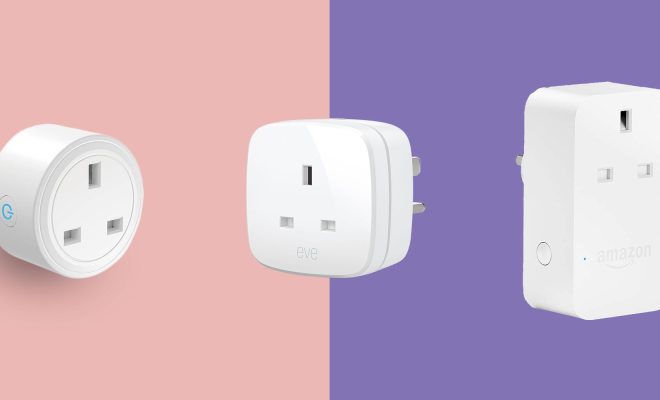
Smart plugs are an excellent addition to any smart home, allowing you to control household electronics such as lamps, fans, or coffee makers conveniently from your smartphone. If you’ve just purchased a new smart plug, follow this step-by-step guide to help you set it up in minutes.

Step 1: Unbox and Inspect Your Smart Plug

Carefully unbox your smart plug and inspect it for any visible damage. Ensure that all the components are included in the box, such as the instructions booklet and any associated cables if required.

Step 2: Install the Smart Plug App on Your Smartphone

Most smart plugs come with a dedicated app that is essential for their configuration and daily use. You can find the app by scanning the QR code provided on the instructions booklet or searching for it by name on your phone’s app store. Install and sign up for an account if needed, granting the necessary permissions.

Step 3: Power On the Smart Plug

Plug your smart plug into a nearby electrical outlet. Some models come with an LED light that indicates when they are powered on, so look for this signal if available.

Step 4: Connect Your Smart Plug to Wi-Fi

Open your smart plug app and navigate to add a new device or follow the on-screen prompts. The app should automatically scan for available devices and display your smart plug once detected. Select your Wi-Fi network from the list (make sure you’re connected to a 2.4GHz network), enter the password, and press ‘Connect’ or ‘Next.’ Wait for the connection process to complete.

Step 5: Rename Your Smart Plug (Optional)

To make it easier to identify which device is being controlled by your smart plug, rename it according to its purpose. Tap on its default name and change it to something descriptive like “Coffee Maker” or “Bedside Lamp.”
Step 6: Connect Your Smart Plug to a Compatible Device

Now, plug your chosen appliance, such as a lamp or fan, into the smart plug. Power on the connected device then test its control through the smart plug app. You should be able to turn the device on and off remotely via the app.

Step 7: Integrate Your Smart Plug with Your Smart Home System (Optional)

For seamless integration of your smart plug with other smart devices, follow your app’s instructions to connect it to systems such as Amazon Alexa, Google Home, or Apple HomeKit. This synchronization will allow you to control all your smart home devices collectively and enable voice commands using virtual assistants like Alexa and Google Assistant.

Conclusion

Congratulations! You have now successfully set up your new smart plug in just a few minutes. By following this simple guide, you are one step closer to enhancing your home with the convenience and versatility of smart home technology. Enjoy the comfort of controlling devices from anywhere using your smartphone and explore more ways to optimize your daily routines through automation.

Previous Article

Samsung AirDresser: A $1,400 Dry-Cleaning Closet for ...

Next Article

Smart Home Cheat Sheet: Top Features of ...

Matthew Lynch

Related articles More from author

  • Tech Advice

    When is the Best Time of Year to Buy a Truck?

    August 22, 2023
    By Matthew Lynch
  • Tech Advice

    Best Gaming Laptop for 2023

    July 13, 2023
    By Matthew Lynch
  • Tech Advice

    The Best Dating Sites for Shy People and Introverts

    October 19, 2023
    By Matthew Lynch
  • Tech Advice

    6 Best Airport Rewards Programs to Maximize Your Travel Experience

    October 20, 2023
    By Matthew Lynch
  • Tech Advice

    Chase: 2023 Home Equity Review

    July 11, 2023
    By Matthew Lynch
  • Tech Advice

    Samsung Galaxy S21 Makes Google Messages App Native, but There’s a Catch

    July 24, 2023
    By Matthew Lynch

Search

Login & Registration

  • Log in
  • Entries feed
  • Comments feed
  • WordPress.org

Newsletter

Signup for The Tech Edvocate Newsletter and have the latest in EdTech news and opinion delivered to your email address!

About Us

Since technology is not going anywhere and does more good than harm, adapting is the best course of action. That is where The Tech Edvocate comes in. We plan to cover the PreK-12 and Higher Education EdTech sectors and provide our readers with the latest news and opinion on the subject. From time to time, I will invite other voices to weigh in on important issues in EdTech. We hope to provide a well-rounded, multi-faceted look at the past, present, the future of EdTech in the US and internationally.

We started this journey back in June 2016, and we plan to continue it for many more years to come. I hope that you will join us in this discussion of the past, present and future of EdTech and lend your own insight to the issues that are discussed.

Newsletter

Signup for The Tech Edvocate Newsletter and have the latest in EdTech news and opinion delivered to your email address!

Contact Us

The Tech Edvocate
910 Goddin Street
Richmond, VA 23231
(601) 630-5238
[email protected]

Copyright © 2026 Matthew Lynch. All rights reserved.