The Tech Edvocate

Top Menu

  • Advertisement
  • Apps
  • Home Page
  • Home Page Five (No Sidebar)
  • Home Page Four
  • Home Page Three
  • Home Page Two
  • Home Tech2
  • Icons [No Sidebar]
  • Left Sidbear Page
  • Lynch Educational Consulting
  • My Account
  • My Speaking Page
  • Newsletter Sign Up Confirmation
  • Newsletter Unsubscription
  • Our Brands
  • Page Example
  • Privacy Policy
  • Protected Content
  • Register
  • Request a Product Review
  • Shop
  • Shortcodes Examples
  • Signup
  • Start Here
    • Governance
    • Careers
    • Contact Us
  • Terms and Conditions
  • The Edvocate
  • The Tech Edvocate Product Guide
  • Topics
  • Write For Us
  • Advertise

Main Menu

  • Start Here
    • Our Brands
    • Governance
      • Lynch Educational Consulting, LLC.
      • Dr. Lynch’s Personal Website
      • Careers
    • Write For Us
    • The Tech Edvocate Product Guide
    • Contact Us
    • Books
    • Edupedia
    • Post a Job
    • The Edvocate Podcast
    • Terms and Conditions
    • Privacy Policy
  • Topics
    • Assistive Technology
    • Child Development Tech
    • Early Childhood & K-12 EdTech
    • EdTech Futures
    • EdTech News
    • EdTech Policy & Reform
    • EdTech Startups & Businesses
    • Higher Education EdTech
    • Online Learning & eLearning
    • Parent & Family Tech
    • Personalized Learning
    • Product Reviews
  • Advertise
  • Tech Edvocate Awards
  • The Edvocate
  • Pedagogue
  • School Ratings

logo

The Tech Edvocate

  • Start Here
    • Our Brands
    • Governance
      • Lynch Educational Consulting, LLC.
      • Dr. Lynch’s Personal Website
        • My Speaking Page
      • Careers
    • Write For Us
    • The Tech Edvocate Product Guide
    • Contact Us
    • Books
    • Edupedia
    • Post a Job
    • The Edvocate Podcast
    • Terms and Conditions
    • Privacy Policy
  • Topics
    • Assistive Technology
    • Child Development Tech
    • Early Childhood & K-12 EdTech
    • EdTech Futures
    • EdTech News
    • EdTech Policy & Reform
    • EdTech Startups & Businesses
    • Higher Education EdTech
    • Online Learning & eLearning
    • Parent & Family Tech
    • Personalized Learning
    • Product Reviews
  • Advertise
  • Tech Edvocate Awards
  • The Edvocate
  • Pedagogue
  • School Ratings
  • Is AuraCam Pro’s Emotional AI a Privacy Nightmare or Security Breakthrough?

  • Unprecedented: N-able’s Global Shutdown After 30+ Zero-Days Revealed

  • The Urgent Truth: Your AI Tools for Financial Advisors Could Be a Compliance Nightmare

  • Unmasking the Troubling Truth About EU’s Digital Omnibus and Your Data

  • Outrageous: Your US Car Insurance 2026 Bill Is About to Explode – Here’s Why

  • Uncovering the Truth: Are AI Spending Concerns About to Tank Your Portfolio?

  • The Silent Revolution: How AI Property Valuation Is Quietly Reshaping Real Estate

  • The Astonishing Truth: Why Your Dream Car Is Now a $52,000 Illusion

  • Toxic Algorithms: Why Your Bank’s AI Could Cost You Everything

  • OpenAI’s GPT-6 Cyber: A Dangerous New AI Threat or Our Ultimate Digital Guardian?

Digital & Mobile Technology
Home›Digital & Mobile Technology›Physically Protect Your MacBook With These Tips

Physically Protect Your MacBook With These Tips
By Matthew Lynch
June 13, 2023
0
Spread the love

MacBooks are valuable and essential devices that are used by individuals for various purposes, ranging from work to entertainment. However, they are also delicate and vulnerable to physical damage. It is, therefore, crucial for MacBook owners to protect their devices from physical damage. Here are some tips to physically protect your MacBook:

1. Use a Protective Case

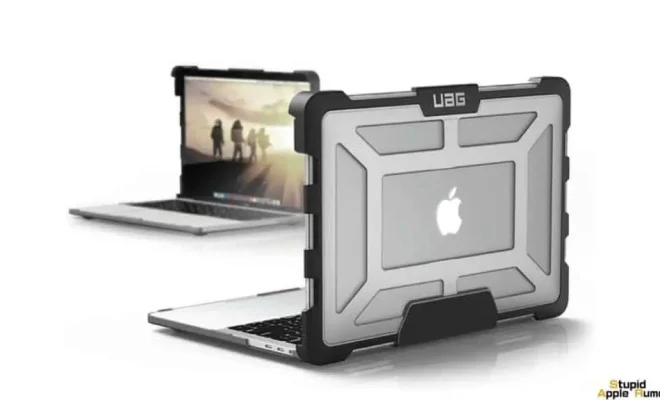
Using a protective case is one of the simplest ways to physically protect your MacBook. A well-designed protective case can protect your MacBook from scratches, dents, and other physical damage. The case should be made of a strong material that can withstand impact, such as polycarbonate or silicone.

2. Invest in a Screen Protector

A screen protector is another essential accessory that can help protect your MacBook’s screen from scratches and cracks. Screen protectors are made from different materials, such as tempered glass or plastic. Tempered glass screen protectors are preferred because they offer better protection and clarity.

3. Don’t Overload Your Backpack

Many MacBook users carry their laptops in backpacks, but it’s important not to overload them. Overloading your backpack can create unnecessary pressure on your MacBook and cause damage. Ensure that your backpack has enough padding to protect your MacBook from impact.

4. Avoid Eating and Drinking Near Your MacBook

Eating and drinking near your MacBook can increase the risk of spills, which can cause significant damage to your device. Even minor spills can lead to liquid seeping into your MacBook’s keyboard, screen, and other components, potentially causing permanent damage.

5. Keep Your MacBook Away From Extreme Temperatures

Extreme temperatures can cause irreversible damage to your MacBook’s battery and other components. Avoid exposing your MacBook to extreme heat or cold. If you have to leave your MacBook in a car, ensure that it is out of direct sunlight with the windows cracked open to prevent high temperatures from building up inside.

In conclusion, protecting your MacBook from physical damage is crucial to ensure its longevity and functionality. Using a protective case and screen protector, avoiding overloading your backpack, avoiding eating and drinking near your MacBook, and keeping it away from extreme temperatures are simple yet effective ways to physically protect your MacBook.


Previous Article

The Best USB Drive Encryption Software

Next Article

How to Use Driver Verifier to Fix ...

Matthew Lynch

Related articles More from author

  • Digital & Mobile Technology

    Samsung Pay vs. Google Pay (Formerly Android Pay)

    June 10, 2023
    By Matthew Lynch
  • Digital & Mobile Technology

    Best Free Memory Test Programs

    June 2, 2023
    By Matthew Lynch
  • Digital & Mobile Technology

    The History of Samsung (1938-Present)

    June 8, 2023
    By Matthew Lynch
  • Digital & Mobile Technology

    MAC Addresses With Formatting Examples

    June 8, 2023
    By Matthew Lynch
  • Digital & Mobile Technology

    What Version of Windows Do I Have?

    June 1, 2023
    By Matthew Lynch
  • Digital & Mobile Technology

    What Is Fuchsia, Google’s New Operating System?

    May 21, 2023
    By Matthew Lynch

Search

Login & Registration

  • Log in
  • Entries feed
  • Comments feed
  • WordPress.org

Newsletter

Signup for The Tech Edvocate Newsletter and have the latest in EdTech news and opinion delivered to your email address!

About Us

Since technology is not going anywhere and does more good than harm, adapting is the best course of action. That is where The Tech Edvocate comes in. We plan to cover the PreK-12 and Higher Education EdTech sectors and provide our readers with the latest news and opinion on the subject. From time to time, I will invite other voices to weigh in on important issues in EdTech. We hope to provide a well-rounded, multi-faceted look at the past, present, the future of EdTech in the US and internationally.

We started this journey back in June 2016, and we plan to continue it for many more years to come. I hope that you will join us in this discussion of the past, present and future of EdTech and lend your own insight to the issues that are discussed.

Newsletter

Signup for The Tech Edvocate Newsletter and have the latest in EdTech news and opinion delivered to your email address!

Contact Us

The Tech Edvocate
910 Goddin Street
Richmond, VA 23231
(601) 630-5238
[email protected]

Copyright © 2026 Matthew Lynch. All rights reserved.