The Tech Edvocate

Top Menu

  • Advertisement
  • Apps
  • Home Page
  • Home Page Five (No Sidebar)
  • Home Page Four
  • Home Page Three
  • Home Page Two
  • Home Tech2
  • Icons [No Sidebar]
  • Left Sidbear Page
  • Lynch Educational Consulting
  • My Account
  • My Speaking Page
  • Newsletter Sign Up Confirmation
  • Newsletter Unsubscription
  • Our Brands
  • Page Example
  • Privacy Policy
  • Protected Content
  • Register
  • Request a Product Review
  • Shop
  • Shortcodes Examples
  • Signup
  • Start Here
    • Governance
    • Careers
    • Contact Us
  • Terms and Conditions
  • The Edvocate
  • The Tech Edvocate Product Guide
  • Topics
  • Write For Us
  • Advertise

Main Menu

  • Start Here
    • Our Brands
    • Governance
      • Lynch Educational Consulting, LLC.
      • Dr. Lynch’s Personal Website
      • Careers
    • Write For Us
    • The Tech Edvocate Product Guide
    • Contact Us
    • Books
    • Edupedia
    • Post a Job
    • The Edvocate Podcast
    • Terms and Conditions
    • Privacy Policy
  • Topics
    • Assistive Technology
    • Child Development Tech
    • Early Childhood & K-12 EdTech
    • EdTech Futures
    • EdTech News
    • EdTech Policy & Reform
    • EdTech Startups & Businesses
    • Higher Education EdTech
    • Online Learning & eLearning
    • Parent & Family Tech
    • Personalized Learning
    • Product Reviews
  • Advertise
  • Tech Edvocate Awards
  • The Edvocate
  • Pedagogue
  • School Ratings

logo

The Tech Edvocate

  • Start Here
    • Our Brands
    • Governance
      • Lynch Educational Consulting, LLC.
      • Dr. Lynch’s Personal Website
        • My Speaking Page
      • Careers
    • Write For Us
    • The Tech Edvocate Product Guide
    • Contact Us
    • Books
    • Edupedia
    • Post a Job
    • The Edvocate Podcast
    • Terms and Conditions
    • Privacy Policy
  • Topics
    • Assistive Technology
    • Child Development Tech
    • Early Childhood & K-12 EdTech
    • EdTech Futures
    • EdTech News
    • EdTech Policy & Reform
    • EdTech Startups & Businesses
    • Higher Education EdTech
    • Online Learning & eLearning
    • Parent & Family Tech
    • Personalized Learning
    • Product Reviews
  • Advertise
  • Tech Edvocate Awards
  • The Edvocate
  • Pedagogue
  • School Ratings
  • The Narwal Freo Z20 Is the Prime Day Gift That Actually Saves Time

  • Capsaicinens rolle: kultur, helse og dyrking av chilipepper

  • Study: Nearly all personal care and cleaning products contain undisclosed chemicals

  • This One AI Wearable Feature Is Quietly Erasing Public Privacy

Digital & Mobile Technology
Home›Digital & Mobile Technology›Perform a Clean Install of OS X Yosemite on Your Mac

Perform a Clean Install of OS X Yosemite on Your Mac
By Matthew Lynch
June 9, 2023
0
Spread the love

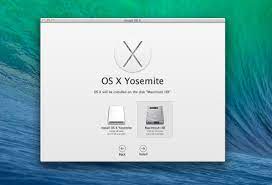
Performing a clean install of OS X Yosemite on your Mac is the best way to ensure that your system runs smoothly and optimally. Whether you’re experiencing performance issues, or simply want a fresh start, a clean install can help solve your problems.

But before you get started, make sure to back up all your important files and data. A clean install will erase all data on your hard drive, so it’s essential to have a backup in case anything goes wrong.

Once you’ve backed up your files, follow these easy steps to perform a clean install of OS X Yosemite:

1. Download OS X Yosemite from the Apple Store

The first step is to download OS X Yosemite from the Apple Store. Once downloaded, the installer will automatically open.

2. Create bootable media

Before you can perform a clean install, you’ll need to create bootable media such as a USB drive or a DVD. This will allow you to boot your Mac from the media, so you can install the operating system.

3. Boot from the installation media

Once you’ve created the bootable media, shut down your Mac and insert the USB drive or DVD. Then, turn on your Mac while holding down the option key. This will prompt your Mac to display the boot options menu. Select the installation media, and the installation will begin.

4. Erase the hard drive

During the installation process, you’ll be prompted to select the hard drive to install the operating system. You’ll also be given the option to erase the hard drive. Choose this option to ensure that all data on the drive is erased.

5. Install OS X Yosemite

Once your hard drive is erased, you can proceed with the installation of OS X Yosemite. Follow the prompts to complete the installation process. Once the installation is complete, you’ll have a fresh copy of OS X Yosemite on your Mac.

After the installation process is complete, you can restore your files and data from your backup. And with your Mac running a clean and freshly installed OS X Yosemite, you can enjoy improved performance and reliability.

In conclusion, performing a clean install of OS X Yosemite on your Mac may seem daunting, but it’s a straightforward process that can help solve many performance issues. Just make sure to back up your files and data before you start, and follow the steps carefully to avoid any issues.

Previous Article

What Is the Amazon Echo Input and ...

Next Article

Speedtest.net Website Review

Matthew Lynch

Related articles More from author

  • Digital & Mobile Technology

    FPO in Graphic Design

    May 31, 2023
    By Matthew Lynch
  • Digital & Mobile Technology

    What is an Object-Oriented Language (OOL)?

    May 5, 2023
    By Matthew Lynch
  • Digital & Mobile Technology

    10 Ways to Speed Up a Bluetooth Data Transfer

    July 31, 2023
    By Matthew Lynch
  • Digital & Mobile Technology

    Things About Mini PCs You Should Consider Before Buying

    June 23, 2023
    By Matthew Lynch
  • Digital & Mobile Technology

    How to Mute a Story on Snapchat

    June 23, 2023
    By Matthew Lynch
  • Digital & Mobile Technology

    Don’t Mess This Up: How to Implement Cloud Computing

    April 13, 2023
    By Matthew Lynch

Search

Login & Registration

  • Log in
  • Entries feed
  • Comments feed
  • WordPress.org

Newsletter

Signup for The Tech Edvocate Newsletter and have the latest in EdTech news and opinion delivered to your email address!

About Us

Since technology is not going anywhere and does more good than harm, adapting is the best course of action. That is where The Tech Edvocate comes in. We plan to cover the PreK-12 and Higher Education EdTech sectors and provide our readers with the latest news and opinion on the subject. From time to time, I will invite other voices to weigh in on important issues in EdTech. We hope to provide a well-rounded, multi-faceted look at the past, present, the future of EdTech in the US and internationally.

We started this journey back in June 2016, and we plan to continue it for many more years to come. I hope that you will join us in this discussion of the past, present and future of EdTech and lend your own insight to the issues that are discussed.

Newsletter

Signup for The Tech Edvocate Newsletter and have the latest in EdTech news and opinion delivered to your email address!

Contact Us

The Tech Edvocate
910 Goddin Street
Richmond, VA 23231
(601) 630-5238
[email protected]

Copyright © 2026 Matthew Lynch. All rights reserved.