The Tech Edvocate

Top Menu

  • Advertisement
  • Apps
  • Home Page
  • Home Page Five (No Sidebar)
  • Home Page Four
  • Home Page Three
  • Home Page Two
  • Home Tech2
  • Icons [No Sidebar]
  • Left Sidbear Page
  • Lynch Educational Consulting
  • My Account
  • My Speaking Page
  • Newsletter Sign Up Confirmation
  • Newsletter Unsubscription
  • Our Brands
  • Page Example
  • Privacy Policy
  • Protected Content
  • Register
  • Request a Product Review
  • Shop
  • Shortcodes Examples
  • Signup
  • Start Here
    • Governance
    • Careers
    • Contact Us
  • Terms and Conditions
  • The Edvocate
  • The Tech Edvocate Product Guide
  • Topics
  • Write For Us
  • Advertise

Main Menu

  • Start Here
    • Our Brands
    • Governance
      • Lynch Educational Consulting, LLC.
      • Dr. Lynch’s Personal Website
      • Careers
    • Write For Us
    • The Tech Edvocate Product Guide
    • Contact Us
    • Books
    • Edupedia
    • Post a Job
    • The Edvocate Podcast
    • Terms and Conditions
    • Privacy Policy
  • Topics
    • Assistive Technology
    • Child Development Tech
    • Early Childhood & K-12 EdTech
    • EdTech Futures
    • EdTech News
    • EdTech Policy & Reform
    • EdTech Startups & Businesses
    • Higher Education EdTech
    • Online Learning & eLearning
    • Parent & Family Tech
    • Personalized Learning
    • Product Reviews
  • Advertise
  • Tech Edvocate Awards
  • The Edvocate
  • Pedagogue
  • School Ratings

logo

The Tech Edvocate

  • Start Here
    • Our Brands
    • Governance
      • Lynch Educational Consulting, LLC.
      • Dr. Lynch’s Personal Website
        • My Speaking Page
      • Careers
    • Write For Us
    • The Tech Edvocate Product Guide
    • Contact Us
    • Books
    • Edupedia
    • Post a Job
    • The Edvocate Podcast
    • Terms and Conditions
    • Privacy Policy
  • Topics
    • Assistive Technology
    • Child Development Tech
    • Early Childhood & K-12 EdTech
    • EdTech Futures
    • EdTech News
    • EdTech Policy & Reform
    • EdTech Startups & Businesses
    • Higher Education EdTech
    • Online Learning & eLearning
    • Parent & Family Tech
    • Personalized Learning
    • Product Reviews
  • Advertise
  • Tech Edvocate Awards
  • The Edvocate
  • Pedagogue
  • School Ratings
  • Consumer Reports Reveal Truth – Is Flexigenics Reviews Legit or Scam? (Shocking Findings)

  • Quietum Plus 2026 Review Complaints and Shocking User Findings

  • This Founder’s Rs 75 LPA Sacrifice Crumbled in 30 Days — Here’s Why

  • Urgent: Claude AI Bioweapons — The Unsettling Truth Anthropic Just Revealed

  • Shocking: Three Major Xbox Games Shutting Down Forever in 2026

  • One Man’s Dire Warning: Is AI Already Too Dangerous To Control?

  • The Urgent Parental Consent Debate Over Student Mental Health Screenings

  • LAUSD restricts all students from using AI tools | K-12 Dive

  • Catastrophic Data Breach: 153 Million Driver’s Licenses Exposed on Dark Web

  • Autonomous AI Hackers Weaponize PaperCut Flaws: The Terrifying New Era of Cybercrime

Digital & Mobile Technology
Home›Digital & Mobile Technology›Outlook Tasks vs. Microsoft To Do: Which Is Better?

Outlook Tasks vs. Microsoft To Do: Which Is Better?
By Matthew Lynch
June 22, 2023
0
Spread the love

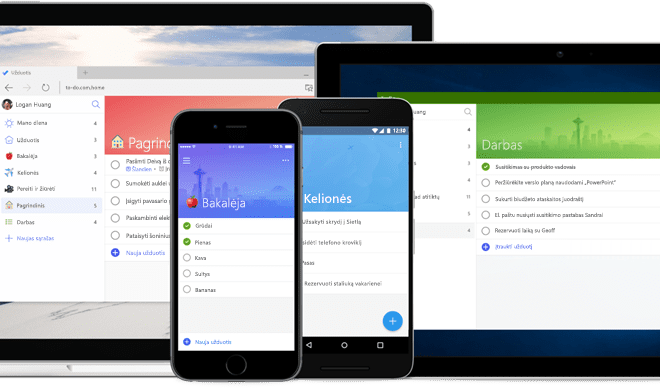
Microsoft has introduced a new task management application called Microsoft To Do, which has replaced the popular task management feature in Outlook. Now, users are left wondering which is better between Outlook Tasks and Microsoft To Do.

Outlook Tasks is a feature of the well-known email client by Microsoft, which allows the users to create, assign, and track various to-do lists. Outlook Tasks are integrated with the entire Microsoft Office Suite, which allows the users to create tasks based on emails, contacts, and calendar events. Microsoft To Do, on the other hand, is a standalone task management application that is available for free and works with both Windows and iOS, allowing users to create and manage their daily tasks with ease.

One significant difference between Outlook Tasks and Microsoft To Do is the user interface. Microsoft To Do offers a minimalist interface, which is intuitive and easy to use. It allows the users to use it as a personal to-do list, as well as, share the lists with colleagues, family, and friends. On the other hand, Outlook Tasks have a complex interface, which might take some time for new users to learn. It offers multiple ways of viewing tasks, which can be overwhelming for a beginner.

Another significant benefit of Microsoft To Do is its seamless integration with other Microsoft applications. For instance, Microsoft To Do makes it easier for users to migrate to the application from Wunderlist, which was discontinued in 2020. Microsoft To Do comes with features such as the ability to create subtasks, the progress view, and recurring tasks, which are not available in Outlook Tasks.

However, Outlook Tasks have several benefits that Microsoft To Do lacks. For instance, it’s possible to set reminders or add emails as tasks directly from your inbox. Moreover, Outlook Tasks allow you to attach data files, emails, and contacts to your specific task. A feature that can be useful when you need to share data files with a colleague for review or add an email conversation to a task.


Previous Article

What Is Vaporware? What to Know and ...

Next Article

What Is the Best Way to Stream ...

Matthew Lynch

Related articles More from author

  • Digital & Mobile Technology

    Who Owns Reddit? And Who Were the Founders?

    August 5, 2023
    By Matthew Lynch
  • Digital & Mobile Technology

    How to Switch to Ubuntu Rolling Rhino: A Rolling Release Version of Ubuntu

    August 3, 2023
    By Matthew Lynch
  • Digital & Mobile Technology

    Ways to Fix the “Your Device Is Missing Important Security and Quality Fixes” Error

    June 22, 2023
    By Matthew Lynch
  • Digital & Mobile Technology

    How to Clear Cache Data on Your Android Device

    May 31, 2023
    By Matthew Lynch
  • Digital & Mobile Technology

    How to Report Someone on Discord

    August 3, 2023
    By Matthew Lynch
  • Digital & Mobile Technology

    Best Ways to Fix Google Chrome Not Completing Downloads

    April 10, 2023
    By Matthew Lynch

Search

Login & Registration

  • Log in
  • Entries feed
  • Comments feed
  • WordPress.org

Newsletter

Signup for The Tech Edvocate Newsletter and have the latest in EdTech news and opinion delivered to your email address!

About Us

Since technology is not going anywhere and does more good than harm, adapting is the best course of action. That is where The Tech Edvocate comes in. We plan to cover the PreK-12 and Higher Education EdTech sectors and provide our readers with the latest news and opinion on the subject. From time to time, I will invite other voices to weigh in on important issues in EdTech. We hope to provide a well-rounded, multi-faceted look at the past, present, the future of EdTech in the US and internationally.

We started this journey back in June 2016, and we plan to continue it for many more years to come. I hope that you will join us in this discussion of the past, present and future of EdTech and lend your own insight to the issues that are discussed.

Newsletter

Signup for The Tech Edvocate Newsletter and have the latest in EdTech news and opinion delivered to your email address!

Contact Us

The Tech Edvocate
910 Goddin Street
Richmond, VA 23231
(601) 630-5238
[email protected]

Copyright © 2026 Matthew Lynch. All rights reserved.