The Tech Edvocate

Top Menu

  • Advertisement
  • Apps
  • Home Page
  • Home Page Five (No Sidebar)
  • Home Page Four
  • Home Page Three
  • Home Page Two
  • Home Tech2
  • Icons [No Sidebar]
  • Left Sidbear Page
  • Lynch Educational Consulting
  • My Account
  • My Speaking Page
  • Newsletter Sign Up Confirmation
  • Newsletter Unsubscription
  • Our Brands
  • Page Example
  • Privacy Policy
  • Protected Content
  • Register
  • Request a Product Review
  • Shop
  • Shortcodes Examples
  • Signup
  • Start Here
    • Governance
    • Careers
    • Contact Us
  • Terms and Conditions
  • The Edvocate
  • The Tech Edvocate Product Guide
  • Topics
  • Write For Us
  • Advertise

Main Menu

  • Start Here
    • Our Brands
    • Governance
      • Lynch Educational Consulting, LLC.
      • Dr. Lynch’s Personal Website
      • Careers
    • Write For Us
    • The Tech Edvocate Product Guide
    • Contact Us
    • Books
    • Edupedia
    • Post a Job
    • The Edvocate Podcast
    • Terms and Conditions
    • Privacy Policy
  • Topics
    • Assistive Technology
    • Child Development Tech
    • Early Childhood & K-12 EdTech
    • EdTech Futures
    • EdTech News
    • EdTech Policy & Reform
    • EdTech Startups & Businesses
    • Higher Education EdTech
    • Online Learning & eLearning
    • Parent & Family Tech
    • Personalized Learning
    • Product Reviews
  • Advertise
  • Tech Edvocate Awards
  • The Edvocate
  • Pedagogue
  • School Ratings

logo

The Tech Edvocate

  • Start Here
    • Our Brands
    • Governance
      • Lynch Educational Consulting, LLC.
      • Dr. Lynch’s Personal Website
        • My Speaking Page
      • Careers
    • Write For Us
    • The Tech Edvocate Product Guide
    • Contact Us
    • Books
    • Edupedia
    • Post a Job
    • The Edvocate Podcast
    • Terms and Conditions
    • Privacy Policy
  • Topics
    • Assistive Technology
    • Child Development Tech
    • Early Childhood & K-12 EdTech
    • EdTech Futures
    • EdTech News
    • EdTech Policy & Reform
    • EdTech Startups & Businesses
    • Higher Education EdTech
    • Online Learning & eLearning
    • Parent & Family Tech
    • Personalized Learning
    • Product Reviews
  • Advertise
  • Tech Edvocate Awards
  • The Edvocate
  • Pedagogue
  • School Ratings
  • This One Skill Is Quietly Reshaping Every Career — And How to Master It Now

  • The Silent Threat: How AI Is Reshaping Recent College Graduates’ Job Prospects

  • This Crucial Shift in AI Will Devastate Millions of College Grads

  • The Brutal Truth: Zero-Day Exploit Analysis vs. Traditional Cybersecurity Careers — Which Path Pays $300,000?

  • The Urgent Truth: Why These Certifications Are Your Only Defense Against Zero-Day Attacks

  • The FBI Investigates a Zero-Day Attack on Your Job Applications

  • The Startling Truth About AI’s Impact on Your Coding Job by 2026

  • The Shocking Truth About Your Code: AI Is Already Rewriting Your Future

  • Is This Why Code Review Is Dead? AI’s Staggering Impact on Tech Jobs

  • The Shocking Truth About CogniBoost vs Focus Drugs: What No One Is Telling You

Tech Advice
Home›Tech Advice›New TV Setup: The Settings and Tweaks We Always Recommend

New TV Setup: The Settings and Tweaks We Always Recommend
By Matthew Lynch
July 16, 2023
0
Spread the love

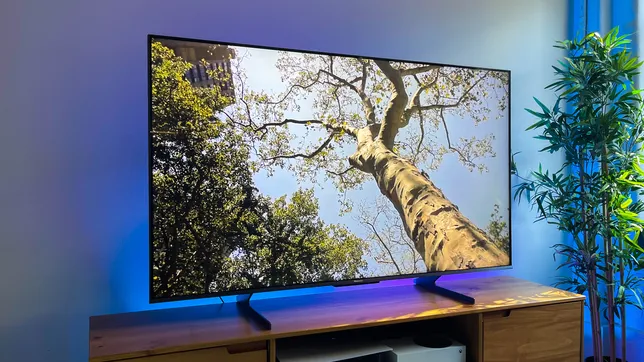
You’ve just purchased a brand-new television, and now it’s time to set it up for the best possible viewing experience. To help you get started, we’ve put together a list of settings and tweaks we always recommend for new TV setups. These will ensure that you’re getting the most out of your new TV and enjoying movies, television shows, and gaming to the fullest.

1. Picture Mode

The first thing you’ll want to do is adjust your TV’s picture mode. Most TVs come with various presets like Standard, Cinema, Vivid, or Game. Start by choosing the Cinema or Movie mode as these usually provide a more accurate color representation and better overall picture quality.

2. Backlight or Brightness

Next, adjust your TV’s backlight or brightness setting. This controls the overall luminance of the screen. You should find a balance between too dark and too bright; this may involve some experimentation until you find what works best for your room’s lighting conditions.

3. Contrast

The contrast setting determines the difference between the darkest and brightest parts of an image on your screen. Properly setting this will help reveal detail in dark scenes and prevent bright scenes from appearing washed out. Aim for a setting that keeps black levels deep while maintaining detail in shadows.

4. Color Temperature

Getting the right color temperature is crucial for an accurate picture. Most TVs come with presets like “Warm,” “Normal,” or “Cool.” We recommend starting with the “Warm” setting as it generally provides a more natural color balance, closer to what our eyes perceive in real life.

5. Sharpness

Many people mistakenly believe that increasing sharpness will provide a clearer image; however, this can lead to an unnatural-looking picture with overemphasized edges. For most content, we advise setting sharpness to its default level or slightly lower.

6. Motion Smoothing

A common feature in newer TVs is motion smoothing, which aims to reduce motion blur by interpolating frames. While this can sometimes create a crisper image, it often results in a so-called “soap opera effect” that many viewers find unnatural. We recommend disabling motion smoothing entirely or adjusting it to its least aggressive setting.

7. Game Mode

If you’re a gamer, be sure to enable your TV’s game mode. This will optimize the television’s performance for console gaming by minimizing input lag, providing a faster and more responsive gaming experience.

8. Sound Settings

Finally, don’t forget to fine-tune your TV’s sound settings. Consider using the “Cinema” or “Movie” audio mode as these typically offer a more immersive sound experience. If you’re using external speakers or a soundbar, be sure to connect and configure them properly as well.

In conclusion, taking the time to adjust these settings will provide you with an enhanced viewing experience that truly showcases the capabilities of your new TV. Don’t be afraid to tweak and experiment until you find the perfect setup for your space and preferences. Happy watching!


Previous Article

New Samsung 8K Projector Scales Up With ...

Next Article

Free antenna TV is getting an upgrade ...

Matthew Lynch

Related articles More from author

  • Tech Advice

    2025 Jeep Recon: The Electric Almost-Wrangler

    August 22, 2023
    By Matthew Lynch
  • Tech Advice

    5 Best Air Miles Credit Cards in Canada

    October 20, 2023
    By Matthew Lynch
  • Tech Advice

    Understanding Which COVID-19 Variant You Have: A Closer Look

    July 6, 2023
    By Matthew Lynch
  • Tech Advice

    The Best Sleeper Sofas To Add Extra Function And Flair To Your Home

    August 9, 2023
    By Matthew Lynch
  • Tech Advice

    The Refreshed 2024 Audi Q8 Gets a Little Extra Zest

    September 12, 2023
    By Matthew Lynch
  • Tech Advice

    Yes, You Can Find Your Dream Apartment on Craigslist

    July 10, 2023
    By Matthew Lynch

Search

Login & Registration

  • Log in
  • Entries feed
  • Comments feed
  • WordPress.org

Newsletter

Signup for The Tech Edvocate Newsletter and have the latest in EdTech news and opinion delivered to your email address!

About Us

Since technology is not going anywhere and does more good than harm, adapting is the best course of action. That is where The Tech Edvocate comes in. We plan to cover the PreK-12 and Higher Education EdTech sectors and provide our readers with the latest news and opinion on the subject. From time to time, I will invite other voices to weigh in on important issues in EdTech. We hope to provide a well-rounded, multi-faceted look at the past, present, the future of EdTech in the US and internationally.

We started this journey back in June 2016, and we plan to continue it for many more years to come. I hope that you will join us in this discussion of the past, present and future of EdTech and lend your own insight to the issues that are discussed.

Newsletter

Signup for The Tech Edvocate Newsletter and have the latest in EdTech news and opinion delivered to your email address!

Contact Us

The Tech Edvocate
910 Goddin Street
Richmond, VA 23231
(601) 630-5238
[email protected]

Copyright © 2026 Matthew Lynch. All rights reserved.