The Tech Edvocate

Top Menu

  • Advertisement
  • Apps
  • Home Page
  • Home Page Five (No Sidebar)
  • Home Page Four
  • Home Page Three
  • Home Page Two
  • Home Tech2
  • Icons [No Sidebar]
  • Left Sidbear Page
  • Lynch Educational Consulting
  • My Account
  • My Speaking Page
  • Newsletter Sign Up Confirmation
  • Newsletter Unsubscription
  • Our Brands
  • Page Example
  • Privacy Policy
  • Protected Content
  • Register
  • Request a Product Review
  • Shop
  • Shortcodes Examples
  • Signup
  • Start Here
    • Governance
    • Careers
    • Contact Us
  • Terms and Conditions
  • The Edvocate
  • The Tech Edvocate Product Guide
  • Topics
  • Write For Us
  • Advertise

Main Menu

  • Start Here
    • Our Brands
    • Governance
      • Lynch Educational Consulting, LLC.
      • Dr. Lynch’s Personal Website
      • Careers
    • Write For Us
    • The Tech Edvocate Product Guide
    • Contact Us
    • Books
    • Edupedia
    • Post a Job
    • The Edvocate Podcast
    • Terms and Conditions
    • Privacy Policy
  • Topics
    • Assistive Technology
    • Child Development Tech
    • Early Childhood & K-12 EdTech
    • EdTech Futures
    • EdTech News
    • EdTech Policy & Reform
    • EdTech Startups & Businesses
    • Higher Education EdTech
    • Online Learning & eLearning
    • Parent & Family Tech
    • Personalized Learning
    • Product Reviews
  • Advertise
  • Tech Edvocate Awards
  • The Edvocate
  • Pedagogue
  • School Ratings

logo

The Tech Edvocate

  • Start Here
    • Our Brands
    • Governance
      • Lynch Educational Consulting, LLC.
      • Dr. Lynch’s Personal Website
        • My Speaking Page
      • Careers
    • Write For Us
    • The Tech Edvocate Product Guide
    • Contact Us
    • Books
    • Edupedia
    • Post a Job
    • The Edvocate Podcast
    • Terms and Conditions
    • Privacy Policy
  • Topics
    • Assistive Technology
    • Child Development Tech
    • Early Childhood & K-12 EdTech
    • EdTech Futures
    • EdTech News
    • EdTech Policy & Reform
    • EdTech Startups & Businesses
    • Higher Education EdTech
    • Online Learning & eLearning
    • Parent & Family Tech
    • Personalized Learning
    • Product Reviews
  • Advertise
  • Tech Edvocate Awards
  • The Edvocate
  • Pedagogue
  • School Ratings
  • A Visitors Guide to Long Beach (CA), United States

  • A Visitor’s Guide to Fresno (CA), United States

  • A Visitors Guide to New Orleans (LA), United States

  • A Visitors Guide to Sacramento (CA), United States

  • A Visitors Guide to Lyon, France

  • JisuLife Ultra2 Portable Fan: A Powerful Multi-Function Cooling Solution

  • A Visitors Guide to Viña del Mar, Chile

  • A Visitors Guide to Århus, Denmark

  • A Visitors Guide to Bakersfield (CA), United States

  • A Visitors Guide to Aurora (CO), United States

Assistive Technology
Home›Assistive Technology›Network Issues? Here’s How to Change Wi-Fi Channels on Your Router

Network Issues? Here’s How to Change Wi-Fi Channels on Your Router
By Matthew Lynch
June 15, 2023
0
Spread the love

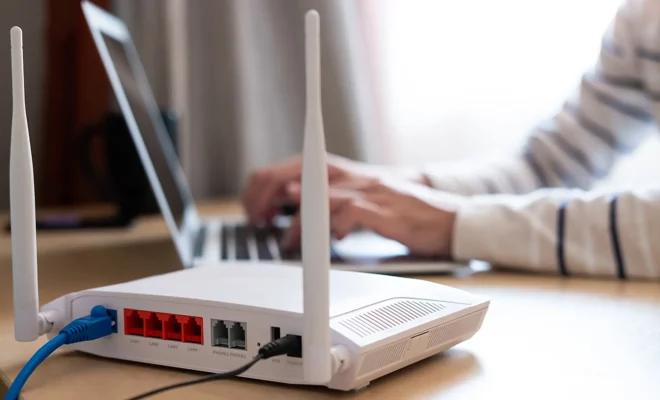
Network issues can be a frustrating experience for anyone who relies heavily on internet connectivity for work, leisure, and communication. One of the common causes of network issues is interference from other devices that share the same frequency as your Wi-Fi router. This can result in slow internet speeds, dropped connections, and other issues. Fortunately, changing Wi-Fi channels on your router can help mitigate these problems.

What is a Wi-Fi Channel?

A Wi-Fi channel is a specific frequency used by your Wi-Fi router to transmit data to and from your devices. Wi-Fi routers often use either the 2.4GHz or 5GHz frequency bands, which are further divided into multiple channels. For instance, the 2.4GHz band features 14 channels, while the 5GHz band offers 24 channels.

How to Change Wi-Fi Channels on Your Router

To change the Wi-Fi channel on your router, follow these simple steps:

Step 1: Connect to your router

Open your web browser and enter the router’s IP address in the address bar. This will take you to the router’s login page.

Step 2: Enter your login credentials

Enter your username and password in the appropriate fields. If you don’t know the login credentials, check your router’s manual or contact your internet service provider.

Step 3: Access the router settings

Once you have entered your login credentials, you should have access to your router’s settings. Look for the “Wireless settings” option and click on it.

Step 4: Choose the Wi-Fi channel

In the Wireless settings menu, look for the “Channel” or “Wireless channel” option. Click on the dropdown menu and choose a different channel from the list. It’s recommended to choose a channel that’s least congested to avoid interference from other devices.

Step 5: Save the changes

After selecting a different Wi-Fi channel, click on the “Save” or “Apply” button to save the changes. Wait for a few seconds for the router to reboot and apply the new settings.


Previous Article

How to Read and Execute From a ...

Next Article

Auto-Brightness Not Working on Your iPhone?

Matthew Lynch

Related articles More from author

  • Assistive Technology

    How to Fix a Frozen Computer

    June 8, 2023
    By Matthew Lynch
  • Assistive Technology

    How to Fix the PS5 ‘Cannot Connect to the Wi-Fi Network’ Error

    June 6, 2023
    By Matthew Lynch
  • Assistive Technology

    How to Save Pictures from Google

    June 6, 2023
    By Matthew Lynch
  • Assistive Technology

    How to Adjust Your PS5 HDR Settings to Get the Best Results

    June 30, 2023
    By Matthew Lynch
  • Assistive Technology

    How to Fix win32kfull.sys BSOD in Windows 10

    August 5, 2023
    By Matthew Lynch
  • Assistive Technology

    Xbox One Won’t Turn On? How to Fix It

    June 8, 2023
    By Matthew Lynch

Search

Login & Registration

  • Register
  • Log in
  • Entries feed
  • Comments feed
  • WordPress.org

Newsletter

Signup for The Tech Edvocate Newsletter and have the latest in EdTech news and opinion delivered to your email address!

About Us

Since technology is not going anywhere and does more good than harm, adapting is the best course of action. That is where The Tech Edvocate comes in. We plan to cover the PreK-12 and Higher Education EdTech sectors and provide our readers with the latest news and opinion on the subject. From time to time, I will invite other voices to weigh in on important issues in EdTech. We hope to provide a well-rounded, multi-faceted look at the past, present, the future of EdTech in the US and internationally.

We started this journey back in June 2016, and we plan to continue it for many more years to come. I hope that you will join us in this discussion of the past, present and future of EdTech and lend your own insight to the issues that are discussed.

Newsletter

Signup for The Tech Edvocate Newsletter and have the latest in EdTech news and opinion delivered to your email address!

Contact Us

The Tech Edvocate
910 Goddin Street
Richmond, VA 23231
(601) 630-5238
[email protected]

Copyright © 2025 Matthew Lynch. All rights reserved.