The Tech Edvocate

Top Menu

  • Advertisement
  • Apps
  • Home Page
  • Home Page Five (No Sidebar)
  • Home Page Four
  • Home Page Three
  • Home Page Two
  • Home Tech2
  • Icons [No Sidebar]
  • Left Sidbear Page
  • Lynch Educational Consulting
  • My Account
  • My Speaking Page
  • Newsletter Sign Up Confirmation
  • Newsletter Unsubscription
  • Our Brands
  • Page Example
  • Privacy Policy
  • Protected Content
  • Register
  • Request a Product Review
  • Shop
  • Shortcodes Examples
  • Signup
  • Start Here
    • Governance
    • Careers
    • Contact Us
  • Terms and Conditions
  • The Edvocate
  • The Tech Edvocate Product Guide
  • Topics
  • Write For Us
  • Advertise

Main Menu

  • Start Here
    • Our Brands
    • Governance
      • Lynch Educational Consulting, LLC.
      • Dr. Lynch’s Personal Website
      • Careers
    • Write For Us
    • The Tech Edvocate Product Guide
    • Contact Us
    • Books
    • Edupedia
    • Post a Job
    • The Edvocate Podcast
    • Terms and Conditions
    • Privacy Policy
  • Topics
    • Assistive Technology
    • Child Development Tech
    • Early Childhood & K-12 EdTech
    • EdTech Futures
    • EdTech News
    • EdTech Policy & Reform
    • EdTech Startups & Businesses
    • Higher Education EdTech
    • Online Learning & eLearning
    • Parent & Family Tech
    • Personalized Learning
    • Product Reviews
  • Advertise
  • Tech Edvocate Awards
  • The Edvocate
  • Pedagogue
  • School Ratings

logo

The Tech Edvocate

  • Start Here
    • Our Brands
    • Governance
      • Lynch Educational Consulting, LLC.
      • Dr. Lynch’s Personal Website
        • My Speaking Page
      • Careers
    • Write For Us
    • The Tech Edvocate Product Guide
    • Contact Us
    • Books
    • Edupedia
    • Post a Job
    • The Edvocate Podcast
    • Terms and Conditions
    • Privacy Policy
  • Topics
    • Assistive Technology
    • Child Development Tech
    • Early Childhood & K-12 EdTech
    • EdTech Futures
    • EdTech News
    • EdTech Policy & Reform
    • EdTech Startups & Businesses
    • Higher Education EdTech
    • Online Learning & eLearning
    • Parent & Family Tech
    • Personalized Learning
    • Product Reviews
  • Advertise
  • Tech Edvocate Awards
  • The Edvocate
  • Pedagogue
  • School Ratings
  • The Brutal Truth: Why 75% of Fintech Startups Collapse in 5 Years

  • This AI Company’s Staggering 14 Million Record Data Leak Is Just The Beginning

  • New York Rep Introduces Bill That Could Keep Games Playable for Longer – PCMag

  • Mind-Blowing: These AI Investment Funds Are Crushing the Market — Here’s How

  • The AI Detector Deception: Why Universities Are Pulling the Plug

  • Stunning: New Student Loan Repayment Rules Could Hike Payments for Millions

  • Shocking: California’s Billion-Dollar Clean Transit Initiative Drove Nowhere

  • Why EV Charging Reliability Soared Despite Cratering Sales

  • A new lithium-ion battery breakthrough could lead to cells that deliver more power for longer — they might be useful for everything from EVs to gaming laptops to robots to drones | TechRadar

  • One Breakthrough: How AI is Reshaping Medicine Faster Than Anyone Imagined

Tech Advice
Home›Tech Advice›MacBook Pro ports: All the things you can now plug into your new laptop

MacBook Pro ports: All the things you can now plug into your new laptop
By Matthew Lynch
July 14, 2023
0
Spread the love

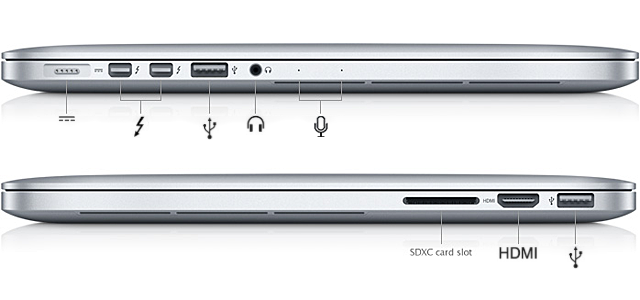
The MacBook Pro is a powerful and sleek device that has become synonymous with top-of-the-line performance among laptops. One of its most attractive features, especially for those who thrive on multitasking, is its diverse array of ports. These allow users to connect to various peripherals, expanding the functionality of their laptop. In this article, we will explore the different ports available on the latest MacBook Pro models and discuss some accessories you can use with them.

1. Thunderbolt 3 (USB-C) Ports

Arguably the most versatile port on a MacBook Pro, the Thunderbolt 3 (USB-C) port supports high-speed data transfer, video output, and charging. You can connect devices like external hard drives, 4K and 5K displays, audio interfaces, eGPU enclosures, and even other computers via Thunderbolt 3 cables.

2. USB-A Ports

Some MacBook Pro models feature USB-A ports alongside Thunderbolt 3 (USB-C) ports, allowing you to connect traditional USB devices without needing an adapter. These include storage devices (flash drives or external hard drives), mice, keyboards, and other peripherals.

3. HDMI Port

The HDMI port allows you to connect your MacBook Pro to an external display or projector. Since it’s a widely adopted standard for video output, you’ll likely find it handy in most settings: watching movies on a bigger screen at home or giving presentations during meetings.

4. SDXC Card Slot

The SDXC Card Slot is designed for reading SD memory cards commonly used in digital cameras. It enables photographers and videographers to quickly transfer their photos and videos directly from their camera’s card to their computer without needing a separate card reader.

5. Headphone Jack

The headphone jack allows you to plug in your favorite pair of wired headphones or speakers directly into your MacBook Pro. The audio quality is consistently good and makes it an appropriate choice for listening to music or monitoring audio during video editing.

6. Ethernet Port

While Wi-Fi is standard for nearly all devices today, you may still need an Ethernet port in specific situations. An adapter can be purchased to connect your MacBook Pro to a wired network, improving network stability and bandwidth in instances when wireless connections are less reliable.

As you can see, the ports available on MacBook Pro models cater to various connectivity and productivity needs. Don’t forget to invest in compatible peripherals, adapters, or docking stations to ensure seamless connectivity with your existing devices and accessories.

Previous Article

MacBook Pro M2 13-Inch vs. MacBook Air ...

Next Article

Actually, Your Chromebook Can Run Microsoft Office

Matthew Lynch

Related articles More from author

  • Tech Advice

    The Significance of 1284 in the Era of High-Speed Internet

    July 8, 2023
    By Matthew Lynch
  • Tech Advice

    Best PC Gaming Headset for 2023

    July 17, 2023
    By Matthew Lynch
  • Tech Advice

    Procreate App Review: This $10 App Opens Up a New World of Digital Art on iPad

    July 24, 2023
    By Matthew Lynch
  • Tech Advice

    What Are Subprime Auto Loans?

    August 21, 2023
    By Matthew Lynch
  • Tech Advice

    Best Wiper Blades for Jeep Wranglers: A Comprehensive Guide

    August 17, 2023
    By Matthew Lynch
  • Tech Advice

    Speaker of the year: Magnepan 3.6/R

    July 16, 2023
    By Matthew Lynch

Search

Login & Registration

  • Log in
  • Entries feed
  • Comments feed
  • WordPress.org

Newsletter

Signup for The Tech Edvocate Newsletter and have the latest in EdTech news and opinion delivered to your email address!

About Us

Since technology is not going anywhere and does more good than harm, adapting is the best course of action. That is where The Tech Edvocate comes in. We plan to cover the PreK-12 and Higher Education EdTech sectors and provide our readers with the latest news and opinion on the subject. From time to time, I will invite other voices to weigh in on important issues in EdTech. We hope to provide a well-rounded, multi-faceted look at the past, present, the future of EdTech in the US and internationally.

We started this journey back in June 2016, and we plan to continue it for many more years to come. I hope that you will join us in this discussion of the past, present and future of EdTech and lend your own insight to the issues that are discussed.

Newsletter

Signup for The Tech Edvocate Newsletter and have the latest in EdTech news and opinion delivered to your email address!

Contact Us

The Tech Edvocate
910 Goddin Street
Richmond, VA 23231
(601) 630-5238
[email protected]

Copyright © 2026 Matthew Lynch. All rights reserved.