The Tech Edvocate

Top Menu

  • Advertisement
  • Apps
  • Home Page
  • Home Page Five (No Sidebar)
  • Home Page Four
  • Home Page Three
  • Home Page Two
  • Home Tech2
  • Icons [No Sidebar]
  • Left Sidbear Page
  • Lynch Educational Consulting
  • My Account
  • My Speaking Page
  • Newsletter Sign Up Confirmation
  • Newsletter Unsubscription
  • Our Brands
  • Page Example
  • Privacy Policy
  • Protected Content
  • Register
  • Request a Product Review
  • Shop
  • Shortcodes Examples
  • Signup
  • Start Here
    • Governance
    • Careers
    • Contact Us
  • Terms and Conditions
  • The Edvocate
  • The Tech Edvocate Product Guide
  • Topics
  • Write For Us
  • Advertise

Main Menu

  • Start Here
    • Our Brands
    • Governance
      • Lynch Educational Consulting, LLC.
      • Dr. Lynch’s Personal Website
      • Careers
    • Write For Us
    • The Tech Edvocate Product Guide
    • Contact Us
    • Books
    • Edupedia
    • Post a Job
    • The Edvocate Podcast
    • Terms and Conditions
    • Privacy Policy
  • Topics
    • Assistive Technology
    • Child Development Tech
    • Early Childhood & K-12 EdTech
    • EdTech Futures
    • EdTech News
    • EdTech Policy & Reform
    • EdTech Startups & Businesses
    • Higher Education EdTech
    • Online Learning & eLearning
    • Parent & Family Tech
    • Personalized Learning
    • Product Reviews
  • Advertise
  • Tech Edvocate Awards
  • The Edvocate
  • Pedagogue
  • School Ratings

logo

The Tech Edvocate

  • Start Here
    • Our Brands
    • Governance
      • Lynch Educational Consulting, LLC.
      • Dr. Lynch’s Personal Website
        • My Speaking Page
      • Careers
    • Write For Us
    • The Tech Edvocate Product Guide
    • Contact Us
    • Books
    • Edupedia
    • Post a Job
    • The Edvocate Podcast
    • Terms and Conditions
    • Privacy Policy
  • Topics
    • Assistive Technology
    • Child Development Tech
    • Early Childhood & K-12 EdTech
    • EdTech Futures
    • EdTech News
    • EdTech Policy & Reform
    • EdTech Startups & Businesses
    • Higher Education EdTech
    • Online Learning & eLearning
    • Parent & Family Tech
    • Personalized Learning
    • Product Reviews
  • Advertise
  • Tech Edvocate Awards
  • The Edvocate
  • Pedagogue
  • School Ratings
  • Consumer Reports Reveal Truth – Is Flexigenics Reviews Legit or Scam? (Shocking Findings)

  • Quietum Plus 2026 Review Complaints and Shocking User Findings

  • This Founder’s Rs 75 LPA Sacrifice Crumbled in 30 Days — Here’s Why

  • Urgent: Claude AI Bioweapons — The Unsettling Truth Anthropic Just Revealed

  • Shocking: Three Major Xbox Games Shutting Down Forever in 2026

  • One Man’s Dire Warning: Is AI Already Too Dangerous To Control?

  • The Urgent Parental Consent Debate Over Student Mental Health Screenings

  • LAUSD restricts all students from using AI tools | K-12 Dive

  • Catastrophic Data Breach: 153 Million Driver’s Licenses Exposed on Dark Web

  • Autonomous AI Hackers Weaponize PaperCut Flaws: The Terrifying New Era of Cybercrime

Digital & Mobile Technology
Home›Digital & Mobile Technology›Lightroom vs. Photoshop: What Are the Differences?

Lightroom vs. Photoshop: What Are the Differences?
By Matthew Lynch
June 21, 2023
0
Spread the love

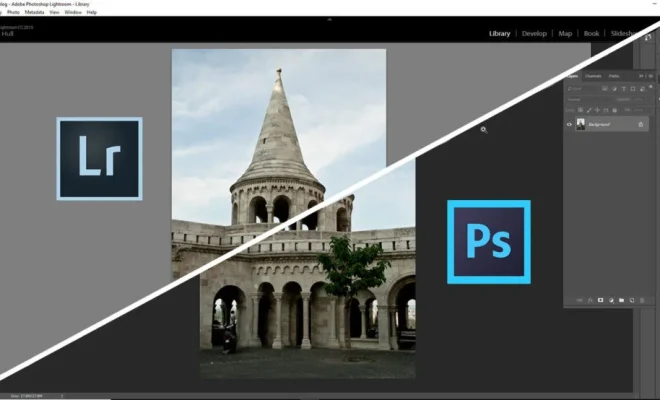
As a beginner or professional photographer, it’s essential to choose the right image editing software that fits your needs. While Lightroom and Photoshop are both products of Adobe, they have different functionalities and features. In this article, we’ll explore the differences between Lightroom and Photoshop.

Lightroom: What is it, and what can it do?

Lightroom is a photo editing software that focuses on cataloging, sorting, and editing images. It’s a powerful tool for organizing, enhancing, and exporting your photos. With Lightroom, you can work with several images at once and create presets that let you apply the same settings to multiple images quickly. Some of the things you can do in Lightroom include:

1. Image sorting and management: Lightroom allows you to organize your photos by applying keywords, metadata, and flags to identify them. You can also filter out images based on specific criteria such as date and camera type.

2. Raw image editing: Lightroom has robust support for raw images, which means you can make adjustments such as white balance, exposure, and tonal adjustments without damaging the original file’s quality.

3. Non-destructive editing: Lightroom allows you to edit images without altering the original file. You can always revert back to the original image or use various versions of the same photo.

4. Batch editing: Lightroom lets you apply the same settings to multiple images at once, which saves you time.

Photoshop: What is it, and what can it do?

Photoshop is an image editing software that’s more advanced than Lightroom. It’s made for more complex operations, such as creating graphics, digital art, and compositing images. Some of the things you can do in Photoshop include:

1. Pixel-level editing: Photoshop allows you to make precise edits on a per-pixel basis, making it a powerful tool for retouching and restoring images.

2. Layer-based editing: Photoshop lets you add several layers to an image, which means you can create composite images by combining several photos and applying blending modes.

3. Advanced effects: Photoshop has a wide range of filters and effects that can transform your images. You can also create effects from scratch using tools like brushes, gradients, and masks.

4. 3D image creation: Photoshop allows you to create 3D models from scratch or import existing 3D models.

Lightroom vs. Photoshop: Which one is right for you?

If you’re a beginner, Lightroom is the perfect tool to get started with image editing. It’s easy to learn, has lots of tutorials available online, and can produce stunning images. Lightroom is ideal for anyone who works with large numbers of images and wants to organize them efficiently.

On the other hand, if you’re a professional photographer or graphic designer, Photoshop is a must-have tool. It’s more advanced than Lightroom and has more features that allow you to do things like photo manipulation, digital art, and graphic design. Photoshop is ideal for anyone who wants to take their image editing skills to the next level.

Conclusion

In summary, Lightroom and Photoshop are two image editing tools that cater to different needs. Lightroom is ideal for beginners and anyone who works with large numbers of images. It’s easy to learn, and with presets, you can make quick edits to images with ease. However, if you’re a professional photographer or graphic designer, Photoshop is the way to go. It’s more advanced and has more features, which makes it a powerful tool for complex operations like photo manipulation, digital art, and graphic design. Ultimately, the choice between Lightroom and Photoshop depends on your needs and how you plan to use the software.


Previous Article

How to Add External Subtitles on Windows ...

Next Article

Is It Worth Posting YouTube Shorts? The ...

Matthew Lynch

Related articles More from author

  • Digital & Mobile Technology

    What is IT strategist (information technology strategist)?

    May 23, 2023
    By Matthew Lynch
  • Digital & Mobile Technology

    Ways to Open the Windows Recycle Bin When It’s Missing on the Desktop

    August 5, 2023
    By Matthew Lynch
  • Digital & Mobile Technology

    What is a Leased Line?

    April 18, 2023
    By Matthew Lynch
  • Digital & Mobile Technology

    What Is A CPU and What Does It Do?

    August 5, 2023
    By Matthew Lynch
  • Digital & Mobile Technology

    How to Change the Peek Display Clock on Motorola Phones

    June 21, 2023
    By Matthew Lynch
  • Digital & Mobile Technology

    6 Easy Ways to Remove or Delete a Calendar From iPhone

    February 19, 2024
    By Matthew Lynch

Search

Login & Registration

  • Log in
  • Entries feed
  • Comments feed
  • WordPress.org

Newsletter

Signup for The Tech Edvocate Newsletter and have the latest in EdTech news and opinion delivered to your email address!

About Us

Since technology is not going anywhere and does more good than harm, adapting is the best course of action. That is where The Tech Edvocate comes in. We plan to cover the PreK-12 and Higher Education EdTech sectors and provide our readers with the latest news and opinion on the subject. From time to time, I will invite other voices to weigh in on important issues in EdTech. We hope to provide a well-rounded, multi-faceted look at the past, present, the future of EdTech in the US and internationally.

We started this journey back in June 2016, and we plan to continue it for many more years to come. I hope that you will join us in this discussion of the past, present and future of EdTech and lend your own insight to the issues that are discussed.

Newsletter

Signup for The Tech Edvocate Newsletter and have the latest in EdTech news and opinion delivered to your email address!

Contact Us

The Tech Edvocate
910 Goddin Street
Richmond, VA 23231
(601) 630-5238
[email protected]

Copyright © 2026 Matthew Lynch. All rights reserved.