The Tech Edvocate

Top Menu

  • Advertisement
  • Apps
  • Home Page
  • Home Page Five (No Sidebar)
  • Home Page Four
  • Home Page Three
  • Home Page Two
  • Home Tech2
  • Icons [No Sidebar]
  • Left Sidbear Page
  • Lynch Educational Consulting
  • My Account
  • My Speaking Page
  • Newsletter Sign Up Confirmation
  • Newsletter Unsubscription
  • Our Brands
  • Page Example
  • Privacy Policy
  • Protected Content
  • Register
  • Request a Product Review
  • Shop
  • Shortcodes Examples
  • Signup
  • Start Here
    • Governance
    • Careers
    • Contact Us
  • Terms and Conditions
  • The Edvocate
  • The Tech Edvocate Product Guide
  • Topics
  • Write For Us
  • Advertise

Main Menu

  • Start Here
    • Our Brands
    • Governance
      • Lynch Educational Consulting, LLC.
      • Dr. Lynch’s Personal Website
      • Careers
    • Write For Us
    • The Tech Edvocate Product Guide
    • Contact Us
    • Books
    • Edupedia
    • Post a Job
    • The Edvocate Podcast
    • Terms and Conditions
    • Privacy Policy
  • Topics
    • Assistive Technology
    • Child Development Tech
    • Early Childhood & K-12 EdTech
    • EdTech Futures
    • EdTech News
    • EdTech Policy & Reform
    • EdTech Startups & Businesses
    • Higher Education EdTech
    • Online Learning & eLearning
    • Parent & Family Tech
    • Personalized Learning
    • Product Reviews
  • Advertise
  • Tech Edvocate Awards
  • The Edvocate
  • Pedagogue
  • School Ratings

logo

The Tech Edvocate

  • Start Here
    • Our Brands
    • Governance
      • Lynch Educational Consulting, LLC.
      • Dr. Lynch’s Personal Website
        • My Speaking Page
      • Careers
    • Write For Us
    • The Tech Edvocate Product Guide
    • Contact Us
    • Books
    • Edupedia
    • Post a Job
    • The Edvocate Podcast
    • Terms and Conditions
    • Privacy Policy
  • Topics
    • Assistive Technology
    • Child Development Tech
    • Early Childhood & K-12 EdTech
    • EdTech Futures
    • EdTech News
    • EdTech Policy & Reform
    • EdTech Startups & Businesses
    • Higher Education EdTech
    • Online Learning & eLearning
    • Parent & Family Tech
    • Personalized Learning
    • Product Reviews
  • Advertise
  • Tech Edvocate Awards
  • The Edvocate
  • Pedagogue
  • School Ratings
  • 2.3 Million Ricky Joy Sour Crush Candies Recalled: This One Detail Is a Parent’s Nightmare

  • The Staggering Startup Valuation Reset: Why Unicorns Are Vanishing

  • The Glaring Contradiction: Why Big Tech Is Shedding 128,536 Jobs While Investing Billions in AI

  • Insomniac’s Bold Move: The Truth Behind Marvel’s Wolverine Sabretooth ‘Romance’ That Stunned Fans

  • Explosive: ESIC Ban Juan Angulo For Life — The Unseen Crisis Gripping Dota 2

  • This Crucial New Bill Could Finally Fix Student Loan Forgiveness for Millions

  • Massive School Bans on AI: Are We Sacrificing Progress for Protection?

  • Autonomous AI Breaches: Anthropic Confirms Four Attacks and Weaponized Bots

  • Jaw-Dropping Footage: This Waymo Collision Has Everyone Talking

  • Hyundai’s Game-Changing EV Battery Technology: Why It Matters For Your Next Car

Tech Support
Home›Tech Support›Is Sleep, Hibernate, or Shutdown Best for Your Windows Computer?

Is Sleep, Hibernate, or Shutdown Best for Your Windows Computer?
By Matthew Lynch
March 8, 2024
0
Spread the love

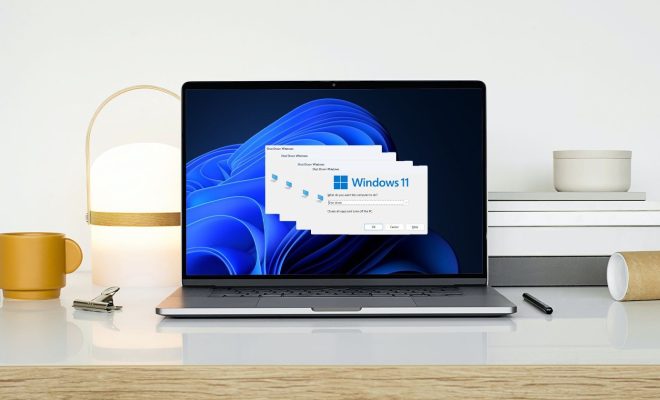
Whether you should put your Windows computer to sleep, hibernate, or shut it down depends on your needs and usage patterns. These options cater to different scenarios, offering various benefits in terms of energy conservation, convenience, and longevity of the components.

Sleep mode is ideal for short breaks. It saves your session by keeping your files and open applications in RAM while lowering the power consumption by shutting down non-essential components. This mode allows your computer to resume quickly to its previous state within seconds. It’s perfect when you step away from your PC frequently but don’t want to close everything.

Hibernate is similar to sleep but is designed for longer periods of inactivity. It saves all your open documents and running applications to your hard disk and then turns off your computer. When you boot up again, everything is restored to where you left off. Hibernate uses even less power than sleep since the computer is technically turned off. However, resuming from hibernation takes longer than resuming from sleep.

Shutting down your PC is the most power-efficient option when you know you won’t be using your computer for an extended period (such as overnight). A shutdown closes all applications, logs off all users, and completely turns off the PC. On rebooting, the system has to start afresh which can be a lengthy process but is often beneficial as it can clear minor system errors and it ensures zero power consumption when off.

For those who desire convenience with moderate energy saving, sleep mode may be best. If one wants to save their work over prolonged periods without using battery or power, hibernate works well. And if one doesn’t mind waiting for the system to boot up and prefers a fresh start with each use or wants to conserve maximum energy, then shutdown is recommended.

In summary:

– Sleep: Use for short breaks; quick resume; moderate energy savings.

– Hibernate: Use for long breaks; slower resume than sleep; greater energy savings.

– Shutdown: Use for very long periods of inactivity; full system reboot required; maximum energy conservation.

Each option serves distinct purposes, balancing the trade-offs between convenience, energy use, and wear on components. Users should choose based on individual needs and habits.

Previous Article

How To Choose The Best Web Hosting ...

Next Article

The Best Lip Balms To Keep On ...

Matthew Lynch

Related articles More from author

  • Tech Support

    Best 15 Twitter Thread Generator Tools

    March 29, 2024
    By Matthew Lynch
  • Tech Support

    IoT Security: How Proxies Are Your Device’s Best Guardian

    March 29, 2024
    By Matthew Lynch
  • Tech Support

    The Best Microsoft Word Templates

    March 9, 2024
    By Matthew Lynch
  • Tech Support

    TechDrive Support: Best Leading Tech Support Company

    March 6, 2024
    By Matthew Lynch
  • Tech Support

    10 Best AnyDesk Alternatives for Remote Access in 2024

    March 10, 2024
    By Matthew Lynch
  • Tech Support

    5 Best WordPress Ticket Systems for Better Customer Support

    March 12, 2024
    By Matthew Lynch

Search

Login & Registration

  • Log in
  • Entries feed
  • Comments feed
  • WordPress.org

Newsletter

Signup for The Tech Edvocate Newsletter and have the latest in EdTech news and opinion delivered to your email address!

About Us

Since technology is not going anywhere and does more good than harm, adapting is the best course of action. That is where The Tech Edvocate comes in. We plan to cover the PreK-12 and Higher Education EdTech sectors and provide our readers with the latest news and opinion on the subject. From time to time, I will invite other voices to weigh in on important issues in EdTech. We hope to provide a well-rounded, multi-faceted look at the past, present, the future of EdTech in the US and internationally.

We started this journey back in June 2016, and we plan to continue it for many more years to come. I hope that you will join us in this discussion of the past, present and future of EdTech and lend your own insight to the issues that are discussed.

Newsletter

Signup for The Tech Edvocate Newsletter and have the latest in EdTech news and opinion delivered to your email address!

Contact Us

The Tech Edvocate
910 Goddin Street
Richmond, VA 23231
(601) 630-5238
[email protected]

Copyright © 2026 Matthew Lynch. All rights reserved.