The Tech Edvocate

Top Menu

  • Advertisement
  • Apps
  • Home Page
  • Home Page Five (No Sidebar)
  • Home Page Four
  • Home Page Three
  • Home Page Two
  • Home Tech2
  • Icons [No Sidebar]
  • Left Sidbear Page
  • Lynch Educational Consulting
  • My Account
  • My Speaking Page
  • Newsletter Sign Up Confirmation
  • Newsletter Unsubscription
  • Our Brands
  • Page Example
  • Privacy Policy
  • Protected Content
  • Register
  • Request a Product Review
  • Shop
  • Shortcodes Examples
  • Signup
  • Start Here
    • Governance
    • Careers
    • Contact Us
  • Terms and Conditions
  • The Edvocate
  • The Tech Edvocate Product Guide
  • Topics
  • Write For Us
  • Advertise

Main Menu

  • Start Here
    • Our Brands
    • Governance
      • Lynch Educational Consulting, LLC.
      • Dr. Lynch’s Personal Website
      • Careers
    • Write For Us
    • The Tech Edvocate Product Guide
    • Contact Us
    • Books
    • Edupedia
    • Post a Job
    • The Edvocate Podcast
    • Terms and Conditions
    • Privacy Policy
  • Topics
    • Assistive Technology
    • Child Development Tech
    • Early Childhood & K-12 EdTech
    • EdTech Futures
    • EdTech News
    • EdTech Policy & Reform
    • EdTech Startups & Businesses
    • Higher Education EdTech
    • Online Learning & eLearning
    • Parent & Family Tech
    • Personalized Learning
    • Product Reviews
  • Advertise
  • Tech Edvocate Awards
  • The Edvocate
  • Pedagogue
  • School Ratings

logo

The Tech Edvocate

  • Start Here
    • Our Brands
    • Governance
      • Lynch Educational Consulting, LLC.
      • Dr. Lynch’s Personal Website
        • My Speaking Page
      • Careers
    • Write For Us
    • The Tech Edvocate Product Guide
    • Contact Us
    • Books
    • Edupedia
    • Post a Job
    • The Edvocate Podcast
    • Terms and Conditions
    • Privacy Policy
  • Topics
    • Assistive Technology
    • Child Development Tech
    • Early Childhood & K-12 EdTech
    • EdTech Futures
    • EdTech News
    • EdTech Policy & Reform
    • EdTech Startups & Businesses
    • Higher Education EdTech
    • Online Learning & eLearning
    • Parent & Family Tech
    • Personalized Learning
    • Product Reviews
  • Advertise
  • Tech Edvocate Awards
  • The Edvocate
  • Pedagogue
  • School Ratings
  • A Visitor’s Guide to Fresno (CA), United States

  • A Visitors Guide to New Orleans (LA), United States

  • A Visitors Guide to Sacramento (CA), United States

  • A Visitors Guide to Lyon, France

  • JisuLife Ultra2 Portable Fan: A Powerful Multi-Function Cooling Solution

  • A Visitors Guide to Viña del Mar, Chile

  • A Visitors Guide to Århus, Denmark

  • A Visitors Guide to Bakersfield (CA), United States

  • A Visitors Guide to Aurora (CO), United States

  • A Visitor’s Guide to Toledo (OH), United States

Tech Support
Home›Tech Support›This Is The Best Settings For Gmail Inbox

This Is The Best Settings For Gmail Inbox
By Matthew Lynch
March 30, 2024
0
Spread the love

In the era of digital communication, your email inbox can quickly become a hub of unmanaged chaos or a streamlined platform for productivity. With countless emails flooding in daily, it’s essential to configure your Gmail settings for maximum efficiency and organization. Here are the best settings to consider for a more manageable Gmail inbox.

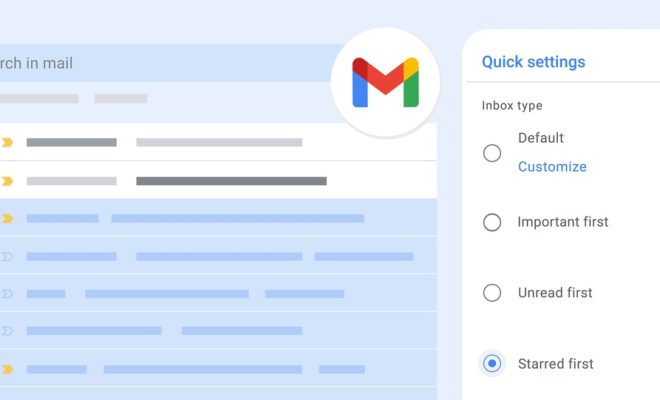
1. Inbox Type: Set your inbox type to “Priority Inbox.” This will help you focus on important emails first. Priority Inbox divides your inbox into sections, showing important and unread messages at the top.

2. Categories: Utilize inbox categories such as Primary, Social, Promotions, Updates, and Forums. Gmail can automatically sort incoming emails into these tabs, reducing clutter in your primary view.

3. Filters and Labels: Create custom filters to automatically label, archive, or forward emails based on specific criteria such as sender, subject line keywords, or containing attachments.

4. Undo Send: Enable ‘Undo Send’ in Gmail’s General Settings. You can set a cancellation period of 5 to 30 seconds after sending an email—a lifesaver for those moments when you spot a typo just as you hit send.

5. Conversation View: If you prefer to see all emails in a thread as one conversation rather than individual messages scattered through your inbox, ensure ‘Conversation view’ is turned on in the General Settings.

6. Nudges: Turn on ‘Nudges’, which will remind you to follow up on emails you’ve sent that haven’t been replied to or prompt you to respond to emails that may have slipped through the cracks.

7. High-Priority Notifications: In the Gmail app settings on your phone, activate high-priority notifications to only receive alerts for crucial communications.

8. Send & Archive: Activate the ‘Send & Archive’ button in the General Settings to help clean up your inbox quickly as you reply to messages.

9. Desktop Notifications: Enable desktop notifications if you want immediate alerts when high-priority emails arrive while working on other tasks.

10. Smart Reply and Smart Compose: For faster responses and writing assistance, keep ‘Smart Reply’ and ‘Smart Compose’ features active as they suggest quick replies & predictive text based on your writing style.

11. Advanced Search & Operators: Get familiar with advanced search capabilities and search operators like “from:”, “to:”, “subject:”, and others for swift navigation through heavy email volume.

By implementing these settings adjustments within your Gmail account, you’ll enhance not only its functionality but also reclaim time in your day-to-day workflow. It’s about making sure that technology serves your needs effectively and efficiently, turning potential email overload into an organized system tailored just for you.

Previous Article

Star Wars: The 10 Best Live-Action Moments

Next Article

5 Tips For Creating The Best Minimalist ...

Matthew Lynch

Related articles More from author

  • Tech Support

    TechDrive Support: Best Leading Tech Support Company

    March 6, 2024
    By Matthew Lynch
  • Tech Support

    5 Best WordPress Ticket Systems for Better Customer Support

    March 12, 2024
    By Matthew Lynch
  • Tech Support

    The Best Google Calendar Shortcuts

    March 10, 2024
    By Matthew Lynch
  • Tech Support

    The Best Microsoft Word Templates

    March 9, 2024
    By Matthew Lynch
  • Tech Support

    10 Best AnyDesk Alternatives for Remote Access in 2024

    March 10, 2024
    By Matthew Lynch
  • Tech Support

    IoT Security: How Proxies Are Your Device’s Best Guardian

    March 29, 2024
    By Matthew Lynch

Search

Login & Registration

  • Register
  • Log in
  • Entries feed
  • Comments feed
  • WordPress.org

Newsletter

Signup for The Tech Edvocate Newsletter and have the latest in EdTech news and opinion delivered to your email address!

About Us

Since technology is not going anywhere and does more good than harm, adapting is the best course of action. That is where The Tech Edvocate comes in. We plan to cover the PreK-12 and Higher Education EdTech sectors and provide our readers with the latest news and opinion on the subject. From time to time, I will invite other voices to weigh in on important issues in EdTech. We hope to provide a well-rounded, multi-faceted look at the past, present, the future of EdTech in the US and internationally.

We started this journey back in June 2016, and we plan to continue it for many more years to come. I hope that you will join us in this discussion of the past, present and future of EdTech and lend your own insight to the issues that are discussed.

Newsletter

Signup for The Tech Edvocate Newsletter and have the latest in EdTech news and opinion delivered to your email address!

Contact Us

The Tech Edvocate
910 Goddin Street
Richmond, VA 23231
(601) 630-5238
[email protected]

Copyright © 2025 Matthew Lynch. All rights reserved.