The Tech Edvocate

Top Menu

  • Advertisement
  • Apps
  • Home Page
  • Home Page Five (No Sidebar)
  • Home Page Four
  • Home Page Three
  • Home Page Two
  • Home Tech2
  • Icons [No Sidebar]
  • Left Sidbear Page
  • Lynch Educational Consulting
  • My Account
  • My Speaking Page
  • Newsletter Sign Up Confirmation
  • Newsletter Unsubscription
  • Our Brands
  • Page Example
  • Privacy Policy
  • Protected Content
  • Register
  • Request a Product Review
  • Shop
  • Shortcodes Examples
  • Signup
  • Start Here
    • Governance
    • Careers
    • Contact Us
  • Terms and Conditions
  • The Edvocate
  • The Tech Edvocate Product Guide
  • Topics
  • Write For Us
  • Advertise

Main Menu

  • Start Here
    • Our Brands
    • Governance
      • Lynch Educational Consulting, LLC.
      • Dr. Lynch’s Personal Website
      • Careers
    • Write For Us
    • The Tech Edvocate Product Guide
    • Contact Us
    • Books
    • Edupedia
    • Post a Job
    • The Edvocate Podcast
    • Terms and Conditions
    • Privacy Policy
  • Topics
    • Assistive Technology
    • Child Development Tech
    • Early Childhood & K-12 EdTech
    • EdTech Futures
    • EdTech News
    • EdTech Policy & Reform
    • EdTech Startups & Businesses
    • Higher Education EdTech
    • Online Learning & eLearning
    • Parent & Family Tech
    • Personalized Learning
    • Product Reviews
  • Advertise
  • Tech Edvocate Awards
  • The Edvocate
  • Pedagogue
  • School Ratings

logo

The Tech Edvocate

  • Start Here
    • Our Brands
    • Governance
      • Lynch Educational Consulting, LLC.
      • Dr. Lynch’s Personal Website
        • My Speaking Page
      • Careers
    • Write For Us
    • The Tech Edvocate Product Guide
    • Contact Us
    • Books
    • Edupedia
    • Post a Job
    • The Edvocate Podcast
    • Terms and Conditions
    • Privacy Policy
  • Topics
    • Assistive Technology
    • Child Development Tech
    • Early Childhood & K-12 EdTech
    • EdTech Futures
    • EdTech News
    • EdTech Policy & Reform
    • EdTech Startups & Businesses
    • Higher Education EdTech
    • Online Learning & eLearning
    • Parent & Family Tech
    • Personalized Learning
    • Product Reviews
  • Advertise
  • Tech Edvocate Awards
  • The Edvocate
  • Pedagogue
  • School Ratings
  • Tribit FlyBuds C3 Earbuds: Premium Features at a Budget-Friendly Price

  • Is AuraCam Pro’s Emotional AI a Privacy Nightmare or Security Breakthrough?

  • Unprecedented: N-able’s Global Shutdown After 30+ Zero-Days Revealed

  • The Urgent Truth: Your AI Tools for Financial Advisors Could Be a Compliance Nightmare

  • Unmasking the Troubling Truth About EU’s Digital Omnibus and Your Data

  • Outrageous: Your US Car Insurance 2026 Bill Is About to Explode – Here’s Why

  • Uncovering the Truth: Are AI Spending Concerns About to Tank Your Portfolio?

  • The Silent Revolution: How AI Property Valuation Is Quietly Reshaping Real Estate

  • The Astonishing Truth: Why Your Dream Car Is Now a $52,000 Illusion

  • Toxic Algorithms: Why Your Bank’s AI Could Cost You Everything

Tech Advice
Home›Tech Advice›iPad Air: How to set up and use Apple’s new Touch ID fingerprint sensor

iPad Air: How to set up and use Apple’s new Touch ID fingerprint sensor
By Matthew Lynch
July 14, 2023
0
Spread the love

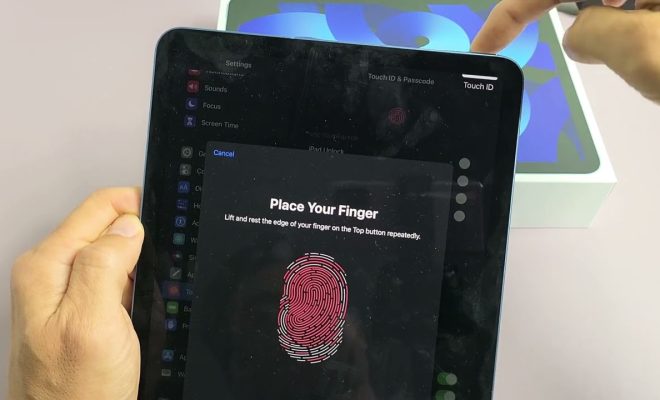
Apple’s iPad Air has gained an exciting new feature – the Touch ID fingerprint sensor. The Touch ID sensor allows users to unlock their device and make secure payments with just a touch of a finger. This article will walk you through setting up and using the Touch ID feature on your iPad Air.

Setting Up Touch ID on Your iPad Air

1. Turn on your iPad Air, if it is not already on, and locate the Touch ID button at the top-right corner of the device.

2. Go to the Settings app on your iPad Air and tap “Touch ID & Passcode” from the list of options.

3. You will be prompted to enter your device passcode. If you haven’t set up a passcode yet, do so now by following the on-screen instructions.

4. Once you’ve entered your passcode, tap “Add a Fingerprint” to set up your first fingerprint for Touch ID.

5. Place your finger (usually thumb or index finger) on the Touch ID button, ensuring that the entire surface of your finger covers the button.

6. As soon as you feel a slight vibration, lift your finger and place it back down again, slightly shifting its position each time to ensure that all parts of your fingerprint are captured.

7. Once the capturing process is complete, you will be prompted to adjust your grip to capture the edges of your fingerprint. Repeat step 6 for capturing the edges of your fingerprint.

8. When you have successfully completed the setup process, tap “Continue” to proceed. You can add additional fingerprints by tapping “Add Another Fingerprint” and following steps 5-7 again.

How to Use Touch ID

1. Unlocking Your iPad Air: To unlock your iPad using Touch ID, simply press down on the Touch ID button with a registered finger when your device screen is turned on. You will feel a slight vibration, and your iPad Air will unlock immediately.

2. Secure Purchases: To utilize Touch ID for making App Store or iTunes purchases, go to Settings, and then tap “Touch ID & Passcode.” From there, toggle the switch on for both “iTunes & App Store” and “Apple Pay.” After you set this up, you can use your fingerprint to authenticate purchases from supported apps and websites.

3. Password Autofill: Touch ID also works with password auto-fill for apps and websites that support this feature. When prompted to enter a saved password, tap the password field to display a “Use Touch ID” prompt. Simply press down on the Touch ID button to authenticate.

4. Third-Party Apps: Many third-party apps now support Touch ID integration for added security. Check your favorite apps’ settings menus to see if they offer Touch ID authentication.

By setting up and using Apple’s new Touch ID fingerprint sensor on your iPad Air, you can enjoy added convenience and security in your daily interactions with your device. The future of device access is at your fingertips!


Previous Article

iPad 10th Gen Review: Better Camera, but ...

Next Article

Reasons to pick the iPad Pro over ...

Matthew Lynch

Related articles More from author

  • Tech Advice

    13 Amazon Coffee Makers for Your Best Brew

    August 11, 2023
    By Matthew Lynch
  • Tech Advice

    Lego Star Wars: The Skywalker Saga Lets You Roam All Over 9 Movies and More

    July 17, 2023
    By Matthew Lynch
  • Tech Advice

    11 Best Trading Platforms for Day Trading

    October 20, 2023
    By Matthew Lynch
  • Tech Advice

    Car Insurance That Takes Checks: Everything You Need to Know

    August 18, 2023
    By Matthew Lynch
  • Tech Advice

    5 ways to prevent hearing loss while using headphones

    July 5, 2023
    By Matthew Lynch
  • Tech Advice

    Apple iPhone 6 vs. iPhone 6 Plus: What’s the difference?

    July 17, 2023
    By Matthew Lynch

Search

Login & Registration

  • Log in
  • Entries feed
  • Comments feed
  • WordPress.org

Newsletter

Signup for The Tech Edvocate Newsletter and have the latest in EdTech news and opinion delivered to your email address!

About Us

Since technology is not going anywhere and does more good than harm, adapting is the best course of action. That is where The Tech Edvocate comes in. We plan to cover the PreK-12 and Higher Education EdTech sectors and provide our readers with the latest news and opinion on the subject. From time to time, I will invite other voices to weigh in on important issues in EdTech. We hope to provide a well-rounded, multi-faceted look at the past, present, the future of EdTech in the US and internationally.

We started this journey back in June 2016, and we plan to continue it for many more years to come. I hope that you will join us in this discussion of the past, present and future of EdTech and lend your own insight to the issues that are discussed.

Newsletter

Signup for The Tech Edvocate Newsletter and have the latest in EdTech news and opinion delivered to your email address!

Contact Us

The Tech Edvocate
910 Goddin Street
Richmond, VA 23231
(601) 630-5238
[email protected]

Copyright © 2026 Matthew Lynch. All rights reserved.