The Tech Edvocate

Top Menu

  • Advertisement
  • Apps
  • Home Page
  • Home Page Five (No Sidebar)
  • Home Page Four
  • Home Page Three
  • Home Page Two
  • Home Tech2
  • Icons [No Sidebar]
  • Left Sidbear Page
  • Lynch Educational Consulting
  • My Account
  • My Speaking Page
  • Newsletter Sign Up Confirmation
  • Newsletter Unsubscription
  • Our Brands
  • Page Example
  • Privacy Policy
  • Protected Content
  • Register
  • Request a Product Review
  • Shop
  • Shortcodes Examples
  • Signup
  • Start Here
    • Governance
    • Careers
    • Contact Us
  • Terms and Conditions
  • The Edvocate
  • The Tech Edvocate Product Guide
  • Topics
  • Write For Us
  • Advertise

Main Menu

  • Start Here
    • Our Brands
    • Governance
      • Lynch Educational Consulting, LLC.
      • Dr. Lynch’s Personal Website
      • Careers
    • Write For Us
    • The Tech Edvocate Product Guide
    • Contact Us
    • Books
    • Edupedia
    • Post a Job
    • The Edvocate Podcast
    • Terms and Conditions
    • Privacy Policy
  • Topics
    • Assistive Technology
    • Child Development Tech
    • Early Childhood & K-12 EdTech
    • EdTech Futures
    • EdTech News
    • EdTech Policy & Reform
    • EdTech Startups & Businesses
    • Higher Education EdTech
    • Online Learning & eLearning
    • Parent & Family Tech
    • Personalized Learning
    • Product Reviews
  • Advertise
  • Tech Edvocate Awards
  • The Edvocate
  • Pedagogue
  • School Ratings

logo

The Tech Edvocate

  • Start Here
    • Our Brands
    • Governance
      • Lynch Educational Consulting, LLC.
      • Dr. Lynch’s Personal Website
        • My Speaking Page
      • Careers
    • Write For Us
    • The Tech Edvocate Product Guide
    • Contact Us
    • Books
    • Edupedia
    • Post a Job
    • The Edvocate Podcast
    • Terms and Conditions
    • Privacy Policy
  • Topics
    • Assistive Technology
    • Child Development Tech
    • Early Childhood & K-12 EdTech
    • EdTech Futures
    • EdTech News
    • EdTech Policy & Reform
    • EdTech Startups & Businesses
    • Higher Education EdTech
    • Online Learning & eLearning
    • Parent & Family Tech
    • Personalized Learning
    • Product Reviews
  • Advertise
  • Tech Edvocate Awards
  • The Edvocate
  • Pedagogue
  • School Ratings
  • Autonomous Ransomware AI Agents Are Here — And They’re Targeting Your Power Grid

  • Unprecedented: This One Thing Is Crushing Major AI Investments

  • Rotirile gratuite fără depunere: activarea rundelor și creditarea câștigurilor

  • The Astonishing Reason Millions Are Ditching Old Finance Education for This New Method

  • Why Your Bank Account Needs These 7 Gamified Money Apps Right Now

  • Why Millions Are Finally Beating Debt Thanks to Gamification in Personal Finance Apps

  • 5.7 Million Students Exposed: Why This Breach Demands Immediate Legal Action

  • The Brutal Truth About EdTech Breaches: 8 Defenses Schools Need NOW

  • Millions of Student Records Exposed: The Scandalous ETS Data Breach

  • Amazon’s Secret Weapon: Why Its Workforce Strategy Crushes eBay’s Layoff Cycle

Tech Advice
Home›Tech Advice›Invisible files with “._” prefix are created on some shared volumes and external disks

Invisible files with “._” prefix are created on some shared volumes and external disks
By Matthew Lynch
July 14, 2023
0
Spread the love

Introduction

Have you ever noticed a peculiar, invisible file with a “._” prefix appearing on your shared volumes or external disks? These files can be puzzling, and their presence raises questions about their origin and purpose. In this article, we will dive deep into the world of these invisible files and shed light on why they are created on some shared volumes and external disks.

What are Invisible Files with “._” Prefix?

These invisible files with names that start with “._” are commonly referred to as dot-underscore files or hidden files. Their purpose is to store additional metadata associated with the primary file. Apple’s macOS and OS X operating systems create these files when a user interacts with a non-native file system (such as a shared volume or an external drive formatted in a different format than HFS+ or APFS).

Why are they created?

When using an Apple computer, Mac users experience a smooth and seamless interaction with local files stored within the macOS or OS X native file systems (HFS+ or APFS). These systems have inherent mechanisms to store resource fork data and other metadata. However, when interacting with non-native file systems such as FAT32, exFAT, or NTFS (commonly found in shared volumes and external disks), macOS cannot utilize the same techniques to store this metadata.

To work around this limitation, the operating system creates these dot-underscore files when you interact with non-native storage locations. So it is essentially a way to maintain compatibility between macOS/OS X native features and external storage devices that use different file system formats.

What information do these files contain?

The dot-underscore files contain resource fork data and other metadata associated with the primary file. This additional information can include extended attributes, Finder information, custom icons, preview images, among others.
Should you be concerned about these files?

Although they might seem intimidating, these dot-underscore files are typically harmless and have little to no impact on the overall performance of your system or the integrity of your data. However, if you are sharing files with users on non-Apple devices, these hidden files can become visible and possibly cause confusion.

How to prevent their creation or remove existing ones?

If you want to avoid creating these files when working with shared volumes or external disks, one solution is to use a third-party application that suppresses their creation, such as BlueHarvest. Alternatively, you can also format your external disk in a macOS-native format (HFS+ or APFS) if it will only be used with Apple devices.

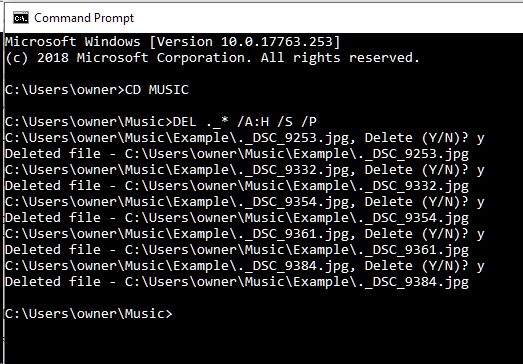
In case these invisible files have already been created and are causing issues for other users, you can remove them using Terminal commands like “find” and “rm” (remove). However, be cautious when using these commands as it’s possible to accidentally delete important files if not done correctly.

Conclusion

To sum up, invisible files with “._” prefix are created by macOS or OS X on shared volumes and external disks formatted in non-native file systems as a way to store metadata associated with the primary files. They serve an essential purpose in maintaining compatibility between different storage systems and help preserve the native functionality of macOS/OS X. While generally harmless, if they become a nuisance or cause confusion when sharing data with others, there are ways to prevent their creation or remove them safely.


Previous Article

Interchanging MacBook (60W), MacBook Pro (85W) power ...

Next Article

iPad 10th Gen Review: Better Camera, but ...

Matthew Lynch

Related articles More from author

  • Tech Advice

    What to Do If You Find Out You’re Pregnant: A Comprehensive Guide

    July 7, 2023
    By Matthew Lynch
  • Tech Advice

    Can I Change My Social Security Number? – Understanding the Exceptions and Reasons for a New SSN

    July 11, 2023
    By Matthew Lynch
  • Tech Advice

    A Visual Guide to Your Daily Servings of Vegetables and Fruits

    July 7, 2023
    By Matthew Lynch
  • Tech Advice

    The Best Ultraportable Laptops for 2023

    July 19, 2023
    By Matthew Lynch
  • Tech Advice

    The 7 Best Plant-Based Chicken Nuggets According to Vegetarians and Omnivores

    July 7, 2023
    By Matthew Lynch
  • Tech Advice

    2024 Ford Ranger Lariat 4×2 SuperCrew 5 ft. box 128 in. WB Truck: Trim Details, Reviews, Prices, Specs, and ...

    August 21, 2023
    By Matthew Lynch

Search

Login & Registration

  • Log in
  • Entries feed
  • Comments feed
  • WordPress.org

Newsletter

Signup for The Tech Edvocate Newsletter and have the latest in EdTech news and opinion delivered to your email address!

About Us

Since technology is not going anywhere and does more good than harm, adapting is the best course of action. That is where The Tech Edvocate comes in. We plan to cover the PreK-12 and Higher Education EdTech sectors and provide our readers with the latest news and opinion on the subject. From time to time, I will invite other voices to weigh in on important issues in EdTech. We hope to provide a well-rounded, multi-faceted look at the past, present, the future of EdTech in the US and internationally.

We started this journey back in June 2016, and we plan to continue it for many more years to come. I hope that you will join us in this discussion of the past, present and future of EdTech and lend your own insight to the issues that are discussed.

Newsletter

Signup for The Tech Edvocate Newsletter and have the latest in EdTech news and opinion delivered to your email address!

Contact Us

The Tech Edvocate
910 Goddin Street
Richmond, VA 23231
(601) 630-5238
[email protected]

Copyright © 2026 Matthew Lynch. All rights reserved.