The Tech Edvocate

Top Menu

  • Advertisement
  • Apps
  • Home Page
  • Home Page Five (No Sidebar)
  • Home Page Four
  • Home Page Three
  • Home Page Two
  • Home Tech2
  • Icons [No Sidebar]
  • Left Sidbear Page
  • Lynch Educational Consulting
  • My Account
  • My Speaking Page
  • Newsletter Sign Up Confirmation
  • Newsletter Unsubscription
  • Our Brands
  • Page Example
  • Privacy Policy
  • Protected Content
  • Register
  • Request a Product Review
  • Shop
  • Shortcodes Examples
  • Signup
  • Start Here
    • Governance
    • Careers
    • Contact Us
  • Terms and Conditions
  • The Edvocate
  • The Tech Edvocate Product Guide
  • Topics
  • Write For Us
  • Advertise

Main Menu

  • Start Here
    • Our Brands
    • Governance
      • Lynch Educational Consulting, LLC.
      • Dr. Lynch’s Personal Website
      • Careers
    • Write For Us
    • The Tech Edvocate Product Guide
    • Contact Us
    • Books
    • Edupedia
    • Post a Job
    • The Edvocate Podcast
    • Terms and Conditions
    • Privacy Policy
  • Topics
    • Assistive Technology
    • Child Development Tech
    • Early Childhood & K-12 EdTech
    • EdTech Futures
    • EdTech News
    • EdTech Policy & Reform
    • EdTech Startups & Businesses
    • Higher Education EdTech
    • Online Learning & eLearning
    • Parent & Family Tech
    • Personalized Learning
    • Product Reviews
  • Advertise
  • Tech Edvocate Awards
  • The Edvocate
  • Pedagogue
  • School Ratings

logo

The Tech Edvocate

  • Start Here
    • Our Brands
    • Governance
      • Lynch Educational Consulting, LLC.
      • Dr. Lynch’s Personal Website
        • My Speaking Page
      • Careers
    • Write For Us
    • The Tech Edvocate Product Guide
    • Contact Us
    • Books
    • Edupedia
    • Post a Job
    • The Edvocate Podcast
    • Terms and Conditions
    • Privacy Policy
  • Topics
    • Assistive Technology
    • Child Development Tech
    • Early Childhood & K-12 EdTech
    • EdTech Futures
    • EdTech News
    • EdTech Policy & Reform
    • EdTech Startups & Businesses
    • Higher Education EdTech
    • Online Learning & eLearning
    • Parent & Family Tech
    • Personalized Learning
    • Product Reviews
  • Advertise
  • Tech Edvocate Awards
  • The Edvocate
  • Pedagogue
  • School Ratings
  • Why Millions Are Ditching Degrees for These Microcredential Programs

  • The Astonishing Truth: Why Microcredentials Could Be Your Career’s Secret Weapon

  • Why Employers Are Paying 15% More for This One Credential – Not Your Degree

  • 7 Critical Steps to Safeguard Students When Implementing AI in Your Classroom

  • The Astonishing Truth: Your School’s Data Security Might Be a Time Bomb – 7 LMS Platforms That Are Actually Safe for K-12

  • The Troubling Truth: AI in Education Could Be Compromising Your Child’s Privacy

  • Revealed: The Brutal Truth About IronCircle vs Other Cybersecurity Boot Camps

  • This One Thing About University Boot Camps Is Infuriating — Don’t Fall For It

  • Revealed: The Brutal Truth About University Boot Camp Debt

  • Revealed: The 7 Tools EdTech Pros Are Using to Dominate Remote Work in 2026

Tech Advice
Home›Tech Advice›Intel Compute Stick Review: The Little PC That Almost Could

Intel Compute Stick Review: The Little PC That Almost Could
By Matthew Lynch
July 12, 2023
0
Spread the love

When it comes to portable computing, most of us think about laptops or maybe even smartphones and tablets for on-the-go productivity. However, Intel has introduced a unique product that aims to revolutionize the idea of portable computing: the Intel Compute Stick. In this review, we will dive into the pros and cons of this little device and find out if it delivers on its promises.

Design and Portability

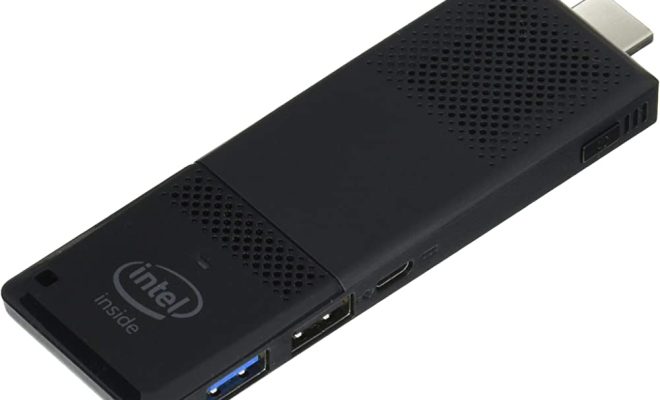
The Intel Compute Stick is an ultra-compact PC that comes in a form factor slightly larger than a typical USB flash drive. It has an HDMI connector at one end, which you plug directly into any HDMI-compatible display (such as TVs or monitors). This makes it incredibly portable and easy to carry around, even in your pocket.

Performance

Equipped with an Intel Atom processor, this mini-computer is capable of handling most day-to-day tasks for basic users. While you shouldn’t expect lightning speeds or the ability to multitask extensively, it can easily handle web browsing, streaming videos and music, word processing, and other light tasks. However, if you’re planning on using it for heavy applications or gaming, you might want to skip it.

Connectivity

Connectivity-wise, the Intel Compute Stick has built-in WiFi and Bluetooth 4.0 support. This enables wireless internet access and compatibility with various peripherals such as keyboards and mice. Additionally, there’s a microSD card slot for extra storage, as well as a USB port for other devices.

User Experience

Setting up the Intel Compute Stick is fairly straightforward – all you need is an HDMI-compatible display and an external input device such as a wireless keyboard or mouse.

Running Windows 10 Home edition out of the box (a Linux Ubuntu version is also available), you get a familiar environment with access to Microsoft’s suite of applications. The user experience is smooth overall but can become sluggish when multiple applications are running simultaneously.

Limitations and Drawbacks

Of course, the Intel Compute Stick isn’t without its limitations. As mentioned earlier,
performance is adequate for everyday use, but it may falter when pushed to its limits. It also gets quite hot under heavy usage, which can cause it to throttle performance to maintain safe temperatures.

Another downside is the limited number of ports for peripherals. There is only one USB port available – this means that if you need more wired connections, you’ll have to invest in a separate USB hub.

Conclusion

In conclusion, the Intel Compute Stick is a fascinating little device that tries to redefine portable computing. While it certainly achieves portability and ease of use, its performance might not be sufficient for everyone’s needs – particularly those looking for more high-performance systems.

For basic users who need an ultra-portable PC for light tasks and media consumption, the Compute Stick is a solid option. However, if you require more powerful capabilities or multiple ports for peripherals, you may want to explore other alternatives in the market.


Previous Article

Instant Pot Max Review: A Disappointment for ...

Next Article

Apple iPhone 11 Review: The Best $700 ...

Matthew Lynch

Related articles More from author

  • Tech Advice

    Disney Plans to Clamp Down on Shared Streaming Passwords

    October 19, 2023
    By Matthew Lynch
  • Tech Advice

    Warranty for Kia: Everything You Need to Know

    August 21, 2023
    By Matthew Lynch
  • Tech Advice

    Why FPS, frames per second, and frame rate matter for Xbox, PlayStation, movies and TV

    July 24, 2023
    By Matthew Lynch
  • Tech Advice

    10 Most Popular Cars in America – Bestselling Cars in USA

    August 17, 2023
    By Matthew Lynch
  • Tech Advice

    JLab JBuds Air Sport Review

    July 20, 2023
    By Matthew Lynch
  • Tech Advice

    HP Pavilion 23 Review: A Sleek and Powerful All-in-One Desktop PC

    July 12, 2023
    By Matthew Lynch

Search

Login & Registration

  • Log in
  • Entries feed
  • Comments feed
  • WordPress.org

Newsletter

Signup for The Tech Edvocate Newsletter and have the latest in EdTech news and opinion delivered to your email address!

About Us

Since technology is not going anywhere and does more good than harm, adapting is the best course of action. That is where The Tech Edvocate comes in. We plan to cover the PreK-12 and Higher Education EdTech sectors and provide our readers with the latest news and opinion on the subject. From time to time, I will invite other voices to weigh in on important issues in EdTech. We hope to provide a well-rounded, multi-faceted look at the past, present, the future of EdTech in the US and internationally.

We started this journey back in June 2016, and we plan to continue it for many more years to come. I hope that you will join us in this discussion of the past, present and future of EdTech and lend your own insight to the issues that are discussed.

Newsletter

Signup for The Tech Edvocate Newsletter and have the latest in EdTech news and opinion delivered to your email address!

Contact Us

The Tech Edvocate
910 Goddin Street
Richmond, VA 23231
(601) 630-5238
[email protected]

Copyright © 2026 Matthew Lynch. All rights reserved.