The Tech Edvocate

Top Menu

  • Advertisement
  • Apps
  • Home Page
  • Home Page Five (No Sidebar)
  • Home Page Four
  • Home Page Three
  • Home Page Two
  • Home Tech2
  • Icons [No Sidebar]
  • Left Sidbear Page
  • Lynch Educational Consulting
  • My Account
  • My Speaking Page
  • Newsletter Sign Up Confirmation
  • Newsletter Unsubscription
  • Our Brands
  • Page Example
  • Privacy Policy
  • Protected Content
  • Register
  • Request a Product Review
  • Shop
  • Shortcodes Examples
  • Signup
  • Start Here
    • Governance
    • Careers
    • Contact Us
  • Terms and Conditions
  • The Edvocate
  • The Tech Edvocate Product Guide
  • Topics
  • Write For Us
  • Advertise

Main Menu

  • Start Here
    • Our Brands
    • Governance
      • Lynch Educational Consulting, LLC.
      • Dr. Lynch’s Personal Website
      • Careers
    • Write For Us
    • The Tech Edvocate Product Guide
    • Contact Us
    • Books
    • Edupedia
    • Post a Job
    • The Edvocate Podcast
    • Terms and Conditions
    • Privacy Policy
  • Topics
    • Assistive Technology
    • Child Development Tech
    • Early Childhood & K-12 EdTech
    • EdTech Futures
    • EdTech News
    • EdTech Policy & Reform
    • EdTech Startups & Businesses
    • Higher Education EdTech
    • Online Learning & eLearning
    • Parent & Family Tech
    • Personalized Learning
    • Product Reviews
  • Advertise
  • Tech Edvocate Awards
  • The Edvocate
  • Pedagogue
  • School Ratings

logo

The Tech Edvocate

  • Start Here
    • Our Brands
    • Governance
      • Lynch Educational Consulting, LLC.
      • Dr. Lynch’s Personal Website
        • My Speaking Page
      • Careers
    • Write For Us
    • The Tech Edvocate Product Guide
    • Contact Us
    • Books
    • Edupedia
    • Post a Job
    • The Edvocate Podcast
    • Terms and Conditions
    • Privacy Policy
  • Topics
    • Assistive Technology
    • Child Development Tech
    • Early Childhood & K-12 EdTech
    • EdTech Futures
    • EdTech News
    • EdTech Policy & Reform
    • EdTech Startups & Businesses
    • Higher Education EdTech
    • Online Learning & eLearning
    • Parent & Family Tech
    • Personalized Learning
    • Product Reviews
  • Advertise
  • Tech Edvocate Awards
  • The Edvocate
  • Pedagogue
  • School Ratings
  • A Visitors Guide to Long Beach (CA), United States

  • A Visitor’s Guide to Fresno (CA), United States

  • A Visitors Guide to New Orleans (LA), United States

  • A Visitors Guide to Sacramento (CA), United States

  • A Visitors Guide to Lyon, France

  • JisuLife Ultra2 Portable Fan: A Powerful Multi-Function Cooling Solution

  • A Visitors Guide to Viña del Mar, Chile

  • A Visitors Guide to Århus, Denmark

  • A Visitors Guide to Bakersfield (CA), United States

  • A Visitors Guide to Aurora (CO), United States

Tech Advice
Home›Tech Advice›If You’ve Ever Called 911 by Accident on Your iPhone, You Need to Read This

If You’ve Ever Called 911 by Accident on Your iPhone, You Need to Read This
By Matthew Lynch
July 17, 2023
0
Spread the love

Introduction:

Accidental calls to emergency services can cause unnecessary panic and waste valuable resources. With smartphones becoming increasingly prevalent, accidental 911 calls are becoming more common, especially from iPhones. This article will discuss the reasons behind these accidental calls and suggest measures you can take to avoid making them.

Reasons for Accidental 911 Calls:

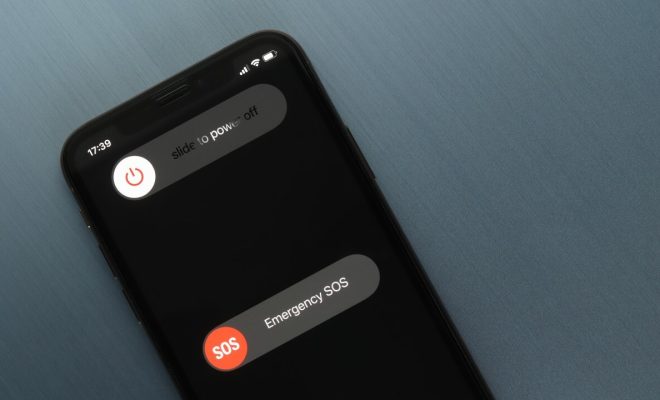
1. Emergency SOS feature: Apple introduced the Emergency SOS feature in iOS 10. When you quickly press your iPhone’s power button five times, it initiates a call to emergency services. While this feature is meant to help users in distress, it can be accidentally triggered during regular use or when retrieving the phone from a pocket or purse.

2. Siri activation: Another common reason is the unintentional activation of Siri – iPhone’s voice assistant. Sometimes, Siri might misunderstand your command and initiate a call to emergency services without your consent.

3. Apple Watch integration: Accidental calls can also be made through an Apple Watch when holding down the side button launches the Emergency SOS feature.

Preventive Measures:

To minimize the chances of unintentionally dialing 911 on your iPhone, consider taking these steps:

1. Disable the Emergency SOS auto-call feature: Go to Settings > Emergency SOS > Toggle off “Call with Side Button.” This will still allow you to contact emergency services by swiping on your screen, but it will not initiate a call automatically when pressing the power button.

2. Be mindful of using Siri: Accidental Siri activations often happen due to accidental long presses of the home (on older models) or side (on newer models) buttons. Ensure that you don’t unknowingly press these buttons, or firmly instruct Siri to cancel if she misunderstands your requests.

3. Manage Apple Watch settings: In the Watch app on your iPhone, navigate to My Watch > General > Emergency SOS and toggle off “Hold Side Button” to disable the feature.

What to Do If You Accidentally Dial 911:

Should you realize that you have accidentally dialed 911, don’t panic – simply stay on the line and explain the situation to the operator. They will appreciate your honesty and understand that such calls can happen accidentally.

Conclusion:

Accidental 911 calls from iPhones can be frustrating for both the user and emergency responders. By understanding the common reasons behind these calls and taking preventive measures, iPhone users can help reduce unnecessary stress on emergency services and themselves.


Previous Article

iPhone 13 review: Apple delivers a delightful ...

Next Article

If Your iPhone Fails to Create a ...

Matthew Lynch

Related articles More from author

  • Tech Advice

    How Much Available Credit Should I Have?

    September 7, 2023
    By Matthew Lynch
  • Tech Advice

    Cut the Rope 2 Review: A Great Mix of Challenge and Entertainment

    July 11, 2023
    By Matthew Lynch
  • Tech Advice

    2024 Chevrolet Trucks: What’s New for Colorado, Silverado, and More

    August 19, 2023
    By Matthew Lynch
  • Tech Advice

    Pixel Tablet Hands-On: Google’s Family Android Device, Dock Included

    July 14, 2023
    By Matthew Lynch
  • Tech Advice

    Fleet Cards for Small Business: How to Find the Best Fuel Card

    October 20, 2023
    By Matthew Lynch
  • Tech Advice

    Best Cars to Tow Behind an RV: Everything You Need to Know

    August 17, 2023
    By Matthew Lynch

Search

Login & Registration

  • Register
  • Log in
  • Entries feed
  • Comments feed
  • WordPress.org

Newsletter

Signup for The Tech Edvocate Newsletter and have the latest in EdTech news and opinion delivered to your email address!

About Us

Since technology is not going anywhere and does more good than harm, adapting is the best course of action. That is where The Tech Edvocate comes in. We plan to cover the PreK-12 and Higher Education EdTech sectors and provide our readers with the latest news and opinion on the subject. From time to time, I will invite other voices to weigh in on important issues in EdTech. We hope to provide a well-rounded, multi-faceted look at the past, present, the future of EdTech in the US and internationally.

We started this journey back in June 2016, and we plan to continue it for many more years to come. I hope that you will join us in this discussion of the past, present and future of EdTech and lend your own insight to the issues that are discussed.

Newsletter

Signup for The Tech Edvocate Newsletter and have the latest in EdTech news and opinion delivered to your email address!

Contact Us

The Tech Edvocate
910 Goddin Street
Richmond, VA 23231
(601) 630-5238
[email protected]

Copyright © 2025 Matthew Lynch. All rights reserved.