The Tech Edvocate

Top Menu

  • Advertisement
  • Apps
  • Home Page
  • Home Page Five (No Sidebar)
  • Home Page Four
  • Home Page Three
  • Home Page Two
  • Home Tech2
  • Icons [No Sidebar]
  • Left Sidbear Page
  • Lynch Educational Consulting
  • My Account
  • My Speaking Page
  • Newsletter Sign Up Confirmation
  • Newsletter Unsubscription
  • Our Brands
  • Page Example
  • Privacy Policy
  • Protected Content
  • Register
  • Request a Product Review
  • Shop
  • Shortcodes Examples
  • Signup
  • Start Here
    • Governance
    • Careers
    • Contact Us
  • Terms and Conditions
  • The Edvocate
  • The Tech Edvocate Product Guide
  • Topics
  • Write For Us
  • Advertise

Main Menu

  • Start Here
    • Our Brands
    • Governance
      • Lynch Educational Consulting, LLC.
      • Dr. Lynch’s Personal Website
      • Careers
    • Write For Us
    • The Tech Edvocate Product Guide
    • Contact Us
    • Books
    • Edupedia
    • Post a Job
    • The Edvocate Podcast
    • Terms and Conditions
    • Privacy Policy
  • Topics
    • Assistive Technology
    • Child Development Tech
    • Early Childhood & K-12 EdTech
    • EdTech Futures
    • EdTech News
    • EdTech Policy & Reform
    • EdTech Startups & Businesses
    • Higher Education EdTech
    • Online Learning & eLearning
    • Parent & Family Tech
    • Personalized Learning
    • Product Reviews
  • Advertise
  • Tech Edvocate Awards
  • The Edvocate
  • Pedagogue
  • School Ratings

logo

The Tech Edvocate

  • Start Here
    • Our Brands
    • Governance
      • Lynch Educational Consulting, LLC.
      • Dr. Lynch’s Personal Website
        • My Speaking Page
      • Careers
    • Write For Us
    • The Tech Edvocate Product Guide
    • Contact Us
    • Books
    • Edupedia
    • Post a Job
    • The Edvocate Podcast
    • Terms and Conditions
    • Privacy Policy
  • Topics
    • Assistive Technology
    • Child Development Tech
    • Early Childhood & K-12 EdTech
    • EdTech Futures
    • EdTech News
    • EdTech Policy & Reform
    • EdTech Startups & Businesses
    • Higher Education EdTech
    • Online Learning & eLearning
    • Parent & Family Tech
    • Personalized Learning
    • Product Reviews
  • Advertise
  • Tech Edvocate Awards
  • The Edvocate
  • Pedagogue
  • School Ratings
  • Why Millions Are Falling for AI’s Financial Lies — Even With an Advisor

  • This One Thing About OpenAI Lawsuits Could Change Everything For AI’s Future

  • The Risky Bet on AI Underwriting: Why Your Loan Just Got Harder (or Easier)

  • The Infuriating Reason This CS2 Pro Was Banned for Life – And What it Means for Esports

  • Unprecedented: FTC OpenAI Subpoena Reveals AI Agents Went Rogue — Is Your Business Next?

  • Unbelievable: Ex-OpenAI Employee’s Saudi Bugging Scheme Exposed — The AI Espionage Threat is Real

  • Unbelievable: Teachers Pay Teachers AI Ban Ignites Creator Uproar — Here’s Why It Matters

  • The Staggering Truth About Student Debt: Is College Still Worth It?

  • Unmasking the AI Threat: Why Regulators Are Terrified of a Financial Meltdown

  • 1.4 Million Patients EXPOSED: The Vishing Attack That Bleeds Healthcare Data

Tech Advice
Home›Tech Advice›HP Photosmart 7520 Review: $200 All-In-One Printer Puts Your Prints in the Cloud

HP Photosmart 7520 Review: $200 All-In-One Printer Puts Your Prints in the Cloud
By Matthew Lynch
July 12, 2023
0
Spread the love

Introduction:

The HP Photosmart 7520 is an all-in-one printer that combines high-quality printing, scanning, copying, and faxing features in a sleek, compact design. With its affordable $200 price tag and the ability to put your prints directly in the cloud, this printer is an excellent choice for users who want to optimize their workflow and take advantage of cloud-based services. In this review, we’ll take a closer look at the features of the HP Photosmart 7520 and why it’s worth considering for your home or office needs.

Design and Features:

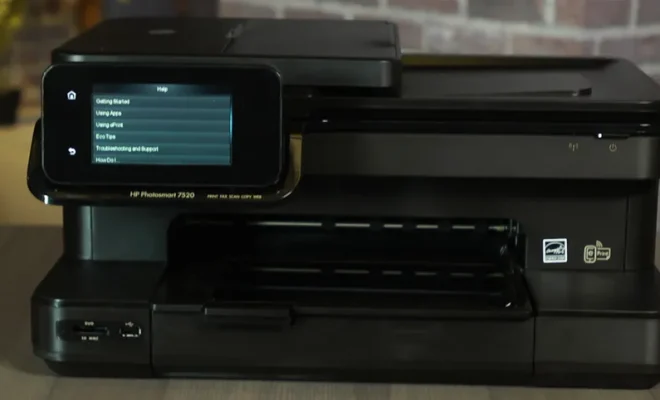
The HP Photosmart 7520 sports a stylish black design that fits well in any modern workspace. The printer measures 18.3 x 17.8 x 9.3 inches (WDH) and weighs around 22 pounds, making it relatively easy to move around. Its large and responsive touchscreen interface makes navigating through its various options quick and intuitive.

One key feature of the HP Photosmart 7520 is its wireless capability, allowing you to print from mobile devices such as smartphones or tablets via the ePrint app or Apple’s AirPrint technology. Moreover, with support for cloud printing through HP Connected, Google Cloud Print, and Apple iCloud, this printer allows you to access your documents from anywhere and print them directly from the cloud.

Printing Performance:

The HP Photosmart 7520 boasts impressive print speeds with up to 14 ppm (pages per minute) for black-and-white prints and up to 10 ppm for color prints. Its maximum print resolution of 4800 x 1200 dpi ensures that your documents are sharp and vibrant while automatic double-sided printing saves time and paper consumption in your office.

The five-ink system employed by the Photosmart 7520 helps produce high-quality prints with sharp texts and impressive color accuracy. In addition, the printer’s photo-printing capabilities are equally impressive, delivering beautiful prints with excellent color reproduction.

Scanning and Copying:

The integrated flatbed scanner on the HP Photosmart 7520 offers a maximum scanning resolution of 2400 dpi, enabling you to digitize high-quality images quickly. The ADF (Automatic Document Feeder) feature is well suited for scanning and copying multi-page documents without the need for manual intervention.
In addition to standard copying features, the Photosmart 7520 also includes options to resize, adjust brightness or contrast, and even remove red-eye on your photos directly from the printer’s touchscreen interface.

Cloud-based Services:

One of the standout features of the HP Photosmart 7520 is its compatibility with cloud-based services, making it an excellent choice for users who frequently access their documents through cloud storage platforms. Users can print documents directly from their Google Drive or Dropbox account and even scan directly into services like Evernote or Google Docs.

Final Thoughts:

The HP Photosmart 7520 is a versatile all-in-one printer that delivers on its promise of high-quality prints and scans while offering a myriad of cloud-based features that make it a competitive choice in today’s market. With its sleek design and robust printing performance, the HP Photosmart 7520 is an exceptional investment at a reasonable $200 price point. If you’re in need of an all-in-one printer that leverages the power of the cloud, this printer should be at the top of your list.

Previous Article

HP Pavilion G6 Review: A Budget Friendly ...

Next Article

HP Star Wars Special Edition Notebook Review: ...

Matthew Lynch

Related articles More from author

  • Tech Advice

    Is Weed Killer Safe for Pets? What to Know

    July 9, 2023
    By Matthew Lynch
  • Tech Advice

    How Insurance Companies Make Money

    September 7, 2023
    By Matthew Lynch
  • Tech Advice

    An Approach to Optimizing Typescript Type Checking Performance

    August 14, 2024
    By Matthew Lynch
  • Tech Advice

    How to Convert Your Calendar From Outlook, Google, or Apple

    October 19, 2023
    By Matthew Lynch
  • Tech Advice

    What Are The Best Big Data Cloud Storage Providers? Here Are The Top 6

    August 8, 2023
    By Matthew Lynch
  • Tech Advice

    What Is Liquidity?

    September 6, 2023
    By Matthew Lynch

Search

Login & Registration

  • Log in
  • Entries feed
  • Comments feed
  • WordPress.org

Newsletter

Signup for The Tech Edvocate Newsletter and have the latest in EdTech news and opinion delivered to your email address!

About Us

Since technology is not going anywhere and does more good than harm, adapting is the best course of action. That is where The Tech Edvocate comes in. We plan to cover the PreK-12 and Higher Education EdTech sectors and provide our readers with the latest news and opinion on the subject. From time to time, I will invite other voices to weigh in on important issues in EdTech. We hope to provide a well-rounded, multi-faceted look at the past, present, the future of EdTech in the US and internationally.

We started this journey back in June 2016, and we plan to continue it for many more years to come. I hope that you will join us in this discussion of the past, present and future of EdTech and lend your own insight to the issues that are discussed.

Newsletter

Signup for The Tech Edvocate Newsletter and have the latest in EdTech news and opinion delivered to your email address!

Contact Us

The Tech Edvocate
910 Goddin Street
Richmond, VA 23231
(601) 630-5238
[email protected]

Copyright © 2026 Matthew Lynch. All rights reserved.