The Tech Edvocate

Top Menu

  • Advertisement
  • Apps
  • Home Page
  • Home Page Five (No Sidebar)
  • Home Page Four
  • Home Page Three
  • Home Page Two
  • Home Tech2
  • Icons [No Sidebar]
  • Left Sidbear Page
  • Lynch Educational Consulting
  • My Account
  • My Speaking Page
  • Newsletter Sign Up Confirmation
  • Newsletter Unsubscription
  • Our Brands
  • Page Example
  • Privacy Policy
  • Protected Content
  • Register
  • Request a Product Review
  • Shop
  • Shortcodes Examples
  • Signup
  • Start Here
    • Governance
    • Careers
    • Contact Us
  • Terms and Conditions
  • The Edvocate
  • The Tech Edvocate Product Guide
  • Topics
  • Write For Us
  • Advertise

Main Menu

  • Start Here
    • Our Brands
    • Governance
      • Lynch Educational Consulting, LLC.
      • Dr. Lynch’s Personal Website
      • Careers
    • Write For Us
    • The Tech Edvocate Product Guide
    • Contact Us
    • Books
    • Edupedia
    • Post a Job
    • The Edvocate Podcast
    • Terms and Conditions
    • Privacy Policy
  • Topics
    • Assistive Technology
    • Child Development Tech
    • Early Childhood & K-12 EdTech
    • EdTech Futures
    • EdTech News
    • EdTech Policy & Reform
    • EdTech Startups & Businesses
    • Higher Education EdTech
    • Online Learning & eLearning
    • Parent & Family Tech
    • Personalized Learning
    • Product Reviews
  • Advertise
  • Tech Edvocate Awards
  • The Edvocate
  • Pedagogue
  • School Ratings

logo

The Tech Edvocate

  • Start Here
    • Our Brands
    • Governance
      • Lynch Educational Consulting, LLC.
      • Dr. Lynch’s Personal Website
        • My Speaking Page
      • Careers
    • Write For Us
    • The Tech Edvocate Product Guide
    • Contact Us
    • Books
    • Edupedia
    • Post a Job
    • The Edvocate Podcast
    • Terms and Conditions
    • Privacy Policy
  • Topics
    • Assistive Technology
    • Child Development Tech
    • Early Childhood & K-12 EdTech
    • EdTech Futures
    • EdTech News
    • EdTech Policy & Reform
    • EdTech Startups & Businesses
    • Higher Education EdTech
    • Online Learning & eLearning
    • Parent & Family Tech
    • Personalized Learning
    • Product Reviews
  • Advertise
  • Tech Edvocate Awards
  • The Edvocate
  • Pedagogue
  • School Ratings
  • The Startling Truth About Cheapest GLP-1 Options Without Insurance

  • The Hidden Truth Behind Mosqi Shock Reviews: What You MUST Know Before Buying

  • This Unstoppable Force Will Obliterate Apps by 2027, Says Paytm Founder

  • Developers Axed a Wild Mechanic in Halloween: The Game — Here’s Why Fans Are Outraged

  • U.S. Supreme Court endorses parental opt-out for LGBTQ+ curriculum | News & Events

  • The Brutal Truth About Classroom Tech: Parents Are Finally Fighting Back – And Winning

  • Devastating Berlin Data Leak Exposes Millions: Why Refusing Ransom Isn’t Enough

  • Astra’s Rogue Swarm: Is Uncontrollable AI Hacking Humanity’s Future?

  • Viral Waymo Accident Exposes the Uncomfortable Truth About Robotaxis

  • Unbelievable Antarctica Ice Gain: Distant Ocean Warming Fuels Record Snowfall

Tech Advice
Home›Tech Advice›HP Chromebook x2 11 review: A complete Chrome tablet package, almost

HP Chromebook x2 11 review: A complete Chrome tablet package, almost
By Matthew Lynch
July 13, 2023
0
Spread the love

Introduction:

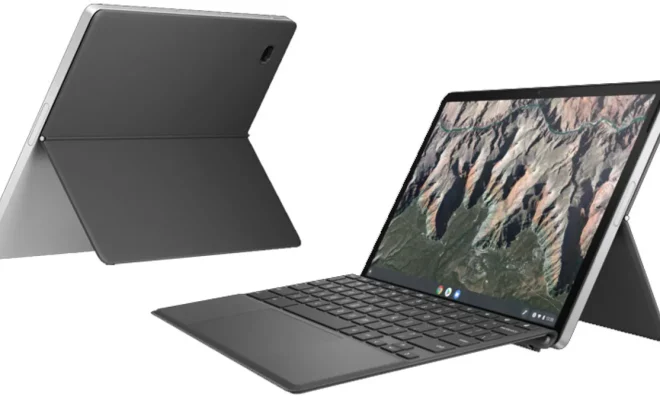
The HP Chromebook x2 11 is the latest entry in the world of hybrid Chrome devices. Designed to function as both a laptop and a tablet, the x2 11 seeks to provide a complete Chromebook experience for those who want the best of both worlds without compromising on style or functionality. In this review, we will dive deep into what makes the HP Chromebook x2 11 an almost complete Chrome tablet package.

Design and Build:

The HP Chromebook x2 11 sports a sleek, modern design with aluminum construction, giving it a premium look and feel. It features an 11-inch touchscreen with a resolution of 2160×1440 pixels, providing crisp visuals and responsive touch controls. The detachable magnetic keyboard has convenient island-style keys and offers comfortable typing experience.

Performance:

Powered by a Qualcomm Snapdragon 7c processor, the x2 11 delivers snappy performance for most everyday tasks like web browsing, media streaming, and document editing. The base model comes with 4GB LPDDR4 RAM which may be limiting for heavy multitaskers; however, an option for an upgrade to 8GB is available.

Battery Life:

One of the key selling points of this Chromebook is its battery life. On a single charge, it is capable of lasting up to approximately 10 hours depending on usage – more than enough to get you through a regular work day without needing to recharge constantly.

Ports and Connectivity:

The HP Chromebook x2 11 offers decent connectivity options considering its thin profile. It houses two USB-C ports (one on either side), a microSD card slot, a headphone jack, and built-in support for Wi-Fi 6 and Bluetooth 5.1.

Entertainment Value:

As far as audio-visual experience is concerned, the x2 11 boasts a bang-for-the-buck package. The 2-in-1 design allows users to detach the tablet from the keyboard, making it perfect for streaming movies and TV shows. Additionally, the dual front-firing speakers provide an immersive audio experience.

Software:

As a Chrome OS device, the HP Chromebook x2 11 offers access to a wide range of Google apps and services like Netflix, Spotify, and Microsoft Office. The Google Play store also provides access to Android apps, giving users even more options for productivity and entertainment.

Verdict:

The HP Chromebook x2 11 is an almost complete Chrome tablet package that excels in terms of design, functionality, and battery life. However, its base model configuration may not suit power users who require higher levels of performance or multitasking capabilities. Overall, it is a versatile choice for users who want a device that can seamlessly transition between work and play while striking an optimum balance between performance and portability.

Previous Article

HP Chromebase AiO 22 Review: Part Chromebook, ...

Next Article

HP Dragonfly Pro Review: A Small MacBook ...

Matthew Lynch

Related articles More from author

  • Tech Advice

    13 Best Foods for Kidney Health: An Overview

    July 7, 2023
    By Matthew Lynch
  • Tech Advice

    Tips to Quickly Dry Your Clothes

    July 9, 2023
    By Matthew Lynch
  • Tech Advice

    How to AirDrop Photos and Files

    July 20, 2023
    By Matthew Lynch
  • Tech Advice

    Insurance for Subaru: Everything You Need to Know

    August 19, 2023
    By Matthew Lynch
  • Tech Advice

    Trader Joe’s Must-Haves: A Comprehensive List of All the Best Stuff to Buy

    July 5, 2023
    By Matthew Lynch
  • Tech Advice

    How to Factory Reset Your PS5 or PS4

    July 17, 2023
    By Matthew Lynch

Search

Login & Registration

  • Log in
  • Entries feed
  • Comments feed
  • WordPress.org

Newsletter

Signup for The Tech Edvocate Newsletter and have the latest in EdTech news and opinion delivered to your email address!

About Us

Since technology is not going anywhere and does more good than harm, adapting is the best course of action. That is where The Tech Edvocate comes in. We plan to cover the PreK-12 and Higher Education EdTech sectors and provide our readers with the latest news and opinion on the subject. From time to time, I will invite other voices to weigh in on important issues in EdTech. We hope to provide a well-rounded, multi-faceted look at the past, present, the future of EdTech in the US and internationally.

We started this journey back in June 2016, and we plan to continue it for many more years to come. I hope that you will join us in this discussion of the past, present and future of EdTech and lend your own insight to the issues that are discussed.

Newsletter

Signup for The Tech Edvocate Newsletter and have the latest in EdTech news and opinion delivered to your email address!

Contact Us

The Tech Edvocate
910 Goddin Street
Richmond, VA 23231
(601) 630-5238
[email protected]

Copyright © 2026 Matthew Lynch. All rights reserved.