The Tech Edvocate

Top Menu

  • Advertisement
  • Apps
  • Home Page
  • Home Page Five (No Sidebar)
  • Home Page Four
  • Home Page Three
  • Home Page Two
  • Home Tech2
  • Icons [No Sidebar]
  • Left Sidbear Page
  • Lynch Educational Consulting
  • My Account
  • My Speaking Page
  • Newsletter Sign Up Confirmation
  • Newsletter Unsubscription
  • Our Brands
  • Page Example
  • Privacy Policy
  • Protected Content
  • Register
  • Request a Product Review
  • Shop
  • Shortcodes Examples
  • Signup
  • Start Here
    • Governance
    • Careers
    • Contact Us
  • Terms and Conditions
  • The Edvocate
  • The Tech Edvocate Product Guide
  • Topics
  • Write For Us
  • Advertise

Main Menu

  • Start Here
    • Our Brands
    • Governance
      • Lynch Educational Consulting, LLC.
      • Dr. Lynch’s Personal Website
      • Careers
    • Write For Us
    • The Tech Edvocate Product Guide
    • Contact Us
    • Books
    • Edupedia
    • Post a Job
    • The Edvocate Podcast
    • Terms and Conditions
    • Privacy Policy
  • Topics
    • Assistive Technology
    • Child Development Tech
    • Early Childhood & K-12 EdTech
    • EdTech Futures
    • EdTech News
    • EdTech Policy & Reform
    • EdTech Startups & Businesses
    • Higher Education EdTech
    • Online Learning & eLearning
    • Parent & Family Tech
    • Personalized Learning
    • Product Reviews
  • Advertise
  • Tech Edvocate Awards
  • The Edvocate
  • Pedagogue
  • School Ratings

logo

The Tech Edvocate

  • Start Here
    • Our Brands
    • Governance
      • Lynch Educational Consulting, LLC.
      • Dr. Lynch’s Personal Website
        • My Speaking Page
      • Careers
    • Write For Us
    • The Tech Edvocate Product Guide
    • Contact Us
    • Books
    • Edupedia
    • Post a Job
    • The Edvocate Podcast
    • Terms and Conditions
    • Privacy Policy
  • Topics
    • Assistive Technology
    • Child Development Tech
    • Early Childhood & K-12 EdTech
    • EdTech Futures
    • EdTech News
    • EdTech Policy & Reform
    • EdTech Startups & Businesses
    • Higher Education EdTech
    • Online Learning & eLearning
    • Parent & Family Tech
    • Personalized Learning
    • Product Reviews
  • Advertise
  • Tech Edvocate Awards
  • The Edvocate
  • Pedagogue
  • School Ratings
  • RayNeo iO Smart Glasses: A Comprehensive Review

  • Glo Skin Beauty: The Aesthetician-Backed Brand Taking 25% Off for October Prime Day

  • The Shocking Truth: ESG Training Programs Are Quietly Reshaping Your Career Path

  • Why Millions of People Are Switching to These Green Energy Certifications Right Now

  • The green skills gap in 2026: How to address this growing problem

  • The Shocking Truth: Your Degree Won’t Land You the Best IT Jobs in 2026

  • The Brutal Truth About Degrees: Why Micro-Credentials Are Quietly Dominating Careers by 2026

  • Why 96% of Employers Now Prefer Skills Over Degrees: The Micro-Credential Revolution

  • This Crucial Mistake With AI Is Stunting Student Minds: Here’s How to Fix It

  • The AI ‘Cognitive Surrender’ Crisis: 7 Tools Every Educator Needs NOW

Assistive Technology
Home›Assistive Technology›How to Write a Morse Code Translator in Python

How to Write a Morse Code Translator in Python
By Matthew Lynch
June 14, 2023
0
Spread the love

Morse code became one of the earliest forms of long-distance communication in the world. Developed in the 1830s and 1840s, it is a system of communication using dots and dashes to represent letters, numbers, and punctuation. With the development of radio communication in the 20th century, Morse code became an integral part of long-distance communication among pilots, sailors, and radio operators. Writing a Morse code translator in Python is relatively easy, and in this article, we will discuss the steps to create one.

  1. Understanding Morse Code

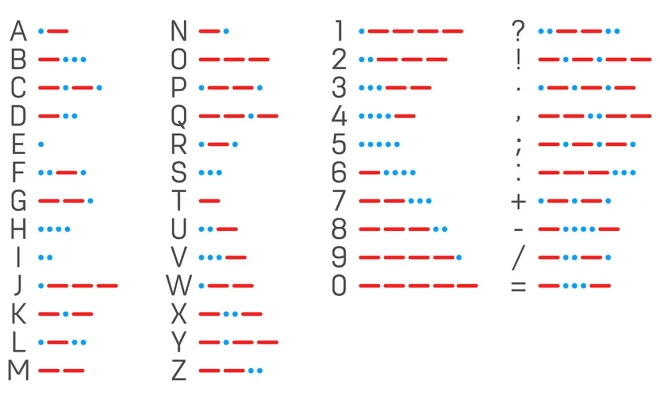
The first step in writing a Morse code translator in Python is to understand the Morse code. Morse code consists of dots and dashes, where the dots represent a short signal, and the dashes represent a long signal. Each letter, number, and punctuation mark is represented by a unique sequence of dots and dashes.

The International Morse code consists of 26 letters, 10 numbers, and some special characters, such as the period, comma, and question mark. You can find a table of the Morse code symbols online or in books.

  1. Creating a Python Dictionary

Once you understand the Morse code symbols, the next step is to create a Python dictionary that can translate the dots and dashes to their corresponding letters, numbers, and punctuation marks. To create a dictionary, use the curly braces {} and separate each key-value pair with a colon (:). Here is an example dictionary:

“`

morse_code = {

‘.-‘: ‘a’,

‘-…’: ‘b’,

‘-.-.’: ‘c’,

‘-..’: ‘d’,

‘.’: ‘e’,

‘..-.’: ‘f’,

‘–.’: ‘g’,

‘….’: ‘h’,

‘..’: ‘i’,

‘.—‘: ‘j’,

‘-.-‘: ‘k’,

‘.-..’: ‘l’,

‘–‘: ‘m’,

‘-.’: ‘n’,

‘—‘: ‘o’,

‘.–.’: ‘p’,

‘–.-‘: ‘q’,

‘.-.’: ‘r’,

‘…’: ‘s’,

‘-‘: ‘t’,

‘..-‘: ‘u’,

‘…-‘: ‘v’,

‘.–‘: ‘w’,

‘-..-‘: ‘x’,

‘-.–‘: ‘y’,

‘–..’: ‘z’,

‘—–‘: ‘0’,

‘.—-‘: ‘1’,

‘..—‘: ‘2’,

‘…–‘: ‘3’,

‘….-‘: ‘4’,

‘…..’: ‘5’,

‘-….’: ‘6’,

‘–…’: ‘7’,

‘—..’: ‘8’,

‘—-.’: ‘9’,

‘.-.-.-‘: ‘.’,

‘–..–‘: ‘,’,

‘..–..’: ‘?’,

‘-..-.’: ‘/’

}

“`

In the above example, each key is a string of dots and dashes, and each value is a letter, number, or punctuation mark.

  1. Writing the Code

With the dictionary created, writing the actual code for the Morse code translator is straightforward. Here is an example function that takes a string of dots and dashes as input and returns the corresponding text:

“`

def morse_to_text(morse_code, morse_string):

text = ”

words = morse_string.split(‘ / ‘)

for word in words:

letters = word.split(‘ ‘)

for letter in letters:

if letter in morse_code:

text += morse_code[letter]

text += ‘ ‘

return text

“`

The function takes two arguments – the Morse code dictionary and the Morse code string. The string is first split by the space character to get the individual words. Then, each word is split again by the ‘/’ character to separate the words. Finally, each letter is looked up in the dictionary, and the corresponding text is appended to the output string.

  1. Testing the Code

You can test the Morse code translator with some Morse code input, such as “.-. .-.. .- – / – .. … … – ..- –.”, which translates to “ralph must too”. To test the code, you can use the following lines:

“`

morse_code = {

# your dictionary here

}

morse_input = “.- .-.. .- — / — .. … … ..- -.”

text_output = morse_to_text(morse_code, morse_input)

print(text_output)

“`

When you run the above lines, you should see the output “ralph must too” on your screen.

Previous Article

How to Download Vudu on Fire Stick

Next Article

All About Over-The-Air Antennas (OTA)

Matthew Lynch

Related articles More from author

  • Assistive Technology

    How to Check RAM and Motherboard Compatibility

    June 8, 2023
    By Matthew Lynch
  • Assistive Technology

    What Is Mail Drop? How to Use Mail Drop on iPhone and Mac

    June 6, 2023
    By Matthew Lynch
  • Assistive Technology

    How to Easily Share Your iPhone’s Audio to Two Sets of AirPods or Beats

    July 15, 2023
    By Matthew Lynch
  • Assistive Technology

    How to Disable the News and Interests Taskbar Widget in Windows 11

    June 14, 2023
    By Matthew Lynch
  • Assistive Technology

    How to Turn Off High Contrast Mode on Windows

    June 22, 2023
    By Matthew Lynch
  • Assistive Technology

    The Most Common Hardware Problems on Android Phones and How to Fix Them

    June 5, 2023
    By Matthew Lynch

Search

Login & Registration

  • Log in
  • Entries feed
  • Comments feed
  • WordPress.org

Newsletter

Signup for The Tech Edvocate Newsletter and have the latest in EdTech news and opinion delivered to your email address!

About Us

Since technology is not going anywhere and does more good than harm, adapting is the best course of action. That is where The Tech Edvocate comes in. We plan to cover the PreK-12 and Higher Education EdTech sectors and provide our readers with the latest news and opinion on the subject. From time to time, I will invite other voices to weigh in on important issues in EdTech. We hope to provide a well-rounded, multi-faceted look at the past, present, the future of EdTech in the US and internationally.

We started this journey back in June 2016, and we plan to continue it for many more years to come. I hope that you will join us in this discussion of the past, present and future of EdTech and lend your own insight to the issues that are discussed.

Newsletter

Signup for The Tech Edvocate Newsletter and have the latest in EdTech news and opinion delivered to your email address!

Contact Us

The Tech Edvocate
910 Goddin Street
Richmond, VA 23231
(601) 630-5238
[email protected]

Copyright © 2026 Matthew Lynch. All rights reserved.