The Tech Edvocate

Top Menu

  • Advertisement
  • Apps
  • Home Page
  • Home Page Five (No Sidebar)
  • Home Page Four
  • Home Page Three
  • Home Page Two
  • Home Tech2
  • Icons [No Sidebar]
  • Left Sidbear Page
  • Lynch Educational Consulting
  • My Account
  • My Speaking Page
  • Newsletter Sign Up Confirmation
  • Newsletter Unsubscription
  • Our Brands
  • Page Example
  • Privacy Policy
  • Protected Content
  • Register
  • Request a Product Review
  • Shop
  • Shortcodes Examples
  • Signup
  • Start Here
    • Governance
    • Careers
    • Contact Us
  • Terms and Conditions
  • The Edvocate
  • The Tech Edvocate Product Guide
  • Topics
  • Write For Us
  • Advertise

Main Menu

  • Start Here
    • Our Brands
    • Governance
      • Lynch Educational Consulting, LLC.
      • Dr. Lynch’s Personal Website
      • Careers
    • Write For Us
    • The Tech Edvocate Product Guide
    • Contact Us
    • Books
    • Edupedia
    • Post a Job
    • The Edvocate Podcast
    • Terms and Conditions
    • Privacy Policy
  • Topics
    • Assistive Technology
    • Child Development Tech
    • Early Childhood & K-12 EdTech
    • EdTech Futures
    • EdTech News
    • EdTech Policy & Reform
    • EdTech Startups & Businesses
    • Higher Education EdTech
    • Online Learning & eLearning
    • Parent & Family Tech
    • Personalized Learning
    • Product Reviews
  • Advertise
  • Tech Edvocate Awards
  • The Edvocate
  • Pedagogue
  • School Ratings

logo

The Tech Edvocate

  • Start Here
    • Our Brands
    • Governance
      • Lynch Educational Consulting, LLC.
      • Dr. Lynch’s Personal Website
        • My Speaking Page
      • Careers
    • Write For Us
    • The Tech Edvocate Product Guide
    • Contact Us
    • Books
    • Edupedia
    • Post a Job
    • The Edvocate Podcast
    • Terms and Conditions
    • Privacy Policy
  • Topics
    • Assistive Technology
    • Child Development Tech
    • Early Childhood & K-12 EdTech
    • EdTech Futures
    • EdTech News
    • EdTech Policy & Reform
    • EdTech Startups & Businesses
    • Higher Education EdTech
    • Online Learning & eLearning
    • Parent & Family Tech
    • Personalized Learning
    • Product Reviews
  • Advertise
  • Tech Edvocate Awards
  • The Edvocate
  • Pedagogue
  • School Ratings
  • A Visitor’s Guide to Fresno (CA), United States

  • A Visitors Guide to New Orleans (LA), United States

  • A Visitors Guide to Sacramento (CA), United States

  • A Visitors Guide to Lyon, France

  • JisuLife Ultra2 Portable Fan: A Powerful Multi-Function Cooling Solution

  • A Visitors Guide to Viña del Mar, Chile

  • A Visitors Guide to Århus, Denmark

  • A Visitors Guide to Bakersfield (CA), United States

  • A Visitors Guide to Aurora (CO), United States

  • A Visitor’s Guide to Toledo (OH), United States

Online Learning & eLearning
Home›Online Learning & eLearning›How to Watch and Chat on YouTube Live Stream

How to Watch and Chat on YouTube Live Stream
By Matthew Lynch
March 27, 2023
0
Spread the love

YouTube Live Streaming has become a popular platform for creators to connect with their audience and share their content. The platform has also given its viewers the opportunity to watch live videos and engage with their favourite channels via chat. However, for those new to YouTube Live Streaming, the process of watching and chatting can be overwhelming. In this article, we will guide you on how to watch and chat on YouTube Live Stream.

Step 1: Finding a Live Stream

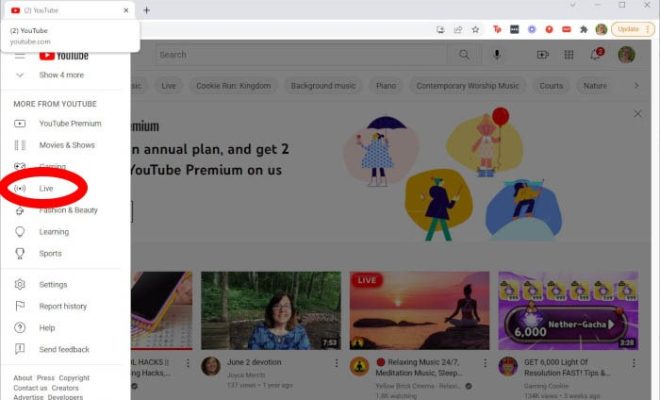
The first step to watching and chatting on YouTube Live Stream is to find a live stream. On the YouTube homepage, you can browse through the channels or use the search bar to type the name of the channel you want to watch. Once you find the channel, click on the “Videos” tab, and you will see a “Live Now” or “Upcoming Live Streams” option. Click on the live video you want to watch, and the live stream will start playing.

Step 2: Enabling the Chat Feature

Now that you have found the live stream, it’s time to activate the chat feature. To do this, look for the “Chat” option on the right-hand side of the screen. If the live stream has an active chat feature, you will see the chat box open. If not, you may need to log in to YouTube to enable the chat feature. Click the “Sign in” button in the top right corner, and enter your credentials to access the chat.

Step 3: Chatting on the Live Stream

Once you have logged in and activated the chat feature, you can start chatting with the host and other viewers. Type your message in the chat box and hit enter to send it. Your message will appear in the chat window, along with other viewers’ messages. You can use the chat feature to interact with the host, ask questions or share your thoughts with other viewers.

Step 4: Moderating the Chat

If you are the host of a live stream, it’s important to moderate the chat to ensure that the conversation stays respectful and relevant. YouTube Live Streaming has several moderation tools such as blocking, muting and reporting to maintain the chat’s integrity. You can also assign moderators to help you manage the chatroom and respond to any inappropriate comments. In conclusion, live streaming on YouTube presents an excellent opportunity for creators to connect with their audience, and the chat feature enables viewers to engage actively with the host and other viewers. As a viewer, you can easily watch and chat on YouTube Live Stream by following the simple steps outlined above. As a host, it’s important to monitor the chat and moderate it appropriately to ensure a positive viewing experience for everyone involved. So, start exploring the world of YouTube Live Streaming and connect with your favorite channels today!


Previous Article

How to View Your Recent Ad Activity ...

Next Article

How to Watch Any Video on Oculus ...

Matthew Lynch

Related articles More from author

  • How to Use System Restore in Windows 11
    EdTech Startups & BusinessesOnline Learning & eLearning

    How to Use System Restore in Windows 11

    March 19, 2023
    By Matthew Lynch
  • Online Learning & eLearning

    The Best Virtual Keyboarding Jobs Available Right Now Online

    March 18, 2024
    By Matthew Lynch
  • Online Learning & eLearning

    How to Use Your Own Headphones for In-Flight Entertainment

    March 26, 2023
    By Matthew Lynch
  • Online Learning & eLearning

    The Metaverse Will Be a Multi-Platform Mess

    March 19, 2023
    By Matthew Lynch
  • Elementary EducationOnline Learning & eLearning

    The 9 Best Sites to Play Online Board Games with Friends

    May 28, 2023
    By Matthew Lynch
  • Online Learning & eLearning

    Best Full Stack Web Developer Course Online

    March 5, 2024
    By Matthew Lynch

Search

Login & Registration

  • Register
  • Log in
  • Entries feed
  • Comments feed
  • WordPress.org

Newsletter

Signup for The Tech Edvocate Newsletter and have the latest in EdTech news and opinion delivered to your email address!

About Us

Since technology is not going anywhere and does more good than harm, adapting is the best course of action. That is where The Tech Edvocate comes in. We plan to cover the PreK-12 and Higher Education EdTech sectors and provide our readers with the latest news and opinion on the subject. From time to time, I will invite other voices to weigh in on important issues in EdTech. We hope to provide a well-rounded, multi-faceted look at the past, present, the future of EdTech in the US and internationally.

We started this journey back in June 2016, and we plan to continue it for many more years to come. I hope that you will join us in this discussion of the past, present and future of EdTech and lend your own insight to the issues that are discussed.

Newsletter

Signup for The Tech Edvocate Newsletter and have the latest in EdTech news and opinion delivered to your email address!

Contact Us

The Tech Edvocate
910 Goddin Street
Richmond, VA 23231
(601) 630-5238
[email protected]

Copyright © 2025 Matthew Lynch. All rights reserved.