The Tech Edvocate

Top Menu

  • Advertisement
  • Apps
  • Home Page
  • Home Page Five (No Sidebar)
  • Home Page Four
  • Home Page Three
  • Home Page Two
  • Home Tech2
  • Icons [No Sidebar]
  • Left Sidbear Page
  • Lynch Educational Consulting
  • My Account
  • My Speaking Page
  • Newsletter Sign Up Confirmation
  • Newsletter Unsubscription
  • Our Brands
  • Page Example
  • Privacy Policy
  • Protected Content
  • Register
  • Request a Product Review
  • Shop
  • Shortcodes Examples
  • Signup
  • Start Here
    • Governance
    • Careers
    • Contact Us
  • Terms and Conditions
  • The Edvocate
  • The Tech Edvocate Product Guide
  • Topics
  • Write For Us
  • Advertise

Main Menu

  • Start Here
    • Our Brands
    • Governance
      • Lynch Educational Consulting, LLC.
      • Dr. Lynch’s Personal Website
      • Careers
    • Write For Us
    • The Tech Edvocate Product Guide
    • Contact Us
    • Books
    • Edupedia
    • Post a Job
    • The Edvocate Podcast
    • Terms and Conditions
    • Privacy Policy
  • Topics
    • Assistive Technology
    • Child Development Tech
    • Early Childhood & K-12 EdTech
    • EdTech Futures
    • EdTech News
    • EdTech Policy & Reform
    • EdTech Startups & Businesses
    • Higher Education EdTech
    • Online Learning & eLearning
    • Parent & Family Tech
    • Personalized Learning
    • Product Reviews
  • Advertise
  • Tech Edvocate Awards
  • The Edvocate
  • Pedagogue
  • School Ratings

logo

The Tech Edvocate

  • Start Here
    • Our Brands
    • Governance
      • Lynch Educational Consulting, LLC.
      • Dr. Lynch’s Personal Website
        • My Speaking Page
      • Careers
    • Write For Us
    • The Tech Edvocate Product Guide
    • Contact Us
    • Books
    • Edupedia
    • Post a Job
    • The Edvocate Podcast
    • Terms and Conditions
    • Privacy Policy
  • Topics
    • Assistive Technology
    • Child Development Tech
    • Early Childhood & K-12 EdTech
    • EdTech Futures
    • EdTech News
    • EdTech Policy & Reform
    • EdTech Startups & Businesses
    • Higher Education EdTech
    • Online Learning & eLearning
    • Parent & Family Tech
    • Personalized Learning
    • Product Reviews
  • Advertise
  • Tech Edvocate Awards
  • The Edvocate
  • Pedagogue
  • School Ratings
  • A Visitor’s Guide to Fresno (CA), United States

  • A Visitors Guide to New Orleans (LA), United States

  • A Visitors Guide to Sacramento (CA), United States

  • A Visitors Guide to Lyon, France

  • JisuLife Ultra2 Portable Fan: A Powerful Multi-Function Cooling Solution

  • A Visitors Guide to Viña del Mar, Chile

  • A Visitors Guide to Århus, Denmark

  • A Visitors Guide to Bakersfield (CA), United States

  • A Visitors Guide to Aurora (CO), United States

  • A Visitor’s Guide to Toledo (OH), United States

Online Learning & eLearning
Home›Online Learning & eLearning›How to Use Your Own Headphones for In-Flight Entertainment

How to Use Your Own Headphones for In-Flight Entertainment
By Matthew Lynch
March 26, 2023
0
Spread the love

Travelling can be quite tedious, particularly on long flights. While in-flight entertainment can keep you entertained, airline earbuds frequently lack excellent sound quality, and they are not particularly comfortable. Fortunately, using your headphones is an option. Continue reading to know how to use your own headphones for in-flight entertainment.

Step 1: Check the airline’s policy on the compatibility of your headphones.

Before you carry your headphones onto the plane, double-check the airline’s rules regarding compatibility. Some airlines may only allow certain types of cables, jacks, or headphone styles. This may limit the types of headphones you can use or require you to use an adapter.

Step 2: Bring a compatible adapter.

If your headphones do not fit into the airline’s entertainment system, you may require an adapter. Some airlines sell adapters onboard their flights, but it is recommended that you bring your adapter to ensure compatibility.

Step 3: Use the airline’s entertainment system.

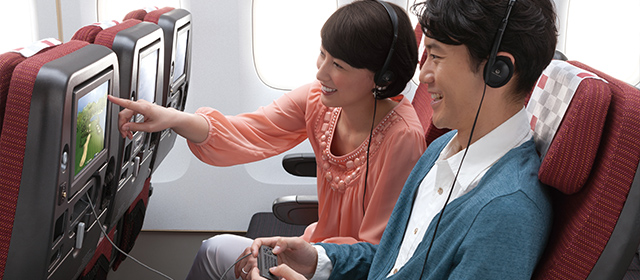
After boarding the airplane, you will get an entertainment system, which is either a screen on the back of the seat or on a shared monitor. Plug your headphones into the jack on the seat or in the armrest. The majority of airline seats have these jacks; however, double-check before boarding to ensure that you purchase or rent the right headphones.

Step 4: Adjust the volume.

Once everything has been plugged up appropriately, you can adjust the volume of your headphones. This can be done either on the seat’s screen, the armrest portion, or using your own devices’ volume controls.

Step 5: Start watching.

After you’ve gotten everything set up, you can begin watching the films, TV shows, or listening to music provided by the airline. Sit back, plug in, and appreciate your in-flight entertainment experience.

Additional Tips:

• Remember to bring your headphones and adapters when traveling.

• To reduce external noise, consider getting noise-canceling headphones.

• Ensure your headphones are entirely charged or have a spare battery if they are wireless.

• Keep your headphones in a handy place so that you can reach them easily.

In summary,using your headphones for in-flight entertainment is a wonderful way to enjoy your favorite films, TV shows, or music on long flights. It is essential to investigate the airline’s policies beforehand and bring the necessary items for easy and comfortable access. Follow the steps provided above, and your in-flight entertainment experience will be relaxed and enjoyable.

Previous Article

How to Use Your iPhone as a ...

Next Article

How to Use Your Phone as a ...

Matthew Lynch

Related articles More from author

  • Online Learning & eLearning

    Top 5 Ways to Fix Error 0x8007003B on Windows 11

    April 2, 2023
    By Matthew Lynch
  • Online Learning & eLearning

    My iPhone Won’t Ring

    March 19, 2023
    By Matthew Lynch
  • Online Learning & eLearning

    Top 8 Ways to Fix ‘There Was an Error Connecting to Apple ID Server’ on iPhone

    April 10, 2023
    By Matthew Lynch
  • Online Learning & eLearning

    Top 5 Ways to Fix Chrome Remote Desktop Not Working on Windows 11

    April 2, 2023
    By Matthew Lynch
  • Online Learning & eLearning

    YouTube Rises Above All Else in Student Learning at Home

    June 22, 2021
    By Matthew Lynch
  • Online Learning & eLearning

    Top 7 Ways to Fix Auto Brightness Not Working on iPhone

    April 3, 2023
    By Matthew Lynch

Search

Login & Registration

  • Register
  • Log in
  • Entries feed
  • Comments feed
  • WordPress.org

Newsletter

Signup for The Tech Edvocate Newsletter and have the latest in EdTech news and opinion delivered to your email address!

About Us

Since technology is not going anywhere and does more good than harm, adapting is the best course of action. That is where The Tech Edvocate comes in. We plan to cover the PreK-12 and Higher Education EdTech sectors and provide our readers with the latest news and opinion on the subject. From time to time, I will invite other voices to weigh in on important issues in EdTech. We hope to provide a well-rounded, multi-faceted look at the past, present, the future of EdTech in the US and internationally.

We started this journey back in June 2016, and we plan to continue it for many more years to come. I hope that you will join us in this discussion of the past, present and future of EdTech and lend your own insight to the issues that are discussed.

Newsletter

Signup for The Tech Edvocate Newsletter and have the latest in EdTech news and opinion delivered to your email address!

Contact Us

The Tech Edvocate
910 Goddin Street
Richmond, VA 23231
(601) 630-5238
[email protected]

Copyright © 2025 Matthew Lynch. All rights reserved.