How to use Yelp Waitlist
Ever found yourself staring at a packed restaurant entrance, stomach rumbling, and wondering if you should just give up and go home? We’ve all been there. The anticipation of a great meal often comes with the frustrating reality of a long wait. But what if there was a way to sidestep some of that agony, to essentially put your name down before you even leave your couch? That’s precisely where the Yelp Waitlist comes in, a feature that’s quietly transforming how many of us approach dining out.
For years, the ritual was simple: show up, put your name on a clipboard, and hover awkwardly near the host stand, hoping your turn would come soon. Then came the advent of pagers, offering a small radius of freedom. Now, with the ubiquity of smartphones and apps like Yelp, the entire process has been streamlined, giving diners a significant edge. This isn’t just about convenience; it’s about reclaiming your time and making your dining experience smoother from the very first thought of dinner. This comprehensive Yelp Waitlist guide will walk you through everything you need to know, from the basics of getting started to advanced tips for maximizing its benefits.
Understanding the Yelp Waitlist Ecosystem
Before we dive into the nitty-gritty of using it, let’s get a clear picture of what the Yelp Waitlist actually is. At its core, it’s a digital queue management system integrated directly into the Yelp platform. For restaurants, it replaces the old paper list or even proprietary tablet systems, allowing them to manage incoming diners efficiently. For you, the diner, it means the power to add your party to a restaurant’s queue remotely, often before you’ve even arrived.
It’s important to distinguish the Yelp Waitlist from reservations. While both aim to secure you a table, they operate differently. A reservation guarantees you a spot at a specific time. A waitlist, however, puts you in line. Your estimated wait time might fluctuate based on how quickly tables turn over, but you’re actively in the queue. This flexibility is often perfect for those spontaneous dinner plans or when you’re just not quite sure when you’ll be ready to eat. Think of it as putting your name down without having to physically be there, saving you precious minutes and avoiding that awkward standing-around dance.
Who Benefits Most from This Feature?
Honestly, almost everyone can benefit, but certain groups will find it particularly indispensable. Families with young children, for example, can avoid the meltdowns that often accompany long waits in crowded lobbies. Business professionals on a tight schedule can maximize their lunch breaks. Even solo diners or couples looking for a relaxed evening can appreciate the peace of mind that comes with knowing their place in line is secure. It’s especially useful for popular spots that don’t take traditional reservations but always have a line out the door. Imagine being able to enjoy an extra 20 minutes at home, knowing your name is already on the list at that trendy brunch spot.
1. Getting Started: Finding Restaurants with Yelp Waitlist
The first step in leveraging the Yelp Waitlist is knowing how to find restaurants that actually offer it. Not every establishment uses this feature, so a quick check is always necessary. Thankfully, Yelp makes this quite intuitive within its app and website.
When you’re browsing for restaurants, either by searching for a specific place or exploring options in your area, keep an eye out for a distinct button or banner. On a restaurant’s individual Yelp page, typically near the top where you find information about reservations or ordering takeout, you’ll see a section labeled ‘Join Waitlist’ or something similar. If a restaurant doesn’t offer it, this option simply won’t appear. You can also use Yelp’s filters. When you’re searching for restaurants, look for a ‘Waitlist’ filter under the ‘Features’ or ‘Amenities’ section. Applying this filter will narrow down your results to only show places where you can digitally queue up. This saves you the frustration of checking each restaurant individually, streamlining your search for a spot that fits your immediate dining needs.
Once you’ve identified a restaurant that utilizes the Yelp Waitlist, you’re halfway there. It’s worth noting that availability can sometimes be dynamic. A restaurant might use the waitlist feature only during peak hours, or they might temporarily turn it off if they’re facing an unusually slow period or a sudden rush. So, if you don’t see the option immediately, don’t despair; it might just be a matter of timing. Always confirm by checking the restaurant’s Yelp page directly for the most up-to-date information on their waitlist status.
2. Joining the Waitlist: A Step-by-Step Walkthrough
Once you’ve found a restaurant offering the Yelp Waitlist, adding your name to the queue is straightforward. This process is designed to be quick and user-friendly, getting you in line with minimal fuss. Here’s how it typically unfolds: (See: Queue management systems explained.)
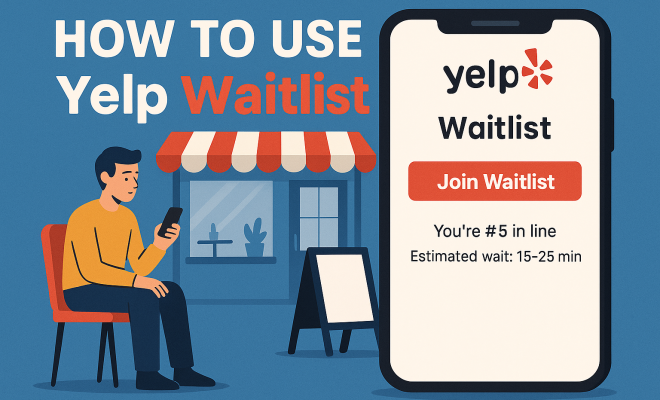
First, tap the ‘Join Waitlist’ button on the restaurant’s Yelp page. This will take you to a dedicated screen where you’ll need to provide a few key pieces of information. The most crucial detail is your party size. Be accurate here; an incorrect number could lead to delays or issues when you arrive, as the restaurant will be preparing a table for the size you indicated. Next, you’ll usually be asked for your name and phone number. This is vital because the restaurant will use this number to text you updates about your wait time and, most importantly, to notify you when your table is ready. Some restaurants might also ask for any special requests, like a high chair or an accessible table, which you can note in a designated field.
After inputting your details, Yelp will often display an estimated wait time. This is a dynamic estimate based on current restaurant activity, so it’s a good guide, but remember it can change. Confirm your details, and then hit the ‘Add Me to Waitlist’ or ‘Join Waitlist’ button. You’ll usually receive a confirmation message within the app and often a text message as well, confirming your place in line and providing a link to track your status. This tracking link is incredibly useful, allowing you to monitor your estimated wait time in real-time, which brings us to our next point.
3. Tracking Your Place in Line: Real-Time Updates
One of the most powerful aspects of the Yelp Waitlist is the ability to track your progress in real-time. Gone are the days of aimlessly waiting in a crowded lobby, wondering if your name has been forgotten. With Yelp, you have transparency and control over your wait.
After joining a waitlist, you’ll typically see a status screen within the Yelp app that updates dynamically. This screen will show you your current estimated wait time, how many parties are ahead of you, and sometimes even a live countdown. If you opted for text message notifications, you’ll also receive updates directly to your phone. These texts usually provide a link that, when clicked, opens a web page (even if you don’t have the Yelp app installed) where you can view your real-time status. This means you can run errands, relax at a nearby park, or simply finish up at home without constantly checking in with the restaurant.
The real-time tracking feature is a game-changer for planning. If the estimated wait time suddenly drops, you know it’s time to head over. If it increases, you can relax a bit longer. It minimizes the stress and uncertainty associated with waiting for a table. Just remember to keep an eye on your phone, as the notification that your table is ready will be crucial. Missing that text could mean losing your spot, so make sure your ringer is on and you’re paying attention as your estimated time draws near.
4. Confirmation and Arrival: What to Expect
As your estimated wait time dwindles, your anticipation builds, and the Yelp Waitlist system kicks into high gear to ensure a smooth transition from queue to table. This final stage is crucial, and understanding what to expect will help you avoid any last-minute snags.
When your table is nearly ready or has just become available, the restaurant will send you a text message notification. This message is your cue to head to the host stand immediately. It will typically say something like, “Your table at [Restaurant Name] is ready! Please check in at the host stand.” Some systems might give you a small window, say 5-10 minutes, to arrive and claim your table before they move on to the next party. This is why paying attention to those final notifications is so important. Don’t assume you have all the time in the world; popular restaurants move quickly, especially during peak hours.
Upon arrival, simply inform the host that you joined the waitlist via Yelp and provide the name under which your party was listed. They’ll typically confirm your party size and then seat you. It’s a remarkably efficient process when everyone plays their part. If you’re running a little late or encounter unexpected traffic, some restaurants allow you to reply to the text message to indicate you’re on your way, or even to request a slight delay. However, this courtesy isn’t universal, and it’s always best to be prompt. Being proactive and communicating any potential delays can make a big difference, but the safest bet is to arrive a few minutes before you expect your table to be ready.
5. Canceling or Leaving the Waitlist: When Plans Change
Life happens, and sometimes plans change unexpectedly. Maybe you found another restaurant, or perhaps your party size shrunk, or you simply decided to cook at home. Whatever the reason, it’s good etiquette and often necessary to remove yourself from a restaurant’s Yelp Waitlist if you no longer plan to dine there. This frees up your spot for other hungry diners and helps the restaurant manage their queue more accurately. (See: Impact of dining experiences on health.)
Fortunately, canceling your spot on the Yelp Waitlist is just as easy as joining it. When you’re tracking your waitlist status within the Yelp app or via the text message link, you’ll usually see an option to ‘Leave Waitlist’ or ‘Cancel.’ Tapping this button will prompt a confirmation, and once confirmed, your name will be removed from the restaurant’s queue. You’ll often receive a confirmation message that you’ve successfully left the waitlist. This simple act of canceling is a small courtesy that helps the restaurant immensely, especially during busy times, by ensuring their estimated wait times remain accurate for everyone else.
Don’t be afraid to use this feature if your plans genuinely shift. It’s built into the system for a reason. Ignoring your waitlist spot and simply not showing up can inconvenience the restaurant and contribute to longer perceived wait times for other patrons. Being a considerate diner means using the features thoughtfully, both for joining and for gracefully exiting when circumstances dictate. A quick tap can make a big difference for everyone involved.
6. Troubleshooting Common Yelp Waitlist Issues
While the Yelp Waitlist is generally smooth sailing, like any technology, you might occasionally encounter a hiccup. Knowing how to address these common issues can save you frustration and ensure your dining plans stay on track.
One frequent issue is not receiving text notifications. First, double-check that you entered the correct phone number when joining the waitlist. A single digit off can mean your notifications are going to someone else. Also, ensure your phone’s ‘Do Not Disturb’ mode isn’t active, or that you haven’t accidentally blocked messages from the specific number the restaurant uses for notifications. If you’re still not getting texts, try tracking your status directly through the Yelp app or the web link provided in your initial confirmation. If all else fails, a quick call to the restaurant to confirm your spot and ask for an update is always a good idea.
Another common concern is the estimated wait time seeming wildly inaccurate. Remember, these are estimates. Factors like a sudden rush, a large party lingering longer than expected, or a kitchen backup can all affect the real-time flow. While the system tries its best, it’s not foolproof. If the wait time seems to be excessively off, again, a polite call to the restaurant for clarification is your best bet. Avoid showing up too early or too late based solely on a rapidly changing estimate. Aim to arrive when you’re reasonably close to the top of the queue, as indicated by the app, and be prepared for a minor buffer on either side. Most restaurants are understanding and want to get you seated as quickly as possible.
7. Tips for Maximizing Your Yelp Waitlist Experience
To truly master the art of using the Yelp Waitlist, a few strategic approaches can make your dining experience even better. These insights go beyond the basic steps and help you leverage the system to its fullest potential.
Firstly, consider joining the waitlist a bit earlier than you think you’ll need to. During peak dining hours (Friday and Saturday evenings, Sunday brunch), wait times can balloon quickly. Adding your name 30-45 minutes before you plan to leave home can often mean the difference between getting seated quickly and still waiting once you arrive. This is especially true for highly popular restaurants that don’t take reservations. Secondly, always be accurate with your party size. While it might be tempting to list a smaller number to get seated faster, restaurants often won’t seat you if your actual party size exceeds what you listed, potentially sending you back to the end of the line. It’s simply not worth the hassle.
Another smart tip is to use the waitlist feature when you’re already in the vicinity but not quite ready to be seated. For instance, if you’re shopping in a mall and know you want to eat at a restaurant inside, join the waitlist while you’re still browsing. By the time you’re done shopping, your table might be ready. Finally, don’t be afraid to communicate. If you’re running five minutes late, or if your party size unexpectedly changes by one person, a quick call to the restaurant can often mitigate potential issues. Clear communication can prevent misunderstandings and ensure the smoothest possible transition from waitlist to table. The Yelp Waitlist is a powerful tool, but like any tool, it works best when used thoughtfully and strategically. (See: Yelp Waitlist feature analysis.)
Yelp Waitlist vs. Reservations: Which Is Right for You?
While this Yelp Waitlist guide focuses on the advantages of digital queuing, it’s worth taking a moment to differentiate it clearly from traditional reservations and understand when each option shines. Both aim to secure you a dining spot, but their underlying philosophies are quite different, catering to varying dining needs and preferences.
Reservations offer certainty. When you book a reservation for 7:00 PM, you expect to be seated at 7:00 PM, give or take a few minutes. This is ideal for special occasions, large groups, or when you have strict time constraints, like catching a show afterward. Reservations provide peace of mind and are often necessary for high-demand, fine-dining establishments. You commit to a specific time, and the restaurant commits to having a table ready for you. The downside? They require planning ahead, and spontaneity is often sacrificed.
The Yelp Waitlist, on the other hand, offers flexibility and convenience for more impromptu dining. It’s perfect for those moments when you decide on dinner an hour before you want to eat, or when your schedule is a little fluid. You’re not tied to a precise time, but you gain the advantage of being in line without physically waiting. It bridges the gap between walking in cold and making a formal reservation, making it an excellent choice for casual dining, popular brunch spots, or restaurants that don’t accept reservations at all. It’s a system built for the modern diner who values efficiency without losing the ability to be a bit spontaneous.
The Future of Dining: Integration and Innovation
The Yelp Waitlist, alongside similar digital queuing systems, represents a significant evolution in the dining experience. It’s part of a broader trend towards integrating technology into every aspect of our daily lives, making once-cumbersome tasks simpler and more efficient. What started as a simple digital clipboard has grown into a sophisticated system that benefits both diners and restaurants.
For restaurants, these systems provide valuable data on peak times, average wait durations, and party flow, allowing them to optimize staffing and table turnover. For diners, the benefit is clear: less waiting, more doing. We’re seeing more restaurants adopt these systems, and the features are likely to continue evolving. Expect tighter integration with other dining services, perhaps even predictive wait times based on AI, or personalized notifications that adapt to your travel time. The goal is always the same: to make the journey from craving to plate as smooth and enjoyable as possible. The Yelp Waitlist is a prime example of how thoughtful technological application can enhance a very human experience.
So, the next time your stomach starts rumbling and you’re contemplating a meal out, don’t resign yourself to endless waiting. Pull out your phone, open Yelp, and consult this Yelp Waitlist guide. With a few taps, you can put yourself in line, reclaim your time, and enjoy a much smoother path to that delicious meal you’ve been craving. Happy dining!
Trending Now
Frequently Asked Questions
How does the Yelp Waitlist work?
The Yelp Waitlist is a digital queue management system that allows diners to add their names to a restaurant's waitlist remotely via the Yelp app. It streamlines the process by replacing traditional paper lists, enabling users to manage their dining experience more efficiently before even arriving at the restaurant.
Is Yelp Waitlist the same as making a reservation?
No, the Yelp Waitlist is not the same as a reservation. A reservation guarantees you a table at a specific time, while a waitlist simply puts you in line, with wait times potentially fluctuating based on table availability.
Can I join the Yelp Waitlist before arriving at the restaurant?
Yes, you can join the Yelp Waitlist remotely before you arrive at the restaurant. This allows you to secure your spot in line and make your dining experience smoother and more convenient.
What are the benefits of using Yelp Waitlist?
Using Yelp Waitlist offers several benefits, including reducing wait times, allowing diners to manage their time better, and providing the convenience of joining a queue without being physically present at the restaurant.
How do I use the Yelp Waitlist feature?
To use the Yelp Waitlist feature, simply open the Yelp app, search for the restaurant you wish to dine at, and select the option to join the waitlist. Follow the prompts to add your party size and confirm your place in line.
Agree or disagree? Drop a comment and tell us what you think.