The Tech Edvocate

Top Menu

  • Advertisement
  • Apps
  • Home Page
  • Home Page Five (No Sidebar)
  • Home Page Four
  • Home Page Three
  • Home Page Two
  • Home Tech2
  • Icons [No Sidebar]
  • Left Sidbear Page
  • Lynch Educational Consulting
  • My Account
  • My Speaking Page
  • Newsletter Sign Up Confirmation
  • Newsletter Unsubscription
  • Our Brands
  • Page Example
  • Privacy Policy
  • Protected Content
  • Register
  • Request a Product Review
  • Shop
  • Shortcodes Examples
  • Signup
  • Start Here
    • Governance
    • Careers
    • Contact Us
  • Terms and Conditions
  • The Edvocate
  • The Tech Edvocate Product Guide
  • Topics
  • Write For Us
  • Advertise

Main Menu

  • Start Here
    • Our Brands
    • Governance
      • Lynch Educational Consulting, LLC.
      • Dr. Lynch’s Personal Website
      • Careers
    • Write For Us
    • The Tech Edvocate Product Guide
    • Contact Us
    • Books
    • Edupedia
    • Post a Job
    • The Edvocate Podcast
    • Terms and Conditions
    • Privacy Policy
  • Topics
    • Assistive Technology
    • Child Development Tech
    • Early Childhood & K-12 EdTech
    • EdTech Futures
    • EdTech News
    • EdTech Policy & Reform
    • EdTech Startups & Businesses
    • Higher Education EdTech
    • Online Learning & eLearning
    • Parent & Family Tech
    • Personalized Learning
    • Product Reviews
  • Advertise
  • Tech Edvocate Awards
  • The Edvocate
  • Pedagogue
  • School Ratings

logo

The Tech Edvocate

  • Start Here
    • Our Brands
    • Governance
      • Lynch Educational Consulting, LLC.
      • Dr. Lynch’s Personal Website
        • My Speaking Page
      • Careers
    • Write For Us
    • The Tech Edvocate Product Guide
    • Contact Us
    • Books
    • Edupedia
    • Post a Job
    • The Edvocate Podcast
    • Terms and Conditions
    • Privacy Policy
  • Topics
    • Assistive Technology
    • Child Development Tech
    • Early Childhood & K-12 EdTech
    • EdTech Futures
    • EdTech News
    • EdTech Policy & Reform
    • EdTech Startups & Businesses
    • Higher Education EdTech
    • Online Learning & eLearning
    • Parent & Family Tech
    • Personalized Learning
    • Product Reviews
  • Advertise
  • Tech Edvocate Awards
  • The Edvocate
  • Pedagogue
  • School Ratings
  • Is the AI Bubble Bursting? OpenAI’s Funding Woes Revealed

  • Why Millions Are Skipping College for These 7 Online Courses Right Now

  • The Astonishing Truth About PS5 Pro vs Xbox Ally X Financing

  • The Urgent Truth About 2026 Privacy Laws: Why Your Business Could Face Catastrophic Fines

  • Shocking: Esports Pros Reveal the Critical Steps to Protect Your Earnings

  • The Staggering Truth About These New Weight Loss Drugs — And Why You Need to Know

  • The Quiet Crisis: Why Your Auto Loan Interest Rates Are Still Skyrocketing

  • Elvis’s Ghost Haunts AI: The $41 Million Anthropic Copyright Lawsuit Explained

  • 7 Micro-SaaS Tools Quietly Transforming Freelance Productivity — Don’t Miss Out!

  • Who Really Owns the Moon? The Shocking Truth About Lunar Real Estate

Higher Education EdTechOnline Learning & eLearning
Home›Higher Education EdTech›How to Use the G++ Compiler on Linux

How to Use the G++ Compiler on Linux
By Matthew Lynch
March 25, 2023
0
G++ Compiler on Linux
Spread the love

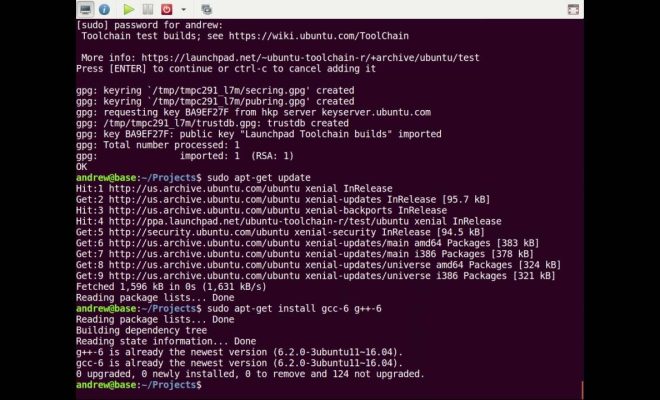
G++ is a popular C++ compiler that is widely used by developers on multiple platforms. Linux is known to be the preferred operating system for software development. If you are a developer working with Linux, then it is essential to know how to use the G++ compiler on your platform.

Here is a step-by-step guide on how to use the G++ compiler on Linux.

  1. Install G++

 You can easily install G++ compiler using the default package manager for your Linux distribution. For instance, if you are working on Ubuntu, use the command below to install G++ compiler.

“`

sudo apt-get install g++

“`

  1. Create a new file

 Create a new C++ file in a directory of your choice using a text editor like Atom, VSCode or vi. A simple “Hello world” program would be an excellent starting point.

“`cpp

#include

using namespace std;

int main() {

cout << “Hello, World!” << endl;

return 0;

}

“`

  1. Save the file

Save the file with a relevant name, such as “hello.cpp.” Be sure to use the “.cpp” extension for C++ files.

  1. Compile the file

Use the command below to compile your C++ code:

“`

g++ hello.cpp

“`

This command will create an executable file with the same name as the source file, but without the “.cpp” extension.

  1. Run the program

 To run the executable file, use the command below:

“`

./a.out

“`

If you have renamed the output file in step 4, replace “a.out” in this command with the new file name.

  1. Advanced compilation options

There are a number of other compilation options available for G++. These options can be useful for different types of projects or to fine-tune the compilation process. Some of the commonly used options include:

– -o : This option allows you to specify the name of the output file.

“`

g++ hello.cpp -o hello.out

“`

– -Wall or -Wextra: These options enable all available warning messages during compilation. It is usually a good practice to enable warning messages during development.

“`

g++ hello.cpp -Wall -o hello.out

“`

– -O: This option specifies the level of optimization to be performed during compilation, where n is a number from 0-3. Higher values mean increased optimization, but can also increase compilation time.

“`

g++ hello.cpp -O2 -o hello.out

“`

  1. Debugging options

 G++ also provides debugging options that can be used to detect and fix errors during development. Some of the commonly used debugging options include:

– -g: This option enables debugging information to be included in the executable file.

“`

g++ hello.cpp -g -o hello.out

“`

– -DDEBUG: This option defines a macro named DEBUG, which can be used to enable debugging statements in your code.

“`

g++ hello.cpp -DDEBUG -o hello.out

“`

Conclusion

G++ is a powerful and versatile C++ compiler that is widely used by developers on Linux. Knowing how to use it effectively can help you streamline the development process and improve the quality of your code. Whether you are a beginner or an advanced developer, this guide should give you a good starting point for using G++ on Linux.


Previous Article

Tips To Select The Right Course Management ...

Next Article

Mapping Out A Training Roadmap To Keep ...

Matthew Lynch

Related articles More from author

  • Online Learning & eLearning

    It’s Time to Change the Narrative of Online and Distance Education

    August 1, 2018
    By Matthew Lynch
  • EdTech NewsHigher Education EdTech

    Virtual campus: online universities are the future of higher education

    July 25, 2016
    By Matthew Lynch
  • Elementary EducationOnline Learning & eLearning

    The Best LED Strip Light

    March 31, 2023
    By Matthew Lynch
  • Online Learning & eLearning

    What Is a Daemon?

    June 15, 2023
    By Matthew Lynch
  • Online Learning & eLearning

    How eLearning Providers Can Help Students Who Struggle Online

    October 12, 2019
    By Matthew Lynch
  • Higher Education EdTech

    How Walmart’s College Tuition Program Works: A Comprehensive Guide

    August 8, 2023
    By Matthew Lynch

Search

Login & Registration

  • Log in
  • Entries feed
  • Comments feed
  • WordPress.org

Newsletter

Signup for The Tech Edvocate Newsletter and have the latest in EdTech news and opinion delivered to your email address!

About Us

Since technology is not going anywhere and does more good than harm, adapting is the best course of action. That is where The Tech Edvocate comes in. We plan to cover the PreK-12 and Higher Education EdTech sectors and provide our readers with the latest news and opinion on the subject. From time to time, I will invite other voices to weigh in on important issues in EdTech. We hope to provide a well-rounded, multi-faceted look at the past, present, the future of EdTech in the US and internationally.

We started this journey back in June 2016, and we plan to continue it for many more years to come. I hope that you will join us in this discussion of the past, present and future of EdTech and lend your own insight to the issues that are discussed.

Newsletter

Signup for The Tech Edvocate Newsletter and have the latest in EdTech news and opinion delivered to your email address!

Contact Us

The Tech Edvocate
910 Goddin Street
Richmond, VA 23231
(601) 630-5238
[email protected]

Copyright © 2026 Matthew Lynch. All rights reserved.