The Tech Edvocate

Top Menu

  • Advertisement
  • Apps
  • Home Page
  • Home Page Five (No Sidebar)
  • Home Page Four
  • Home Page Three
  • Home Page Two
  • Home Tech2
  • Icons [No Sidebar]
  • Left Sidbear Page
  • Lynch Educational Consulting
  • My Account
  • My Speaking Page
  • Newsletter Sign Up Confirmation
  • Newsletter Unsubscription
  • Our Brands
  • Page Example
  • Privacy Policy
  • Protected Content
  • Register
  • Request a Product Review
  • Shop
  • Shortcodes Examples
  • Signup
  • Start Here
    • Governance
    • Careers
    • Contact Us
  • Terms and Conditions
  • The Edvocate
  • The Tech Edvocate Product Guide
  • Topics
  • Write For Us
  • Advertise

Main Menu

  • Start Here
    • Our Brands
    • Governance
      • Lynch Educational Consulting, LLC.
      • Dr. Lynch’s Personal Website
      • Careers
    • Write For Us
    • The Tech Edvocate Product Guide
    • Contact Us
    • Books
    • Edupedia
    • Post a Job
    • The Edvocate Podcast
    • Terms and Conditions
    • Privacy Policy
  • Topics
    • Assistive Technology
    • Child Development Tech
    • Early Childhood & K-12 EdTech
    • EdTech Futures
    • EdTech News
    • EdTech Policy & Reform
    • EdTech Startups & Businesses
    • Higher Education EdTech
    • Online Learning & eLearning
    • Parent & Family Tech
    • Personalized Learning
    • Product Reviews
  • Advertise
  • Tech Edvocate Awards
  • The Edvocate
  • Pedagogue
  • School Ratings

logo

The Tech Edvocate

  • Start Here
    • Our Brands
    • Governance
      • Lynch Educational Consulting, LLC.
      • Dr. Lynch’s Personal Website
        • My Speaking Page
      • Careers
    • Write For Us
    • The Tech Edvocate Product Guide
    • Contact Us
    • Books
    • Edupedia
    • Post a Job
    • The Edvocate Podcast
    • Terms and Conditions
    • Privacy Policy
  • Topics
    • Assistive Technology
    • Child Development Tech
    • Early Childhood & K-12 EdTech
    • EdTech Futures
    • EdTech News
    • EdTech Policy & Reform
    • EdTech Startups & Businesses
    • Higher Education EdTech
    • Online Learning & eLearning
    • Parent & Family Tech
    • Personalized Learning
    • Product Reviews
  • Advertise
  • Tech Edvocate Awards
  • The Edvocate
  • Pedagogue
  • School Ratings
  • Viaim Opennote Review: The AI Note-Taker That Disappears Into Your Daily Routine

  • A Visitors Guide to Long Beach (CA), United States

  • A Visitor’s Guide to Fresno (CA), United States

  • A Visitors Guide to New Orleans (LA), United States

  • A Visitors Guide to Sacramento (CA), United States

  • A Visitors Guide to Lyon, France

  • JisuLife Ultra2 Portable Fan: A Powerful Multi-Function Cooling Solution

  • A Visitors Guide to Viña del Mar, Chile

  • A Visitors Guide to Århus, Denmark

  • A Visitors Guide to Bakersfield (CA), United States

Digital & Mobile Technology
Home›Digital & Mobile Technology›How to Use Spotify for Pets to Make a Playlist for Your Animal Companion

How to Use Spotify for Pets to Make a Playlist for Your Animal Companion
By Matthew Lynch
June 12, 2023
0
Spread the love

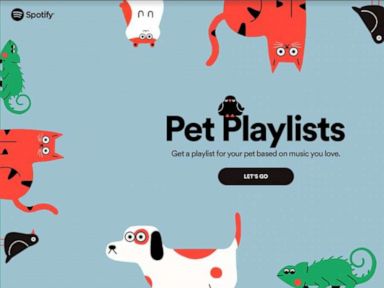
As humans, we all know how much music can influence our mood and change our perspectives. But have you ever considered how music can impact your furry companion’s life? As a pet lover, Spotify’s Pet Playlists feature is surely an exciting chapter.

Spotify’s Pet Playlists allow you to create a personalized playlist for your pets based on their personality traits and preferences. The playlists generated by this feature are designed to calm your pet’s nerves, excite their playfulness, and accommodate mood swings.

Creating a playlist for your furry friend can be a fun and interactive activity. Here’s how you can create a customized playlist suitable for your pet:

Step 1: Visit Spotify’s Pet Playlist website

Visit Spotify’s Pet Playlist website on your web browser or use the Spotify mobile app. In the search tab, type Pet Playlist, and the website will appear.

Step 2: Fill out the questionnaire

Spotify’s Pet Playlist feature asks you to fill out a simple questionnaire that evaluates your pet’s personality. It asks for your pet’s name, species, its temperament and energy level, as well as your preferences in music genres.

Step 3: Upload an adorable photo of your pet

This is where you get to show off your pet’s cuteness. Spotify’s Pet Playlist feature allows you to upload a picture of your pet to give it a personalized touch to the playlist. The photo is also used for the playlist cover.

Step 4: Preview the playlist

After completing the questionnaire, Spotify’s algorithm generates a personalized playlist for your pet based on the answers you provided. The playlist is a compilation of tracks that are designed to suit your pet’s energy and mood.

Step 5: Share with your pet

Once the playlist is generated, you can have your furry friend listen to it via the Spotify mobile app or any other device that supports Spotify. You can also share it with friends and family who may want to listen to it too.

Conclusion

Creating a playlist for your pet using Spotify’s Pet Playlist feature is a unique way to show your love and care towards your furry friend. With just a few clicks, you can have your pet’s personalized playlist in no time. Give it a try and see how your pet reacts to the music. You may be pleasantly surprised by what you see.


Previous Article

What Are Battle Royale Games?

Next Article

Google Assistant May Get Its “What’s On ...

Matthew Lynch

Related articles More from author

  • Digital & Mobile Technology

    How to Buy and Read Kindle Books on iPad

    June 10, 2023
    By Matthew Lynch
  • Digital & Mobile Technology

    Use Microsoft Word’s Quick Parts to Insert Frequently Used Text

    June 11, 2023
    By Matthew Lynch
  • Digital & Mobile Technology

    Best People Search Engines for Finding Anyone

    June 12, 2023
    By Matthew Lynch
  • Digital & Mobile Technology

    Typora Is Officially Out of Beta: What’s New in v1.0?

    June 22, 2023
    By Matthew Lynch
  • Digital & Mobile Technology

    How to Validate a URL Using Regular Expressions

    September 8, 2023
    By Matthew Lynch
  • Digital & Mobile Technology

    How to Use a Ring Light for Better Photographs

    June 12, 2023
    By Matthew Lynch

Search

Login & Registration

  • Register
  • Log in
  • Entries feed
  • Comments feed
  • WordPress.org

Newsletter

Signup for The Tech Edvocate Newsletter and have the latest in EdTech news and opinion delivered to your email address!

About Us

Since technology is not going anywhere and does more good than harm, adapting is the best course of action. That is where The Tech Edvocate comes in. We plan to cover the PreK-12 and Higher Education EdTech sectors and provide our readers with the latest news and opinion on the subject. From time to time, I will invite other voices to weigh in on important issues in EdTech. We hope to provide a well-rounded, multi-faceted look at the past, present, the future of EdTech in the US and internationally.

We started this journey back in June 2016, and we plan to continue it for many more years to come. I hope that you will join us in this discussion of the past, present and future of EdTech and lend your own insight to the issues that are discussed.

Newsletter

Signup for The Tech Edvocate Newsletter and have the latest in EdTech news and opinion delivered to your email address!

Contact Us

The Tech Edvocate
910 Goddin Street
Richmond, VA 23231
(601) 630-5238
[email protected]

Copyright © 2025 Matthew Lynch. All rights reserved.