Master MetaTrader 4: Your Essential Trading Platform Guide
“`html
MetaTrader 4 is one of the most prevalent trading platforms in the financial world today. It has garnered a dedicated following among traders due to its user-friendly interface, powerful functionalities, and extensive customization options. This MetaTrader 4 tutorial aims to guide you through the essential features and tools of the platform, empowering you to maximize your trading potential.
1. What is MetaTrader 4?
MetaTrader 4 (MT4) is an electronic trading platform developed by MetaQuotes Software in 2005. Originally designed for forex trading, it has evolved to encompass other financial instruments, making it a versatile tool for various markets. MT4 supports trading in Forex, CFDs, commodities, and cryptocurrencies, catering to both individual and institutional traders.
The platform’s architecture is designed to ensure speed and reliability, allowing traders to execute orders efficiently. With its integration of automated trading through Expert Advisors (EAs) and a robust set of analytical tools, MT4 has transformed how traders approach the markets. Whether you’re a novice or an experienced trader, understanding MetaTrader 4 is crucial, as it lays the groundwork for effective trading strategies.
2. Getting Started: Installation and Setup
To begin your trading journey with MetaTrader 4, the first step is installation. You can download MT4 from your broker’s website or directly from the MetaQuotes website. The installation process is straightforward. Once downloaded, open the file and follow the prompts to install the software on your computer or mobile device.
After installation, you’ll need to set up your trading account. Choose a broker that offers MT4 and register for an account. Upon approval, you’ll receive login credentials. Open MT4 and enter your account details in the “File” > “Login to Trade Account” section. This process connects you to the global financial markets.
It’s worth noting that many brokers offer demo accounts that allow you to practice trading without risking real money. This is a great way to familiarize yourself with the platform and its functionalities before diving into live trading.
3. Understanding the Interface
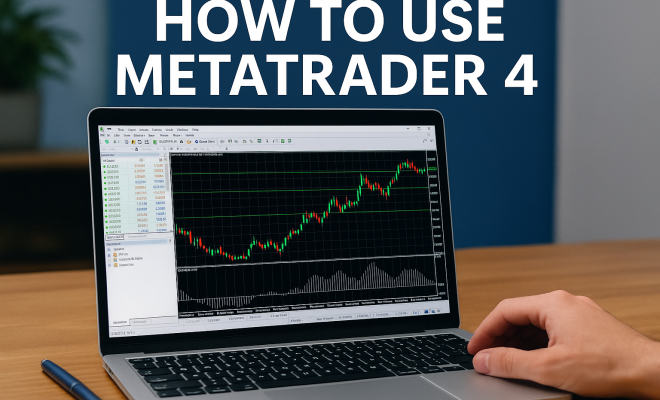
The MetaTrader 4 interface is designed to be intuitive, making it easy for users to navigate. Upon launching the platform, you’ll see several key components: the market watch, chart area, and terminal window. Understanding these elements is vital for efficient trading.
- Market Watch: This panel displays current prices of instruments and allows you to quickly execute trades.
- Chart Area: Here, you can view price movements in real-time. MT4 offers multiple chart types, including line, bar, and candlestick charts, which you can customize according to your preferences.
- Terminal Window: This section provides vital information about your account status, including open trades, balance, and equity.
By familiarizing yourself with these components, you can navigate the platform with ease, allowing for quicker decision-making during trades. Also, consider customizing your layout by arranging the various windows to suit your trading style. A tailored environment can enhance your focus and efficiency.
4. Executing Trades: A Step-by-Step Guide
Executing trades on MT4 is a straightforward process. To open a new trade, right-click on the instrument you want to trade in the Market Watch and select “New Order.” A window will appear where you can specify trade parameters, including volume, stop-loss, and take-profit levels.
Once you’ve configured your parameters, you can choose to either place a market order or a pending order. A market order executes immediately at the current market price, while a pending order allows you to set a specific price for execution later. After reviewing your parameters, click the “Buy” or “Sell” button to execute your trade. It’s that simple!
As you gain experience, you’ll find that mastering order types can significantly enhance your trading advantage. Experimenting with different order types and strategies can help you find the approach that best aligns with your trading goals.
5. Utilizing Technical Analysis Tools
One of MetaTrader 4’s strongest features is its rich selection of technical analysis tools. Whether you’re relying on basic indicators or more complex chart patterns, MT4 provides everything you need to analyze market trends effectively.
The platform comes preloaded with over 30 built-in technical indicators, such as Moving Averages, Relative Strength Index (RSI), and Bollinger Bands. You can also customize your trading charts by adding these indicators. Simply right-click on the chart, select “Indicators List,” and add the desired tool. This flexibility allows you to tailor your analysis to your specific trading strategy. (See: MetaTrader 4 overview on Wikipedia.)
Additionally, MT4 supports various timeframes, which can further enhance your technical analysis. By observing price action across different timeframes, you can gain a more comprehensive view of market trends and make informed trading decisions.
6. Employing Expert Advisors (EAs)
Expert Advisors are an integral part of the MetaTrader 4 experience. These automated trading systems can analyze market conditions and execute trades on your behalf according to pre-defined strategies. This feature is particularly beneficial for traders who cannot monitor the markets constantly.
To use EAs, you’ll need to ensure they are enabled in your MT4 settings. You can find a plethora of EAs available for free or for purchase online. Once you’ve downloaded an EA, move it to the “Experts” folder in your MT4 directory. Restart MT4, and you’ll see your EA available in the “Navigator” panel. Simply drag and drop it onto your desired chart to activate it.
Keep in mind that while EAs can save time and automate trading, they require thorough testing and optimization. Run backtests to gauge their effectiveness and adjust parameters as needed to improve performance based on historical data.
7. Managing Risk: Stop-Loss and Take-Profit Orders
Risk management is a crucial aspect of trading, and MT4 offers essential tools to help protect your capital. The platform allows you to set stop-loss and take-profit orders, which automatically close your positions when specific price levels are reached.
To set a stop-loss or take-profit, enter your desired levels in the “Order” window when opening a trade. Alternatively, you can modify existing trades by right-clicking on your position in the terminal window and selecting “Modify.” Effective use of these orders can help you minimize losses and secure profits, allowing for a more disciplined trading approach.
Statistics show that many successful traders attribute their success to robust risk management strategies. By setting appropriate stop-loss and take-profit levels, you can better manage your risk-reward ratio and enhance your overall trading results.
8. Analyzing Performance with Reports
Tracking your trading performance is vital for long-term success, and MT4 provides detailed reports that show your trading history. You can access reports by navigating to the “Account History” tab in the terminal window. Here, you’ll find information about all your executed trades, including profit and loss for each position.
Furthermore, MT4 enables you to export your trading history for more in-depth analysis. By reviewing your performance, you can identify strengths and weaknesses, refine your strategies, and ultimately enhance your trading skills. Trading is a learning process, and monitoring your results is a key component of that journey.
Consider creating a trading journal to document your trades, the rationale behind them, and the outcomes. Writing down your thoughts can help you identify patterns in your decision-making and guide improvements in your trading strategy.
9. Current Relevance and Future of MetaTrader 4
Even years after its release, MetaTrader 4 remains a favorite among traders worldwide. The platform’s reliability and comprehensive feature set have ensured its ongoing relevance in the rapidly evolving trading landscape. Although some traders have begun transitioning to MetaTrader 5, MT4 continues to flourish, especially among forex traders.
Looking ahead, it’s clear that MetaTrader 4 will remain an essential tool for traders seeking a straightforward yet powerful platform. As the financial markets adapt to new technologies, MT4’s adaptability will likely ensure its place in the trading toolkit for years to come.
Recent surveys indicate that a significant portion of retail traders still prefer MT4 over newer platforms due to its simplicity and reliability. This loyalty highlights the importance of understanding the platform inside and out to leverage its full potential.
10. Advanced Charting Techniques
Once you’ve gotten comfortable with the basics, diving into advanced charting techniques can significantly improve your trading strategies. The MT4 platform allows you to draw trend lines, Fibonacci retracement levels, and various geometric shapes right on your charts. These tools can help you visualize potential entry and exit points based on historical price movements.
Trend lines, in particular, are crucial for understanding market direction. By connecting significant highs or lows, you can mark areas of potential support and resistance. Fibonacci retracement levels help you determine potential reversal levels based on the Fibonacci sequence. Combining these techniques with the built-in indicators can provide you with a more comprehensive view of market trends.
Another advanced technique is the use of multi-timeframe analysis, which allows you to assess trends and potential reversals across various timeframes. This can give you a clearer perspective on where to enter or exit trades. (See: MetaTrader resources from CDC.)
11. Customizing Your Trading Environment
Your trading environment should be tailored to your preferences for optimal performance and comfort. MT4 allows you to customize not only your charts but also your workspace. You can arrange your terminal windows, modify colors for better visibility, and even save your workspace layout for future sessions.
Consider using different color schemes for your charts to enhance visibility based on your lighting conditions. Dark themes may reduce eye strain in low-light environments, while lighter themes may be preferred in well-lit conditions. Additionally, you can create multiple profiles to switch between different setups based on your specific trading strategies or instruments.
Also, don’t overlook the importance of workspace ergonomics. Positioning your monitor at eye level and using a comfortable chair can enhance focus and productivity during long trading sessions.
12. The Importance of Backtesting
Backtesting is an essential part of developing a robust trading strategy. MT4 allows traders to test their strategies against historical data, providing insights into potential performance before committing real funds. You can access the Strategy Tester from the “View” menu, where you can select an EA, set parameters, and choose the historical data range for testing.
When conducting backtests, pay attention to the drawdown, win rate, and overall profitability. Remember that past performance is not indicative of future results, but backtesting can help you refine your approach and identify weaknesses in your strategy. You might even discover that a minor adjustment leads to significantly improved performance.
Consider using various scenarios during backtesting, including different market conditions (bullish, bearish, and sideways) to assess how your strategy holds up across different environments. This thorough approach can help you build more resilient trading strategies.
13. Understanding Market Orders vs. Pending Orders
Understanding the difference between market orders and pending orders is crucial for effective trading. A market order is executed immediately at the current market price, making it ideal for traders looking to enter or exit positions quickly. Conversely, a pending order is an instruction to buy or sell at a specific price in the future, which can be useful when anticipating market movements.
Traders often use pending orders to set up trades at levels they believe will be significant, such as near support or resistance levels. By planning your trades in advance, you can avoid getting caught up in the emotional decision-making that often occurs during high volatility. Additionally, mix both types of orders in your strategy to create a more balanced approach to market entries and exits.
Another important aspect to consider is the impact of slippage, which can occur when market orders are executed at a different price than expected. Being aware of this can help you choose when to use market orders versus pending orders more effectively.
14. Common Mistakes to Avoid
Even experienced traders can fall victim to common mistakes when using MetaTrader 4. One of the most frequent errors is neglecting to set stop-loss orders, which can lead to larger-than-expected losses. Always plan your risk management strategy before entering a trade.
Another mistake is over-leveraging your account. While using leverage can amplify profits, it can also increase losses. Stick to a reasonable leverage ratio and never risk more than you can afford to lose. Additionally, ensure that you’re using the latest version of MT4 to benefit from all available features and security updates. Keeping your platform updated minimizes the risk of technical issues that could impact your trading.
Check your settings regularly; sometimes, configurations can reset, or you may accidentally disable features like EAs or alerts. Staying vigilant can help prevent preventable errors. (See: Forex trading insights from The New York Times.)
15. Frequently Asked Questions (FAQ)
What devices can I use to access MetaTrader 4?
You can access MetaTrader 4 on various devices, including Windows and Mac computers, as well as mobile devices running Android and iOS. The mobile app is particularly useful for traders who wish to monitor their accounts on the go.
Is MetaTrader 4 safe to use?
MetaTrader 4 is generally considered safe, especially when used through reputable brokers. However, it’s essential to ensure that your broker is regulated and offers robust security measures, such as SSL encryption and two-factor authentication.
Can I run multiple instances of MetaTrader 4?
Yes, you can run multiple instances of MetaTrader 4 on your computer, allowing you to trade different accounts or setups simultaneously. However, keep in mind that this may require additional resources from your computer.
What are the differences between MetaTrader 4 and MetaTrader 5?
MetaTrader 5 includes several enhancements over MT4, such as additional timeframes, more technical indicators, and built-in fundamental analysis tools. While MT5 is designed to cater to a broader range of trading instruments, MT4 remains popular for its simplicity and focus on forex trading.
Can I integrate third-party indicators into MetaTrader 4?
Absolutely! MT4 supports the integration of custom indicators. You can download them from online trading communities or develop your own using the MQL4 programming language. Adding these indicators can further enhance your trading analysis capabilities.
Is there a demo account available for MetaTrader 4?
Yes, most brokers offer demo accounts that allow you to practice trading with virtual funds on MetaTrader 4. This is an excellent way to familiarize yourself with the platform and test your trading strategies without financial risk.
What is the best way to learn MetaTrader 4?
The best way to learn MetaTrader 4 is through a combination of hands-on practice, utilizing demo accounts, and accessing educational resources. Many brokers provide tutorials and guides, and there are countless online courses available. Engaging with trading communities and forums can also provide valuable insights and tips from experienced traders.
Can I trade cryptocurrencies on MetaTrader 4?
Yes, you can trade cryptocurrencies on MetaTrader 4, but this depends on whether your broker offers cryptocurrency trading. Some brokers have integrated crypto pairs into their offering, allowing you to trade digital assets just like you would with forex or commodities.
What are ‘Pips’ in trading, and how are they relevant in MT4?
A pip, or “percentage in point,” is a unit of measurement for the price movement of a currency pair. In most currency pairs, a pip is equal to 0.0001. Understanding pips is crucial when placing trades in MT4, as they are commonly used to measure price fluctuations and determine profit and loss.
Mastering MetaTrader 4 is a significant step toward achieving success in your trading endeavors. By understanding its features, utilizing technical and automated tools, and managing risk effectively, you can craft a trading strategy that suits your goals. This MetaTrader 4 tutorial has provided you with foundational knowledge; now it’s time to put it into practice and explore the vast opportunities that await you in the trading world.
“`
Trending Now
Frequently Asked Questions
What is MetaTrader 4 used for?
MetaTrader 4 (MT4) is primarily used for trading in financial markets, including Forex, CFDs, commodities, and cryptocurrencies. It provides traders with a user-friendly interface, powerful analytical tools, and the ability to automate trading through Expert Advisors (EAs), making it suitable for both novice and experienced traders.
How do I install MetaTrader 4?
To install MetaTrader 4, download it from your broker’s website or the MetaQuotes website. After downloading, open the installation file and follow the prompts. Once installed, you can set up your trading account by entering your login credentials to connect to the global financial markets.
Can I use MetaTrader 4 on my mobile device?
Yes, MetaTrader 4 is available for both desktop and mobile devices. You can download the mobile app from your device's app store, allowing you to trade on-the-go and access your trading account from anywhere.
What are Expert Advisors in MetaTrader 4?
Expert Advisors (EAs) are automated trading scripts within MetaTrader 4 that execute trades based on pre-defined criteria. They allow traders to automate their trading strategies, making it easier to manage trades and respond to market conditions without manual intervention.
Is MetaTrader 4 suitable for beginners?
Yes, MetaTrader 4 is suitable for beginners due to its user-friendly interface and extensive resources for learning. It offers demo accounts for practice, allowing new traders to familiarize themselves with the platform and develop their trading skills without risking real money.
What did we miss? Let us know in the comments and join the conversation.