How to use logic jumps in Typeform
“`html
Ever filled out a long, tedious survey only to realize half the questions weren’t even relevant to you? It’s frustrating, right? That’s precisely the problem that logic jumps Typeform aims to solve, transforming static questionnaires into dynamic, personalized conversations. Think of logic jumps as the intelligent backbone of a smart survey – they allow your form to adapt in real-time based on a respondent’s answers, creating a far more engaging and efficient experience for everyone involved.
In essence, logic jumps are conditional rules that dictate which questions a respondent sees next. Instead of a linear path through every single question, logic jumps guide users down relevant branches, skipping over anything that doesn’t apply. This isn’t just a minor tweak; it’s a fundamental shift in how we design and interact with online forms. It makes surveys feel less like an interrogation and more like a tailored dialogue, which, as we’ll explore, has massive implications for data quality, completion rates, and overall user satisfaction.
1. The Core Concept of Logic Jumps Typeform: Beyond Linear Forms
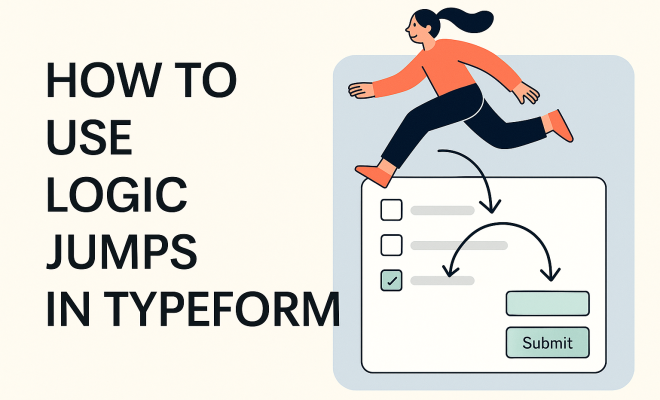
At its heart, a logic jump is an ‘if-then’ statement applied to your survey flow. If a respondent answers ‘X’ to question A, then they’ll see question C next, skipping question B entirely. If they answer ‘Y’ to question A, they might go to question B. This dynamic routing is what makes Typeform’s interface so powerful, moving beyond the rigid, one-size-fits-all approach of traditional forms. It’s about creating a unique path for each user, ensuring they only encounter questions pertinent to their specific situation or previous responses.
This personalization isn’t just a nicety; it’s a strategic advantage. Imagine you’re collecting feedback on a software product. Some users might be new, others experienced. Without logic jumps, you’d have to ask everyone about onboarding, even if they’ve been using the software for years. With logic jumps, you can ask, “Are you a new user?” If they say yes, you then present a series of questions about onboarding. If no, you immediately jump them to questions about advanced features or long-term satisfaction. This immediately cuts down on irrelevant questions, reduces survey fatigue, and makes the whole process feel much more respectful of the respondent’s time.
2. Why Logic Jumps Matter: Boosting Engagement and Data Quality
The impact of well-implemented logic jumps Typeform can be seen across several key metrics. Firstly, engagement rates tend to skyrocket. When a survey feels relevant and personalized, people are far more likely to complete it. Nobody wants to waste their time answering questions that don’t apply to them, and logic jumps eliminate that friction. This direct correlation between relevance and completion rates is a huge win for anyone relying on survey data.
Secondly, and perhaps even more critically, logic jumps dramatically improve data quality. Irrelevant questions often lead to inaccurate or rushed answers, as respondents try to get through the survey as quickly as possible. By filtering out non-applicable questions, you ensure that every piece of data you collect is from someone for whom that question was genuinely pertinent. This means cleaner data, more reliable insights, and ultimately, better decision-making based on your survey results. You’re not just collecting more data; you’re collecting better data.
3. Setting Up Your First Logic Jump: A Step-by-Step Guide
Getting started with logic jumps in Typeform is surprisingly intuitive, thanks to its user-friendly interface. The process typically begins after you’ve drafted your initial set of questions. You’ll navigate to the ‘Logic’ section within the Typeform builder, where you can define the rules for your conditional paths. It’s here that you connect specific answers to subsequent questions or groups of questions, creating a branching flow.
Let’s walk through a simple example. Suppose you have a question asking, “Do you own a pet?” with ‘Yes’ and ‘No’ as options. If a respondent selects ‘Yes,’ you’d want to ask a follow-up question like, “What kind of pet do you own?” If they select ‘No,’ this follow-up question is irrelevant, so you’d want to skip it. In Typeform, you’d select the ‘Do you own a pet?’ question, then add a logic jump rule that says: ‘If answer is ‘Yes,’ jump to ‘What kind of pet do you own?’ If answer is ‘No,’ jump to the next relevant question (or End Screen). It’s a visual process, allowing you to drag and drop or select from menus, making it quite accessible even for beginners.
4. Types of Logic Jumps: Field Jumps vs. Conditional Logic
Typeform offers a couple of distinct ways to implement logic, which you’ll encounter as you build more complex forms. The most straightforward is a ‘Field Jump,’ where a specific answer to a question directs the user to another specific question or an End Screen. This is what we just described with the pet example – a direct, one-to-one or one-to-many relationship based on a single field’s input.
Then there’s ‘Conditional Logic,’ which allows for more sophisticated branching based on multiple conditions or more complex criteria. With conditional logic, you can set up rules like: ‘If Question A is ‘Yes’ AND Question B is ‘Green,’ then jump to Question D.’ This ability to combine conditions opens up a whole new world of possibilities, letting you create highly nuanced and adaptive survey flows. You might use this for qualification forms, where a respondent needs to meet several criteria before proceeding to a specific section of questions, or for product recommenders that suggest items based on a combination of preferences. (See: CDC Youth Risk Behavior Survey.)
5. Designing for Clarity: Mapping Your Logic Jumps Typeform
While logic jumps are incredibly powerful, they can also become complex very quickly if not planned carefully. Before you even touch the Typeform builder, it’s often a good idea to map out your survey flow. This could be as simple as a pen-and-paper flowchart or using a digital mind-mapping tool. Visualizing the different paths a respondent can take will help you identify potential dead ends, redundant questions, or missed opportunities for personalization.
Think about the journey from the user’s perspective. What information do you need from them at each stage? What are the logical decision points? By sketching out these branches, you can ensure that your logic jumps Typeform are coherent and serve a clear purpose. A well-designed flow means a smoother experience for your respondents and more accurate data for you. Don’t be afraid to iterate on your map; it’s much easier to rearrange boxes on a diagram than to reconfigure complex logic within the builder.
6. Practical Use Cases: Where Logic Jumps Shine
The applications for logic jumps are incredibly diverse, stretching across various industries and objectives. Let’s look at a few common scenarios where they truly excel:
- Lead Qualification: Imagine a sales lead form. You only want to route highly qualified leads to your sales team. You can use logic jumps to ask about company size, budget, and specific needs. If a lead doesn’t meet certain criteria, they might be directed to a resource page or a less intensive follow-up, saving your sales team valuable time.
- Customer Feedback Surveys: Post-purchase surveys can be tailored based on the product purchased, the customer’s experience level, or even whether they contacted support. This ensures feedback is relevant to their unique journey, leading to more actionable insights.
- Event Registrations: If you’re hosting an event with different tracks or ticket types, logic jumps can ask attendees about their preferences and then only show them relevant agenda items, dietary restrictions, or breakout session choices.
- Quizzes and Assessments: For interactive quizzes, logic jumps can provide immediate feedback or branch to different questions based on whether a previous answer was correct or incorrect, creating a dynamic learning experience.
- Product Configurators: Helping customers build a customized product (e.g., a computer, a car, or even a meal kit) is a perfect fit. Choices about one component can reveal or hide options for others, guiding the user through a complex selection process effortlessly.
These are just a handful of examples, but they illustrate the power of making your forms adaptive rather than static. Each scenario benefits from the increased relevance and efficiency that logic jumps provide.
7. Testing Your Logic: Avoiding Dead Ends and Frustration
Once you’ve built your Typeform with all its intricate logic jumps, the absolute most crucial step is rigorous testing. It’s incredibly easy to inadvertently create a dead end, a loop, or a path that simply doesn’t make sense from a user’s perspective. Before you share your form with the world, run through it multiple times, taking every conceivable path. Pretend to be different types of respondents, selecting various combinations of answers to ensure the logic flows exactly as you intend.
Get a colleague or a friend to test it too. A fresh pair of eyes can often spot issues that you, as the creator, might overlook. Ask them to think aloud as they complete the form, noting any points of confusion or unexpected jumps. This iterative testing process is non-negotiable for any form that uses logic jumps Typeform, especially those with complex branching. You want the user experience to be seamless, not frustrating.
8. Beyond Basic Jumps: Advanced Logic and Variables
While simple field jumps are a great starting point, Typeform offers more advanced features that elevate the power of logic jumps even further. One such feature is the ability to use ‘variables’ or ‘hidden fields.’ These allow you to capture information in the background without explicitly asking the respondent, or to carry over information from previous answers to dynamically populate future questions or the End Screen.
For instance, you might ask for a respondent’s name early on, store it as a variable, and then use that variable to personalize a later question like, “Thanks, [Name]! Now, tell us about…” This level of personalization makes the survey feel even more conversational and less like a generic form. Combining these advanced techniques with conditional logic can create truly sophisticated and intelligent forms that gather rich, contextual data.
9. The Future of Forms: Conversational Design and Logic Jumps
The trend in online interactions is increasingly moving towards conversational interfaces, and logic jumps Typeform are at the forefront of this shift for forms. Gone are the days of sterile, static web forms that feel like filling out a government document. Today, users expect a more dynamic, engaging, and personalized experience, whether they’re buying a product, signing up for a service, or providing feedback.
By leveraging logic jumps, you’re not just building a form; you’re crafting an interactive dialogue. You’re showing your respondents that you value their time and that you’re genuinely interested in their specific input. This approach doesn’t just improve data collection; it enhances brand perception, builds trust, and ultimately leads to stronger relationships with your audience. The future of online forms is conversational, and logic jumps are the key to unlocking that potential, making every interaction feel unique and relevant.
10. Impact on User Experience (UX) and User Interface (UI)
Logic jumps fundamentally reshape the user experience (UX) of your forms. A well-designed Typeform with logic jumps feels less like a chore and more like a guided conversation. This isn’t just about efficiency; it’s about emotional engagement. When users feel understood and valued because they’re only asked relevant questions, their perception of your brand or organization improves significantly. They’re less likely to abandon the form out of frustration or boredom, leading to higher completion rates, which can sometimes jump by 20-30% compared to static forms. (See: New York Times on online surveys.)
From a user interface (UI) perspective, Typeform excels by presenting one question at a time. When combined with logic jumps, this minimalist UI becomes incredibly powerful. The user never feels overwhelmed by a wall of text or an endless scroll of questions. Each step is clear, focused, and purposeful, driven by their previous answer. This focused approach reduces cognitive load, making the entire process feel lighter and more manageable, even for complex data collection tasks. It’s about creating a smooth, almost intuitive flow that anticipates the user’s needs.
11. Integrating Logic Jumps with Other Tools: Expanding Your Reach
The power of logic jumps Typeform extends beyond the Typeform interface itself. Typeform integrates seamlessly with hundreds of other tools and platforms, allowing you to automate workflows and make your data even more actionable. Imagine this: a lead qualification Typeform uses logic jumps to identify a “hot” lead. Once that lead completes the form, Typeform can automatically send their details to your CRM (like Salesforce or HubSpot), trigger an email notification to your sales team, and even schedule a follow-up task in your project management tool (like Trello or Asana).
This kind of integration means that the intelligence you build into your Typeform with logic jumps isn’t isolated. It becomes a critical part of a larger, interconnected ecosystem. For example, in a customer feedback scenario, specific logic jump paths could trigger different actions: a positive review might add the customer to a testimonial request list in Mailchimp, while a negative review could open a support ticket in Zendesk. This automation saves tremendous manual effort and ensures that insights gained through your forms are acted upon swiftly and appropriately.
12. Common Pitfalls and How to Avoid Them
While logic jumps are fantastic, there are a few common traps creators can fall into. Being aware of these will help you build stronger, more effective forms:
- Over-complication: It’s easy to get carried away and create overly complex logic trees. This can make the form difficult to manage, test, and debug. Start simple, then add complexity as needed. If your flowchart starts looking like a spaghetti monster, it’s time to simplify.
- Forgetting “Else” or Default Paths: Every logic jump rule needs a clear destination for every possible answer. What happens if a user doesn’t fit any of your specified conditions? Make sure there’s always a default path, even if it’s just to the next general question or an end screen.
- Lack of Testing: As mentioned, this is critical. A single broken logic jump can ruin the user experience and lead to bad data. Test, test, and test again, from every angle.
- Ignoring User Perspective: Sometimes, what seems logical to you as the creator might not be intuitive for the user. Always put yourself in their shoes. Is the language clear? Does the flow make sense?
- Inconsistent Question Phrasing: When branching, ensure that subsequent questions maintain a consistent tone and style. Abrupt changes in phrasing can be jarring for the respondent.
By keeping these points in mind, you can harness the full power of logic jumps without introducing unnecessary headaches for yourself or your respondents.
13. The Role of Data Analysis in Optimizing Logic Jumps
Building a Typeform with logic jumps isn’t a “set it and forget it” task. To truly optimize your forms, you need to analyze the data they collect. Typeform provides built-in analytics that show you completion rates, time spent on questions, and even drop-off points. By reviewing these metrics, you can identify areas where your logic jumps might be causing friction.
For example, if you see a significant drop-off after a particular logic jump, it might indicate that the questions following that jump are irrelevant, too numerous, or poorly phrased for that specific segment of respondents. You might also discover that a certain branch of your logic is rarely accessed, prompting you to reconsider its necessity or how users are being routed there. Continuous analysis allows you to refine your logic, making your forms even more efficient and user-friendly over time. It’s an iterative process of design, deployment, analysis, and refinement.
Frequently Asked Questions about Logic Jumps Typeform
Q1: What’s the main benefit of using logic jumps in Typeform?
The biggest benefit is personalization. Logic jumps make your forms dynamic, showing respondents only the questions relevant to them based on their previous answers. This drastically improves user experience, reduces survey fatigue, and leads to much higher completion rates and better quality data because people aren’t rushing through irrelevant questions.
Q2: Are logic jumps difficult to set up in Typeform?
Not at all! Typeform’s interface is designed to be very intuitive. You’ll typically find a ‘Logic’ section where you can visually define your rules. For simple jumps, it’s pretty straightforward: “If this answer, then go to this question.” For more complex conditional logic, it might take a little more planning, but the visual builder still makes it manageable.
Q3: Can I use logic jumps for quizzes or assessments?
Absolutely! Logic jumps are perfect for quizzes. You can set rules to provide immediate feedback if an answer is correct or incorrect, or even branch respondents to different follow-up questions or educational content based on their performance. It makes for a much more engaging and interactive assessment experience. (See: Harvard University research on surveys.)
Q4: What’s the difference between a ‘Field Jump’ and ‘Conditional Logic’ in Typeform?
A ‘Field Jump’ is a direct jump based on a single answer to a single question. For example, “If ‘Yes’ to Question A, jump to Question C.” ‘Conditional Logic’ is more advanced, allowing you to combine multiple criteria or conditions before a jump occurs, such as “If ‘Yes’ to Question A AND ‘Blue’ to Question B, then jump to Question D.” Conditional logic gives you more nuanced control.
Q5: How important is testing my Typeform with logic jumps?
Extremely important! It’s the most crucial step. Complex logic can easily lead to unintended paths, dead ends, or skipped critical questions. You need to thoroughly test every possible route a respondent might take to ensure the form flows exactly as you designed it. Get others to test it too, as a fresh pair of eyes can spot issues you might miss.
Q6: Can logic jumps help with lead qualification for sales teams?
Definitely. Many businesses use logic jumps for lead qualification. You can ask a series of questions about budget, company size, or specific needs. If a lead meets your predefined criteria (e.g., budget over X amount, company size over Y employees), logic jumps can route them directly to a sales representative. If they don’t, they might be sent to a content resource, saving your sales team from spending time on unqualified leads.
Q7: Do logic jumps work with other integrations?
Yes, and this is where they become incredibly powerful. Typeform integrates with hundreds of other tools (CRMs, email marketing platforms, project management tools). You can use the outcomes of your logic jumps to trigger actions in these external systems. For instance, a specific answer in your Typeform could automatically create a new contact in your CRM, send a personalized email, or update a task.
Q8: Can I personalize questions using information gathered earlier in the form?
Yes, this is possible using Typeform’s ‘variables’ or ‘hidden fields.’ You can capture a respondent’s name or other details early on and then use that information to dynamically insert into later questions, making the form feel much more personal and conversational, like “Thanks, [Name]! What’s next for you?”
Q9: What should I do if my logic jumps become too complicated?
If your logic starts feeling like a maze, take a step back. Try to simplify your questions or break the form into smaller, more manageable sections if possible. Mapping out your flow with a diagram or flowchart before building it in Typeform can prevent over-complication. Remember, the goal is clarity for the user, not just demonstrating advanced logic capabilities. Student surveys insights offers useful background here.
Q10: How do logic jumps contribute to better data quality?
By ensuring respondents only see relevant questions, logic jumps prevent them from providing arbitrary or rushed answers to questions that don’t apply to them. This means the data you collect is more focused, accurate, and truly reflective of the respondent’s situation, leading to more reliable insights for your decision-making.
“`
Trending Now
Frequently Asked Questions
What are logic jumps in Typeform?
Logic jumps in Typeform are conditional rules that control the flow of questions based on respondents' answers. They allow surveys to adapt in real-time, creating a personalized experience by directing users to relevant questions while skipping those that do not apply.
How do logic jumps improve survey completion rates?
Logic jumps enhance survey completion rates by making the questionnaire more relevant to each respondent. By only showing pertinent questions, they reduce frustration and disengagement, leading to a smoother experience and encouraging users to finish the survey.
Can I create dynamic surveys with Typeform?
Yes, Typeform allows you to create dynamic surveys using logic jumps. This feature enables you to design personalized questionnaires that adapt based on the answers provided, ensuring that respondents only see questions that are relevant to their specific context.
What is the benefit of using logic jumps in surveys?
The primary benefit of using logic jumps in surveys is increased user engagement. By tailoring the questions to each respondent's previous answers, you create a more conversational and less tedious experience, which can lead to higher data quality and user satisfaction.
How do I set up logic jumps in Typeform?
To set up logic jumps in Typeform, you need to access the 'Logic' section within your form settings. From there, you can create 'if-then' rules that determine which questions appear based on specific answers, allowing you to customize the survey flow effectively.
What's your take on this? Share your thoughts in the comments below — we read every one.