The Tech Edvocate

Top Menu

  • Advertisement
  • Apps
  • Home Page
  • Home Page Five (No Sidebar)
  • Home Page Four
  • Home Page Three
  • Home Page Two
  • Home Tech2
  • Icons [No Sidebar]
  • Left Sidbear Page
  • Lynch Educational Consulting
  • My Account
  • My Speaking Page
  • Newsletter Sign Up Confirmation
  • Newsletter Unsubscription
  • Our Brands
  • Page Example
  • Privacy Policy
  • Protected Content
  • Register
  • Request a Product Review
  • Shop
  • Shortcodes Examples
  • Signup
  • Start Here
    • Governance
    • Careers
    • Contact Us
  • Terms and Conditions
  • The Edvocate
  • The Tech Edvocate Product Guide
  • Topics
  • Write For Us
  • Advertise

Main Menu

  • Start Here
    • Our Brands
    • Governance
      • Lynch Educational Consulting, LLC.
      • Dr. Lynch’s Personal Website
      • Careers
    • Write For Us
    • The Tech Edvocate Product Guide
    • Contact Us
    • Books
    • Edupedia
    • Post a Job
    • The Edvocate Podcast
    • Terms and Conditions
    • Privacy Policy
  • Topics
    • Assistive Technology
    • Child Development Tech
    • Early Childhood & K-12 EdTech
    • EdTech Futures
    • EdTech News
    • EdTech Policy & Reform
    • EdTech Startups & Businesses
    • Higher Education EdTech
    • Online Learning & eLearning
    • Parent & Family Tech
    • Personalized Learning
    • Product Reviews
  • Advertise
  • Tech Edvocate Awards
  • The Edvocate
  • Pedagogue
  • School Ratings

logo

The Tech Edvocate

  • Start Here
    • Our Brands
    • Governance
      • Lynch Educational Consulting, LLC.
      • Dr. Lynch’s Personal Website
        • My Speaking Page
      • Careers
    • Write For Us
    • The Tech Edvocate Product Guide
    • Contact Us
    • Books
    • Edupedia
    • Post a Job
    • The Edvocate Podcast
    • Terms and Conditions
    • Privacy Policy
  • Topics
    • Assistive Technology
    • Child Development Tech
    • Early Childhood & K-12 EdTech
    • EdTech Futures
    • EdTech News
    • EdTech Policy & Reform
    • EdTech Startups & Businesses
    • Higher Education EdTech
    • Online Learning & eLearning
    • Parent & Family Tech
    • Personalized Learning
    • Product Reviews
  • Advertise
  • Tech Edvocate Awards
  • The Edvocate
  • Pedagogue
  • School Ratings
  • Miro vs Conceptboard for project management

  • How to use Teamwork for resource management

  • How much does Procore cost per month

  • How to organize Microsoft Planner buckets

  • Is Teamwork good for billable hours

  • Procore vs Buildertrend which is better

  • Airtable project management templates

  • Can Miro track project progress

  • How to use Basecamp for client work

  • Can Lucidchart create swimlane diagrams

Digital & Mobile Technology
Home›Digital & Mobile Technology›How to Use FaceTime on Android and Windows

How to Use FaceTime on Android and Windows
By Matthew Lynch
May 30, 2023
0
Spread the love

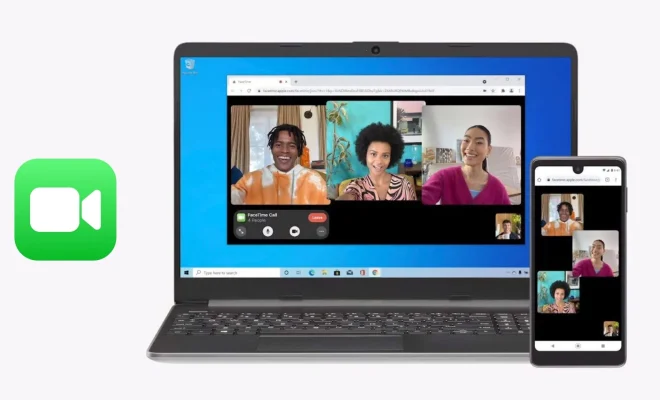
FaceTime is a popular video chat service offered by Apple. Unfortunately, it is exclusive to Apple devices, and Android and Windows users are left with little in terms of alternatives. Still, there are ways for Android and Windows users to use FaceTime, and this article will show you how.

First of all, it is worth noting that you won’t be able to use the official FaceTime app on Android or Windows. However, you can use alternatives that offer similar features and capabilities.

Here are the options available:

Using a Third-Party App:

There are many third-party video chat apps that work on both Android and Windows. Some of the most popular include WhatsApp, Google Duo, Skype, and Zoom.

To make a video call through WhatsApp, select the person you want to talk to from your contacts, tap the video call icon and wait for the recipient to answer. Google Duo works in a similar way, allowing you to start a video call by selecting the person you want to talk to and tapping the video call icon.

Skype requires that both parties have the app installed before you can make a video call. You can initiate the call by selecting your contact and then tapping the video call icon. Zoom is another video chat app that has gained popularity during the pandemic. To start a video call, you need to create a Zoom account, and then you can invite other users to join the call.

Using an Android or Windows Emulator:

Another way to use FaceTime on Android or Windows is to use an emulator. Emulators are essentially virtual machines that allow you to run other operating systems within your main operating system. This means that you can run iOS (the operating system that FaceTime is built on) on your Android or Windows device.

Some of the most popular emulators include Bluestacks, iPadian, and Andyroid. To use an emulator, you will need to download and install it on your device. Once installed, you can download the FaceTime app and use it just as you would on an iPhone or iPad.

It is worth noting that using an emulator is not always smooth, and the experience may vary, based on the device and emulator you use.

In conclusion, while it is not possible to use the official FaceTime app on Android or Windows, there are alternatives and workarounds that offer similar features and capabilities. All that remains is to choose the option that works best for you and start making video calls with your loved ones

Previous Article

How to Use FaceTime on Your Laptop

Next Article

How to Use Automator in macOS

Matthew Lynch

Related articles More from author

  • Digital & Mobile Technology

    How to Check if Your Printer Is AirPrint Enabled

    August 5, 2023
    By Matthew Lynch
  • Digital & Mobile Technology

    Best Websites to Find an Internship

    June 15, 2023
    By Matthew Lynch
  • Digital & Mobile Technology

    Is Suddenlink Down… Or Is It Just You?

    July 31, 2023
    By Matthew Lynch
  • Digital & Mobile Technology

    How to Fix Xapofx1_5.dll Not Found or Missing Errors

    June 9, 2023
    By Matthew Lynch
  • Digital & Mobile Technology

    Best Websites to Download Free SVG Icons

    June 21, 2023
    By Matthew Lynch
  • Digital & Mobile Technology

    Car Audio DAC: From Analog to Digital and Back

    June 10, 2023
    By Matthew Lynch

Search

Login & Registration

  • Log in
  • Entries feed
  • Comments feed
  • WordPress.org

Newsletter

Signup for The Tech Edvocate Newsletter and have the latest in EdTech news and opinion delivered to your email address!

About Us

Since technology is not going anywhere and does more good than harm, adapting is the best course of action. That is where The Tech Edvocate comes in. We plan to cover the PreK-12 and Higher Education EdTech sectors and provide our readers with the latest news and opinion on the subject. From time to time, I will invite other voices to weigh in on important issues in EdTech. We hope to provide a well-rounded, multi-faceted look at the past, present, the future of EdTech in the US and internationally.

We started this journey back in June 2016, and we plan to continue it for many more years to come. I hope that you will join us in this discussion of the past, present and future of EdTech and lend your own insight to the issues that are discussed.

Newsletter

Signup for The Tech Edvocate Newsletter and have the latest in EdTech news and opinion delivered to your email address!

Contact Us

The Tech Edvocate
910 Goddin Street
Richmond, VA 23231
(601) 630-5238
[email protected]

Copyright © 2026 Matthew Lynch. All rights reserved.