The Tech Edvocate

Top Menu

  • Advertisement
  • Apps
  • Home Page
  • Home Page Five (No Sidebar)
  • Home Page Four
  • Home Page Three
  • Home Page Two
  • Home Tech2
  • Icons [No Sidebar]
  • Left Sidbear Page
  • Lynch Educational Consulting
  • My Account
  • My Speaking Page
  • Newsletter Sign Up Confirmation
  • Newsletter Unsubscription
  • Our Brands
  • Page Example
  • Privacy Policy
  • Protected Content
  • Register
  • Request a Product Review
  • Shop
  • Shortcodes Examples
  • Signup
  • Start Here
    • Governance
    • Careers
    • Contact Us
  • Terms and Conditions
  • The Edvocate
  • The Tech Edvocate Product Guide
  • Topics
  • Write For Us
  • Advertise

Main Menu

  • Start Here
    • Our Brands
    • Governance
      • Lynch Educational Consulting, LLC.
      • Dr. Lynch’s Personal Website
      • Careers
    • Write For Us
    • The Tech Edvocate Product Guide
    • Contact Us
    • Books
    • Edupedia
    • Post a Job
    • The Edvocate Podcast
    • Terms and Conditions
    • Privacy Policy
  • Topics
    • Assistive Technology
    • Child Development Tech
    • Early Childhood & K-12 EdTech
    • EdTech Futures
    • EdTech News
    • EdTech Policy & Reform
    • EdTech Startups & Businesses
    • Higher Education EdTech
    • Online Learning & eLearning
    • Parent & Family Tech
    • Personalized Learning
    • Product Reviews
  • Advertise
  • Tech Edvocate Awards
  • The Edvocate
  • Pedagogue
  • School Ratings

logo

The Tech Edvocate

  • Start Here
    • Our Brands
    • Governance
      • Lynch Educational Consulting, LLC.
      • Dr. Lynch’s Personal Website
        • My Speaking Page
      • Careers
    • Write For Us
    • The Tech Edvocate Product Guide
    • Contact Us
    • Books
    • Edupedia
    • Post a Job
    • The Edvocate Podcast
    • Terms and Conditions
    • Privacy Policy
  • Topics
    • Assistive Technology
    • Child Development Tech
    • Early Childhood & K-12 EdTech
    • EdTech Futures
    • EdTech News
    • EdTech Policy & Reform
    • EdTech Startups & Businesses
    • Higher Education EdTech
    • Online Learning & eLearning
    • Parent & Family Tech
    • Personalized Learning
    • Product Reviews
  • Advertise
  • Tech Edvocate Awards
  • The Edvocate
  • Pedagogue
  • School Ratings
  • Unbelievable: This One Ad Sparked Mass Fury — And It’s Not What You Think

  • Urgent: 25,000 Dressers Recalled on Amazon, Wayfair – A Fatal Flaw You Need to Know

  • This Wild AI Startup Feud Is Exposing the Dark Side of Viral Marketing

  • Unbelievable: Judges Just Upheld the Trump Blacklisting of a Major AI Startup

  • The Scandalous PapaSmithy Apology: Why Fans Are Still Furious About FlyQuest’s Controversial Video

  • Macau Gaming Dispute Escalates to Classroom Knife Attack: A Troubling Warning

  • School Surveys & Student Privacy: A Parent Guide for 2026

  • The Billion-Dollar Blunder: Why AI Detection Software Is Failing Our Students

  • China’s 5-Minute EV Charge: The Staggering Truth America Ignores

  • This Astonishing Nikon AI Controversy Exposes Science’s New Frontier

Digital & Mobile Technology
Home›Digital & Mobile Technology›How to Use Excel’s Descriptive Statistics for Data Analysis

How to Use Excel’s Descriptive Statistics for Data Analysis
By Matthew Lynch
June 21, 2023
0
Spread the love

Excel is an excellent tool for performing data analysis, and it offers a wide range of features and functions that can help users interpret and understand their data better. One particularly useful function in Excel is the Descriptive Statistics function, which can help users quickly and easily analyze large data sets to gain valuable insights.

The Descriptive Statistics function is found within Excel’s Analysis Toolpak, a powerful add-in that provides a variety of analytical tools for users. To access the Descriptive Statistics function, users must first enable the Analysis Toolpak by clicking on the File tab, selecting Options, and then clicking on the Add-Ins tab. Under the Manage drop-down menu, select Excel Add-ins and click on the Go button. Check the box next to Analysis Toolpak and click OK.

Once the Analysis Toolpak is enabled, users can access the Descriptive Statistics function by clicking on the Data tab and selecting the Data Analysis button. In the Data Analysis dialog box, select Descriptive Statistics and click OK.

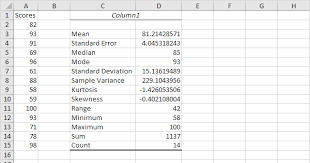
The Descriptive Statistics function provides users with a range of statistical measures to help them better understand their data. The output is displayed in a new worksheet, which includes a summary table of the selected variables, showing the mean, median, mode, standard deviation, variance, range, minimum, maximum, and other statistical measures for each variable.

The Descriptive Statistics function is particularly useful when working with large data sets because it can quickly and easily provide users with important statistical insights. For example, users can use the function to analyze sales data for a particular period, identifying the average sales revenue, the total revenue generated, and how the revenue is distributed across different products, regions, or customer segments.

Another advantage of the Descriptive Statistics function is that it can help users identify outliers or anomalies in their data sets. Outliers are data points that are significantly different from the rest of the data and can significantly impact the overall analysis. Using the Descriptive Statistics function, users can quickly identify outliers by looking at the minimum and maximum values, as well as the range and interquartile range.

In conclusion, Excel’s Descriptive Statistics function is an incredibly valuable tool for data analysis. It provides users with a wide range of statistical measures that can help them understand their data better and make informed decisions based on their findings. By using the Descriptive Statistics function, users can quickly identify trends, outliers, and patterns in their data, which can lead to more accurate and valuable insights overall.


Previous Article

What Is the Newest Fitbit?

Next Article

How to Copy and Paste Text in ...

Matthew Lynch

Related articles More from author

  • Digital & Mobile Technology

    What Is the Golden Ratio in Photography?

    September 8, 2023
    By Matthew Lynch
  • Digital & Mobile Technology

    How to Set up an Out-Of-Office Vacation Responder in Gmail

    July 4, 2023
    By Matthew Lynch
  • Digital & Mobile Technology

    The Difference Between Converting HDMI to DisplayPort and DisplayPort to HDMI

    August 3, 2023
    By Matthew Lynch
  • Digital & Mobile Technology

    How to Set Up Parental Controls on a Router

    June 4, 2023
    By Matthew Lynch
  • Digital & Mobile Technology

    No-Contract Cricket Prepaid Wireless Plans

    June 10, 2023
    By Matthew Lynch
  • Digital & Mobile Technology

    Xbox One vs. Xbox Series X: Is It Worth Upgrading?

    June 6, 2023
    By Matthew Lynch

Search

Login & Registration

  • Log in
  • Entries feed
  • Comments feed
  • WordPress.org

Newsletter

Signup for The Tech Edvocate Newsletter and have the latest in EdTech news and opinion delivered to your email address!

About Us

Since technology is not going anywhere and does more good than harm, adapting is the best course of action. That is where The Tech Edvocate comes in. We plan to cover the PreK-12 and Higher Education EdTech sectors and provide our readers with the latest news and opinion on the subject. From time to time, I will invite other voices to weigh in on important issues in EdTech. We hope to provide a well-rounded, multi-faceted look at the past, present, the future of EdTech in the US and internationally.

We started this journey back in June 2016, and we plan to continue it for many more years to come. I hope that you will join us in this discussion of the past, present and future of EdTech and lend your own insight to the issues that are discussed.

Newsletter

Signup for The Tech Edvocate Newsletter and have the latest in EdTech news and opinion delivered to your email address!

Contact Us

The Tech Edvocate
910 Goddin Street
Richmond, VA 23231
(601) 630-5238
[email protected]

Copyright © 2026 Matthew Lynch. All rights reserved.