Mastering Airbnb on Desktop: Your Complete 2024 Guide
“`html
If you’re looking to book a unique stay or an unforgettable experience, Airbnb is one of the best platforms to explore. Understanding how to use Airbnb on desktop can enhance your booking experience, making it smoother and more efficient. In this guide, we’ll walk you through the essential steps, tips, and insights to ensure you make the most out of this popular hosting service. From setting up your account to filtering your search results effectively, we’ve got you covered.
1. Creating Your Airbnb Account
Before you dive into the world of Airbnb, you need to create an account. Head to the Airbnb homepage and click on the “Sign Up” button. You can register using an email address, phone number, or social media account like Facebook or Google.
Once you’ve signed up, Airbnb will prompt you to complete your profile. It’s beneficial to add a profile picture and a brief bio since hosts often prefer to rent to guests who have a complete profile. A well-rounded profile can also increase your chances of getting accepted at popular listings.
2. Exploring the Interface: Understanding the Dashboard
Once logged in, you’ll land on your dashboard. This central hub displays all essential features, including your trips, messages, saved listings, and account settings. Familiarizing yourself with this interface will help you navigate the platform more effectively.
The dashboard also provides shortcuts to explore new listings, view personalized recommendations based on your previous searches, and access the help section. Understanding how to use Airbnb on desktop begins with mastering the dashboard.
3. Searching for Listings: Tips for Effective Searches
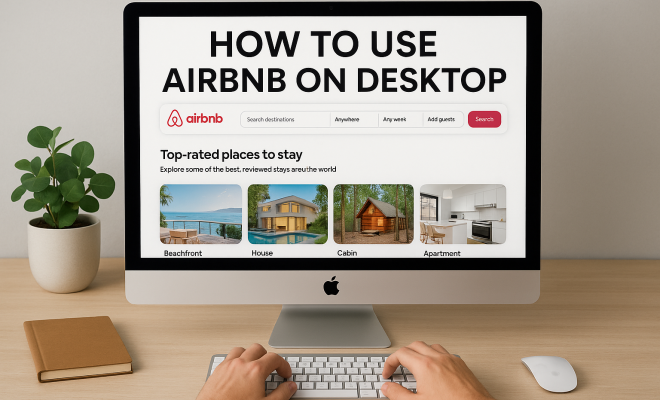
To search for listings, enter your destination, check-in and check-out dates, and the number of guests. This can be done from the homepage. After hitting “Search,” the results will populate based on your criteria. However, the initial results can be overwhelming, so utilizing Airbnb’s search filters is crucial.
On the left sidebar, you can narrow down your options by specifying price range, property type, amenities, and more. Filters such as ‘Superhost’ and ‘Instant Book’ can significantly enhance your chances of finding comfortable accommodations that meet your needs.
4. Understanding the Listing Details
When you click on a listing, the details page will provide a wealth of information, including photos, description, amenities, house rules, and cancellation policy. Pay close attention to the reviews section, where previous guests share their experiences, which is invaluable in determining the quality of the listing.
Don’t overlook the host’s response rate and cancellation policy. These elements can provide insights into how responsive and trustworthy a host is. Also, remember to check for additional fees such as cleaning, service, or taxes that may not be included in the initial price.
5. Communicating with Hosts
Once you’ve found a potential listing, reaching out to the host can be beneficial. Use the messaging feature to ask any lingering questions or clarify house rules. This communication can also give you a feel for how accommodating the host will be during your stay.
Effective communication is key; brief, clear questions tend to yield the best responses. This dialogue not only helps you prepare for your trip but also establishes a rapport with your host, which could be helpful should you encounter any issues during your stay.
6. Booking Your Stay
After narrowing down your options and communicating with potential hosts, you can proceed to book. On the listing page, you’ll see the “Reserve” button. Clicking this will prompt you to review your booking details and enter payment information. (See: Airbnb overview on Wikipedia.)
Airbnb typically offers two booking options: Instant Book and Request to Book. Instant Book allows you to book immediately without waiting for host approval, while Request to Book may require the host to approve your request before finalizing the reservation. Consider your urgency to secure your stay when choosing between these two options.
7. Managing Your Reservations
Once your booking is confirmed, you can manage your reservations through the dashboard. Here, you can view your upcoming trips, communicate with your host, and access check-in details. Make sure to keep track of any relevant messages or updates from your host.
Also, check the cancellation policy for your booking. If your plans change, knowing the cancellation terms will help you avoid unnecessary penalties. Airbnb provides options for modifying or canceling your reservation directly from your account, which can save you time and hassle.
8. Leaving Reviews and Feedback
After your stay, you’ll have the opportunity to leave a review for the host and the property. This feedback is crucial not only for the host but also for future guests. By sharing your experience, you contribute to the community, helping others make informed choices.
Be honest and constructive in your review. Highlight what you enjoyed and mention areas for improvement if applicable. Not only does this assist fellow travelers, but it can also help hosts understand how they can enhance their offerings.
9. Staying Safe While Using Airbnb
While Airbnb strives to create a safe environment, there are steps you should take to ensure your safety. Always communicate through the platform instead of outside sources to keep documentation of your interactions. Avoid sharing personal information like your phone number or home address until you’ve arrived at your destination.
Lastly, familiarize yourself with Airbnb’s safety resources. The platform provides a detailed Help Center and emergency resources that can guide you in case of any issues during your stay. Your safety is paramount, so don’t hesitate to use these tools.
10. Using Airbnb’s Advanced Search Features
Sometimes, finding the perfect place to stay requires more than just basic filters. Airbnb offers advanced search options that allow you to refine your results significantly. You can find these features by clicking on “More filters” after your initial search.
Options include selecting specific amenities such as pools, hot tubs, kitchens, or pet-friendly accommodations. You can also filter by the type of property, whether you prefer entire homes, private rooms, or shared spaces. If you’re traveling with a large group, you might want to set a minimum number of beds or even search for options that allow events.
For anyone with specific needs, like wheelchair accessibility, Airbnb provides filters to ensure you find a listing that accommodates your requirements. Using these advanced search features can save you time and help you focus on listings that genuinely meet your expectations.
11. Understanding Pricing: Hidden Fees and Discounts
When selecting your accommodation, it’s essential to pay attention to the total price displayed on the listing. While Airbnb shows a base rate, additional charges such as cleaning fees, service fees, and local taxes can significantly increase your total cost.
To avoid surprises, always look for the “Total” price before booking. Additionally, some hosts offer discounts for longer stays, so if you’re planning an extended trip, it might be worth inquiring about weekly or monthly rates. You can also take advantage of special offers during certain seasons or for early bookings.
Statistics suggest that guests often overlook these fees, with a recent survey indicating that over 30% of travelers reported being surprised by the final price post-booking. Being proactive about understanding pricing can enhance your experience and help you budget more effectively.
12. Exploring Unique Stays
Airbnb is famous for its variety of listings, including unique stays that go beyond traditional accommodations. If you’re looking for something extraordinary, consider filtering for unique stays. This category includes treehouses, castles, yurts, and even houseboats. (See: CDC guidelines for travelers.)
Staying in a unique property can add an exciting element to your travel experience. For instance, you might find a cozy cabin in the woods that offers a serene escape or a vibrant loft in a bustling city center that puts you right in the heart of the action. Unique stays often come with their own charm and personality, making your trip memorable.
In 2021, Airbnb reported a significant increase in bookings for unique stays, with searches for treehouses increasing by 200% and for castles by 150%. If you want to immerse yourself in the local culture, choosing an unconventional place to stay can be a great way to do so.
13. Utilizing Airbnb Experiences
In addition to accommodations, Airbnb offers a wide array of experiences that guests can book during their stay. These range from guided tours to cooking classes, yoga sessions, or even adventure sports. Engaging in local experiences can provide insight into the culture and environment of your destination.
On the desktop interface, you can find experiences by clicking on the “Experiences” tab after entering your destination. This feature allows you to filter by categories such as outdoor activities, food and drink, arts and culture, and more. Many hosts are locals who share their passions and knowledge, giving you the chance to connect with the community.
Statistics show that over 40% of travelers use Airbnb Experiences to enhance their trips, highlighting the platform’s role in promoting local tourism. If you’re looking for something to do during your stay, consider booking an experience that excites you and allows you to meet new people.
14. Frequently Asked Questions
How do I reset my Airbnb password?
If you’ve forgotten your password, click on the “Login” button and then on “Forgot password?” Follow the prompts to reset it via your email or phone number.
Can I change my reservation dates after booking?
Yes, you can change your reservation dates by going to your Trips section on the dashboard and selecting the reservation you want to modify. However, this feature may depend on the host’s cancellation policy and availability.
What should I do if I have a problem with my host or accommodation?
If you encounter any issues, you can contact Airbnb’s customer support or use the messaging feature to communicate with your host directly. Always document your interactions and take photos if necessary.
Is it safe to book an Airbnb?
While Airbnb has systems in place to ensure safety, it’s always wise to read reviews, communicate through the platform, and be aware of cancellation policies. Following these guidelines can help protect you during your stay.
Can I book an Airbnb for someone else?
Yes, you can book accommodations for others. Simply enter their information at the time of booking, and make sure to share the details with them once the reservation is confirmed.
15. Common Pitfalls to Avoid
Though using Airbnb can be straightforward, there are some common pitfalls that travelers should be aware of. One of the most common is failing to read the cancellation policy thoroughly before booking. Each host sets their own terms, which can range from flexible to strict. Understanding these terms can help you avoid losing money if your plans change. (See: New York Times on Airbnb safety.)
Another pitfall is neglecting to thoroughly review the listing photos and descriptions. Some guests may be tempted to book a listing based solely on its location or price, but overlooking specifics such as cleanliness, space, and amenities can lead to an unpleasant stay. Always take the time to evaluate the listing with a discerning eye.
Finally, not communicating with hosts can be a missed opportunity. If you have questions or specific needs, reaching out can clarify expectations and help ensure a smoother experience. Many hosts appreciate proactive communication and are willing to accommodate reasonable requests.
16. Preparing for Your Trip: Essential Tips
Once your booking is confirmed, preparing for your trip becomes crucial. Start by creating a list of items to pack based on the amenities available at your accommodation. For example, if your Airbnb has a kitchen, you may want to bring cooking essentials or favorite snacks. If it lacks laundry facilities, consider bringing extra clothing to avoid running out of essentials.
Research your destination’s local customs, attractions, and any special events happening during your stay. Knowing what to expect can help you feel more at home and can enhance your travel experience. Also, consider downloading offline maps or relevant apps that can assist you while exploring.
Finally, confirm your check-in time with the host a few days before your arrival to ensure everything runs smoothly. Knowing the check-in procedure in advance can save you from unnecessary stress upon arrival.
17. Understanding Airbnb’s New Policies and Features
Airbnb regularly updates its policies and introduces new features to enhance user experience. Staying informed about these changes can help you use the platform more effectively. For instance, Airbnb has launched updated safety features that include enhanced verification processes for both hosts and guests, aiming to create a more secure environment.
Additionally, the platform has been introducing flexible cancellation policies as a response to the evolving needs of travelers in recent years. More hosts are now offering flexible options, allowing guests greater peace of mind when booking. Familiarize yourself with these updates, as they can significantly impact your booking decisions.
18. Conclusion: Enhancing Your Airbnb Experience
By following these steps and tips on how to use Airbnb on desktop, you can maximize your booking experience, ensuring a memorable stay in your chosen destination. Whether you’re traveling for business, leisure, or a unique adventure, a well-planned Airbnb experience can make all the difference.
Remember, your journey begins long before you step foot in your accommodation. Taking the time to understand the platform, communicate effectively, and prepare adequately will enhance every aspect of your travel. Enjoy your travels, and happy booking!
“`
Trending Now
Frequently Asked Questions
How do I create an Airbnb account on desktop?
To create an Airbnb account on desktop, visit the Airbnb homepage and click on the 'Sign Up' button. You can register using an email address, phone number, or social media accounts like Facebook or Google. After signing up, complete your profile with a picture and bio to enhance your chances of booking.
What features can I find on the Airbnb dashboard?
The Airbnb dashboard is your central hub after logging in. It displays essential features like your trips, messages, saved listings, and account settings. Familiarizing yourself with the dashboard helps you navigate the platform efficiently and access personalized recommendations and help sections.
How do I search for listings on Airbnb?
To search for listings on Airbnb, enter your destination, check-in and check-out dates, and the number of guests on the homepage. After clicking 'Search,' results will appear based on your criteria. Use search filters to refine results and find the perfect stay.
What are some tips for using Airbnb effectively?
To use Airbnb effectively, ensure you have a complete profile with a picture and bio, familiarize yourself with the dashboard, and utilize search filters when looking for listings. Additionally, check personalized recommendations and read reviews to make informed decisions.
How can I improve my chances of booking on Airbnb?
To improve your chances of booking on Airbnb, create a complete profile with a profile picture and a brief bio. This makes you more appealing to hosts. Additionally, respond promptly to inquiries and maintain good reviews from previous stays to build trust.
What did we miss? Let us know in the comments and join the conversation.