The Tech Edvocate

Top Menu

  • Advertisement
  • Apps
  • Home Page
  • Home Page Five (No Sidebar)
  • Home Page Four
  • Home Page Three
  • Home Page Two
  • Home Tech2
  • Icons [No Sidebar]
  • Left Sidbear Page
  • Lynch Educational Consulting
  • My Account
  • My Speaking Page
  • Newsletter Sign Up Confirmation
  • Newsletter Unsubscription
  • Our Brands
  • Page Example
  • Privacy Policy
  • Protected Content
  • Register
  • Request a Product Review
  • Shop
  • Shortcodes Examples
  • Signup
  • Start Here
    • Governance
    • Careers
    • Contact Us
  • Terms and Conditions
  • The Edvocate
  • The Tech Edvocate Product Guide
  • Topics
  • Write For Us
  • Advertise

Main Menu

  • Start Here
    • Our Brands
    • Governance
      • Lynch Educational Consulting, LLC.
      • Dr. Lynch’s Personal Website
      • Careers
    • Write For Us
    • The Tech Edvocate Product Guide
    • Contact Us
    • Books
    • Edupedia
    • Post a Job
    • The Edvocate Podcast
    • Terms and Conditions
    • Privacy Policy
  • Topics
    • Assistive Technology
    • Child Development Tech
    • Early Childhood & K-12 EdTech
    • EdTech Futures
    • EdTech News
    • EdTech Policy & Reform
    • EdTech Startups & Businesses
    • Higher Education EdTech
    • Online Learning & eLearning
    • Parent & Family Tech
    • Personalized Learning
    • Product Reviews
  • Advertise
  • Tech Edvocate Awards
  • The Edvocate
  • Pedagogue
  • School Ratings

logo

The Tech Edvocate

  • Start Here
    • Our Brands
    • Governance
      • Lynch Educational Consulting, LLC.
      • Dr. Lynch’s Personal Website
        • My Speaking Page
      • Careers
    • Write For Us
    • The Tech Edvocate Product Guide
    • Contact Us
    • Books
    • Edupedia
    • Post a Job
    • The Edvocate Podcast
    • Terms and Conditions
    • Privacy Policy
  • Topics
    • Assistive Technology
    • Child Development Tech
    • Early Childhood & K-12 EdTech
    • EdTech Futures
    • EdTech News
    • EdTech Policy & Reform
    • EdTech Startups & Businesses
    • Higher Education EdTech
    • Online Learning & eLearning
    • Parent & Family Tech
    • Personalized Learning
    • Product Reviews
  • Advertise
  • Tech Edvocate Awards
  • The Edvocate
  • Pedagogue
  • School Ratings
  • The Chew That Changed My Training: Why Nitraflex Pre-Workout Chews Deliver Unbelievable Pumps

  • The Brutal Truth: Why Your AI Skills Training Is Failing (And How to Fix It)

  • 8 Essential AI Upskilling Programs Your Business Needs to Thrive Now

  • One Critical Mistake Companies Make With AI Skills Training

  • The AI Career Showdown: Which Path Pays More And Fits You Best?

  • The Shocking Truth About the Highest Paying AI Jobs in 2026

  • The Staggering Truth About 5 AI Job Roles That Will Redefine Your Career by 2026

  • Crypto Crackdown: Is the FCA’s Iron Fist Crushing Innovation, or Just Protecting You?

  • 7 Critical Steps to Survive the Crypto Crackdown: How to Navigate FCA Regulations

  • This One Thing Is Quietly Reshaping Illegal Crypto Trading — And Regulators Are Panicking

Digital & Mobile Technology
Home›Digital & Mobile Technology›How to Update a Samsung Smart TV

How to Update a Samsung Smart TV
By Matthew Lynch
June 12, 2023
0
Spread the love

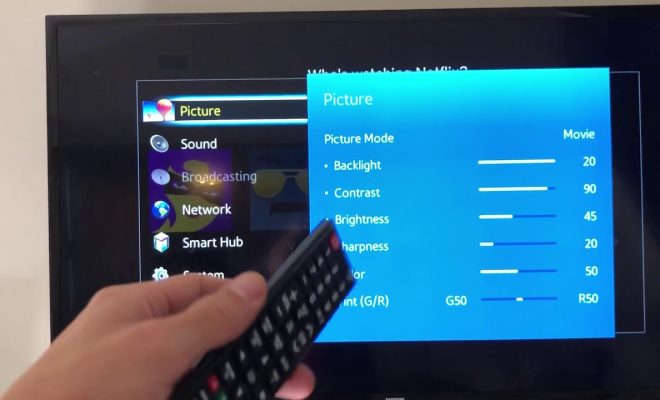
Samsung Smart TVs are known for their advanced features and exceptional user experience. However, it is crucial to keep your Smart TV up-to-date with the latest firmware to ensure that you can access new features, services, and apps that Samsung may release.

Here is a step-by-step guide to updating your Samsung Smart TV to the latest firmware.

Step 1: Check Your TV Model

First, determine your Samsung Smart TV model. You can find this information on the back of your TV or in the user manual. Different TV models may have different steps, so it is important to ensure that you have the correct instructions.

Step 2: Connect to the Internet

Before updating your Samsung Smart TV, make sure that it is connected to the internet. You can connect your TV to the internet using a wired or wireless connection. A wired connection is recommended for a more stable and faster internet connection.

Step 3: Check for Updates

Go to the Smart Hub on your Samsung Smart TV by pressing the Home button on your remote control. Once in the Smart Hub, select “Settings” and then select “Support.” In the Support menu, select “Software Update,” and then select “Update Now.”

Your TV will then search for available updates automatically. If an update is available, the TV will display a message asking you to confirm whether you want to update your TV. Select “Yes” to proceed with the update.

Step 4: Wait for the Update to Complete

Once you have confirmed that you want to update your Samsung Smart TV, your TV will begin to download the latest firmware automatically. The download time will vary depending on your internet connection speed and the size of the update.

Do not turn off your TV or unplug it during the update process. Doing so can damage your TV and may cause the update to fail.

Step 5: Restart Your TV

After the download is complete, the TV will automatically install the firmware. Once the installation is complete, your Samsung Smart TV will restart automatically.

Once your TV has restarted, you can check that the update was successful by going to the “Settings” menu and selecting “Support” and then “Software Update.” Your TV should display the message “The latest update has been installed.”

In Conclusion

Updating your Samsung Smart TV is a simple process that can be done in a few easy steps. Keeping your TV up-to-date will ensure that you have access to the latest features and services, which will enhance your viewing experience. Ensure that you regularly check for updates to keep your Samsung Smart TV running smoothly.


Previous Article

How to Fix It When Facebook Videos ...

Next Article

How to Find Your Xbox One IP ...

Matthew Lynch

Related articles More from author

  • Digital & Mobile Technology

    Best Blu-Ray Players & Why You Should Buy Physical Media

    April 11, 2023
    By Matthew Lynch
  • Digital & Mobile Technology

    What is Social Software?

    May 11, 2023
    By Matthew Lynch
  • Digital & Mobile Technology

    The Best Free Online Music Streaming Services with No Limitations

    June 5, 2023
    By Matthew Lynch
  • Digital & Mobile Technology

    What Is the Difference Between QLED, UHD, and OLED? Which Is Best?

    June 9, 2023
    By Matthew Lynch
  • Digital & Mobile Technology

    How to Fix It When You Can’t Connect to Steam

    June 1, 2023
    By Matthew Lynch
  • Digital & Mobile Technology

    Is There a Real Alternative Car Heater?

    June 12, 2023
    By Matthew Lynch

Search

Login & Registration

  • Log in
  • Entries feed
  • Comments feed
  • WordPress.org

Newsletter

Signup for The Tech Edvocate Newsletter and have the latest in EdTech news and opinion delivered to your email address!

About Us

Since technology is not going anywhere and does more good than harm, adapting is the best course of action. That is where The Tech Edvocate comes in. We plan to cover the PreK-12 and Higher Education EdTech sectors and provide our readers with the latest news and opinion on the subject. From time to time, I will invite other voices to weigh in on important issues in EdTech. We hope to provide a well-rounded, multi-faceted look at the past, present, the future of EdTech in the US and internationally.

We started this journey back in June 2016, and we plan to continue it for many more years to come. I hope that you will join us in this discussion of the past, present and future of EdTech and lend your own insight to the issues that are discussed.

Newsletter

Signup for The Tech Edvocate Newsletter and have the latest in EdTech news and opinion delivered to your email address!

Contact Us

The Tech Edvocate
910 Goddin Street
Richmond, VA 23231
(601) 630-5238
[email protected]

Copyright © 2026 Matthew Lynch. All rights reserved.