
The Tech Edvocate

Top Menu

  • Advertisement
  • Apps
  • Home Page
  • Home Page Five (No Sidebar)
  • Home Page Four
  • Home Page Three
  • Home Page Two
  • Home Tech2
  • Icons [No Sidebar]
  • Left Sidbear Page
  • Lynch Educational Consulting
  • My Account
  • My Speaking Page
  • Newsletter Sign Up Confirmation
  • Newsletter Unsubscription
  • Our Brands
  • Page Example
  • Privacy Policy
  • Protected Content
  • Register
  • Request a Product Review
  • Shop
  • Shortcodes Examples
  • Signup
  • Start Here
    • Governance
    • Careers
    • Contact Us
  • Terms and Conditions
  • The Edvocate
  • The Tech Edvocate Product Guide
  • Topics
  • Write For Us
  • Advertise

Main Menu

  • Start Here
    • Our Brands
    • Governance
      • Lynch Educational Consulting, LLC.
      • Dr. Lynch’s Personal Website
      • Careers
    • Write For Us
    • The Tech Edvocate Product Guide
    • Contact Us
    • Books
    • Edupedia
    • Post a Job
    • The Edvocate Podcast
    • Terms and Conditions
    • Privacy Policy
  • Topics
    • Assistive Technology
    • Child Development Tech
    • Early Childhood & K-12 EdTech
    • EdTech Futures
    • EdTech News
    • EdTech Policy & Reform
    • EdTech Startups & Businesses
    • Higher Education EdTech
    • Online Learning & eLearning
    • Parent & Family Tech
    • Personalized Learning
    • Product Reviews
  • Advertise
  • Tech Edvocate Awards
  • The Edvocate
  • Pedagogue
  • School Ratings

logo

The Tech Edvocate

  • Start Here
    • Our Brands
    • Governance
      • Lynch Educational Consulting, LLC.
      • Dr. Lynch’s Personal Website
        • My Speaking Page
      • Careers
    • Write For Us
    • The Tech Edvocate Product Guide
    • Contact Us
    • Books
    • Edupedia
    • Post a Job
    • The Edvocate Podcast
    • Terms and Conditions
    • Privacy Policy
  • Topics
    • Assistive Technology
    • Child Development Tech
    • Early Childhood & K-12 EdTech
    • EdTech Futures
    • EdTech News
    • EdTech Policy & Reform
    • EdTech Startups & Businesses
    • Higher Education EdTech
    • Online Learning & eLearning
    • Parent & Family Tech
    • Personalized Learning
    • Product Reviews
  • Advertise
  • Tech Edvocate Awards
  • The Edvocate
  • Pedagogue
  • School Ratings
  • Zola Suite pricing 2026

  • How to become Airbnb Superhost

  • Yelp Elite status how to get

  • Rocket Matter vs CosmoLex comparison

  • Lawyaw vs Documate which is better

  • How to use Yelp for marketing

  • How many templates in Lawyaw

  • Can TripAdvisor reviews be edited

  • How to manage documents in Zola Suite

  • Filevine vs Litify features

Tech Advice
Home›Tech Advice›How to turn your Android phone into a metal detector

How to turn your Android phone into a metal detector
By Matthew Lynch
July 4, 2023
0
Spread the love

Introduction:

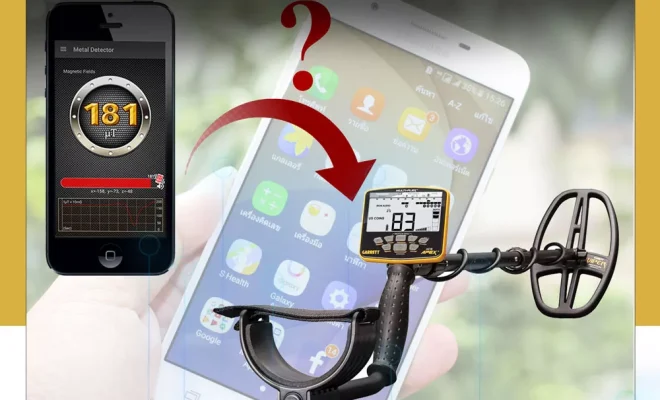
Have you ever wondered if it’s possible to turn your Android phone into a metal detector? Well, it is! This article will guide you through the simple process of transforming your smartphone into a metal detecting machine. With just a few easy steps, you’ll be ready to find hidden treasures and lost metallic objects in no time.

Step 1: Download a Metal Detector App

The first step in turning your Android phone into a metal detector is to download a suitable app from the Google Play Store. Several free and paid apps are available, such as Metal Detector, Smart Metal Detector, and Ultimate Metal Detector. Choose the one that best suits your preferences and install it on your device.

Step 2: Grant Permissions

After installing your chosen app, you’ll need to grant the necessary permissions for it to function properly. Open the app and follow the instructions to allow access to your device’s sensors (such as the magnetometer) and other relevant features. This is essential for the proper working of the metal detector.

Step 3: Calibrate Your Device

Before you start using your new metal detector, it’s important to calibrate your phone’s sensors. This ensures accurate results when looking for metallic objects. The app you installed will guide you through this process with step-by-step instructions. Generally, this involves moving your device in specific patterns or motions so that the app can detect and measure its surroundings accurately.

Step 4: Get Ready to Detect

With your device calibrated and ready for use, it’s time to test out your newly transformed metal detector! Open the app and begin using its detection features as directed by its interface or help documentation. Depending on the app you chose, this may involve holding your phone close to various surfaces while watching for changes in signal strength or listening for audio cues.

Step 5: Practice Makes Perfect

Using a smartphone as a metal detector might take some practice, so don’t get discouraged if you don’t find any lost treasures right away. The more you use it, the better you’ll become at recognizing the various signals and notifications that the app provides when it detects metal. Remember to always follow the guidelines provided by your chosen app to optimize its performance.

Step 6: Respect Local Laws and Regulations

While using your Android phone as a metal detector can be a fun and rewarding experience, it’s crucial to respect local laws and regulations regarding metal detecting. Always obtain necessary permissions before searching on private or protected land, and make sure to leave natural environments undisturbed.

Conclusion:

By following these simple steps, you can successfully turn your Android phone into a metal detector. Start exploring your surroundings and uncovering long-lost treasures with just your smartphone! Just remember to practice responsible metal detecting etiquette and respect local guidelines to ensure an enjoyable treasure hunting experience for all.


Previous Article

How to turn your Android phone into ...

Next Article

19 questions you might be asking after ...

Matthew Lynch

Related articles More from author

  • Tech Advice

    How to stop worrying about speaker impedance

    July 16, 2023
    By Matthew Lynch
  • Tech Advice

    2025 Audi Q6 and SQ6 e-tron Prototype Drive Previews a New EV Era

    August 11, 2023
    By Matthew Lynch
  • Tech Advice

    6 Best Hilton Beach Resorts for a Dreamy Vacation

    October 20, 2023
    By Matthew Lynch
  • Tech Advice

    4 Ways to Block a Number on Sprint

    August 11, 2023
    By Matthew Lynch
  • Tech Advice

    The Best Oil Filter For Your Car – Oil-Filter Guide

    August 21, 2023
    By Matthew Lynch
  • Tech Advice

    2023 Jeep Gladiator Spy Photos Glimpse Updated Interior from Wrangler

    August 11, 2023
    By Matthew Lynch

Search

Login & Registration

  • Log in
  • Entries feed
  • Comments feed
  • WordPress.org

Newsletter

Signup for The Tech Edvocate Newsletter and have the latest in EdTech news and opinion delivered to your email address!

About Us

Since technology is not going anywhere and does more good than harm, adapting is the best course of action. That is where The Tech Edvocate comes in. We plan to cover the PreK-12 and Higher Education EdTech sectors and provide our readers with the latest news and opinion on the subject. From time to time, I will invite other voices to weigh in on important issues in EdTech. We hope to provide a well-rounded, multi-faceted look at the past, present, the future of EdTech in the US and internationally.

We started this journey back in June 2016, and we plan to continue it for many more years to come. I hope that you will join us in this discussion of the past, present and future of EdTech and lend your own insight to the issues that are discussed.

Newsletter

Signup for The Tech Edvocate Newsletter and have the latest in EdTech news and opinion delivered to your email address!

Contact Us

The Tech Edvocate
910 Goddin Street
Richmond, VA 23231
(601) 630-5238
[email protected]

Copyright © 2026 Matthew Lynch. All rights reserved.
