The Tech Edvocate

Top Menu

  • Advertisement
  • Apps
  • Home Page
  • Home Page Five (No Sidebar)
  • Home Page Four
  • Home Page Three
  • Home Page Two
  • Home Tech2
  • Icons [No Sidebar]
  • Left Sidbear Page
  • Lynch Educational Consulting
  • My Account
  • My Speaking Page
  • Newsletter Sign Up Confirmation
  • Newsletter Unsubscription
  • Our Brands
  • Page Example
  • Privacy Policy
  • Protected Content
  • Register
  • Request a Product Review
  • Shop
  • Shortcodes Examples
  • Signup
  • Start Here
    • Governance
    • Careers
    • Contact Us
  • Terms and Conditions
  • The Edvocate
  • The Tech Edvocate Product Guide
  • Topics
  • Write For Us
  • Advertise

Main Menu

  • Start Here
    • Our Brands
    • Governance
      • Lynch Educational Consulting, LLC.
      • Dr. Lynch’s Personal Website
      • Careers
    • Write For Us
    • The Tech Edvocate Product Guide
    • Contact Us
    • Books
    • Edupedia
    • Post a Job
    • The Edvocate Podcast
    • Terms and Conditions
    • Privacy Policy
  • Topics
    • Assistive Technology
    • Child Development Tech
    • Early Childhood & K-12 EdTech
    • EdTech Futures
    • EdTech News
    • EdTech Policy & Reform
    • EdTech Startups & Businesses
    • Higher Education EdTech
    • Online Learning & eLearning
    • Parent & Family Tech
    • Personalized Learning
    • Product Reviews
  • Advertise
  • Tech Edvocate Awards
  • The Edvocate
  • Pedagogue
  • School Ratings

logo

The Tech Edvocate

  • Start Here
    • Our Brands
    • Governance
      • Lynch Educational Consulting, LLC.
      • Dr. Lynch’s Personal Website
        • My Speaking Page
      • Careers
    • Write For Us
    • The Tech Edvocate Product Guide
    • Contact Us
    • Books
    • Edupedia
    • Post a Job
    • The Edvocate Podcast
    • Terms and Conditions
    • Privacy Policy
  • Topics
    • Assistive Technology
    • Child Development Tech
    • Early Childhood & K-12 EdTech
    • EdTech Futures
    • EdTech News
    • EdTech Policy & Reform
    • EdTech Startups & Businesses
    • Higher Education EdTech
    • Online Learning & eLearning
    • Parent & Family Tech
    • Personalized Learning
    • Product Reviews
  • Advertise
  • Tech Edvocate Awards
  • The Edvocate
  • Pedagogue
  • School Ratings
  • A Visitor’s Guide to Fresno (CA), United States

  • A Visitors Guide to New Orleans (LA), United States

  • A Visitors Guide to Sacramento (CA), United States

  • A Visitors Guide to Lyon, France

  • JisuLife Ultra2 Portable Fan: A Powerful Multi-Function Cooling Solution

  • A Visitors Guide to Viña del Mar, Chile

  • A Visitors Guide to Århus, Denmark

  • A Visitors Guide to Bakersfield (CA), United States

  • A Visitors Guide to Aurora (CO), United States

  • A Visitor’s Guide to Toledo (OH), United States

Assistive Technology
Home›Assistive Technology›How to Transfer Files Between Linux, Android, and iOS Using Snapdrop

How to Transfer Files Between Linux, Android, and iOS Using Snapdrop
By Matthew Lynch
June 10, 2023
0
Spread the love

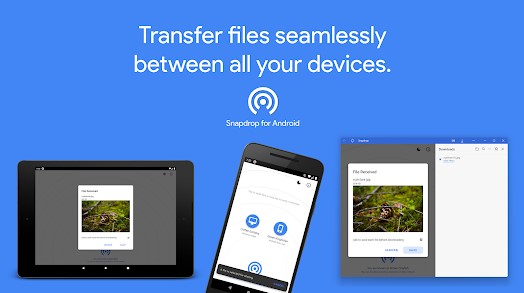
Snapdrop is an open-source web-based file sharing tool that allows you to transfer files between Linux, Android, and iOS devices without the need for a third-party app or software. Snapdrop works by establishing a peer-to-peer connection between the devices using the web browser. Here’s a step-by-step guide on how to use Snapdrop to transfer files between Linux, Android, and iOS devices.

Step 1: Open the Snapdrop website

On your Linux, Android, or iOS device, open your web browser and go to the Snapdrop website (snapdrop.net). You should see the Snapdrop interface with a big blue button that says “Click to Share.”

Step 2: Connect the devices

To transfer files between two or more devices, you need to connect them to the same network. If your devices are connected to the same Wi-Fi network or any other local network, they should automatically appear on the Snapdrop interface.

Step 3: Select the device and share files

Select the device you want to share files with by clicking on its name. You can then drag and drop files or click on the “Send Files” button to select the files you want to transfer. Once you’ve selected the files, click on the “Open” button.

Step 4: Receive files

If you’re the recipient, you’ll see a notification on your device’s web browser asking whether you want to accept the files. Click on “Accept” to receive the files.

Step 5: Download the files

Once the files transfer is complete, you can download them by clicking on the download button or opening the files directly from the Snapdrop interface.

In conclusion, Snapdrop is a convenient and easy-to-use tool for transferring files between Linux, Android, and iOS devices. It’s free, open-source, and doesn’t require any installation, making it accessible to anyone with a web browser. Try it out today and experience hassle-free file sharing.


Here Are All the Pre-Installed iPhone Apps You Can and Can’t Delete

Apple has always been known for its control over the software on its devices. Unlike Android, iPhones come with pre-installed apps that can be difficult or impossible to remove. If you’re wondering which iPhone apps you can delete, here’s a list of pre-installed apps that can and can’t be deleted.

Apps You Can Delete

Apple has gradually started allowing users to delete some of their pre-installed apps with recent updates. The following apps can be deleted from your iPhone:

1. Books

2. Calculator

3. Calendar

4. Compass

5. FaceTime

6. Find My

7. Home

8. iMovie

9. iTunes Store

10. Mail

11. Maps

12. Measure

13. Music

14. News

15. Notes

16. Podcats

17. Reminders

18. Stocks

19. Tips

20. TV

21. Voice Memos

Apps You Can’t Delete

Unfortunately, not all pre-installed apps can be removed from your iPhone. Some apps are essential to the operating system and will remain on your device no matter what. The following apps are examples of pre-installed apps that can’t be deleted:

1. App Store

2. Camera

3. Clock

4. Contacts

5. Health

6. Messages

7. Phone

8. Photos

9. Safari

10. Settings

Although you can’t delete these apps, you can hide them from view by storing them in a folder.

Why Can’t You Delete These Apps?

There are a few reasons why Apple won’t allow users to delete certain pre-installed apps. For starters, some of these apps are essential to the operating system and are designed to work seamlessly with other apps and features on your iPhone.

Secondly, Apple wants to ensure that users have access to certain apps and services that are necessary for everyday use. Imagine trying to use your iPhone without the Phone app, for example. It would be nearly impossible.

Lastly, some pre-installed apps are required by law. For example, the emergency alert app on iPhones is mandated by the government as a safety measure.

In conclusion, while it might be frustrating that you can’t delete some pre-installed apps, you can take comfort in the fact that you can at least get rid of a few of them. Just remember to be careful when deleting apps, as some may be important or have data tied to them that you don’t want to lose. As always, it’s a good idea to consult with Apple support if you have any questions or concerns about removing apps from your iPhone.


Previous Article

How to Fix No Sound in Spotify ...

Next Article

What Are Windows Optional Updates, and How ...

Matthew Lynch

Related articles More from author

  • Assistive Technology

    How to Install Windows 11 on VirtualBox 7.0

    June 23, 2023
    By Matthew Lynch
  • Assistive Technology

    How to Use Strava’s Global Heatmap Feature

    June 23, 2023
    By Matthew Lynch
  • Assistive Technology

    How to Transfer From Coinbase to Coinbase Pro

    June 22, 2023
    By Matthew Lynch
  • Assistive Technology

    How to Create a Form in Microsoft Access

    June 12, 2023
    By Matthew Lynch
  • Assistive Technology

    How to Change Your Yahoo Mail Password

    June 8, 2023
    By Matthew Lynch
  • Assistive Technology

    How to Detect Installed Games on the Epic Games Launcher

    June 12, 2023
    By Matthew Lynch

Search

Login & Registration

  • Register
  • Log in
  • Entries feed
  • Comments feed
  • WordPress.org

Newsletter

Signup for The Tech Edvocate Newsletter and have the latest in EdTech news and opinion delivered to your email address!

About Us

Since technology is not going anywhere and does more good than harm, adapting is the best course of action. That is where The Tech Edvocate comes in. We plan to cover the PreK-12 and Higher Education EdTech sectors and provide our readers with the latest news and opinion on the subject. From time to time, I will invite other voices to weigh in on important issues in EdTech. We hope to provide a well-rounded, multi-faceted look at the past, present, the future of EdTech in the US and internationally.

We started this journey back in June 2016, and we plan to continue it for many more years to come. I hope that you will join us in this discussion of the past, present and future of EdTech and lend your own insight to the issues that are discussed.

Newsletter

Signup for The Tech Edvocate Newsletter and have the latest in EdTech news and opinion delivered to your email address!

Contact Us

The Tech Edvocate
910 Goddin Street
Richmond, VA 23231
(601) 630-5238
[email protected]

Copyright © 2025 Matthew Lynch. All rights reserved.