The Tech Edvocate

Top Menu

  • Advertisement
  • Apps
  • Home Page
  • Home Page Five (No Sidebar)
  • Home Page Four
  • Home Page Three
  • Home Page Two
  • Home Tech2
  • Icons [No Sidebar]
  • Left Sidbear Page
  • Lynch Educational Consulting
  • My Account
  • My Speaking Page
  • Newsletter Sign Up Confirmation
  • Newsletter Unsubscription
  • Our Brands
  • Page Example
  • Privacy Policy
  • Protected Content
  • Register
  • Request a Product Review
  • Shop
  • Shortcodes Examples
  • Signup
  • Start Here
    • Governance
    • Careers
    • Contact Us
  • Terms and Conditions
  • The Edvocate
  • The Tech Edvocate Product Guide
  • Topics
  • Write For Us
  • Advertise

Main Menu

  • Start Here
    • Our Brands
    • Governance
      • Lynch Educational Consulting, LLC.
      • Dr. Lynch’s Personal Website
      • Careers
    • Write For Us
    • The Tech Edvocate Product Guide
    • Contact Us
    • Books
    • Edupedia
    • Post a Job
    • The Edvocate Podcast
    • Terms and Conditions
    • Privacy Policy
  • Topics
    • Assistive Technology
    • Child Development Tech
    • Early Childhood & K-12 EdTech
    • EdTech Futures
    • EdTech News
    • EdTech Policy & Reform
    • EdTech Startups & Businesses
    • Higher Education EdTech
    • Online Learning & eLearning
    • Parent & Family Tech
    • Personalized Learning
    • Product Reviews
  • Advertise
  • Tech Edvocate Awards
  • The Edvocate
  • Pedagogue
  • School Ratings

logo

The Tech Edvocate

  • Start Here
    • Our Brands
    • Governance
      • Lynch Educational Consulting, LLC.
      • Dr. Lynch’s Personal Website
        • My Speaking Page
      • Careers
    • Write For Us
    • The Tech Edvocate Product Guide
    • Contact Us
    • Books
    • Edupedia
    • Post a Job
    • The Edvocate Podcast
    • Terms and Conditions
    • Privacy Policy
  • Topics
    • Assistive Technology
    • Child Development Tech
    • Early Childhood & K-12 EdTech
    • EdTech Futures
    • EdTech News
    • EdTech Policy & Reform
    • EdTech Startups & Businesses
    • Higher Education EdTech
    • Online Learning & eLearning
    • Parent & Family Tech
    • Personalized Learning
    • Product Reviews
  • Advertise
  • Tech Edvocate Awards
  • The Edvocate
  • Pedagogue
  • School Ratings
  • Unmasking the Troubling Truth About EU’s Digital Omnibus and Your Data

  • Outrageous: Your US Car Insurance 2026 Bill Is About to Explode – Here’s Why

  • Uncovering the Truth: Are AI Spending Concerns About to Tank Your Portfolio?

  • The Silent Revolution: How AI Property Valuation Is Quietly Reshaping Real Estate

  • The Astonishing Truth: Why Your Dream Car Is Now a $52,000 Illusion

  • Toxic Algorithms: Why Your Bank’s AI Could Cost You Everything

  • OpenAI’s GPT-6 Cyber: A Dangerous New AI Threat or Our Ultimate Digital Guardian?

  • This Game-Changing Natural Ozempic Alternative Just Blew Up on Social Media

  • Bónuszösszeg, ingyen pörgetés és befizetési feltétel: üdvözlő és befizetés nélküli kaszinóajánlatok magyar játékosoknak

  • 9 Critical Reasons Why Athexio Might Be The Investment You Need (Or Should Avoid)

Digital & Mobile Technology
Home›Digital & Mobile Technology›How to Stop Your iPhone Screen From Rotating

How to Stop Your iPhone Screen From Rotating
By Matthew Lynch
June 6, 2023
0
Spread the love

Is your iPhone screen rotating when you don’t want it to? It can be frustrating to constantly have your screen switching orientation when you just want it to stay put. Fortunately, there are several ways to prevent your iPhone screen from rotating, and you can choose the one that works best for you.

Method 1: Turn off screen rotation in Control Center

The easiest way to stop your iPhone screen from rotating is to turn off the screen rotation feature in Control Center. Here’s how:

1. Swipe down from the top-right corner of your iPhone screen to access Control Center.

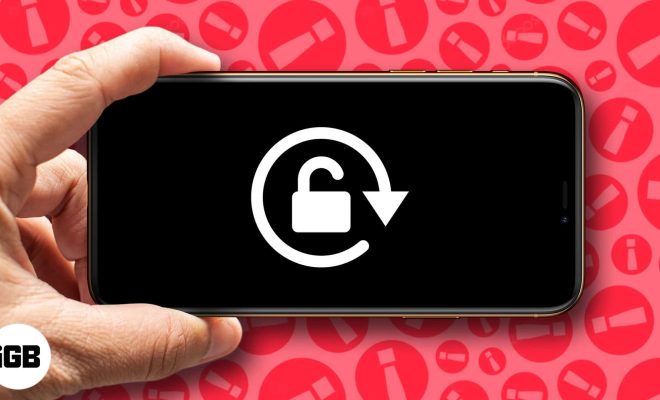
2. Look for the lock icon with a circular arrow around it. This is the screen rotation lock.

3. Tap the screen rotation lock icon to turn it on. The icon will turn red, indicating that screen rotation is now locked.

4. To turn screen rotation back on, simply tap the lock icon again to turn it off.

Method 2: Turn off screen rotation in Settings

If you prefer not to use Control Center, you can turn off screen rotation in your iPhone’s settings. Here’s how:

1. Open the Settings app on your iPhone.

2. Tap on Display & Brightness.

3. Scroll down to the section labeled Display Zoom.

4. Look for the option labeled View. Tap on it.

5. From there, select “Standard” rather than “Zoomed.”

6. Tap on “Set” at the top right-hand corner of the screen to confirm your selection.

7. After your phone asks you to “Restart” or “Cancel” the process, select “Restart.”

Once your phone restarts, the screen rotation should be disabled.

Method 3: Turn off screen rotation in a specific app

If you only want to disable screen rotation for a specific app, you can do so within the app’s settings. Here’s how:

1. Open the app for which you want to disable screen rotation.

2. Hold your iPhone upright, so the screen is in portrait orientation.

3. Once the app is open, try rotating your iPhone to landscape orientation.

4. If the screen rotates, hold your iPhone in landscape mode and look for an icon that looks like a lock with an arrow around it.

5. Tap the icon to lock the screen rotation for that specific app.

6. To turn screen rotation back on for that app, simply tap the same icon again.

With these methods, you can easily control when and how your iPhone screen rotates. Whether you prefer to use Control Center, settings, or app-specific settings, you can make sure your iPhone screen stays put and doesn’t rotate when you don’t want it to.


Previous Article

Best Music Editors of 2023

Next Article

How Much Storage (in GB) Do I ...

Matthew Lynch

Related articles More from author

  • Digital & Mobile Technology

    Does the Nintendo Switch Have Achievements?

    June 5, 2023
    By Matthew Lynch
  • Digital & Mobile Technology

    It’s Harder to Buy PS3 and Vita Games (But You Still Have Options)

    June 23, 2023
    By Matthew Lynch
  • Digital & Mobile Technology

    What is Cloud Security Control?

    May 5, 2023
    By Matthew Lynch
  • Digital & Mobile Technology

    How to Access Your Microsoft Outlook Email From Any Platform

    June 12, 2023
    By Matthew Lynch
  • Digital & Mobile Technology

    How to Program a Universal Remote Control

    May 30, 2023
    By Matthew Lynch
  • Digital & Mobile Technology

    What is a Network Security Policy?

    April 18, 2023
    By Matthew Lynch

Search

Login & Registration

  • Log in
  • Entries feed
  • Comments feed
  • WordPress.org

Newsletter

Signup for The Tech Edvocate Newsletter and have the latest in EdTech news and opinion delivered to your email address!

About Us

Since technology is not going anywhere and does more good than harm, adapting is the best course of action. That is where The Tech Edvocate comes in. We plan to cover the PreK-12 and Higher Education EdTech sectors and provide our readers with the latest news and opinion on the subject. From time to time, I will invite other voices to weigh in on important issues in EdTech. We hope to provide a well-rounded, multi-faceted look at the past, present, the future of EdTech in the US and internationally.

We started this journey back in June 2016, and we plan to continue it for many more years to come. I hope that you will join us in this discussion of the past, present and future of EdTech and lend your own insight to the issues that are discussed.

Newsletter

Signup for The Tech Edvocate Newsletter and have the latest in EdTech news and opinion delivered to your email address!

Contact Us

The Tech Edvocate
910 Goddin Street
Richmond, VA 23231
(601) 630-5238
[email protected]

Copyright © 2026 Matthew Lynch. All rights reserved.