The Tech Edvocate

Top Menu

  • Advertisement
  • Apps
  • Home Page
  • Home Page Five (No Sidebar)
  • Home Page Four
  • Home Page Three
  • Home Page Two
  • Home Tech2
  • Icons [No Sidebar]
  • Left Sidbear Page
  • Lynch Educational Consulting
  • My Account
  • My Speaking Page
  • Newsletter Sign Up Confirmation
  • Newsletter Unsubscription
  • Our Brands
  • Page Example
  • Privacy Policy
  • Protected Content
  • Register
  • Request a Product Review
  • Shop
  • Shortcodes Examples
  • Signup
  • Start Here
    • Governance
    • Careers
    • Contact Us
  • Terms and Conditions
  • The Edvocate
  • The Tech Edvocate Product Guide
  • Topics
  • Write For Us
  • Advertise

Main Menu

  • Start Here
    • Our Brands
    • Governance
      • Lynch Educational Consulting, LLC.
      • Dr. Lynch’s Personal Website
      • Careers
    • Write For Us
    • The Tech Edvocate Product Guide
    • Contact Us
    • Books
    • Edupedia
    • Post a Job
    • The Edvocate Podcast
    • Terms and Conditions
    • Privacy Policy
  • Topics
    • Assistive Technology
    • Child Development Tech
    • Early Childhood & K-12 EdTech
    • EdTech Futures
    • EdTech News
    • EdTech Policy & Reform
    • EdTech Startups & Businesses
    • Higher Education EdTech
    • Online Learning & eLearning
    • Parent & Family Tech
    • Personalized Learning
    • Product Reviews
  • Advertise
  • Tech Edvocate Awards
  • The Edvocate
  • Pedagogue
  • School Ratings

logo

The Tech Edvocate

  • Start Here
    • Our Brands
    • Governance
      • Lynch Educational Consulting, LLC.
      • Dr. Lynch’s Personal Website
        • My Speaking Page
      • Careers
    • Write For Us
    • The Tech Edvocate Product Guide
    • Contact Us
    • Books
    • Edupedia
    • Post a Job
    • The Edvocate Podcast
    • Terms and Conditions
    • Privacy Policy
  • Topics
    • Assistive Technology
    • Child Development Tech
    • Early Childhood & K-12 EdTech
    • EdTech Futures
    • EdTech News
    • EdTech Policy & Reform
    • EdTech Startups & Businesses
    • Higher Education EdTech
    • Online Learning & eLearning
    • Parent & Family Tech
    • Personalized Learning
    • Product Reviews
  • Advertise
  • Tech Edvocate Awards
  • The Edvocate
  • Pedagogue
  • School Ratings
  • A Visitor’s Guide to Fresno (CA), United States

  • A Visitors Guide to New Orleans (LA), United States

  • A Visitors Guide to Sacramento (CA), United States

  • A Visitors Guide to Lyon, France

  • JisuLife Ultra2 Portable Fan: A Powerful Multi-Function Cooling Solution

  • A Visitors Guide to Viña del Mar, Chile

  • A Visitors Guide to Århus, Denmark

  • A Visitors Guide to Bakersfield (CA), United States

  • A Visitors Guide to Aurora (CO), United States

  • A Visitor’s Guide to Toledo (OH), United States

Assistive Technology
Home›Assistive Technology›How to Shazam Music That’s Coming From Your iPhone

How to Shazam Music That’s Coming From Your iPhone
By Matthew Lynch
June 11, 2023
0
Spread the love

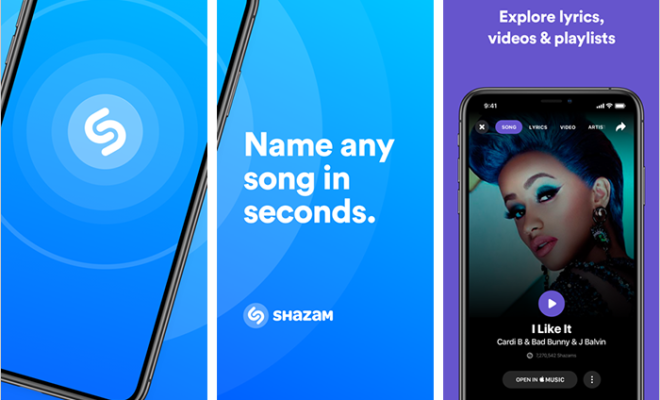
Music has always been one of the go-to escapes for many people. Whether it’s to lift your mood, relax, or get you hyped up for a workout, music has a way of impacting our mood and setting the tone for any activity. Accordingly, the invention of apps like Shazam has made the music listening experience much more convenient. You may already know about Shazam and how to use it to identify unknown songs, but did you know that you can Shazam music that’s coming from your iPhone?

There are several scenarios where you might want to utilize this functionality. Maybe you’re at a party, and someone is playing a song that you like, but you’re too shy to ask what it is. Or perhaps you’re tuning into a live stream of a concert that’s happening on your phone, and you want to know the name of the song that’s currently playing. Here’s how to Shazam music that’s coming from your iPhone:

First, make sure your iPhone is updated to the latest operating system. If not, update it to the latest version.

Open the Control Center on your iPhone. If you’re using an iPhone X or later model, swipe down from the top right corner. If you’re using an iPhone 8 or earlier model, swipe up from the bottom of the screen.

Look for the Shazam icon. If you don’t see it, go to Settings > Control Center > Customize Controls and add Shazam to the list.

Once you locate the Shazam icon, tap it. The app will then start listening for any music that’s currently playing from your iPhone.

Wait a few seconds for Shazam to identify the song. Once it’s identified, you’ll see the name of the song and artist displayed on your screen.

If you want to learn more about the song, click on the result to get additional information such as lyrics, streaming options, or the option to buy it in the Apple Music store.

That’s it! Shazaming music that’s coming from your iPhone is that simple. With this feature, you’ll never have to miss out on discovering new music or finding out what song is currently playing at a party or on a live stream.

In conclusion, Shazam is an excellent tool for music lovers who want to stay up-to-date with new music or identify a catchy tune that they’ve heard but just can’t place. With its ability to easily identify songs that are coming from your iPhone, you’ll be able to streamline your music listening experience and explore new artists and genres quickly. So, the next time you’re listening to music on your iPhone and hear something you like, you know what to do – Shazam it!


Previous Article

The Best Free Universal Video Players for ...

Next Article

How to Find Archived Emails in Gmail

Matthew Lynch

Related articles More from author

  • Assistive Technology

    How to Change the Payment Method on Netflix

    June 8, 2023
    By Matthew Lynch
  • Assistive Technology

    How to Create a Data Entry Form in Excel

    June 15, 2023
    By Matthew Lynch
  • Assistive Technology

    Ways to Check Who Is Tracking You Online

    June 22, 2023
    By Matthew Lynch
  • Assistive Technology

    How to Find Someone on Tinder

    June 11, 2023
    By Matthew Lynch
  • Assistive Technology

    How to Create a Spider Web in Adobe Illustrator

    June 23, 2023
    By Matthew Lynch
  • Assistive Technology

    How to Transfer Money From PayPal to a Bank Account

    June 10, 2023
    By Matthew Lynch

Search

Login & Registration

  • Register
  • Log in
  • Entries feed
  • Comments feed
  • WordPress.org

Newsletter

Signup for The Tech Edvocate Newsletter and have the latest in EdTech news and opinion delivered to your email address!

About Us

Since technology is not going anywhere and does more good than harm, adapting is the best course of action. That is where The Tech Edvocate comes in. We plan to cover the PreK-12 and Higher Education EdTech sectors and provide our readers with the latest news and opinion on the subject. From time to time, I will invite other voices to weigh in on important issues in EdTech. We hope to provide a well-rounded, multi-faceted look at the past, present, the future of EdTech in the US and internationally.

We started this journey back in June 2016, and we plan to continue it for many more years to come. I hope that you will join us in this discussion of the past, present and future of EdTech and lend your own insight to the issues that are discussed.

Newsletter

Signup for The Tech Edvocate Newsletter and have the latest in EdTech news and opinion delivered to your email address!

Contact Us

The Tech Edvocate
910 Goddin Street
Richmond, VA 23231
(601) 630-5238
[email protected]

Copyright © 2025 Matthew Lynch. All rights reserved.