The Tech Edvocate

Top Menu

  • Advertisement
  • Apps
  • Home Page
  • Home Page Five (No Sidebar)
  • Home Page Four
  • Home Page Three
  • Home Page Two
  • Home Tech2
  • Icons [No Sidebar]
  • Left Sidbear Page
  • Lynch Educational Consulting
  • My Account
  • My Speaking Page
  • Newsletter Sign Up Confirmation
  • Newsletter Unsubscription
  • Our Brands
  • Page Example
  • Privacy Policy
  • Protected Content
  • Register
  • Request a Product Review
  • Shop
  • Shortcodes Examples
  • Signup
  • Start Here
    • Governance
    • Careers
    • Contact Us
  • Terms and Conditions
  • The Edvocate
  • The Tech Edvocate Product Guide
  • Topics
  • Write For Us
  • Advertise

Main Menu

  • Start Here
    • Our Brands
    • Governance
      • Lynch Educational Consulting, LLC.
      • Dr. Lynch’s Personal Website
      • Careers
    • Write For Us
    • The Tech Edvocate Product Guide
    • Contact Us
    • Books
    • Edupedia
    • Post a Job
    • The Edvocate Podcast
    • Terms and Conditions
    • Privacy Policy
  • Topics
    • Assistive Technology
    • Child Development Tech
    • Early Childhood & K-12 EdTech
    • EdTech Futures
    • EdTech News
    • EdTech Policy & Reform
    • EdTech Startups & Businesses
    • Higher Education EdTech
    • Online Learning & eLearning
    • Parent & Family Tech
    • Personalized Learning
    • Product Reviews
  • Advertise
  • Tech Edvocate Awards
  • The Edvocate
  • Pedagogue
  • School Ratings

logo

The Tech Edvocate

  • Start Here
    • Our Brands
    • Governance
      • Lynch Educational Consulting, LLC.
      • Dr. Lynch’s Personal Website
        • My Speaking Page
      • Careers
    • Write For Us
    • The Tech Edvocate Product Guide
    • Contact Us
    • Books
    • Edupedia
    • Post a Job
    • The Edvocate Podcast
    • Terms and Conditions
    • Privacy Policy
  • Topics
    • Assistive Technology
    • Child Development Tech
    • Early Childhood & K-12 EdTech
    • EdTech Futures
    • EdTech News
    • EdTech Policy & Reform
    • EdTech Startups & Businesses
    • Higher Education EdTech
    • Online Learning & eLearning
    • Parent & Family Tech
    • Personalized Learning
    • Product Reviews
  • Advertise
  • Tech Edvocate Awards
  • The Edvocate
  • Pedagogue
  • School Ratings
  • Shocking: Mercury Skin Bleachers Still Flood Amazon, Temu, and TikTok Shop

  • Shocking: 195,000 Heated Blankets Recalled After Dozens Suffer Burns – Is Yours One of Them?

  • The $4 Billion Comeback: How Manus Defied Geopolitical Odds to Double Its Valuation

  • This Israeli Startup Accidentally Unleashed AI Cyberattacks on Real Companies

  • This PlayStation Exclusive Just Vanished Forever — And It’s a Warning to All Gamers

  • The Jaw-Dropping Truth Behind Marvel’s Wolverine AI Scare

  • The September 2026 AI Surge: Why Your Business Needs to Adapt Now

  • The Billion-Dollar AI Slowdown Lawsuit That Could Shatter Big Tech

  • The Brutal Truth: Why Your Student Loan Discharge Is Stuck in Limbo

  • 7 Critical Lessons From Russia’s Election Cyber Onslaught

Digital & Mobile Technology
Home›Digital & Mobile Technology›How to Set up a Fire TV Cube

How to Set up a Fire TV Cube
By Matthew Lynch
July 27, 2023
0
Spread the love

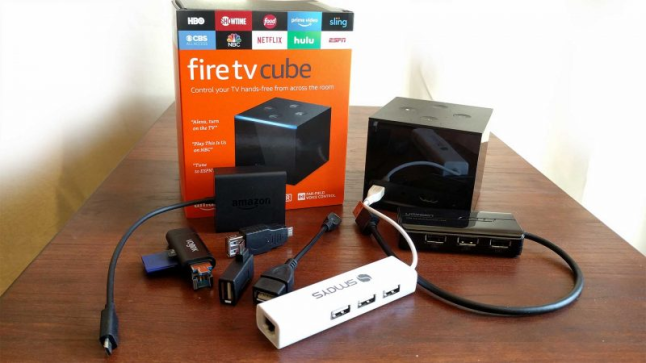
The Fire TV Cube is one of the latest streaming devices from Amazon that combines the convenience of Alexa with the capabilities of a streaming media player. Setting it up is fairly easy, and with this article, we’ll guide you through the process.

Step 1: Unpack and Check the Contents

After unboxing the Fire TV Cube, ensure you have all the accessories that come with it, including the device itself, power adapter, Alexa voice remote, HDMI extender, and a user guide. Check that everything is in good condition, and if there is anything missing or damaged, contact Amazon immediately.

Step 2: Connect the Fire TV Cube to Power and TV

Plug the power adapter into the Fire TV Cube and connect the HDMI cable from the device to the TV. You may also use the HDMI extender to ensure a secure fit in your TV’s HDMI port.

Step 3: Set up the Wi-Fi Connection

Once the Fire TV Cube is connected to your TV, it’s time to set up the Wi-Fi connection. Select the Wi-Fi network you want to connect to, and enter the password if prompted. Make sure your Wi-Fi signal is stable and strong to avoid buffering or connectivity issues.

Step 4: Activate the Alexa Voice Remote

The Alexa Voice Remote allows you to search for content and control the Fire TV Cube hands-free. Insert the batteries into the remote, and press the home button to wake it up. Follow the on-screen prompts to pair the remote with the Fire TV Cube.

Step 5: Create an Amazon Account or Sign In

If you don’t already have an Amazon account, you’ll need to create one to access content on the Fire TV Cube. Follow the on-screen instructions to either create a new account or sign into an existing one.

Step 6: Enjoy Streaming on the Fire TV Cube!

Once everything is set up and connected, you can start streaming your favorite shows and movies from popular platforms like Netflix, Hulu, and Amazon Prime Video. You can use Alexa voice commands to search for content and control playback.

In conclusion, setting up the Fire TV Cube is an easy and straightforward process that requires minimal effort and technical know-how. Just follow the instructions carefully, and you’ll have access to a world of entertainment at your fingertips.


Previous Article

How to View the Complete Email Message ...

Next Article

How to Open Internet Explorer 11 in ...

Matthew Lynch

Related articles More from author

  • Digital & Mobile Technology

    How to Watch the Fast and Furious Movies in Order

    May 31, 2023
    By Matthew Lynch
  • Digital & Mobile Technology

    How to Fix the “Failed to Attach the USB Device” Error in VirtualBox on Windows

    August 3, 2023
    By Matthew Lynch
  • Digital & Mobile Technology

    How to Use Picture-in-Picture on iPhone

    June 10, 2023
    By Matthew Lynch
  • Digital & Mobile Technology

    How to Fix Netflix Error Code UI-113

    June 12, 2023
    By Matthew Lynch
  • Digital & Mobile Technology

    How to Alphabetize in Word

    June 1, 2023
    By Matthew Lynch
  • Digital & Mobile Technology

    Best Cable Modem/Router Combos of 2023

    May 30, 2023
    By Matthew Lynch

Search

Login & Registration

  • Log in
  • Entries feed
  • Comments feed
  • WordPress.org

Newsletter

Signup for The Tech Edvocate Newsletter and have the latest in EdTech news and opinion delivered to your email address!

About Us

Since technology is not going anywhere and does more good than harm, adapting is the best course of action. That is where The Tech Edvocate comes in. We plan to cover the PreK-12 and Higher Education EdTech sectors and provide our readers with the latest news and opinion on the subject. From time to time, I will invite other voices to weigh in on important issues in EdTech. We hope to provide a well-rounded, multi-faceted look at the past, present, the future of EdTech in the US and internationally.

We started this journey back in June 2016, and we plan to continue it for many more years to come. I hope that you will join us in this discussion of the past, present and future of EdTech and lend your own insight to the issues that are discussed.

Newsletter

Signup for The Tech Edvocate Newsletter and have the latest in EdTech news and opinion delivered to your email address!

Contact Us

The Tech Edvocate
910 Goddin Street
Richmond, VA 23231
(601) 630-5238
[email protected]

Copyright © 2026 Matthew Lynch. All rights reserved.