The Tech Edvocate

Top Menu

  • Advertisement
  • Apps
  • Home Page
  • Home Page Five (No Sidebar)
  • Home Page Four
  • Home Page Three
  • Home Page Two
  • Home Tech2
  • Icons [No Sidebar]
  • Left Sidbear Page
  • Lynch Educational Consulting
  • My Account
  • My Speaking Page
  • Newsletter Sign Up Confirmation
  • Newsletter Unsubscription
  • Our Brands
  • Page Example
  • Privacy Policy
  • Protected Content
  • Register
  • Request a Product Review
  • Shop
  • Shortcodes Examples
  • Signup
  • Start Here
    • Governance
    • Careers
    • Contact Us
  • Terms and Conditions
  • The Edvocate
  • The Tech Edvocate Product Guide
  • Topics
  • Write For Us
  • Advertise

Main Menu

  • Start Here
    • Our Brands
    • Governance
      • Lynch Educational Consulting, LLC.
      • Dr. Lynch’s Personal Website
      • Careers
    • Write For Us
    • The Tech Edvocate Product Guide
    • Contact Us
    • Books
    • Edupedia
    • Post a Job
    • The Edvocate Podcast
    • Terms and Conditions
    • Privacy Policy
  • Topics
    • Assistive Technology
    • Child Development Tech
    • Early Childhood & K-12 EdTech
    • EdTech Futures
    • EdTech News
    • EdTech Policy & Reform
    • EdTech Startups & Businesses
    • Higher Education EdTech
    • Online Learning & eLearning
    • Parent & Family Tech
    • Personalized Learning
    • Product Reviews
  • Advertise
  • Tech Edvocate Awards
  • The Edvocate
  • Pedagogue
  • School Ratings

logo

The Tech Edvocate

  • Start Here
    • Our Brands
    • Governance
      • Lynch Educational Consulting, LLC.
      • Dr. Lynch’s Personal Website
        • My Speaking Page
      • Careers
    • Write For Us
    • The Tech Edvocate Product Guide
    • Contact Us
    • Books
    • Edupedia
    • Post a Job
    • The Edvocate Podcast
    • Terms and Conditions
    • Privacy Policy
  • Topics
    • Assistive Technology
    • Child Development Tech
    • Early Childhood & K-12 EdTech
    • EdTech Futures
    • EdTech News
    • EdTech Policy & Reform
    • EdTech Startups & Businesses
    • Higher Education EdTech
    • Online Learning & eLearning
    • Parent & Family Tech
    • Personalized Learning
    • Product Reviews
  • Advertise
  • Tech Edvocate Awards
  • The Edvocate
  • Pedagogue
  • School Ratings
  • Nočno sijajanje zaslonov: estetski pregled spletne igralniške izkušnje

  • This Nordstrom Fall Beauty Product Delivers a ‘Filter Effect’ — Without the Filter

  • Your Smart Devices ARE Listening: The Multi-Million Dollar Deception Revealed

  • The Shocking Truth About AquaHarvest’s Water Footprint in Our Deserts

  • MindLink’s BCI Scandal: 10 Urgent Questions About Your Brain Data

  • Level-5’s AI Apology: Why Fans Are Furious Over One Small Detail

  • This Crucial New Law Just Changed Everything for Kids Online

  • Humanity’s Reckoning? This Viral AI Extinction Warning Ignited a Firestorm

  • Unveiling the Battle: Why Teachers Unions in New York Are Fighting This Federal Program

  • Unbelievable: This Private School Twitter Challenge Is Sparking Outrage

Assistive Technology
Home›Assistive Technology›How to Send an Email to Undisclosed Recipients

How to Send an Email to Undisclosed Recipients
By Matthew Lynch
June 10, 2023
0
Spread the love

Sending an email to undisclosed recipients can be useful when you need to send a message to multiple people without revealing their email addresses to each other. It’s particularly important when you want to protect the privacy of your recipients. Whether you’re sending an email to a team of coworkers, friends, or acquaintances, keeping their email addresses hidden can take care of sensitive information from unwanted exposure.

In this article, we’ll guide you through the steps to sending an email to undisclosed recipients:

Step 1: Create a new email message

First, open your email provider of choice and click on ‘New Email’ to create a new message.

Step 2: Add your recipients to the BCC field

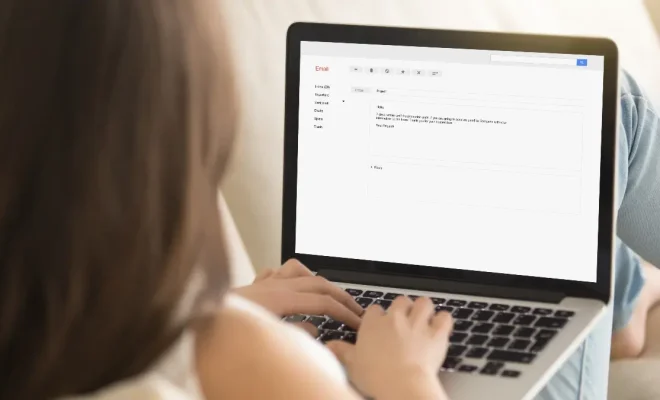
Once you have created a new message, you’ll see the “To” and “CC” fields for adding email addresses. However, if you want to send an email to undisclosed recipients, then you need to use the “Blind Carbon Copy” (BCC) field. The BCC field allows you to send an email to multiple people without revealing their email address to each other.

To do this, click on the “BCC” field to add your undisclosed recipients. Enter their email addresses by separating them with commas.

Step 3: Compose and Send Your Email

Once you have added all your undisclosed recipients, it’s time to compose your message. Type up your email message just as you would with a regular email but avoid using vague salutations such as “Dear All”.

As you compose your message, aim to make it simple, clear, and concise. Remember, the recipients of the email will likely not know who else received the email, so give them an idea of why they’re receiving the message.

After completing your message, review it and ensure it includes all the necessary information and attachments. Once you’re satisfied, click on the ‘Send’ button.

Benefits of Sending Undisclosed Email Messages:

Using the BCC field to send email messages to undisclosed recipients can help you keep their personal email addresses private. This can be beneficial in several ways:

– It helps to protect the privacy of your recipients and prevent any unwanted exposure of their information

– It ensures every recipient receives the email, regardless of whether they typically open email messages sent to mailing lists or group emails.

– It reduces the likelihood of email errors, such as email address typos.

In conclusion, sending an email to undisclosed recipients is straightforward and easy. By using the BCC field, you can easily send one email to a group of people without violating anyone’s privacy or sharing their personal email address with others. Follow the steps outlined in this article to get started today.

Previous Article

How to Report a Craigslist Scam

Next Article

How to Reset Safari to Default Settings

Matthew Lynch

Related articles More from author

  • Assistive Technology

    How to Remove Followers on Twitter

    June 6, 2023
    By Matthew Lynch
  • Assistive Technology

    How to Install WSL 2 on Windows 10

    June 12, 2023
    By Matthew Lynch
  • Assistive Technology

    How to Change Your Mac User Name

    June 6, 2023
    By Matthew Lynch
  • Assistive Technology

    How to Use the Windows 11 Installation Assistant

    June 11, 2023
    By Matthew Lynch
  • Assistive Technology

    How to Set Chrome as Default Browser on Android

    June 6, 2023
    By Matthew Lynch
  • Assistive Technology

    Prices, Specs, and Everything Else We Know About Nvidia’s RTX 4060 and RTX 4070 GPUs

    June 8, 2023
    By Matthew Lynch

Search

Login & Registration

  • Log in
  • Entries feed
  • Comments feed
  • WordPress.org

Newsletter

Signup for The Tech Edvocate Newsletter and have the latest in EdTech news and opinion delivered to your email address!

About Us

Since technology is not going anywhere and does more good than harm, adapting is the best course of action. That is where The Tech Edvocate comes in. We plan to cover the PreK-12 and Higher Education EdTech sectors and provide our readers with the latest news and opinion on the subject. From time to time, I will invite other voices to weigh in on important issues in EdTech. We hope to provide a well-rounded, multi-faceted look at the past, present, the future of EdTech in the US and internationally.

We started this journey back in June 2016, and we plan to continue it for many more years to come. I hope that you will join us in this discussion of the past, present and future of EdTech and lend your own insight to the issues that are discussed.

Newsletter

Signup for The Tech Edvocate Newsletter and have the latest in EdTech news and opinion delivered to your email address!

Contact Us

The Tech Edvocate
910 Goddin Street
Richmond, VA 23231
(601) 630-5238
[email protected]

Copyright © 2026 Matthew Lynch. All rights reserved.