The Tech Edvocate

Top Menu

  • Advertisement
  • Apps
  • Home Page
  • Home Page Five (No Sidebar)
  • Home Page Four
  • Home Page Three
  • Home Page Two
  • Home Tech2
  • Icons [No Sidebar]
  • Left Sidbear Page
  • Lynch Educational Consulting
  • My Account
  • My Speaking Page
  • Newsletter Sign Up Confirmation
  • Newsletter Unsubscription
  • Our Brands
  • Page Example
  • Privacy Policy
  • Protected Content
  • Register
  • Request a Product Review
  • Shop
  • Shortcodes Examples
  • Signup
  • Start Here
    • Governance
    • Careers
    • Contact Us
  • Terms and Conditions
  • The Edvocate
  • The Tech Edvocate Product Guide
  • Topics
  • Write For Us
  • Advertise

Main Menu

  • Start Here
    • Our Brands
    • Governance
      • Lynch Educational Consulting, LLC.
      • Dr. Lynch’s Personal Website
      • Careers
    • Write For Us
    • The Tech Edvocate Product Guide
    • Contact Us
    • Books
    • Edupedia
    • Post a Job
    • The Edvocate Podcast
    • Terms and Conditions
    • Privacy Policy
  • Topics
    • Assistive Technology
    • Child Development Tech
    • Early Childhood & K-12 EdTech
    • EdTech Futures
    • EdTech News
    • EdTech Policy & Reform
    • EdTech Startups & Businesses
    • Higher Education EdTech
    • Online Learning & eLearning
    • Parent & Family Tech
    • Personalized Learning
    • Product Reviews
  • Advertise
  • Tech Edvocate Awards
  • The Edvocate
  • Pedagogue
  • School Ratings

logo

The Tech Edvocate

  • Start Here
    • Our Brands
    • Governance
      • Lynch Educational Consulting, LLC.
      • Dr. Lynch’s Personal Website
        • My Speaking Page
      • Careers
    • Write For Us
    • The Tech Edvocate Product Guide
    • Contact Us
    • Books
    • Edupedia
    • Post a Job
    • The Edvocate Podcast
    • Terms and Conditions
    • Privacy Policy
  • Topics
    • Assistive Technology
    • Child Development Tech
    • Early Childhood & K-12 EdTech
    • EdTech Futures
    • EdTech News
    • EdTech Policy & Reform
    • EdTech Startups & Businesses
    • Higher Education EdTech
    • Online Learning & eLearning
    • Parent & Family Tech
    • Personalized Learning
    • Product Reviews
  • Advertise
  • Tech Edvocate Awards
  • The Edvocate
  • Pedagogue
  • School Ratings
  • 100 Best Microsoft 365 Add-ins

  • 100 Best HubSpot Integrations

  • 100 Best Salesforce Apps

  • 100 Best Notion Integrations

  • 100 Best Windows Apps

  • 100 Best Mac Apps

  • 100 Best Android Apps

  • 100 Best iOS Apps

  • 100 Best Chrome Extensions

  • 100 Best Slack Integrations

Digital & Mobile Technology
Home›Digital & Mobile Technology›How to Save PowerPoint Presentations as PDF Files

How to Save PowerPoint Presentations as PDF Files
By Matthew Lynch
June 9, 2023
0
Spread the love

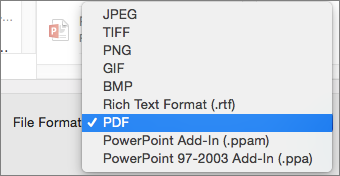
PowerPoint presentations are commonly used in business, academia, and personal projects, but sometimes it’s important to have a static version of your presentation that you can share with others. One way to do that is by saving your presentation as a PDF file. Here are some simple steps to save your PowerPoint presentation as a PDF:

Step 1:

Open your PowerPoint presentation on your computer.

Step 2:

Click on the “File” tab at the top left-hand corner of the screen.

Step 3:

From the dropdown menu, select “Export.”

Step 4:

Click on “Create PDF/XPS Document” and then click on the “Create PDF/XPS” button.

Step 5:

Choose where you want to save the PDF and give it a name.

Step 6:

Click on the “Options” button to choose a few settings like whether to include speaker notes or the slide numbers.

Step 7:

If you’re happy with your settings, click on the “OK” button.

Step 8:

Finally, click on the “Publish” button and wait for the PDF to be created.

After following these steps, you’ll have a PDF file of your PowerPoint presentation that you can open and view on any device that supports PDF files. The formatting will be the same as the original presentation, but without any of the transitions or animations that make PowerPoint presentations dynamic.

One of the advantages of saving your PowerPoint presentation as a PDF is that you can be sure that the formatting will stay the same, regardless of the device used to view it. This means that your presentation will look the same on a desktop computer, laptop, tablet, or smartphone. Another advantage is that a PDF is a common format that is easy to share with others via email, file sharing services, or cloud storage services.

In conclusion, saving a PowerPoint presentation as a PDF is a simple process that can be useful for sharing static versions of your presentation. It is also an effective way to ensure that people can view your presentation on any device. So, give it a try and see how it can help you share your presentations in a more convenient format.


Previous Article

How to Fix Netflix Error Code M7121

Next Article

How to Change an Apple Watch Name ...

Matthew Lynch

Related articles More from author

  • Digital & Mobile Technology

    How to Fix the WHEA Uncorrectable Error

    June 1, 2023
    By Matthew Lynch
  • Digital & Mobile Technology

    The Samsung Apps System for Smart TVs and Blu-ray Disc Players

    June 21, 2023
    By Matthew Lynch
  • Digital & Mobile Technology

    Why You Should Use Microsoft’s OneDrive Personal Cloud Storage

    July 4, 2023
    By Matthew Lynch
  • Digital & Mobile Technology

    Mac Won’t Boot or Start? How to Fix Issues With a Mac Not Turning On

    June 23, 2023
    By Matthew Lynch
  • Digital & Mobile Technology

    What Makes the Crypto Currency Market Volatile? Key Reasons

    June 23, 2023
    By Matthew Lynch
  • Digital & Mobile Technology

    How to Connect the Fitbit App to Apple Watch

    June 6, 2023
    By Matthew Lynch

Search

Login & Registration

  • Log in
  • Entries feed
  • Comments feed
  • WordPress.org

Newsletter

Signup for The Tech Edvocate Newsletter and have the latest in EdTech news and opinion delivered to your email address!

About Us

Since technology is not going anywhere and does more good than harm, adapting is the best course of action. That is where The Tech Edvocate comes in. We plan to cover the PreK-12 and Higher Education EdTech sectors and provide our readers with the latest news and opinion on the subject. From time to time, I will invite other voices to weigh in on important issues in EdTech. We hope to provide a well-rounded, multi-faceted look at the past, present, the future of EdTech in the US and internationally.

We started this journey back in June 2016, and we plan to continue it for many more years to come. I hope that you will join us in this discussion of the past, present and future of EdTech and lend your own insight to the issues that are discussed.

Newsletter

Signup for The Tech Edvocate Newsletter and have the latest in EdTech news and opinion delivered to your email address!

Contact Us

The Tech Edvocate
910 Goddin Street
Richmond, VA 23231
(601) 630-5238
[email protected]

Copyright © 2026 Matthew Lynch. All rights reserved.